Isingeniso
The Logitech UE Boom is a 360-degree wireless Bluetooth speaker designed for portable audio. It features a durable, go-anywhere shape and is equipped with a water and stain resistant acoustic skin. This speaker allows for wireless music playback, phone calls, and can be paired with another UE Boom for stereo sound.

Isithombe: Ngaphambili view of the Logitech UE Boom Wireless Bluetooth Speaker in Northern Light color.
Izici Eziyinhloko
- 360-Degree Sound: Delivers immersive audio in all directions.
- Idizayini Ephathekayo: Versatile, cylindrical shape for easy transport.
- Water and Stain Resistant: Features a colorful acoustic skin with plasma coating for durability against water and stains.
- Ukuxhumana okungenantambo: Connects via Bluetooth from up to 50 feet away. Easy pairing via NFC for compatible devices.
- Double Up Feature: Wirelessly connect two UE BOOM speakers in stereo using the UE BOOM app for enhanced sound.
- Impilo ende yebhethri: Rechargeable battery provides up to 15 hours of playback.
- Isipikhafoni: Integrated crystal-clear speakerphone for calls.
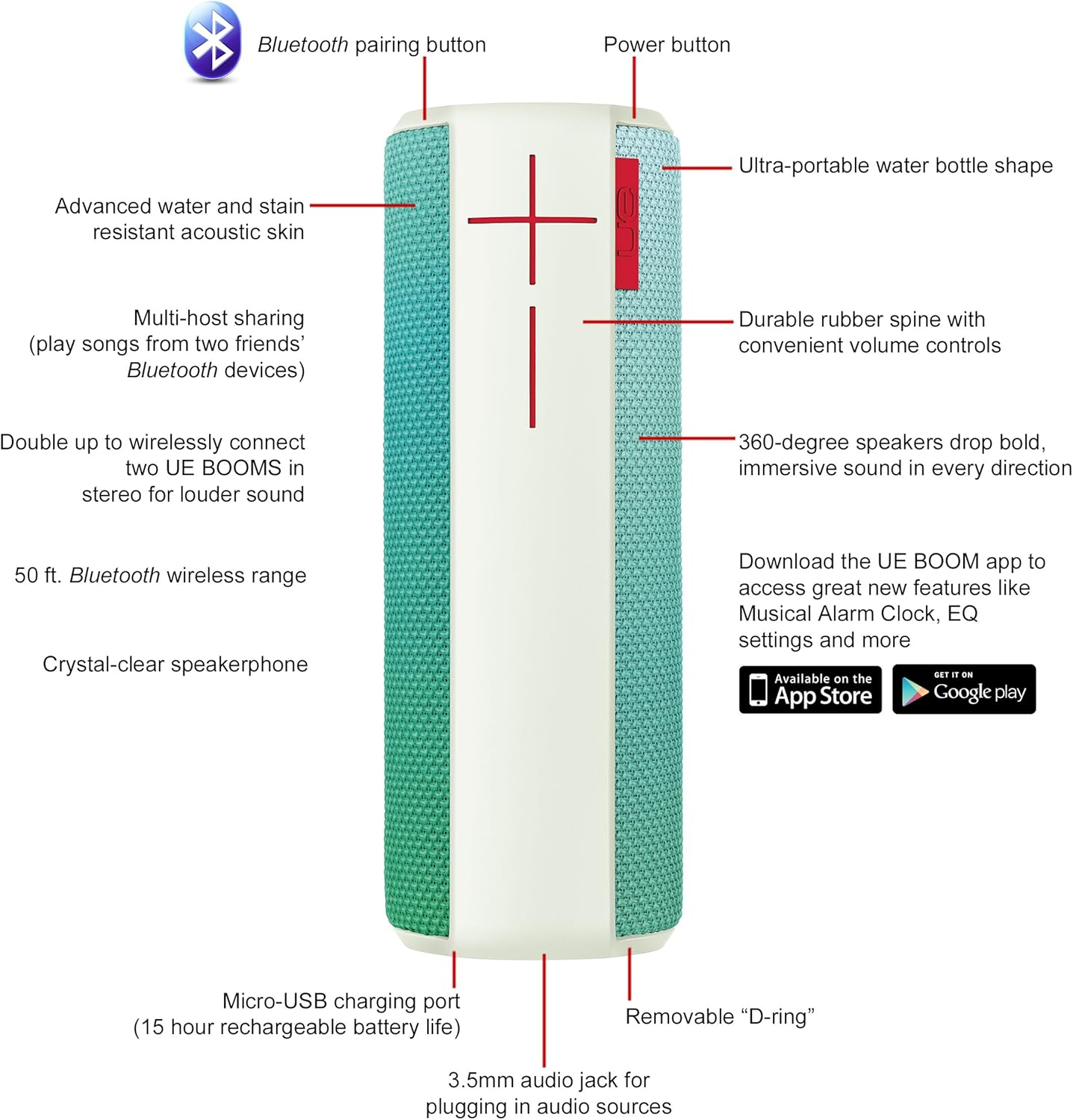
Image: Diagram highlighting key features and controls of the UE Boom speaker, including Bluetooth pairing button, power button, volume controls, micro-USB charging port, and 3.5mm audio jack.
Setha
Ekhokhisa uSomlomo
Before initial use, fully charge your UE Boom speaker. Connect the provided micro-USB cable to the charging port located at the bottom of the speaker and plug the other end into a USB power source. The speaker's battery provides approximately 15 hours of playback on a full charge.
Ukubhanqa kwe-Bluetooth
- Power on your UE Boom speaker by pressing the power button.
- Press and hold the Bluetooth pairing button (usually indicated by a Bluetooth icon) until you hear an audible tone and the LED indicator flashes rapidly.
- On your mobile device (smartphone or tablet), navigate to the Bluetooth settings.
- Select "UE Boom" from the list of available devices to pair.
- Once paired, you will hear a confirmation tone from the speaker.
For NFC-enabled devices, simply tap your device to the NFC area on the speaker for quick pairing.
Imiyalelo yokusebenza
Izilawuli Eziyisisekelo
- Inkinobho yamandla: Located on the top of the speaker to turn it on or off.
- Izilawuli zevolumu: Large '+' and '-' buttons on the side of the speaker adjust the volume.
- Inkinobho ye-Bluetooth: Iqala imodi yokumatanisa ye-Bluetooth.
Using the UE BOOM App
Download the official UE BOOM app from your device's app store (available on App Store and Google Play) to unlock additional features:
- Musical Alarm Clock: Wake up to your favorite music.
- Ukwenza kusebenze isilawuli kude: Turn your speaker on/off from your device.
- Izilungiselelo ze-EQ: Enza ngendlela oyifisayo iphrofayili yomsindofile ngokuncamelayo.
- Okuphindwe kabili: Connect two UE BOOM speakers for a stereo sound experience.
Ukusebenza Kwesipikha Sefoni
When connected to a smartphone, the UE Boom can be used as a speakerphone. Incoming calls will be routed through the speaker, allowing for hands-free communication.
Isondlo
The UE Boom speaker features a water and stain resistant acoustic skin. To clean, gently wipe the speaker with a damp cloth. Avoid using harsh chemicals or abrasive cleaners. Ensure all ports are dry before charging or connecting other devices.
Ukuxazulula inkinga
- Awekho Amandla: Ensure the speaker is charged. Connect it to a power source using the micro-USB cable.
- Ayikwazi Ukubhanqa nge-Bluetooth:
- Qinisekisa ukuthi isipikha sikwimodi yokubhanqa (i-LED ekhanyayo).
- Hlola ukuthi i-Bluetooth ivuliwe yini kudivayisi yakho.
- Move your device closer to the speaker (within 50 feet).
- Zama ukususa ukubhanqa nokumatanisa kabusha idivayisi.
- Ivolumu Ephansi noma Umsindo Ohlanekezelwe:
- Lungisa ivolumu kukho kokubili isipika kanye nedivayisi yakho exhunyiwe.
- Qinisekisa ukuthi isipikha sishajwe ngokugcwele.
- Check for any obstructions around the speaker.
- Uhlelo lokusebenza aluxhumi: Ensure the speaker is powered on and connected via Bluetooth to your device. Update the app to the latest version.
Imininingwane Yomkhiqizo
| Igama Lemodeli | Logitech UE Boom Wireless Bluetooth Speaker |
| Inombolo Yemodeli | 980-001023 |
| Ibhrendi | I-Logitech |
| Umbala | Northern Light |
| Uhlobo lwesipika | Ngaphandle |
| Ubuchwepheshe bokuxhumana | I-Bluetooth, engenantambo |
| Uhlobo olungenantambo | Kufika ku-50 feet (15.24 metres) |
| Umthombo wamandla | Isebenza Ibhethri (1 Lithium Ion ibhethri lifakiwe) |
| Isilinganiso Sempilo Yebhethri | Amahora angu-15 |
| Izinga Lokumelana Namanzi | Ingangeni manzi |
| Isisindo sento | 2.2 Amakhilogremu |
| Ubukhulu bomkhiqizo (LxWxH) | 2.6 x 2.6 x 7.1 amayintshi |
| Okubalulekile | Ipulasitiki |
| I-UPC | 097855112125 |
Ividiyo Yomkhiqizo Esemthethweni
Ividiyo: Kuphelileview of the Logitech UE Boom speaker's features, including 360-degree sound, water resistance, wireless connectivity, and the ability to pair two speakers for louder sound. This video demonstrates the speaker's durability and portability in various environments.
Iwaranti kanye Nokusekela
The Logitech UE Boom Wireless Bluetooth Speaker comes with a Limited Warranty. For specific warranty details, please refer to the documentation included with your product or visit the official Logitech webindawo.
For technical support or customer service, you may contact Logitech at: 646-454-3200.


