1. Isingeniso
This manual provides essential information for the installation, operation, and maintenance of your FSP Group Mini ITX/Flex ATX 300W Power Supply, model FSP300-60LG-5K. This unit is designed to provide stable and efficient power for compact PC systems, featuring 80 Plus Bronze certification for energy efficiency and reliable performance at altitudes up to 5000 meters.
2. Ulwazi Lokuphepha
WARNING: Risk of electric shock. Do not open the power supply unit. There are no user-serviceable parts inside.
- Qinisekisa ukuthi ugesi unqanyuliwe endaweni yokukhipha i-AC ngaphambi kokufakwa noma ukulungiswa.
- Faka ugesi endaweni enomoya omuhle ukuze uvimbele ukushisa ngokweqile.
- Use only the provided power cord or a certified equivalent.
- Ungayivezi iyunithi emswakama noma emazingeni okushisa aphezulu.
- This product is designed for use with compatible computer components. Refer to your system's documentation for compatibility.
3. Okuqukethwe Kwephakheji
Qinisekisa ukuthi zonke izinto zikhona kuphakheji:
- FSP300-60LG-5K Flex ATX 300W Power Supply Unit
- Intambo yamandla ye-AC
- Amadokhumenti (leli bhukwana)

Image: Contents of the FSP300-60LG-5K package, including the power supply unit, AC power cord, and brown cardboard box.
4. Umkhiqizo Uphelileview
The FSP300-60LG-5K is a compact Flex ATX power supply featuring a 40mm ball-bearing fan for cooling and a comprehensive set of connectors for various system components.

Isithombe: Phezulu phansi view of the FSP300-60LG-5K power supply unit, showing its compact form factor and product label.
4.1 Izixhumi
The power supply includes the following connectors:
- Main 24-Pin ATX Connector: For motherboard power.
- P4-Pin Connector: For CPU power.
- Serial-ATA (SATA) Connectors (x3): Kuma-hard drive e-SATA, ama-SSD, kanye nama-optical drive.
- Molex 4-Pin Connectors (x2): For older peripherals or case fans.

Image: The FSP300-60LG-5K power supply unit with its various power cables, including 24-pin ATX, P4, SATA, and Molex connectors, spread out for clear viewing.
4.2 Uhlelo Lokupholisa
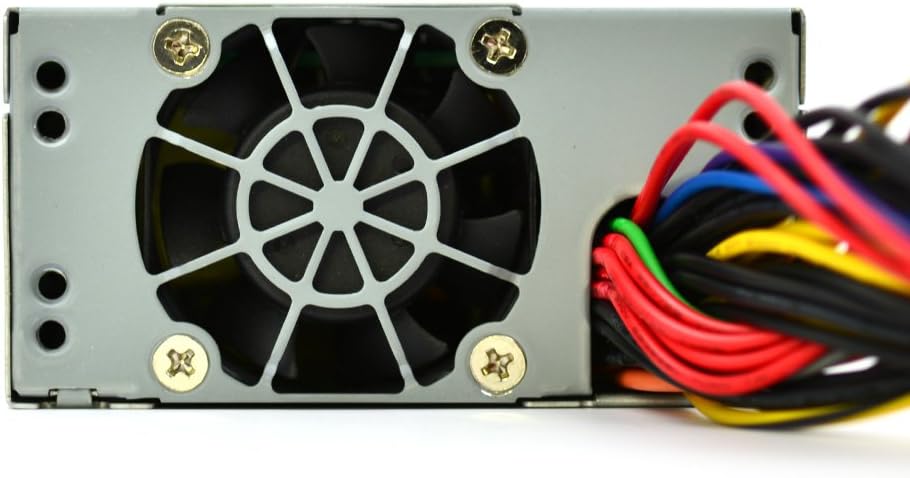
The unit features a single 40mm ball-bearing fan designed to provide efficient cooling while maintaining low noise levels. Proper airflow within the PC chassis is crucial for optimal performance and longevity.

Isithombe: Ukuvala view of the FSP300-60LG-5K power supply, highlighting the 40mm cooling fan and the bundled power cables exiting the unit.
5. Ukusetha nokufakwa
Follow these steps to install the FSP300-60LG-5K power supply into your system:
- Lungiselela Isistimu Yakho: Ensure your computer is powered off and unplugged from the wall outlet. Open your computer case to access the power supply bay.
- Mount the Power Supply: Carefully slide the FSP300-60LG-5K into the Flex ATX power supply bay of your chassis. Secure it with the appropriate screws.
- Xhuma Amandla e-Motherboard: Connect the 24-Pin ATX connector to the corresponding port on your motherboard. Ensure it clicks into place.
- Xhuma Amandla e-CPU: Connect the P4-Pin connector to the CPU power port on your motherboard.
- Xhuma Amapheripherals: Connect the SATA power connectors to your hard drives, SSDs, or optical drives. Use the Molex connectors for any other compatible peripherals or case fans.
- Phatha amakhebuli: Route cables neatly to improve airflow and aesthetics within your case.
- Close Case and Connect AC Power: Close your computer case. Connect the AC power cord to the power supply's inlet and then to a grounded wall outlet.
Isithombe: A enemininingwane view of the FSP300-60LG-5K power supply's rear panel, showing the AC power input socket and the hexagonal ventilation grille.
6. Iziqondiso Zokusebenza
After successful installation, you can power on your system. The FSP300-60LG-5K will automatically provide power to your components. The 40mm fan will operate to cool the unit. No specific user interaction is required for the power supply's operation beyond system power control.
7. Isondlo
Ukugcinwa njalo kusiza ukuqinisekisa ukuthi ugesi wakho uhlala isikhathi eside futhi usebenza kahle kakhulu:
- Ukususa Uthuli: Periodically clean dust from the power supply's fan and ventilation grilles using compressed air. Ensure the system is powered off and unplugged before cleaning.
- Ukungenisa umoya: Ensure that the computer case has adequate airflow and that the power supply's intake and exhaust vents are not obstructed.
- Ukuphathwa Kwekhebula: Keep internal cables tidy to prevent interference with airflow.
8. Ukuxazulula izinkinga
Uma uhlangabezana nezinkinga ngogesi wakho, bheka lezi zinyathelo ezilandelayo ezivamile zokuxazulula izinkinga:
- Awekho Amandla:
- Check if the AC power cord is securely connected to both the power supply and the wall outlet.
- Verify that the wall outlet is functional.
- Ensure all internal power connectors (24-Pin ATX, P4-Pin, SATA, Molex) are firmly seated.
- Ukungazinzi Kwesistimu/Ukuvalwa Okungahleliwe:
- This could indicate insufficient power or overheating. Ensure the power supply is adequately ventilated.
- Verify that your system's power requirements do not exceed the 300W capacity of the power supply.
- Umsindo Wabalandeli Oweqile:
- A certain level of fan noise is normal, especially under load.
- If the noise is unusually loud or grinding, check for dust accumulation in the fan. If the issue persists, contact support.
If these steps do not resolve the issue, contact FSP Group technical support.
9. Imininingwane
| Isici | Incazelo |
|---|---|
| Ibhrendi | FSP |
| Inombolo Yemodeli | FSP300-60LG-5K |
| I-Form Factor | Flex ATX |
| Okukhiphayo Wattage | 300 Watts |
| Ukusebenza kahle | 80 Plus Bronze |
| Okokufaka kwe-AC | 90-264V |
| Indlela Yokupholisa | Air (40mm ball-bearing fan) |
| Ubukhulu (LxWxH) | 5.9 x 3.2 x 1.6 amayintshi |
| Isisindo | 2.2 amakhilogremu |
| Izixhumi Eziyinhloko | 24-Pin ATX, P4-Pin |
| Peripheral Connectors | 3x Serial-ATA, 2x Molex 4-Pin |
| Ukuvikela | I-OVP (Over Voltage Protection), Line input fuse protection |
| Izitifiketi | CE, FCC, cUL, CCC, TUV, CB, RoHS, Lead-Free, Green Product (G.P) |
| MTBF | 100,000 hours at full load at 25℃ |
| Isilinganiso se-Altitude | 5km (5000 meters) |
10. Iwaranti kanye Nokusekela
For warranty information and technical support, please refer to the official FSP Group website or contact your local FSP Group distributor. Keep your purchase receipt for warranty claims.


