1. Umkhiqizo Uphelileview
Welcome to the user manual for the Comelit 2410W/2B Digital Door Intercom. This device is designed for wall-mounted installation and features a privacy function, operating within the Simpllebus 1E2 system. It provides reliable communication and access control for residential and commercial applications.
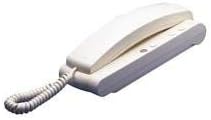
Figure 1: The Comelit 2410W/2B Digital Door Intercom unit. This image displays the white, wall-mounted intercom handset with its coiled cord and base unit, featuring several small buttons.
2. Imiyalelo Yezokuphepha Ebalulekile
- Ukufakwa Kochwepheshe: Ukufakwa kufanele kwenziwe kuphela ngabasebenzi abafanelekayo ngokuhambisana nemithetho nemithetho kagesi yendawo.
- Ukunqanyulwa kwamandla: Always disconnect power to the system before performing any installation, wiring, or maintenance.
- Izimo Zemvelo: Do not expose the device to rain, moisture, direct sunlight, or extreme temperatures. Ensure proper ventilation.
- Ukuhlanza: Sebenzisa indwangu ethambile, eyomile ukuze uhlanze. Ungasebenzisi izinto zokuhlanza abrasive noma izincibilikisi.
- Ukulungiswa: Do not attempt to modify or repair the device. Refer all servicing to qualified service personnel.
3. Okuqukethwe Kwephakheji
Sicela uqinisekise ukuthi zonke izinto zikhona ephaketheni ngaphambi kokuqhubeka nokufaka:
- Comelit 2410W/2B Digital Door Intercom Unit
- I-Wall Mounting Bracket
- Izikulufo zokukhweza kanye nama-Wall plug
- Incwadi Yomsebenzisi (le dokhumenti)
4. Umhlahlandlela Wokufaka
4.1 Mounting the Intercom
- Khetha Indawo: Choose a suitable indoor location for the intercom unit, typically near the entrance or in a central living area. Ensure it is within reach of the Simpllebus 1E2 wiring.
- Mark Drilling Points: Use the mounting bracket as a template to mark the drilling points on the wall.
- Dill Holes: Drill holes at the marked points using an appropriate drill bit for your wall type. Insert wall plugs if necessary.
- Abakaki Abavikelekile: Namathisela ibhulakhethi lokufaka odongeni usebenzisa izikulufo ezinikeziwe.
4.2 Ukuxhunywa kwezintambo
The Comelit 2410W/2B operates on the Simpllebus 1E2 system. Refer to your system's main control unit manual for specific wiring diagrams. General steps include:
- Nqamula Amandla: Ensure the main power to the intercom system is OFF before making any connections.
- Connect Bus Wires: Connect the Simpllebus 1E2 data and power wires to the designated terminals on the intercom unit. Pay close attention to polarity.
- Izintambo ezivikelekile: Qinisekisa ukuthi zonke izintambo zivikelekile futhi zigqunywe ngendlela efanele.
- Namathisela Iyunithi ye-Intercom: Carefully attach the intercom unit to the mounted bracket, ensuring it clicks securely into place.
- Buyisela Amandla: Once all connections are made and secured, restore power to the system.
5. Iziqondiso Zokusebenza
5.1 Ukuphendula ucingo
When a visitor presses the call button at the outdoor station, the intercom unit will ring. To answer the call:
- Lift the handset from the base.
- Speak into the microphone and listen for the visitor's response.
- Ukuvala ucingo, buyisela ihendisethi kusisekelo.
5.2 Ukuvula umnyango
During an active call, or after answering, you can open the door (if connected to an electric lock):
- Press the dedicated door release button (often marked with a key symbol) on the intercom unit.
- The door will unlock for a short period.
5.3 Privacy Function
The Comelit 2410W/2B includes a privacy function to prevent incoming calls from ringing the unit. To activate or deactivate:
- Locate the privacy button on the intercom unit.
- Press the button to toggle the privacy function ON or OFF. An indicator light (if present) may show the status.
- When privacy is ON, the unit will not ring for incoming calls.
6. Isondlo
6.1 Ukuhlanza
To maintain the appearance and functionality of your intercom unit:
- Sula izindawo zangaphandle ngendwangu ethambile, eyomile, engenazinti.
- Ukuze uthole amamaki anenkani, kancane dampen indwangu ngamanzi. Ungasebenzisi amakhemikhali anokhahlo, izihlanzi ezilumayo, noma izincibilikisi.
- Ensure no liquid enters the unit's openings.
6.2 Ukunakekelwa Okuvamile
Avoid dropping the unit or subjecting it to strong impacts. Keep it away from sources of excessive heat or cold.
7. Ukuxazulula izinkinga
If you encounter issues with your Comelit 2410W/2B intercom, refer to the table below for common problems and solutions.
| Inkinga | Imbangela Engenzeka | Isixazululo |
|---|---|---|
| No ring tone when visitor calls. | Privacy function is active. Awekho amandla eyunithi. Inkinga yezintambo. | Deactivate the privacy function. Check power supply to the system. Qinisekisa ukuthi zonke izixhumi zezintambo zivikelekile. |
| Cannot hear visitor / Visitor cannot hear me. | Handset not properly seated. Inkinga yezintambo. Faulty outdoor station. | Ensure handset is correctly placed on the base. Check audio wiring connections. Consult outdoor station manual or professional. |
| Door release button does not work. | No power to the electric lock. Wiring issue to the lock. Lock mechanism fault. | Check power supply to the electric lock. Verify door release wiring. Consult a locksmith or professional installer. |
| Unit is completely unresponsive. | Awekho amandla ohlelweni. Major wiring fault. | Check main power supply to the Simpllebus 1E2 system. Xhumana nochwepheshe oqeqeshiwe ukuze akuhlole. |
Uma inkinga iqhubeka ngemva kokuzama lezi zisombululo, sicela uxhumane nosekelo lobuchwepheshe abaqeqeshiwe.
8. Imininingwane Yezobuchwepheshe
- Ibhrendi: I-Comelit
- Imodeli: 2410W/2B
- Inombolo Yengxenye: COE2410W-2B
- Ukuhambisana Kwesistimu: Simpllebus 1E2
- Uhlobo lokukhweza: Ifakwe odongeni
- Izici: Digital communication, Privacy function
- Isisindo Sento: 4.54 g
- ASIN: B00GZJ5578
- Idethi yokuqala yokutholakala: Februwari 21, 2020
9. Iwaranti kanye Nokusekela
Comelit products are manufactured to high-quality standards. For specific warranty terms and conditions, please refer to the warranty card included with your product or visit the official Comelit webindawo. Gcina ubufakazi bakho bokuthenga ngezimangalo zewaranti.
For technical assistance, troubleshooting beyond this manual, or service inquiries, please contact your authorized Comelit dealer or the Comelit customer support department. Contact details can typically be found on the official Comelit webisayithi noma kumadokhumenti womkhiqizo wakho.


