1. Isingeniso
This manual provides essential instructions for the proper setup, operation, and maintenance of your AmazonBasics 10-Port USB 3.0 Hub. Please read this manual thoroughly before using the product to ensure optimal performance and safety. Keep this manual for future reference.
2. Iziyalezo Zokuphepha
- Ungabeki idivayisi kumswakama, amazinga okushisa aphezulu, noma elangeni eliqondile.
- Ungazami ukuqaqa noma ukuguqula idivayisi. Lokhu kungase kuqede iwaranti futhi kube yingozi yokuphepha.
- Use only the provided power adapter. Using an incompatible power adapter may damage the device or connected peripherals.
- Gcina idivayisi ikude nezingane.
- Ensure proper ventilation around the hub during operation.
3. Okuqukethwe Kwephakheji
Qinisekisa ukuthi zonke izinto ezibalwe ngezansi zikhona ephaketheni lakho:
- AmazonBasics 10-Port USB 3.0 Hub
- I-adaptha yamandla (DC 15V)
- Ikhebula ledatha le-USB 3.0
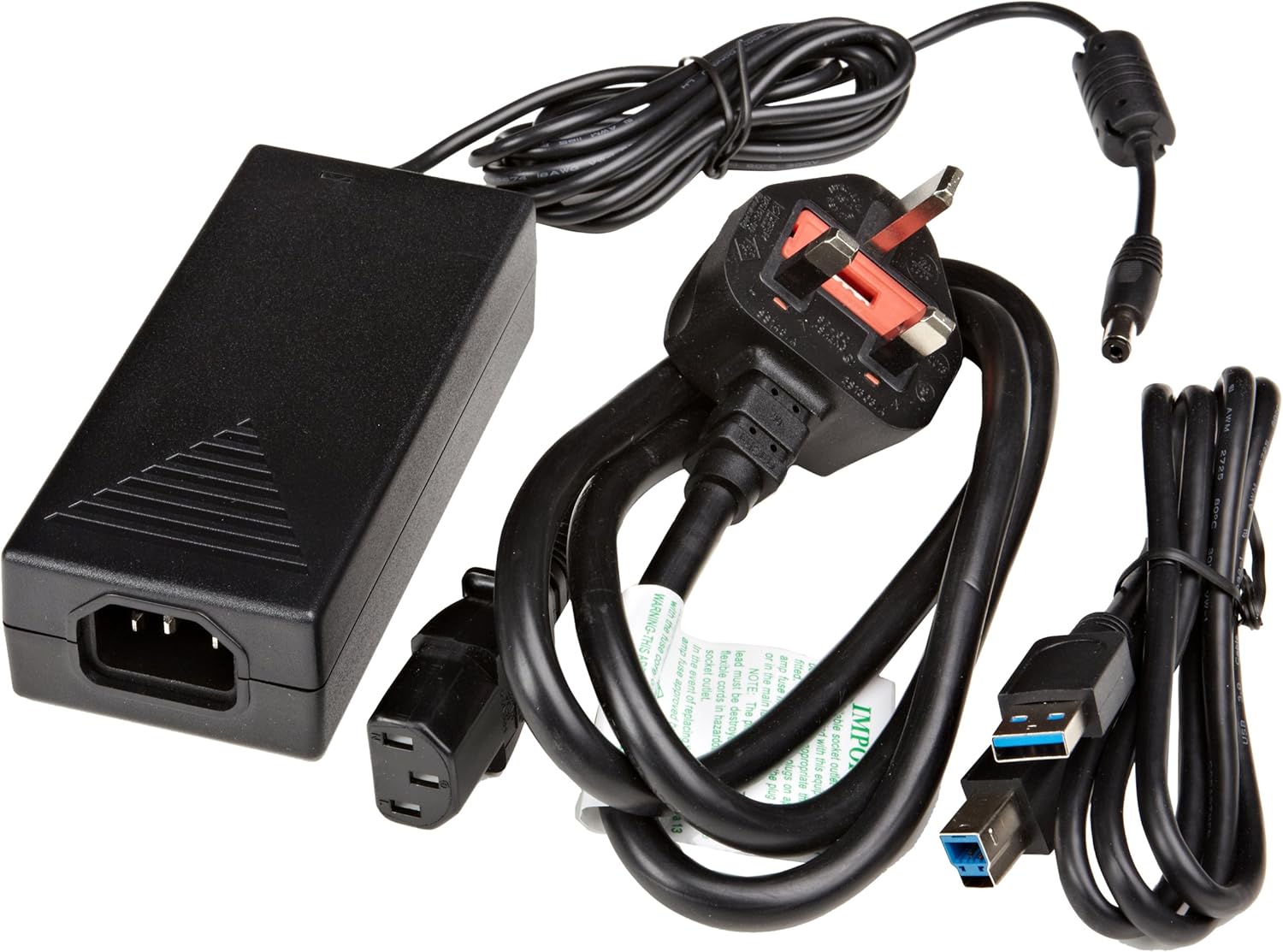
Umfanekiso 3.1: The image displays the AmazonBasics 10-Port USB 3.0 Hub, its power adapter, and a USB 3.0 data cable, which are the typical contents found in the product packaging.
4. Umkhiqizo Uphelileview
The AmazonBasics 10-Port USB 3.0 Hub expands your computer's connectivity, offering ten USB 3.0 ports for various peripherals. It supports high-speed data transfer and is backward compatible with USB 2.0 devices.
4.1 Ngaphambili Naseceleni View

Umfanekiso 4.1: This image shows the front and left side of the USB hub. On the front, three USB 3.0 ports are visible, two of which are labeled 'Fast'. The left side features the upstream USB 3.0 port for connecting to a computer and the DC 15V power input.
4.2 Top and Rear View

Umfanekiso 4.2: Lesi sithombe sinikeza isithombe esingezansi view of the USB hub, highlighting five additional USB 3.0 ports located on the rear panel. An 'ON/OFF' switch is also visible on the side, allowing users to power the hub on or off.
4.3 Phansi View

Umfanekiso 4.3: Phansi view of the hub shows four rubber feet for stability and a product label containing regulatory information and the model number.
5. Umhlahlandlela wokusetha
Follow these steps to set up your USB 3.0 hub:
- Xhuma I-adaptha Yamandla: Plug the provided power adapter into the DC 15V input port on the side of the USB hub. Then, plug the power adapter into a standard electrical outlet.
- Xhuma Kukhompyutha: Use the supplied USB 3.0 data cable to connect the upstream USB 3.0 port on the hub (located on the side) to an available USB 3.0 port on your computer.
- Vula: If the hub has an ON/OFF switch (refer to Figure 4.2), ensure it is in the 'ON' position.
- Xhuma Amapheripherals: You can now connect your USB devices (e.g., external hard drives, keyboards, mice, flash drives) to any of the ten available USB 3.0 ports on the hub.
The hub supports automatic switching between self-power and bus-power mode. For optimal performance with multiple high-power devices, ensure the power adapter is connected.
6. Ukusebenza
Once connected, the AmazonBasics 10-Port USB 3.0 Hub operates automatically. Your computer should recognize connected devices without requiring additional drivers for most operating systems.
- USB 3.0 Speed: The hub supports SuperSpeed (5 Gbps), High Speed (480 Mbps), Full Speed (12 Mbps), and Low Speed (1.5 Mbps) data transfer rates, depending on the connected device and your computer's USB port capabilities.
- Ukuhambisana Kwedivayisi: The hub is compatible with both USB 3.0 and USB 2.0 specifications, allowing you to connect a wide range of USB devices.
- Ukuphathwa kwamandla: The hub intelligently manages power distribution to connected devices. For devices requiring more power, ensure the external power adapter is connected.
7. Ukuxazulula izinkinga
If you encounter issues with your USB hub, refer to the following common problems and solutions:
| Inkinga | Isixazululo Esingenzeka |
|---|---|
| Devices are not recognized. |
|
| Izivinini zokudlulisa idatha ezihamba kancane. |
|
| Hub is not powering on. |
|
| Intermittent device connection. |
|
8. Imininingwane
- Inombolo Yemodeli: HU37A0V1-UK
- Amachweba: 10 x USB 3.0
- Izinga Lokudluliswa Kwedatha: Kufika ku-5 Gbps (USB 3.0 SuperSpeed)
- Ukuhambisana Kwemuva: I-USB 2.0, i-USB 1.1
- Okokufaka kwamandla: DC 15V (via included power adapter)
- Ubukhulu (LxWxH): Cishe 5.71 x 2.96 x 1.06 amayintshi (14.5 x 7.5 x 2.7 cm)
- Isisindo: Cishe amaphawundi angama-1.29 (0.58 kg)
- Ukuhambisana Kwesistimu Esebenzayo: Windows, macOS, Linux (driver-free for most systems)
9. Ukunakekela Nokunakekela
- Clean the hub with a soft, dry cloth. Do not use liquid cleaners or aerosols.
- Gwema ukuvala izimbobo zokungenisa umoya.
- Gcina ihabhu endaweni epholile, eyomile uma ingasetshenziswa.
10. Ulwazi Lokugaywa kabusha
Dispose of this product according to local regulations. Do not dispose of it with general household waste. For more information on recycling electronic waste, contact your local authorities or the retailer where you purchased the product.
11. Iwaranti kanye Nokusekela
For warranty information or technical support, please refer to the AmazonBasics support page or contact Amazon customer service directly. Details can typically be found on the Amazon webisayithi ngaphansi kwezingxenye ezithi 'Usizo' noma 'Isevisi Yamakhasimende'.


