Umkhiqizo Uphelileview
IlogiTag TREX-8 is an advanced external probe temperature recorder designed for accurate and cost-effective electronic temperature monitoring. It integrates state-of-the-art technology with innovative design to provide a high-performance data logging system. This model comes equipped with an ST100S-15 External Probe, essential for precise temperature measurements. Please note that an LTI-HID Docking Station is required for operation and software download, which is available as a free download.
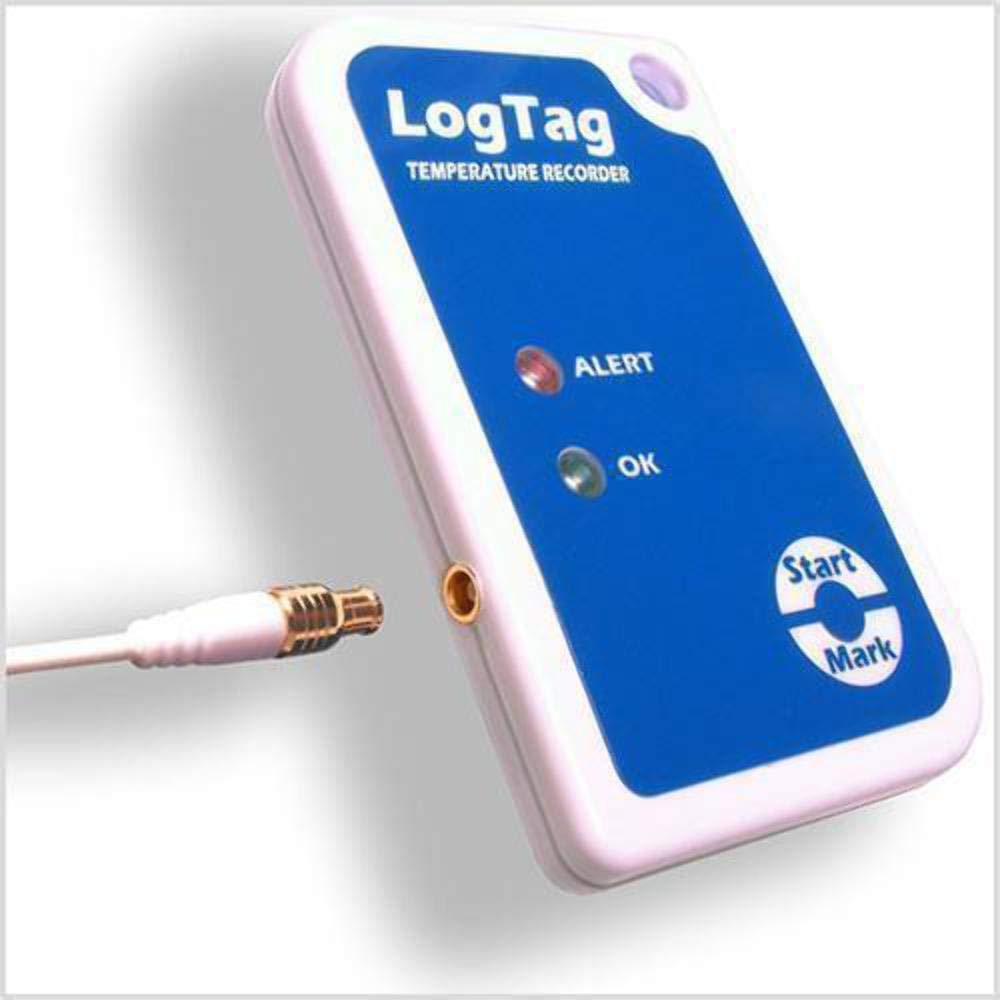
Image: The LogTag TREX-8 Temperature Data Recorder unit with the ST100S-15 remote probe connected.
Izici Eziyinhloko
- External Sensor for Measurement of Temperature.
- Measurement Range of -40°C to 85°C (-40°F to 185°F).
- Accuracy of ±0.5°C.
- Non-Replaceable Battery with 2-3 Year of Typical Life.
- Customizable Alarm Settings with Alert Indicator.
- Includes ST100S-15 External Temperature Probe.
- Requires LTI-HID Docking Station (sold separately).
- Software Available as a Free Download.
Okuqukethwe Kwephakheji
The TREX-8 Temperature Data Recorder package typically includes:
- IlogiTag TREX-8 Temperature Data Recorder unit.
- ST100S-15 1.5M Remote Probe.
- This User Manual.
Note: The LTI-HID Docking Station is required for operation and software download, but is sold separately.
Setha
1. Ukufakwa Kwesofthiwe
Before using the TREX-8, download and install the LogTag Analyzer software from the official LogTag website. This software is essential for configuring the recorder, downloading data, and viewing temperature logs.
2. Ukuxhuma i-Docking Station
Connect the LTI-HID Docking Station (sold separately) to your computer's USB port. Ensure the necessary drivers are installed, which are typically included with the LogTag Isoftware yokuhlaziya.

Image: The LogTag TREX-8 temperature recorder unit inserted into the LTI-HID docking station, ready for connection to a computer.
3. Connecting the Remote Probe
Carefully insert the connector of the ST100S-15 remote probe into the designated port on the TREX-8 data recorder. Ensure a secure connection.

Image: The LogTag TREX-8 temperature recorder with the ST100S-15 remote probe securely connected to its input port.

Image: The ST100S-15 1.5-meter remote temperature probe, coiled, showing its connector and sensor tip.
Imiyalelo yokusebenza
1. Configuring the Recorder
Place the TREX-8 into the LTI-HID Docking Station. Open the LogTag Analyzer software. The software will detect the connected recorder. Use the software to configure logging parameters such as start delay, logging interval, alarm thresholds, and recording duration.
2. Starting a Recording Session
Once configured via the software, remove the TREX-8 from the docking station. To initiate recording, press and hold the "Start/Mark" button on the device until the "OK" indicator light flashes. The device will begin logging data according to the programmed settings.
3. Monitoring Status Indicators
- OK Indicator: A green light indicates normal operation and that the temperature is within the configured limits.
- ALERT Indicator: A red light indicates that the temperature has exceeded or fallen below the configured alarm thresholds.

Image: Close-up of the LogTag TREX-8 showing the "ALERT" (red) and "OK" (green) indicator lights, along with the "Start/Mark" button.
4. Downloading Data
To download recorded data, re-insert the TREX-8 into the LTI-HID Docking Station while it is connected to your computer. Open the LogTag Analyzer software. The software will automatically detect the recorder and prompt you to download the data. Once downloaded, you can view, analyze, and export the temperature logs.
Isondlo
- Ukuhlanza: Wipe the device and probe with a soft, damp indwangu. Ungasebenzisi izinto zokuhlanza ezidukayo noma ucwilise iyunithi emanzini.
- Isitoreji: Store the TREX-8 in a cool, dry place when not in use.
- Impilo Yebhethri: The TREX-8 features a non-replaceable battery with an estimated life of 2-3 years under typical usage. There is no user-serviceable battery compartment.
- I-Probe Care: Handle the remote probe carefully. Avoid sharp bends or excessive pulling on the cable.
Ukuxazulula inkinga
| Inkinga | Imbangela Engenzeka | Isixazululo |
|---|---|---|
| Device not detected by software. | Docking station not connected or drivers not installed. | Ensure LTI-HID Docking Station is securely connected to USB. Reinstall LogTag Analyzer software to ensure drivers are present. |
| "ALERT" light is on. | Temperature has gone outside configured limits. | Check the environment where the probe is placed. Download data to review the temperature excursion details. |
| Device not starting recording. | Not properly configured or "Start/Mark" button not held long enough. | Re-configure the device using LogTag Analyzer. Ensure the "Start/Mark" button is pressed and held until the "OK" light flashes. |
| Ukufundwa kwezinga lokushisa okungalungile. | Damaged probe or incorrect probe connection. | Check the probe for visible damage. Ensure the probe is securely connected to the TREX-8 unit. |
Imininingwane
| Isici | Imininingwane |
|---|---|
| Imodeli | I-TREX-8 |
| Uhlobo Lokuhlola | External ST100S-15 Remote Probe |
| Ibanga Lokulinganisa | -40°C kuya ku-85°C (-40°F kuya ku-185°F) |
| Ukunemba | ±0.5°C |
| Ibhethri | Non-replaceable, 2-3 years typical life |
| Insiza edingekayo | LTI-HID Docking Station (sold separately) |
Ulwazi Lwewaranti
IlogiTag Recorders products are typically covered by a limited warranty against defects in materials and workmanship. For specific warranty terms and conditions, please refer to the documentation provided with your purchase or visit the official LogTag Ukuphinda webindawo. Gcina ubufakazi bakho bokuthenga ngezimangalo zewaranti.
Legal Disclaimer: THIS PRODUCT IS NOT A VFC VACCINE MONITORING KIT - PLEASE SEE ITEM VAC-TRED30-KIT-2.
Ukusekela
For technical support, software downloads, or additional product information, please visit the official LogTag Ukuphinda website or contact their customer service department. Ensure you have your product model number (TREX-8) and any relevant purchase details ready when seeking support.
Official LogTag Isitolo: IlogiTag Gcina ku-Amazon


