1. Isingeniso
This manual provides comprehensive instructions for the installation, operation, and maintenance of your HP 146 GB 2.5-Inch Internal SAS Hard Drive, model 652605-B21. Serial Attached SCSI (SAS) technology represents an advanced evolution of SCSI, integrating its established software advantages with the electrical and physical connection interface of Serial ATA (SATA). This design addresses the increasing demands of enterprise storage for greater capacity, density, security, scalability, and accessibility.
Enterprise data centers require continuous operation, simultaneous user request fulfillment, constant growth and expansion capabilities, and maintenance during operation. The HP 652605-B21 SAS hard drive is engineered to meet these rigorous requirements while delivering high performance.
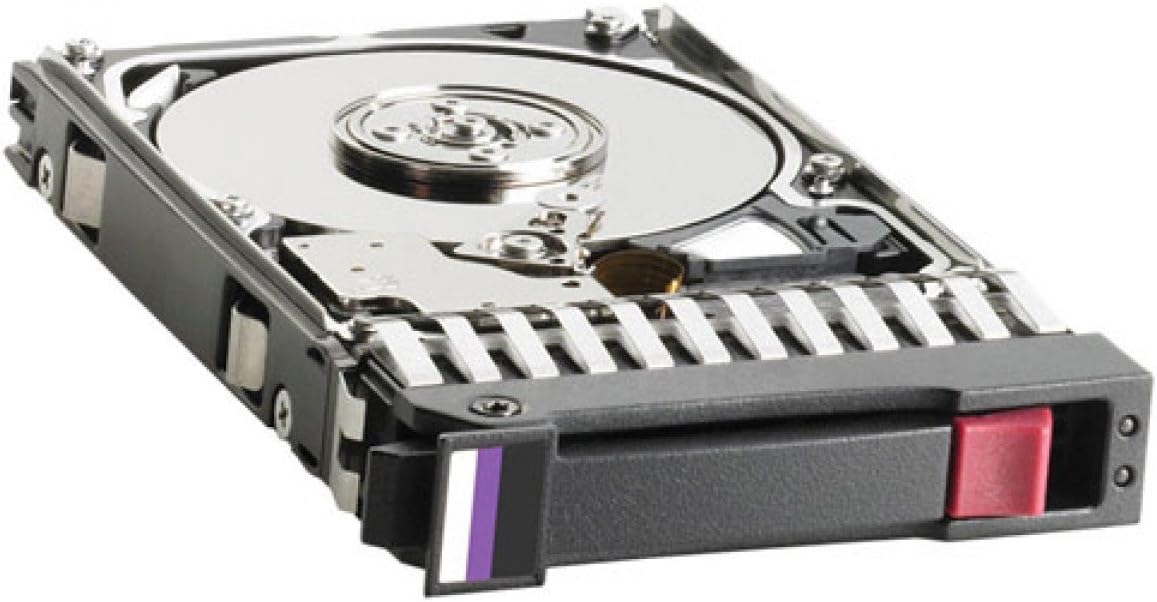
Figure 1: HP 146 GB 2.5-Inch Internal SAS Hard Drive, model 652605-B21. The image displays the drive mounted in its hot-swap tray, revealing the metallic platter through the open casing. The tray includes a purple and white indicator tab and a red release button for easy handling.
2. Yini EseBhokisini
Qinisekisa ukuthi zonke izingxenye zikhona lapho kukhishwa:
- HP 146 GB 2.5-Inch Internal SAS Hard Drive (Model: 652605-B21)
Note: Additional accessories such as mounting screws or cables may be required for installation and are typically sold separately or provided with the server/system chassis.
3. Imininingwane Yezobuchwepheshe
| Isici | Incazelo |
|---|---|
| Inombolo Yemodeli | I-652605-B21 |
| Uchungechunge | 6G SAS SFF |
| Umthamo Wesitoreji | 146 GB |
| Uhlobo Lwe-Hard Drive | I-Mechanical Hard Disk |
| I-Form Factor | 2.5-Inch Small Form Factor (SFF) |
| Isixhumi esibonakalayo | I-Serial Attached SCSI (SAS) |
| Isivinini sokujikeleza | 15000 RPM |
| Isisindo sento | 1.6 amakhilogremu (cishe 0.73 kg) |
| Ubukhulu bomkhiqizo (LxWxH) | 6 x 2 x 8 amayintshi (cishe 15.24 x 5.08 x 20.32 cm) |
| Amadivayisi Ahambisanayo | Desktop/Server systems with compatible 2.5-inch SAS bays |
| Uhlobo Lokufaka | I-Hard Drive yangaphakathi |
4. Ukusetha nokufakwa
This section outlines the general procedure for installing the HP 146 GB SAS Hard Drive into a compatible server or desktop system. Always refer to your system's specific documentation for detailed installation instructions, as procedures may vary.
4.1 Izinyathelo Zokuphepha
- Cisha ugesi: Ensure the system is completely powered off and disconnected from the power source before beginning installation.
- Ukukhipha Okumile: Gqoka ibhande lesihlakala elilwa nokungaguquguquki noma uthinte njalo into yensimbi ephansi ukuze uvimbele ukukhishwa kwe-electrostatic (ESD), okungalimaza izingxenye ze-elekthronikhi.
- Phatha Ngokunakekela: Hard drives are delicate. Avoid dropping or subjecting the drive to impact. Handle by the edges of the tray, not the drive itself.
4.2 Izinyathelo Zokufaka
- Lungiselela Uhlelo: Open the computer case or server chassis according to the manufacturer's instructions. Identify an available 2.5-inch SAS drive bay.
- Mount the Drive (if necessary): If your system uses hot-swap bays, the drive may already be mounted in a compatible tray. If not, secure the hard drive into a 2.5-inch drive tray or adapter using appropriate screws.
- Faka IDrayivu: Carefully slide the drive (in its tray) into the empty SAS drive bay until it clicks into place or is securely seated. Ensure the SAS connector on the drive aligns correctly with the backplane connector in the bay.
- Secure the Drive: If applicable, use any locking mechanisms or screws provided by your system chassis to secure the drive in its bay.
- Vala Uhlelo: Replace the computer case or server chassis cover.
- Vula: Reconnect the power cable and power on the system.
- Ukucushwa Kwesistimu: Access the system's BIOS/UEFI or RAID controller configuration utility to verify that the new drive is detected. You may need to initialize, partition, and format the drive before it can be used by the operating system. Consult your operating system or RAID controller documentation for these steps.
5. Ukusebenza
Once installed and configured, the HP 146 GB SAS Hard Drive operates as a high-performance storage device within your system. SAS drives are designed for enterprise environments, offering features such as:
- Ukuthembeka okuphezulu: Built for continuous operation in demanding server environments.
- Ukusebenza: 15000 RPM spindle speed provides fast data access and transfer rates.
- Dual-Porting: SAS allows for redundant paths to data, enhancing availability and fault tolerance.
- I-Scalability: SAS expanders enable connection of numerous drives to a single controller, facilitating storage expansion.
The operating system will manage data storage and retrieval on the drive. Ensure your operating system and any RAID controllers have the latest drivers for optimal performance and stability.
6. Isondlo
Proper maintenance can extend the lifespan and ensure the reliability of your hard drive. While SAS drives are robust, adhering to these guidelines is recommended:
- Isipele Sedatha: Regularly back up critical data to prevent loss in case of drive failure or other unforeseen events.
- Ukupholisa Kwesistimu: Ensure adequate airflow within your server or computer chassis to maintain optimal operating temperatures for the hard drive. Overheating can reduce drive lifespan.
- Ukuvuselelwa kwe-Firmware: Hlola njalo ukwesekwa kwe-HP webiwebhusayithi yezibuyekezo ze-firmware zemodeli yakho yedrayivu. Izibuyekezo ze-firmware zingathuthukisa ukusebenza, ukuzinza, kanye nokuhambisana.
- Indawo Engokwemvelo: Keep the system in a clean, dust-free environment. Avoid exposing the system to excessive vibration or shock.
- Ukuqapha: Utilize system monitoring tools (e.g., SMART data monitoring) to track the health and performance of your hard drives.
7. Ukuxazulula izinkinga
If you encounter issues with your HP 146 GB SAS Hard Drive, consider the following troubleshooting steps:
7.1 IDrayivu Ayitholakali
- Hlola Ukuxhumana: Ensure the drive is properly seated in its bay and that all SAS cables (if external) are securely connected.
- Ukunikezwa kwamandla kagesi: Verify that the system's power supply is adequate and functioning correctly.
- Izilungiselelo ze-BIOS/UEFI: Check the system's BIOS/UEFI or RAID controller settings to confirm the drive is recognized. Ensure the SAS controller is enabled.
- Abashayeli: Ensure the latest drivers for your SAS controller are installed.
- Test in Another Bay/System: If possible, test the drive in a different compatible SAS bay or system to rule out a faulty bay or controller.
7.2 Izinkinga Zokusebenza
- Izinsiza Zesistimu: Check for other system bottlenecks (CPU, RAM, network) that might be affecting overall performance.
- Drive Health: Use diagnostic tools to check the drive's health (SMART status).
- I-Firmware: Qinisekisa ukuthi idrayivu ine-firmware yakamuva efakiwe.
- Ukucushwa kwe-RAID: If part of a RAID array, verify the RAID status and ensure no drives are degraded.
7.3 Imisindo Engavamile
- Thola umthombo: Determine if the noise is coming directly from the hard drive or another component (e.g., fan).
- Idatha yesipele: If the drive is making clicking, grinding, or loud whirring noises, it may be failing. Immediately back up any critical data.
- Xhumana Nosekelo: If unusual noises persist and indicate a drive issue, contact HP support.
8. Iwaranti kanye Nokusekela
For information regarding the warranty coverage for your HP 146 GB 2.5-Inch Internal SAS Hard Drive, please refer to the warranty documentation included with your purchase or visit the official HP support website. HP provides various support resources, including drivers, firmware updates, and technical assistance.
To access support, visit: www.hp.com/support
Note: Warranty terms and conditions may vary by region and purchase date. Keep your proof of purchase for warranty claims.