1. Umkhiqizo Uphelileview
The Mitel MiVoice 5304 IP Phone is a compact and cost-effective entry-level display phone designed for various environments such as hotel rooms, university dorms, classrooms, and retail spaces. It provides essential communication features and integrates seamlessly with Mitel IP-based communication platforms.
This phone supports both MiNet and SIP protocols, offering flexibility in deployment. It features a backlit display, two lines with LED indication, and programmable keys for enhanced functionality.
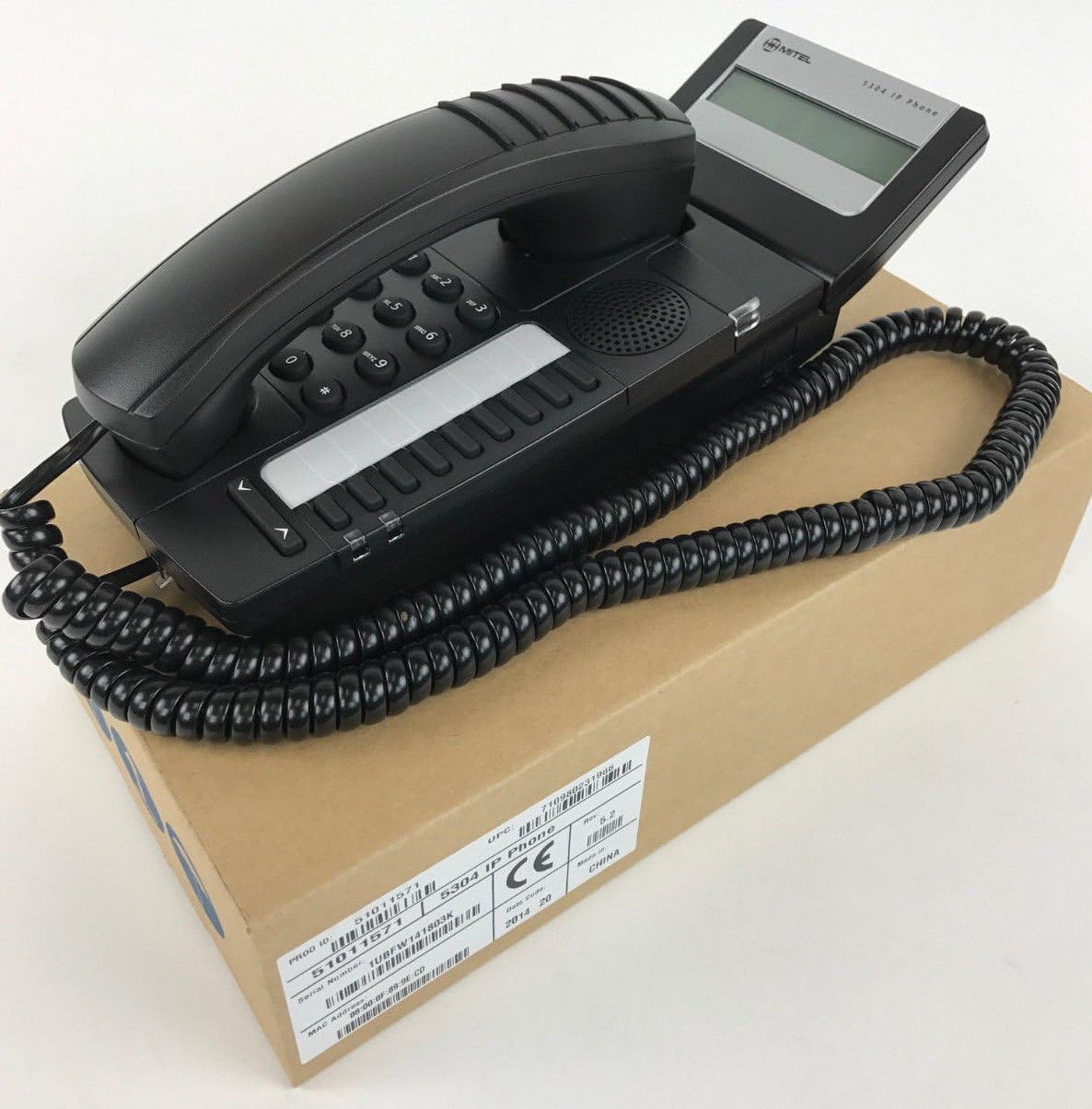
Figure 1: Mitel MiVoice 5304 IP Phone. This image shows the black IP phone with its coiled handset cord, resting on a brown cardboard box. The phone features a numeric keypad, several function buttons, and a small display screen.
2. Izici Eziyinhloko
- Bonisa: Two x 20 character backlit display with auto-dimming.
- Imigqa: Two lines with LED indication (one prime line, one programmable key).
- Okhiye Abahlelekayo: Eight programmable keys for speed dials, feature access codes, paging, conferencing, voicemail access, etc.
- Ukuphega: Paging and page receive capability, including direct page and group page support.
- Usekelo Lwemodi Ekabili: Compatible with both MiNet and SIP protocols.
- Izinkomba Ezibonakalayo: Incoming call visual indication and message waiting indication.
- Izilawuli zomsindo: Adjustable volume and ringing controls.
- Ukukhweza: Wall-mountable (optional accessory may be required).
- Inika amandla: Multiple powering options, including 802.3af compliant Power over Ethernet (PoE).
- Ukufinyeleleka: ADA-compliant (HAC handset).
- Idizayini Ehlangene: Small footprint (approximately 26.5 cm x 10 cm or 10.5 x 4 inches).
- Ukonga Amandla: Designed for power conservation to reduce overall energy consumption.
3. Ukusetha nokufakwa
3.1 Okuqukethwe Kwephakheji
Ngaphambi kokuthi uqale, qiniseka ukuthi zonke izingxenye zikhona:
- Mitel MiVoice 5304 IP Phone unit
- I-handset
- I-handset coiled cord
- Ikhebula le-Ethernet
- (Optional) Power adapter if PoE is not used
3.2 Ukuxhuma Ucingo
- Xhuma Ihendisethi: Plug one end of the coiled handset cord into the handset and the other end into the handset port on the phone base.
- Xhuma Kunethiwekhi: Connect one end of the Ethernet cable to the LAN port on the back of the phone and the other end to an active network port (e.g., a wall jack or network switch). If using Power over Ethernet (PoE), the phone will power on automatically.
- Amandla Okuxhuma (uma ungasebenzisi i-PoE): If your network does not provide PoE, connect an optional Mitel-approved power adapter to the power port on the phone and then to a standard electrical outlet.
- Isinyathelo sokuqala: The phone will power on and begin its boot-up sequence. This may take a few moments as it obtains an IP address and registers with your communication system.
3.3 Ukukhweza Udonga (Ongakukhetha)
The Mitel 5304 IP Phone can be wall-mounted. An optional wall-mount kit (sold separately) may be required. Follow the instructions provided with the wall-mount kit for proper installation.
4. Iziqondiso Zokusebenza
4.1 Ukwenza Izingcingo Nokuphendula
- Ukushaya Ucingo:
- Phakamisa ihendisethi noma cindezela inkinobho Somlomo inkinobho.
- Shayela inombolo oyifunayo usebenzisa ikhiphedi.
- Cindezela inkinobho Dayela or Thumela button (if available) or wait for the call to connect automatically.
- Ukuphendula Ucingo:
- Phakamisa ifoni noma cindezela inkinobho yomugqa okhanyayo noma Somlomo inkinobho.
- Ukuvala Ucingo:
- Shintsha ifoni noma cindezela inkinobho ethi Qeda Ucingo or Somlomo inkinobho.
4.2 Ukusebenzisa Okhiye Abangahlelwa
The Mitel 5304 features eight programmable keys. Their functions are typically configured by your system administrator and can include:
- Speed Dial numbers
- Access to specific features (e.g., Call Forward, Do Not Disturb)
- Paging functions
- Voicemail access
- Umhlangano
To use a programmable key, simply press the button corresponding to the desired function.
4.3 Ukulungisa Ivolumu
Use the volume control buttons (usually located below the keypad or on the side of the phone) to adjust the handset, speakerphone, or ringer volume. Press the + inkinobho yokwandisa ivolumu kanye - inkinobho yokwehlisa ivolumu.
4.4 Message Waiting Indication
A flashing LED indicator on the phone signifies that you have new voicemail messages. To retrieve messages, press the dedicated Umlayezo button (if configured) or dial your voicemail access code.
5. Isondlo Nokunakekela
- Ukuhlanza: Sebenzisa okuthambile, kancane damp cloth to clean the phone's surface. Do not use abrasive cleaners, solvents, or strong chemicals, as these can damage the finish.
- Uthuli: Regularly dust the phone, especially around the keypad and display, to prevent accumulation that could affect performance.
- Imvelo: Keep the phone away from excessive heat, direct sunlight, and moisture. Ensure proper ventilation if placed in an enclosed space.
- Izintambo: Ensure all cables are securely connected and not pinched or damaged.
6. Ukuxazulula izinkinga
| Inkinga | Imbangela Engenzeka | Isixazululo |
|---|---|---|
| Ifoni ayivuli. | No power from Ethernet (PoE) or power adapter not connected/faulty. |
|
| No dial tone or cannot make calls. | Network connectivity issue, phone not registered, or system configuration problem. |
|
| Isibonisi asinalutho noma asifundeki. | Power issue or display fault. |
|
| Angikwazi ukuzwa umuntu ongishayelayo noma ongishayelayo angikwazi ukungizwa. | Volume settings, handset/speaker issue, or network audio problem. |
|
7. Imininingwane
| Isibaluli | Imininingwane |
|---|---|
| Inombolo Yemodeli | 51011571 |
| Ubukhulu bomkhiqizo (L x W x H) | 10 x 10 x 6 amayintshi (25.4 x 25.4 x 15.24 cm) |
| Isisindo sento | 1.9 pounds (0.86 kg) |
| Umbala | Mnyama |
| Uhlobo Lwefoni | Ucingo lwe-IP olunezintambo |
| Umthombo wamandla | Corded Electric (PoE 802.3af compliant or optional power adapter) |
| Uhlobo Lokudayela | Ikhiphedi Eyodwa |
| Bonisa | Two x 20 character backlit display |
| Ukusekelwa Komugqa | 2 Lines with LED indication |
| Izivumelwano ezisekelwayo | MiNet, SIP |
| Amadivayisi Ahambisanayo | VoIP services, IP-based communication systems, Mitel 3300, Mitel SX-200 IP Communications Platforms |
| Amandla Okushaya Izingcingo Zengqungquthela | 2-indlela |
8. Iwaranti kanye Nokusekela
Ukuze uthole ulwazi mayelana newaranti yomkhiqizo, sicela ubheke ikhadi lewaranti elifakiwe ekuthengeni kwakho noma uvakashele i-Mitel esemthethweni. website. For technical support, service, or further inquiries, please contact your Mitel authorized dealer or system administrator.
You can also find additional resources and contact information on the official Mitel webindawo: www.mitel.com


