Isingeniso
This manual provides detailed instructions for the proper setup, operation, and maintenance of your Nortek NDVX 2503 DVD Player. Please read this manual thoroughly before using the device to ensure optimal performance and safety. Keep this manual for future reference.
Ulwazi Lokuphepha
- Umthombo wamandla: Connect the DVD player only to the specified power supply voltage.
- Ukungenisa umoya: Qinisekisa ukuthi kunomoya owanele endaweni yonke. Ungavimbi izimbobo zokungenisa umoya.
- Amanzi Nomswakama: Do not expose the unit to rain, moisture, or dripping/splashing liquids.
- Ukushisa: Gcina iyunithi kude nemithombo yokushisa njengama-radiator, amarejista okushisa, izitofu, noma ezinye izinto ezikhiqiza ukushisa.
- Ukuhlanza: Khipha iyunithi odongeni ngaphambi kokuhlanza. Sebenzisa indwangu eyomile ukuze uhlanze.
- Ukusevisa: Ungazami ukuletha lo mkhiqizo ngokwakho. Dlulisela konke ukwesekwa kubasebenzi bensizakalo abafanelekayo.
Okuqukethwe Kwephakheji
Qinisekisa ukuthi zonke izinto ezibalwe ngezansi zifakiwe kuphakheji yakho:
- Nortek NDVX 2503 DVD Player
- Isilawuli kude (namabhethri)
- AV Cable (RCA type)
- Incwadi Yomsebenzisi (le dokhumenti)
- Intambo Yamandla
Umkhiqizo Uphelileview
Familiarize yourself with the components and controls of your DVD player.
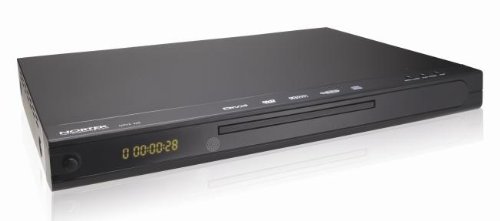
Umfanekiso 1: Ngaphambili view of the Nortek NDVX 2503 DVD Player. This image shows the sleek black casing, the central disc tray, the digital display on the left, and control buttons on the right side of the front panel.
Izilawuli zephaneli yangaphambili:
- Inkinobho yamandla: Ivula noma ivale iyunithi.
- Ithreyi yediski: Insert your DVD or CD here.
- Bonisa: Shows playback time, track number, and other status indicators.
- Inkinobho yokuvula/yokuvala: Ivula futhi ivale ithreyi yediski.
- Inkinobho Dlala/Yemisa Isikhashana: Iqala noma imise ukudlala kwediski.
- Inkinobho yokumisa: Imisa ukudlalwa kwediski.
- Skip Buttons (Forward/Backward): Skips to the next or previous track/chapter.
Izixhumanisi zephaneli yangemuva:
(Note: Specific connections may vary. Common connections include:)
- Audio/Video Output (RCA): Red, White (audio) and Yellow (video) jacks for connecting to a TV or ampokokuphila.
- Coaxial/Optical Digital Audio Output: For connecting to a home theater receiver for digital audio.
- Okokufaka kwamandla: Ixhuma intambo yamandla.
Setha
1. Connecting to a Television:
- Ensure both the DVD player and your television are turned off and unplugged.
- Connect the yellow RCA video cable from the "Video Out" jack on the DVD player to the "Video In" jack on your television.
- Connect the red and white RCA audio cables from the "Audio Out" jacks (Red for Right, White for Left) on the DVD player to the corresponding "Audio In" jacks on your television or audio receiver.
- If using digital audio, connect a coaxial or optical cable from the DVD player's digital audio output to your receiver's digital audio input.
2. Ukuxhunywa kwamandla:
- Plug the power cord into the power input on the rear of the DVD player.
- Xhuma enye ingxenye yentambo yamandla endaweni ephuma odongeni.
3. Initial Power-On:
- Turn on your television and select the correct input source (e.g., AV1, Video 1) that corresponds to where you connected the DVD player.
- Press the Power button on the DVD player or its remote control to turn it on.
- The Nortek logo or a setup menu should appear on your TV screen.
Imiyalelo yokusebenza
1. Disc Playback:
- Cindezela inkinobho VULA/VALA inkinobho kuphaneli engaphambili noma kusilawuli kude ukuze uvule ithreyi yediski.
- Place a DVD, DVD+R, or Video CD disc gently into the tray with the label side facing up.
- Cindezela inkinobho VULA/VALA inkinobho futhi ukuvala ugqoko.
- The player will automatically begin reading the disc. Playback should start shortly. If a menu appears, use the arrow keys on the remote to navigate and the NGENA inkinobho ukukhetha.
- Sebenzisa i- DLALA/YIMISA, IMA, futhi YEQA buttons on the remote or front panel to control playback.
2. Ukuzulazula kwemenyu:
- Sebenzisa i- UMcibisholo buttons on the remote control to move through menu options.
- Cindezela inkinobho NGENA or OK inkinobho yokuqinisekisa ukukhetha.
- I IMENU button typically returns you to the disc's main menu.
Isondlo
Ukuhlanza Iyunithi:
- Unplug the DVD player from the power outlet before cleaning.
- Use a soft, dry cloth to wipe the exterior of the unit. Do not use liquid cleaners or aerosol sprays.
- Avoid getting dust or debris inside the disc tray mechanism.
Ukunakekelwa Kwediski:
- Phatha amadiski ngemiphetho yawo ukuze ugweme ukunyatheliswa kweminwe endaweni yokudlala.
- Store discs in their cases when not in use to prevent scratches.
- Hlanza amadiski angcolile ngendwangu ethambile, engenawo uboya, usula kusukela phakathi nendawo ubheke ngaphandle.
Ukuxazulula inkinga
| Inkinga | Imbangela Engenzeka | Isixazululo |
|---|---|---|
| Awekho amandla | Intambo yamandla ayixhunyiwe; Indawo yamandla ayisebenzi. | Qinisekisa ukuthi intambo yamandla ixhunywe ngokuvikelekile. Hlola i-outlet ngenye idivayisi. |
| Asikho isithombe noma umsindo | AV cables not connected correctly; Incorrect TV input selected. | Check all AV cable connections. Select the correct input source on your TV (e.g., AV1, Video 1). |
| Idiski alidlali | Disc is dirty or scratched; Disc inserted incorrectly; Incompatible disc format. | Clean the disc. Ensure the disc is inserted label-side up. Verify the disc is a supported format (DVD, DVD+R, Video CD). |
| Isilawuli kude asisebenzi | Amabhethri afile noma afakwe ngokungalungile; Ukuphazamiseka phakathi kwesilawuli kude nesidlali. | Replace batteries. Ensure correct battery polarity. Remove any obstructions. Point remote directly at the player's sensor. |
Imininingwane
- Ibhrendi: Nortek
- Igama Lemodeli: NDVX 2503
- Media Types Supported: DVD, DVD+R, Video CD
- ASIN: B0044AL0TM
- Umkhiqizi: Nortek
- Note: Other specifications such as dimensions, weight, and power consumption are not available in the provided data.
Iwaranti kanye Nokusekela
For warranty information or technical support, please refer to the warranty card included with your product or visit the official Nortek webindawo. Gcina ubufakazi bakho bokuthenga banoma yiziphi izimangalo zewaranti.
For further assistance, you may contact Nortek customer service through their official channels.


