1. Isingeniso
The Intermatic EI400C Electronic Countdown In-Wall Timer is designed to provide automatic shut-off functionality for various electrical loads, including indoor and outdoor lighting, bathroom fans, whole house fans, and other appliances. This timer offers precise control from 1 second to 24 hours, enhancing convenience and energy efficiency in your home or office. Its silent operation and simple push-button interface make it user-friendly, while its no-neutral wire requirement simplifies installation in most standard wall boxes.
2. Ulwazi Olubalulekile Lokuphepha
WARNING: Risk of Electric Shock. Improper installation can lead to serious injury or death.
- Always turn off power at the circuit breaker or fuse box before installing or servicing the timer.
- Installation should be performed by a qualified electrician or in accordance with all local and national electrical codes.
- Do not use this timer with sunlamps, saunas, or any loads that could cause personal injury if timed incorrectly or if the timer malfunctions.
- Qinisekisa ukuthi zonke izintambo zivikelekile futhi zigqunywe ngendlela efanele.
- Le divayisi ihloselwe ukusetshenziswa endlini kuphela.
3. Umkhiqizo Uphelileview
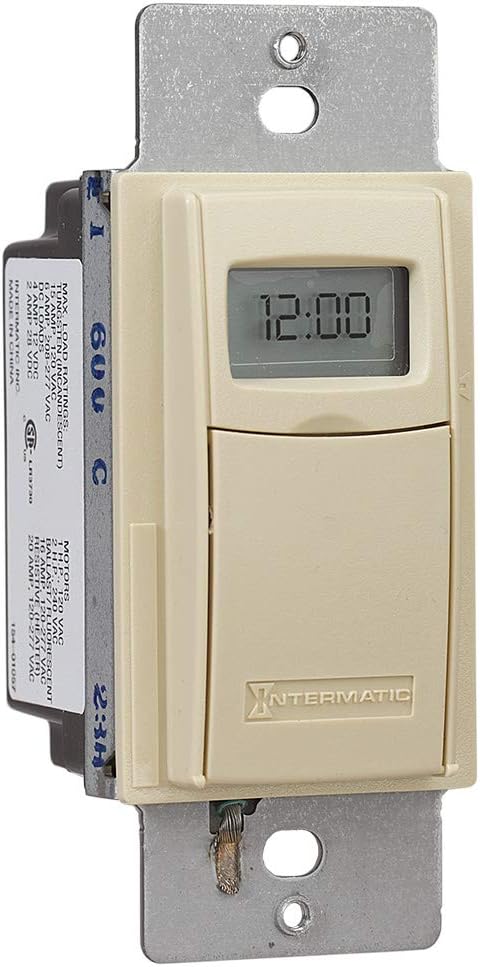
The Intermatic EI400C is an electronic countdown timer designed for in-wall installation. It features a digital display and intuitive controls for setting countdown durations.
3.1 Izingxenye
- Ukuboniswa Kwedijithali: Shows current time and countdown status.
- Inkinobho Yokuvula/Ukuvala: Activates or deactivates the timer.
- Plus (+) / Minus (-) Buttons: Adjust countdown duration.
- Inkinobho yokumisa isikhashana: Temporarily stops the countdown.
- Igumbi Lebhethri: Houses the CR2 lithium battery.
3.2 Izithombe Zomkhiqizo



4. Ukusetha nokufakwa
The Intermatic EI400C timer is designed for easy installation, compatible with single-pole or 3-way switch configurations and does not require a neutral wire connection.
4.1 Izinyathelo Zokufaka Ngaphambili
- Vala Amandla: Locate the circuit breaker or fuse that controls the switch you are replacing and turn off the power. Verify power is off using a voltagumhloli.
- Susa Ukushintsha Okukhona: Carefully remove the wall plate and unscrew the existing switch from the wall box. Disconnect the wires from the old switch.
4.2 Izintambo Iziyalezo
The EI400C timer is compatible with both single-pole and 3-way switch setups. Refer to the diagram provided with your product for specific wiring configurations. Generally, the timer will have two load wires and a ground wire. For 3-way applications, one of the traveler wires from the existing 3-way switch will be connected to the timer.
- Connect the timer's wires to the corresponding house wires using wire nuts.
- Qinisekisa ukuthi konke ukuxhumana kuqinile futhi kuvikelekile.
- The EI400C does not require a neutral wire, simplifying installation in older homes.
4.3 Mounting and Finalizing Installation
- Carefully push the wired timer into the wall box.
- Secure the timer to the wall box with the provided screws.
- Attach the decorative wall plate.
- Buyisela Amandla: Vula amandla futhi ku-circuit breaker.
4.4 Ukufakwa kwebhethri
The timer comes with a replaceable CR2 lithium battery, which powers the internal clock and settings memory. The battery is typically pre-installed or needs to be inserted upon initial setup.
- Open the small front cover of the timer to access the battery compartment.
- Insert the CR2 lithium battery, observing the correct polarity.
- Vala ikhava yengxenye yebhethri ngokuphephile.
5. Iziqondiso Zokusebenza
The EI400C timer offers simple, push-button operation for setting countdown durations from 1 second to 24 hours.
5.1 Setting a Countdown Time
- Izilawuli Zokufinyelela: Gently open the front cover of the timer to reveal the control buttons.
- Lungisa Isikhathi: Sebenzisa i- + futhi - buttons to set the desired countdown duration. The display will show the selected time.
- Qalisa Isikhathi: Cindezela inkinobho Khanyisa cisha button to activate the timer. The connected load will turn on, and the timer will begin counting down.
5.2 Turning Off Before Countdown Ends
If you wish to turn off the connected load before the set countdown time expires, simply press the Khanyisa cisha button again. This will immediately turn off the load and reset the timer.
5.3 Misa Isikhashana Umsebenzi
Cindezela inkinobho Misa isikhashana button to temporarily halt the countdown. The connected load will remain on. Press Misa isikhashana futhi ukuqala kabusha ukubala phansi.
5.4 Lockable Settings
The timer features lockable settings to prevent unintended changes to the program. Refer to the detailed instructions included in the product packaging for how to activate and deactivate this feature.
5.5 Visual/Audible Warnings
The EI400C can be configured to provide a visual or audible warning before the timer turns off. Consult the full product manual for steps on enabling and customizing these warning options.
5.6 Ividiyo Yokufundisa
Ifilimu 1: An official Intermatic video providing an overview of their in-wall timers, including the EI400 series. This video demonstrates general features and benefits of Intermatic in-wall timers, which are applicable to the EI400C model.
6. Isondlo
The Intermatic EI400C timer requires minimal maintenance, primarily focusing on battery replacement.
6.1 Ukushintshwa Kwebhethri
The internal CR2 lithium battery provides power for the timer's memory and display, typically lasting up to three years. When the battery is low, a 'LoBatt' indicator may appear on the display.
- Open the front cover of the timer.
- Carefully remove the old CR2 battery from its compartment.
- Insert a new CR2 lithium battery, ensuring correct polarity.
- Vala ikhava yangaphambili ngokuphepha.
Qaphela: Some users have reported that the battery compartment cover can be difficult to open or may not stay securely closed after multiple battery changes. Exercise care when opening and closing the compartment. If the cover does not stay closed, ensure the battery makes proper contact.
7. Ukuxazulula izinkinga
This section addresses common issues you might encounter with your Intermatic EI400C timer.
| Inkinga | Imbangela Engenzeka | Isixazululo |
|---|---|---|
| Timer display is blank or shows 'LoBatt' | Low or dead CR2 battery, or poor battery contact. | Replace the CR2 lithium battery. Ensure the battery is inserted correctly and the compartment cover is securely closed to maintain contact. |
| Timer shows 'NoOP' error | Indicates a problem with battery contact or internal operation. | Check and re-seat the CR2 battery. If the issue persists, the unit may require replacement. |
| Connected load does not turn on/off | No power to the timer, incorrect wiring, or faulty load. | Verify power at the circuit breaker. Double-check wiring connections according to the installation instructions. Test the connected load (e.g., light bulb) with a different switch or power source. |
| Difficulty opening battery compartment cover | Tight fit or worn plastic tabs. | Use a small, flat-head screwdriver to gently pry open the cover. Be careful not to damage the plastic tabs. |
| Timer does not hold settings after power outage | Dead or missing CR2 battery. | The CR2 battery maintains settings during power outages. Ensure it is installed and functional. |
8. Imininingwane
| Isici | Imininingwane |
|---|---|
| Inombolo Yemodeli | EI400C |
| Ibhrendi | Intermatic |
| Umbala | Indlovu |
| Okubalulekile | Ipulasitiki |
| Voltage | I-120-277 VAC |
| Umthwalo Omkhulu | 20 Amps |
| Ibanga lesibali sikhathi | 1 Second to 24 Hours |
| Shintsha Uhlobo | Single-pole or 3-way |
| Uhlobo Lokukhweza | Standard Wall Box, Rectangular Decorator Wall Plate |
| Kudingeka Ibhethri | 1 CR2 Lithium (included) |
| Impilo Yebhethri | Kuze kufike eminyakeni emi-3 |
| Ubukhulu | 4.13 x 1.75 x 1.2 amayintshi |
| Isisindo sento | 6 ama-ounces (0.38 pounds) |
| Isitifiketi | I-CSA Certified |
| I-UPC | 078275101371 |
9. Iwaranti & Ukusekela
9.1 Ulwazi Lwewaranti
The Intermatic EI400C Electronic Countdown In-Wall Timer comes with a Iwaranti ekhawulelwe yeminyaka engu-5. Lesi siqinisekiso sihlanganisa amaphutha ezintweni zokwakha kanye nokusebenza ngaphansi kokusetshenziswa okuvamile. Sicela ugcine ubufakazi bakho bokuthenga izimangalo zewaranti.
9.2 Ukwesekwa Kwamakhasimende
For technical assistance, troubleshooting beyond this manual, or warranty inquiries, please contact Intermatic customer support. Refer to the official Intermatic webisayithi noma iphakheji yomkhiqizo ukuze uthole ulwazi lwakamuva lokuxhumana.
Izinsiza eziku-inthanethi: Vakashela i- Intermatic Store on Amazon ngolwazi olwengeziwe lomkhiqizo nezisetshenziswa.


