Isingeniso
This manual provides instructions for the setup, operation, and maintenance of your Microsoft Wireless Comfort Desktop 5000. This product combines a wireless keyboard and a wireless mouse designed for comfortable and efficient computer interaction.
The Microsoft Wireless Comfort Desktop 5000 features an ergonomically designed Comfort Curve keyboard and a mouse utilizing BlueTrack Technology for versatile surface tracking. It operates on a 2.4 GHz wireless connection, offering a reliable connection with a range of up to 30 feet.
Umhlahlandlela Wokusetha
Yini EseBhokisini
- Microsoft Wireless Comfort Desktop 5000 Keyboard
- Microsoft Wireless Comfort Desktop 5000 Mouse
- USB Mini-Transceiver
- 2 AA Alkaline Batteries (for keyboard)
- 1 AA Alkaline Battery (for mouse)
Izidingo Zesistimu
- Isistimu esebenzayo: Windows 8, Windows 7, Windows Vista, Windows XP (excluding Windows XP 64-bit)
- I-Hard Drive: 100 MB free space
- Imbobo: Imbobo ye-USB
Ukufakwa Kwebhethri
The keyboard requires two AA alkaline batteries, and the mouse requires one AA alkaline battery. Batteries are included with the product.
- Thola indawo yebhethri ngaphansi kwekhibhodi negundane.
- Vula ikhava yengxenye yebhethri.
- Insert the AA batteries, ensuring correct polarity (+/-).
- Vala ikhava yengxenye yebhethri ngokuphephile.
Connecting the Wireless Transceiver
The wireless desktop set connects to your computer via a USB mini-transceiver.
- Locate the USB mini-transceiver. It may be stored in the mouse's battery compartment for transport.
- Insert the USB mini-transceiver into an available USB port on your computer.
- Ikhompyutha yakho kufanele ibone futhi ifake ngokuzenzakalelayo abashayeli abadingekayo. Le nqubo ingathatha isikhashana.
- Once drivers are installed, the keyboard and mouse should be ready for use.

Figure 1: The compact USB mini-transceiver for wireless connection.

Figure 2: The underside of the mouse showing the storage slot for the USB mini-transceiver.
Imiyalelo yokusebenza
Izici zekhibhodi

Umfanekiso 3: Phezulu-phansi view of the Comfort Curve keyboard layout.
- Comfort Curve Design: The keyboard features an ergonomist-approved Comfort Curve design that encourages a natural wrist posture, reducing strain during extended use.
- Quiet Touch Keys: Experience comfortable typing with low-profile, quiet-touch keys.
- Ukuphumula kwePalm: A soft-touch palm rest is integrated to provide additional comfort and support for your wrists.
- Removable Feet: Adjustable feet on the underside allow you to set the keyboard at a preferred angle for a more comfortable wrist posture.
- Taskbar Favorites for Windows 7: Easily access programs pinned to the Windows Taskbar using dedicated shortcut keys. The keys automatically adapt if you rearrange icons in the Taskbar.
- Media Center Controls: Control media playback directly from your keyboard using dedicated media keys (e.g., play/pause, volume up/down, mute).

Umfanekiso 4: I-engeli view highlighting the integrated palm rest and Comfort Curve design.
Izici zegundane

Umfanekiso 5: I-engeli view of the wireless mouse.
- Ubuchwepheshe be-BlueTrack: The mouse utilizes Microsoft's BlueTrack Technology, combining the power of optical with the precision of laser for remarkable tracking on virtually any surface, including granite, carpet, and wood.
- I-Four-Way Scrolling: The tilt wheel allows for four-way scrolling (up, down, left, and right), enhancing efficiency and comfort when navigating documents or web amakhasi.
- Izinkinobho Ezenzeka Ngokwezifiso: The mouse buttons can be customized for quick access to programs, files, media, and webpages you use most often. Refer to your operating system's mouse settings for customization options.
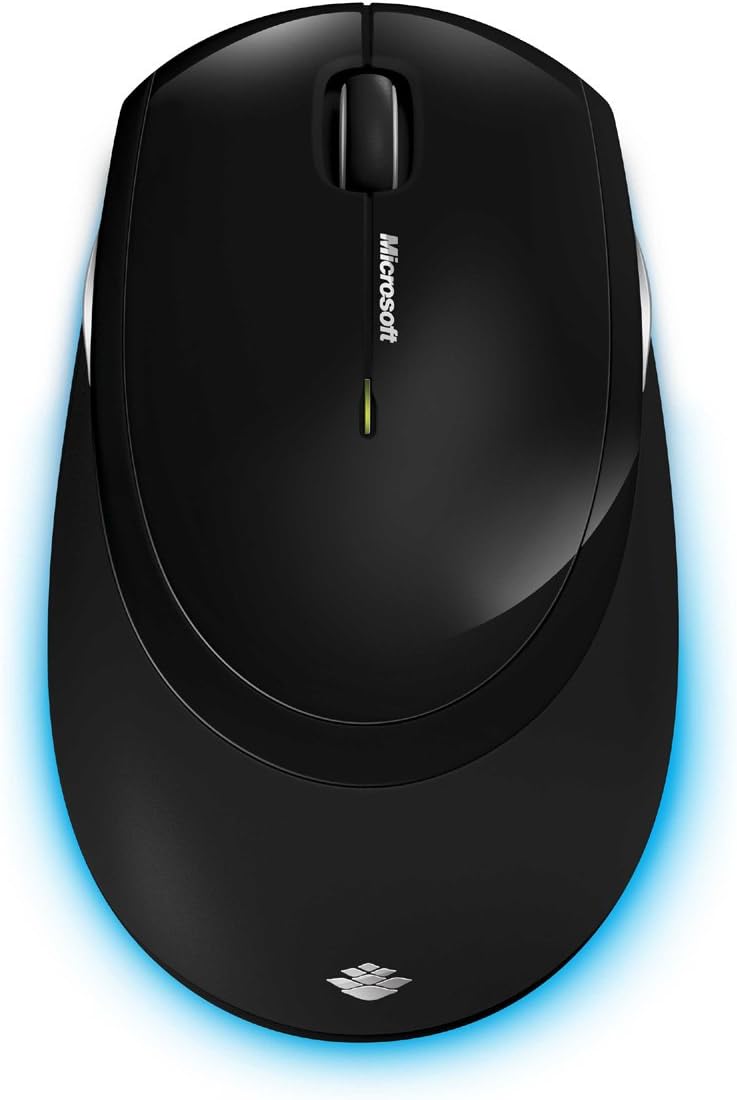
Umfanekiso 6: Phezulu-phansi view of the wireless mouse.
Isondlo
Ukuhlanza
To maintain the performance and appearance of your Microsoft Wireless Comfort Desktop 5000, follow these cleaning guidelines:
- Disconnect the USB transceiver from your computer before cleaning.
- Sebenzisa indwangu ethambile, engenalinti kancane dampefakwe ngamanzi noma isixazululo esithambile sokuhlanza.
- Avoid using harsh chemicals, abrasive cleaners, or solvents, as these can damage the surfaces.
- For the keyboard, you can use compressed air to remove dust and debris from between the keys.
- For the mouse, gently wipe the optical sensor area on the bottom to ensure optimal tracking performance.
Ukushintshwa Kwebhethri
When the batteries are low, the indicator light on the keyboard or mouse may flash. Replace the batteries as described in the "Battery Installation" section under Setup Guide.
- Always use new, high-quality AA alkaline batteries.
- Lahla amabhethri asetshenzisiwe ngokwemithetho yendawo.
Ukuxazulula inkinga
Izinkinga zokuxhumana
- No response from keyboard/mouse:
- Ensure the USB mini-transceiver is securely plugged into a working USB port on your computer.
- Check if the batteries in the keyboard and mouse are correctly installed and have sufficient charge. Replace if necessary.
- Try plugging the transceiver into a different USB port.
- Qala kabusha ikhompuyutha yakho.
- Ukuphazamisa:
- The 2.4 GHz wireless technology can be affected by other wireless devices. Move the transceiver closer to the keyboard and mouse, or move other wireless devices away.
- Avoid placing the transceiver near large metal objects, which can block the wireless signal.
Mouse Tracking Issues
- Erratic or no tracking:
- Ensure the BlueTrack sensor on the bottom of the mouse is clean and free of debris.
- Try using the mouse on a different surface. While BlueTrack is versatile, highly reflective or transparent surfaces (like clear glass) may still cause issues.
Imininingwane
| Isici | Imininingwane |
|---|---|
| Ibhrendi | Microsoft |
| Inombolo Yemodeli | I-CSD-00001 |
| Ubuchwepheshe bokuxhumana | Wireless (USB Transceiver) |
| Uhlobo Olungenantambo | I-2.4 GHz Radio Frequency |
| Amadivayisi Ahambisanayo | Ikhompyutha yomuntu siqu |
| Ukuhambisana Kwesistimu Esebenzayo | Windows 8, Windows 7, Windows Vista, Windows XP (excluding Windows XP 64-bit) |
| Umbala | Mnyama |
| Isisindo sento | 2.9 amakhilogremu |
| Ubukhulu bomkhiqizo (LxWxH) | 8.7 x 2.9 x 18.54 amayintshi |
| Umthombo wamandla | Isebenza Ibhethri |
| Kudingeka Amabhethri | 3 AA batteries (2 for keyboard, 1 for mouse) |
| Idethi Yokuqala Etholakalayo | Julayi 29, 2009 |
Ulwazi Lwewaranti
Specific warranty details for the Microsoft Wireless Comfort Desktop 5000 are not provided within this manual. For comprehensive warranty information, including terms, conditions, and duration, please refer to the official Microsoft webisayithi noma ikhadi lewaranti elifakwe nokupakishwa komkhiqizo wakho.
Ukusekela
For further assistance, technical support, or to download the latest drivers and software for your Microsoft Wireless Comfort Desktop 5000, please visit the official Microsoft support webindawo:
You can also visit the Microsoft Store on Amazon for product information and related accessories:
Ulwazi Olubalulekile
Umshwana Wokuzikhipha Emthwalweni Wezomthetho
Please note that the "Legal Disclaimer" provided with the product pertains to sales terms and conditions, such as return policies and shipping details, and is separate from the operational instructions in this user manual. For specific product usage and safety guidelines, please refer to the relevant sections of this manual.


