1. Isingeniso
I-DigiTech RP255 iyiprosesa ye-guitar ehlukahlukene eyenzelwe abaculi abacula, abaprakthiza, nabaqamba izingoma. Inikeza amathuba amaningi omculo nge-94 ampama-s, amakhabethe, ama-stompbox, kanye nemiphumela. Le yunithi iphinde ibe nomsindo wokusakaza we-USB, ovumela ukuqoshwa okuqondile kukhompyutha. Imisebenzi ebalulekile ifaka phakathi i-looper eyakhelwe ngaphakathi yamasekhondi angu-20, i-wah, i-whammy, kanye ne-volume pedal ehlanganisiwe, kanye namaphethini angu-60 edrama asezingeni eliphezulu okuzijwayeza nokubhala izingoma.
2. Isethaphu kanye Nokuxhumana
Ukuxhumeka okufanele kwe-RP255 yakho kubalulekile ukuze isebenze kahle. Landela lezi zinyathelo ukuze usethe idivayisi yakho:
- Ukuxhuma kwamandla: Xhuma i-adaptha ye-AC ye-9V efakiwe ku-jack yokufaka amandla ye-9VAC 1.3A kuphaneli yangemuva ye-RP255. Xhuma i-adaptha ku-outlet kagesi efanele.
- Okokufaka kwesiginci: Xhuma isiginci sakho ku- INPUT faka i-jack kuphaneli yangemuva usebenzisa ikhebula lensimbi elijwayelekile elingu-1/4-intshi.
- Okukhiphayo ku AmpIsixhumi/Isixubi: Sebenzisa izintambo ezingu-1/4-intshi ukuxhuma OKUNGASELE (i-Mono) OUTPUT futhi UKUPHUMA OKUFANELE ama-jacks ku-guitar yakho ampi-lifier, i-mixer, noma i-interface yomsindo. Ukuze usebenze nge-mono, sebenzisa kuphela i-LEFT (Mono) OUTPUT.
- Okokufaka Kwesisizi: Ukuze udlale kanye nemithombo yomsindo yangaphandle (isib. isidlali se-MP3), xhuma idivayisi ku- I-AUX IN i-jack esebenzisa ikhebula le-stereo elingu-1/8-intshi.
- Ama-headphone: Ukuze uzijwayeze buthule, xhuma ama-headphone e-stereo kuma-headphone IZIHLOKO ujeke.
- Uxhumano lwe-USB: Xhuma i-RP255 kwikhompyutha yakho usebenzisa ikhebula le-USB ukuze usakaze umsindo futhi uhlele amasethingi ngesofthiwe.
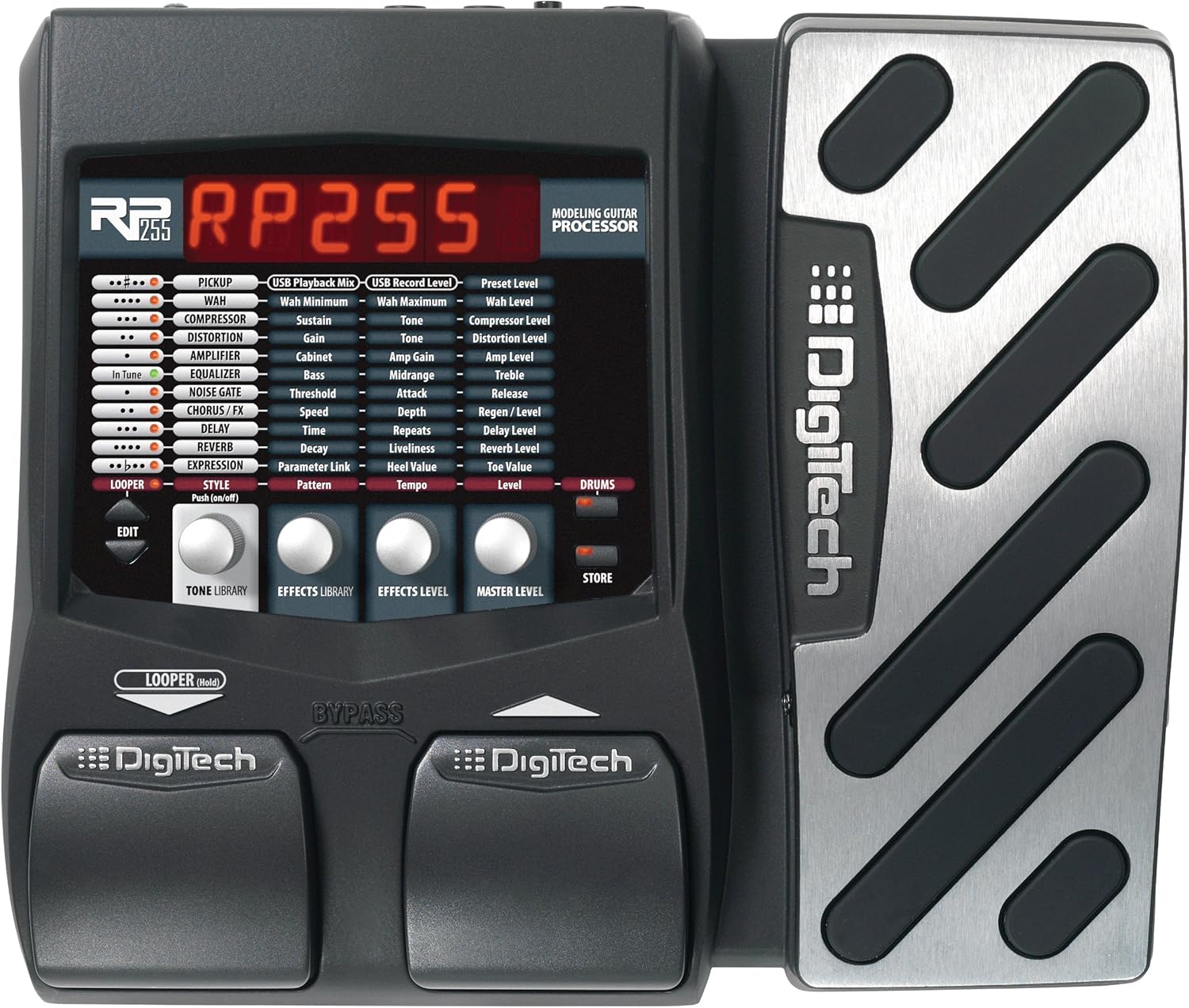
Umfanekiso 1: Ngaphambili view ye-DigiTech RP255, ekhombisa ama-pedal okubonisa nokulawula.

Umfanekiso 2: Iphaneli yangemuva ye-DigiTech RP255, ekhombisa okokufaka, okuphumayo, i-USB, kanye nokuxhumeka kwamandla.
3. Iziqondiso Zokusebenza
3.1 Ukuzulazula Kumasethi Asengaphambili
I-RP255 iza namasethingi amaningi asefekthri. Sebenzisa ama-footswitch ukuze uskrole kuwo. Isibonisi sizobonisa inombolo negama elisethwe kusengaphambili.
3.2 Imiphumela kanye Amp Ukumodela
I-RP255 inezici ezingu-94 ampama-s, amakhabethe, ama-stompbox, kanye nemiphumela. Lokhu kungahlanganiswa futhi kwenziwe ngezifiso ukudala amathoni ahlukile. Bheka incwadi yemiyalelo enemininingwane ukuze uthole ukulungiswa kwepharamitha ethile yohlobo ngalunye lomphumela.
- Amabhokisi estompbox: Finyelela imiphumela ehlukahlukene yokushayela ngokweqile, ukuhlanekezela, kanye ne-fuzz.
- AmpAmakhabethe kanye namakhabethe: Lingisa uhla olubanzi lwegitare yakudala neyesimanje ampama-lifiers kanye namakhabhinethi ezipikha.
- Imiphumela Yokushintshashintsha: Kufaka phakathi i-chorus, i-flanger, i-phaser, kanye ne-tremolo yokwengeza ukunyakaza emsindweni wakho.
- Ukubambezeleka kanye neSaga: Imiphumela ebalulekile esekelwe esikhathini yokujula kanye nomoya.
3.3 Ukusebenza kwe-Looper
I-loop eyakhelwe ngaphakathi yemizuzwana engama-20 ikuvumela ukuthi urekhode futhi uhlele imishwana yesiginci. Lokhu kulungele ukuzijwayeza, ukubhala izingoma, noma ukudala amalungiselelo ayinkimbinkimbi. Bheka incwadi ephelele yemiyalelo ukuze uthole imiyalelo eningiliziwe yokuqopha, ukukopisha ama-dob amaningi, kanye nokudlala.
3.4 Amaphethini Ezigubhu
I-RP255 ihlanganisa amaphethini angu-60 esigubhu asezingeni eliphezulu. Lawa angasetshenziswa njengesisekeli esinesigqi sezikhathi zokuzijwayeza noma njengesisekelo semibono emisha yengoma. Lungisa ijubane kanye nevolumu ukuze kuhambisane nezidingo zakho.
Ukusakaza Umsindo kwe-USB okungu-3.5
Xhuma i-RP255 kwikhompyutha yakho nge-USB ukuze uyisebenzise njengesixhumi esibonakalayo somsindo. Lokhu kukuvumela ukuthi uqophe igitare lakho ngqo kwi-Digital Audio Workstation (DAW) ngemiphumela ye-RP255 kanye amp Amamodeli. Iphinde ivumele ukuhlela nokuphatha amasethingi kusetshenziswa isofthiwe ezinikele.
4. Isondlo
Ukuqinisekisa ukuthi i-DigiTech RP255 yakho ihlala isikhathi eside futhi isebenza kahle, landela lezi ziqondiso zokulungisa:
- Ukuhlanza: Sebenzisa indwangu ethambile neyomile ukuhlanza ingaphandle leyunithi. Gwema ukusebenzisa izihlanzi ezihudulayo, izinyibilikisi, noma ama-wax, ngoba lokhu kungalimaza isiphetho.
- Isitoreji: Gcina i-RP255 endaweni epholile, eyomile kude nokukhanya kwelanga okuqondile, amazinga okushisa aphezulu, kanye nomswakama ophezulu.
- Ukuphatha: Gwema ukuwisa iyunithi noma ukuyibeka engcupheni enamandla. Nqamula njalo ugesi kanye nezintambo lapho uhambisa idivayisi.
- Ukunikezwa kwamandla kagesi: Sebenzisa kuphela i-adaptha yamandla ye-9V AC ecacisiwe. Ukusebenzisa ugesi ongalungile kungalimaza iyunithi futhi kuqede iwaranti.
5. Ukuxazulula izinkinga
Uma uhlangabezana nezinkinga nge-DigiTech RP255 yakho, zama izinyathelo ezilandelayo zokuxazulula izinkinga:
- Awekho Amandla: Qinisekisa ukuthi i-adaptha yamandla ixhunywe ngokuphephile kokubili ku-RP255 kanye ne-outlet yamandla esebenzayo. Qinisekisa ukuthi i-adaptha yamandla uhlobo olufanele (i-9V AC).
- Awukho Umsindo: Hlola konke ukuxhumana kwekhebula (isiginci, okuphumayo ku- amp/mixer, ama-headphone). Qinisekisa ukuthi ivolumu yegitare lakho iphezulu futhi ampI-lifier ivuliwe futhi isethwe kuvolumu ezwakalayo. Qinisekisa ukuthi i-RP255 ayikho kumodi ye-Tuner/Bypass uma ulindele umphumela.
- Umsindo/Umsindo Ongalindelekile: Hlola ukuthi ikhebula lixhunywe kahle yini. Qinisekisa ukuthi libekwe phansi ngendlela efanele. Zama ukusetha kabusha iyunithi ibe yizinto ezizenzakalelayo zasefekthri (bheka incwadi egcwele ukuze uthole imiyalelo).
- Izinkinga zokuxhumana nge-USB: Qinisekisa ukuthi ikhebula le-USB lixhunywe ngokuphephile. Zama imbobo noma ikhebula le-USB elihlukile. Faka kabusha noma yimaphi abashayeli noma isofthiwe edingekayo kukhompyutha yakho.
Ukuze uthole izinkinga eziyinkimbinkimbi, bheka incwadi yomsebenzisi ephelele ye-DigiTech RP255 noma uxhumane nosekelo lwamakhasimende e-DigiTech.
6. Imininingwane
- Isisindo Sento: 4.75 amakhilogremu
- Ubukhulu bomkhiqizo: 14.25 x 2.75 x 8.75 amayintshi
- Inombolo Yemodeli Yento: I-RP255
- I-Hardware Interface: I-USB
- Ifomethi Yesiginali: I-Analog
- Umthombo wamandla: I-Corded Electric
- Voltage: 9 volts
- Umbala: Mnyama
- Imiphumela: 94 Ampamakhabethe, amabhokisi ezimpahla zokugqoka, kanye nemiphumela
- I-Loop: I-loop yemizuzwana engama-20 eyakhelwe ngaphakathi
- I-Pedal: I-wah, i-whammy, kanye ne-volume pedal eyakhelwe ngaphakathi
- Amaphethini Ezigubhu: Amaphethini angu-60 edrama asezingeni eliphezulu
7. Iwaranti kanye Nokusekela
I-DigiTech RP255 iza newaranti yomkhiqizi. Sicela ubheke ikhadi lewaranti elifakwe nomkhiqizo wakho ukuze uthole imigomo nemibandela ethile. Ukuze uthole usekelo lobuchwepheshe, isevisi, noma ulwazi olwengeziwe, sicela uvakashele i-DigiTech esemthethweni. webisayithi noma uxhumane nomnyango wabo wesevisi yamakhasimende. Gcina irisidi lakho lokuthenga njengobufakazi bokuthenga izimangalo zewaranti.


