1. Isingeniso
This manual provides essential information for the safe and efficient use of your Lexmark E260D Monochrome Laser Printer. Please read these instructions carefully before operating the device and retain them for future reference. The Lexmark E260D is designed for fast, high-quality black and white document printing, featuring automatic two-sided printing for efficiency.
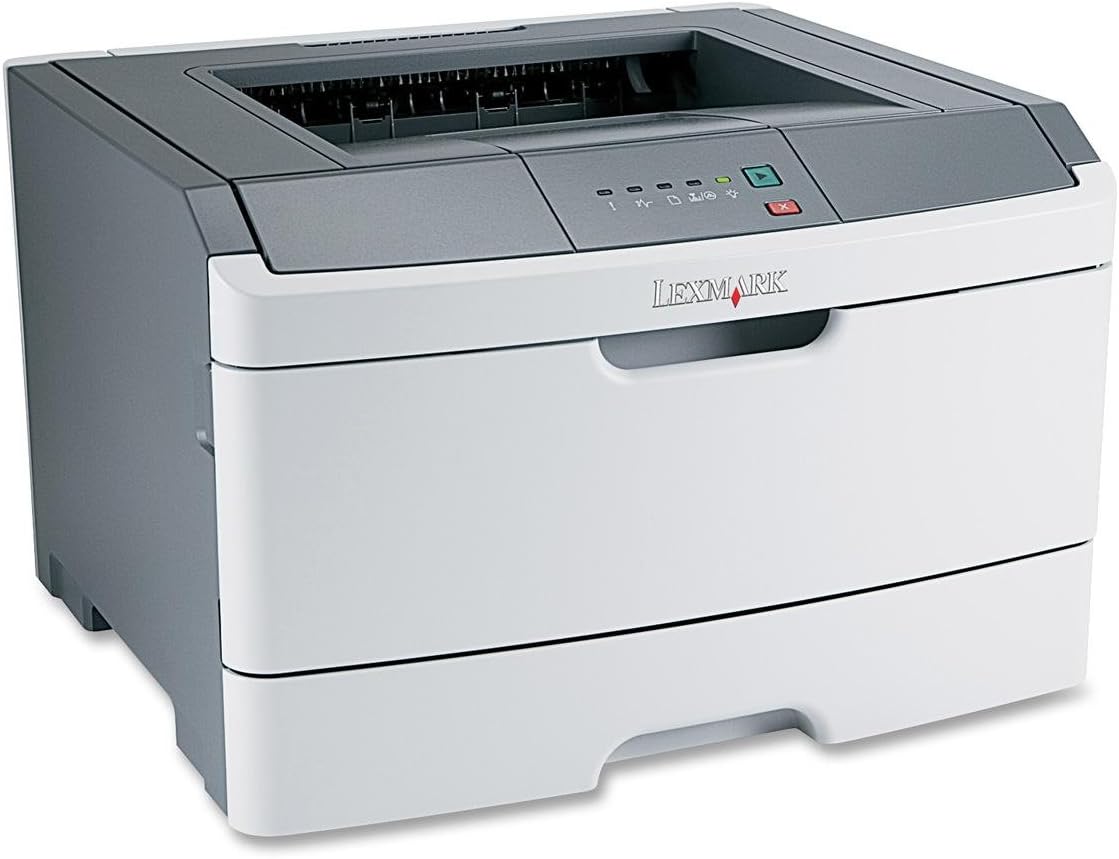
Umfanekiso 1: Lexmark E260D Monochrome Laser Printer. This image shows the printer from a front-right angle, highlighting its compact design with a white body and a dark gray top cover. The output tray is visible on top, and the Lexmark logo is displayed on the front panel above the paper input tray.
2. Ulwazi Lokuphepha
- Xhuma njalo iphrinta endaweni yokukhipha ugesi engasebenzi.
- Ungavimbeli ukuvuleka komoya.
- Gcina iphrinta ikude namanzi noma umswakama oweqile.
- Use only specified power cords and accessories.
- Avoid touching the fuser area, as it can be hot.
3. Okuqukethwe Kwephakheji
Qinisekisa ukuthi zonke izinto zikhona kuphakheji:
- Lexmark E260D Monochrome Laser Printer
- Intambo Yamandla
- Starter Toner Cartridge (may vary by region)
- Setup Guide or Documentation
- USB Cable (may be sold separately)
4. Setha
4.1 Ukuqaqa Iphrinta
- Khipha iphrinta ephaketheni layo.
- Remove all packing materials, tapes, and protective films from the exterior and interior of the printer.
- Beka iphrinta endaweni ezinzile, eqondile enomoya owanele.
4.2 Ukuxhuma Iphrinta
- Xhuma intambo kagesi kuphrinta bese uxhuma endaweni yokukhipha ugesi engasebenzi.
- Connect one end of the USB cable to the printer's USB port and the other end to your computer.
4.3 Ukufaka i-Toner Cartridge
- Vula umnyango wokungena wangaphambili wephrinta.
- Carefully remove the toner cartridge from its packaging and shake it gently to distribute the toner.
- Faka ikhatriji ye-toner kuphrinta kuze kube yilapho icindezela endaweni yayo.
- Close the front access door securely.
4.4 Ukulayisha Iphepha
- Akhiphe ithreyi lephepha.
- Lungisa iziqondiso zephepha ukuze zifane nosayizi wephepha olilayishayo.
- Faka iphepha kuthreyi, uqinisekise ukuthi liyisicaba futhi alidluli umugqa wokugcwalisa ophezulu.
- Push the paper tray back into the printer until it locks.
4.5 Ukufakwa komshayeli
After connecting the printer, your operating system may automatically detect and install the necessary drivers. If not, follow these steps:
- Insert the driver CD (if included) into your computer's CD/DVD drive, or download the latest drivers from the official Lexmark support webindawo.
- Landela imiyalelo esesikrinini ukuze uqedele ukufaka umshayeli.
- Qala kabusha ikhompuyutha yakho uma ucelwa.
5. Ukusebenzisa Iphrinta
5.1 Ukuphrinta Okuyisisekelo
- Qinisekisa ukuthi iphrinta ivuliwe futhi ixhunywe kukhompuyutha yakho.
- Vula idokhumenti ofisa ukuyiphrinta kukhompuyutha yakho.
- Khetha File > Phrinta (noma umyalo olinganayo kuhlelo lwakho lokusebenza).
- Choose the Lexmark E260D from the list of available printers.
- Adjust print settings as needed (e.g., number of copies, page range).
- Chofoza Phrinta.
5.2 Ukuphrinta Okuphindwe Kabili (Okunezinhlangothi Ezimbili)
The Lexmark E260D supports automatic two-sided printing.
- Uma uthumela umsebenzi wokuphrinta, finyelela izakhiwo zephrinta noma izintandokazi.
- Look for an option related to Ukuphrinta kwe-Duplex or Phrinta nhlangothi zombili.
- Select the desired duplex option (e.g., long-edge binding, short-edge binding).
- Confirm your settings and click Phrinta.
6. Isondlo
6.1 Ukuhlanza Iphrinta
- Ingaphandle: Sula ingaphandle ngethafa elithambile, damp, indwangu engenalutho. Ungasebenzisi izinto zokuhlanza abrasive noma izincibilikisi.
- Ngaphakathi: Periodically open the front access door and gently remove any loose toner dust with a dry, lint-free cloth. Avoid touching sensitive components.
6.2 Toner Cartridge Replacement
When the toner level is low, the printer's control panel will indicate it. Replace the toner cartridge as follows:
- Qinisekisa ukuthi iphrinta ivuliwe.
- Vula umnyango wokungena wangaphambili.
- Carefully remove the old toner cartridge by pulling it straight out.
- Unpack the new Lexmark E260D compatible toner cartridge and shake it gently.
- Faka ikhatriji entsha kuphrinta ize ivaleleke endaweni yayo.
- Vala umnyango wokungena wangaphambili.
7. Ukuxazulula izinkinga
7.1 AmaJam Amaphepha
If a paper jam occurs, the printer's control panel will display an error. Follow these general steps:
- Cima iphrinta bese uyikhipha ku-socket kagesi.
- Open all accessible covers (front door, rear door, etc.).
- Carefully remove any jammed paper, pulling it in the direction of the paper path to avoid tearing.
- Close all covers securely.
- Xhuma futhi uvule iphrinta.
7.2 Izinkinga Zekhwalithi Yokuphrinta
- Amaphrinta Aphelile Noma Akhanyayo: The toner cartridge may be low. Try shaking the cartridge gently or replace it.
- Imivimbo noma ama-smudge: Clean the interior of the printer, especially around the toner cartridge area. Ensure the paper type setting matches the loaded paper.
- Amakhasi Angenalutho: Ensure the toner cartridge is properly installed and has toner. Check printer drivers and print settings.
7.3 Izinkinga Zokuxhuma
- Iphrinta ayitholwanga: Ensure the USB cable is securely connected to both the printer and the computer. Try a different USB port or cable. Reinstall printer drivers if necessary.
- Print Jobs Stuck: Clear the print queue on your computer. Restart both the printer and the computer.
7.4 Envelope Printing on Mac
Users printing envelopes on macOS may encounter issues with incorrect print orientation or partial printing. To resolve this:
- In the print dialogue box, locate the menu that initially reads 'Layout'.
- Select 'Paper Feed' from this menu.
- Change the 'Auto Select' option to 'Manual Envelope'.
- Qhubeka nokuphrinta.
8. Imininingwane
| Isici | Ukucaciswa |
|---|---|
| Igama Lemodeli | E260D |
| Ubuchwepheshe bokuphrinta | I-Laser |
| Okukhipha Iphrinta | I-Monochrome |
| Isivinini Sokuphrinta Esiphezulu (Monochrome) | 35 ppm |
| Ukulungiswa Kokuphrinta Okukhulu (Okumnyama Nokumhlophe) | 1200dpi |
| Ukuphrinta kwe-Duplex | Okuzenzakalelayo |
| Ubuchwepheshe bokuxhumana | I-USB 2.0 |
| Amandla Eshidi Lokufaka Okuphezulu | 250 amashidi |
| Supported Print Media | Envelopes, Labels, Paper (plain), Transparencies |
| Amandla Okugcina Inkumbulo | 32 MB |
| Ubukhulu bomkhiqizo | 16.5 x 18.1 x 14 amayintshi |
| Isisindo sento | 29.8 pounds (13.53 kg) |
| Ukusetshenziswa kwamandla (Kumodi) | 16 Watts |
9. Ulwazi Lwewaranti
The Lexmark E260D Monochrome Laser Printer comes with an Exchange Warranty. For specific terms, conditions, and duration of your warranty, please refer to the warranty documentation included with your product or visit the official Lexmark support webindawo.
10. Ukwesekwa Kwamakhasimende
For further assistance, technical support, or to order replacement parts and supplies, please contact Lexmark Customer Support. You can find contact information and additional resources on the official Lexmark webindawo:
- Usekelo lwe-Lexmark Webindawo: www.lexmark.com/support (Sicela uqaphele: Lesi isimeli URL. Refer to your product documentation for the exact support link.)


