
1. Isingeniso
Thank you for choosing the FLEXISPOT CylineX Pro Electric Standing Desk Frame. This manual provides essential information for the safe and efficient assembly, operation, and maintenance of your new adjustable height desk. Please read these instructions carefully before use and retain them for future reference.
The CylineX Pro features a robust dual-motor system, a user-friendly piano-style control panel, and a wide height adjustment range to support a healthy and productive workspace.
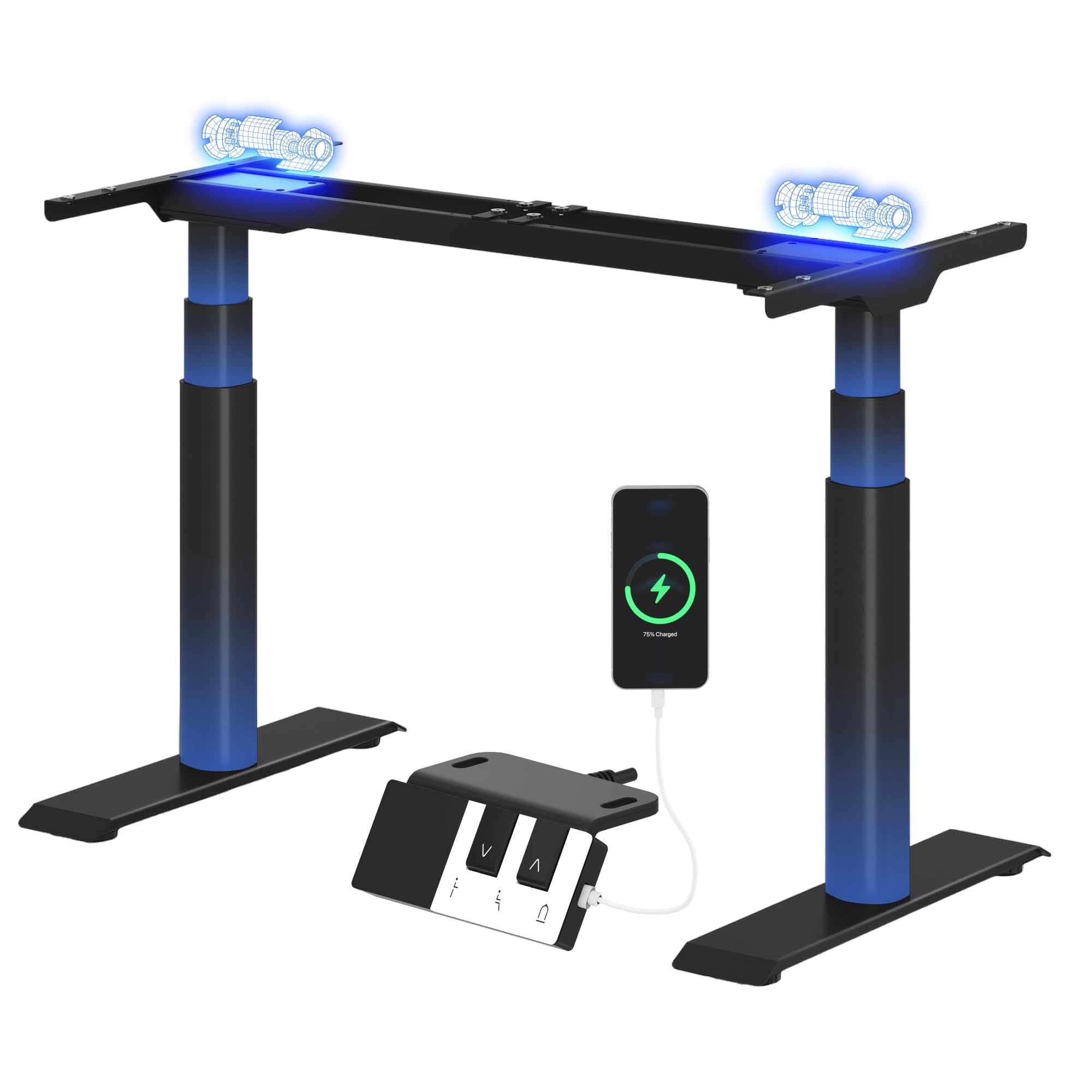
Image: The FLEXISPOT CylineX Pro Electric Standing Desk Frame with a black tabletop in a home office environment.
2. Ulwazi Lokuphepha
Ukuqinisekisa ukusebenza okuphephile futhi uvimbele ukulimala noma ukulimala, sicela uqaphele lezi zinyathelo zokuphepha ezilandelayo:
- Qinisekisa ukuthi zonke izingxenye ziboshwe ngokuphephile ngaphambi kokusetshenziswa.
- Gcina izingane nezilwane ezifuywayo kude nedeski ngesikhathi sokusebenza.
- Ungabeki izandla noma ezinye izinto eduze kwezingxenye ezihambayo.
- Avoid overloading the desk beyond its specified weight capacity.
- Ungahlali noma ume kufreyimu yedeski.
- Nqamula amandla ngaphambi kokuhlanza noma ukulungisa.
- Sebenzisa kuphela i-adaptha yamandla enikeziwe kanye nezinsiza.
- If any unusual noise, smell, or malfunction occurs, immediately unplug the desk and contact customer support.
- The anti-collision system is designed to prevent damage, but users should still exercise caution during height adjustments.

Image: The integrated anti-collision system provides safer movement by automatically reversing if an obstacle is detected.
3. Iziyalezo Zomhlangano
The FLEXISPOT CylineX Pro desk frame is designed for straightforward assembly. It typically takes about 20 minutes to assemble. Please ensure you have received all packages, as the desk frame may be shipped in multiple boxes.
3.1 Okuqukethwe Kwephakheji
Verify that all parts listed in the included user manual are present before beginning assembly. Contact customer support if any parts are missing or damaged.
3.2 Ukuhlanganiswa Kwesinyathelo Ngesinyathelo
- Khipha Izingxenye: Khipha ngokucophelela zonke izingxenye zephakeji futhi uzibeke endaweni ethambile, ehlanzekile ukuze uvimbele imihuzuko.
- Assemble the Crossbar: Connect the two halves of the crossbar (if applicable) and secure them according to the detailed instructions in your physical manual.
- Attach Lifting Columns: Securely attach the lifting columns (legs) to the assembled crossbar.
- Install Feet: Attach the foot supports to the bottom of each lifting column.
- Xhuma Ibhokisi Lokulawula: Mount the control box to the designated area on the frame and connect the motor cables and power cable.
- Namathisela Iphaneli Yokulawula: Mount the piano-style control panel to the desired location on the desk frame or tabletop.
- Ithebula Lokufaka: Carefully place your chosen tabletop onto the assembled frame. Ensure it is centered and aligned, then secure it using the provided screws.
- Ukuphathwa Kwekhebula: Organize and secure all cables using the included cable ties or management accessories.

Image: Components of the desk frame laid out, illustrating the ease of assembly.
4. Iziqondiso Zokusebenza
The CylineX Pro features an intuitive piano-style control panel for easy height adjustment and personalized settings.

Image: The piano-style control panel offers simple and intuitive control with memory functions, sit/stand reminder, child lock, and a USB port.
4.1 Ukulungiswa Okuyisisekelo Kokuphakama
- Cindezela inkinobho Phezulu (^) button to raise the desk.
- Cindezela inkinobho Phansi (v) button to lower the desk.
- Release the button to stop the desk at the desired height.
4.2 Ukusetha Amasethi Ememori Asethiwe
The control panel allows you to save up to three preferred height settings:
- Lungisa ideski libe ukuphakama okufisayo usebenzisa izinkinobho ezithi Phezulu/Phansi.
- Cindezela inkinobho "M" button (Memory) followed by one of the numbered preset buttons (1, 2, or 3). The display will show "S-" followed by the number to confirm the setting is saved.
- To recall a saved height, simply press the corresponding numbered preset button.
4.3 Sit/Stand Reminder
Activate the sit/stand reminder to prompt you to change positions at regular intervals:
- Cindezela inkinobho Isikhathi button (often depicted as a clock icon) to cycle through reminder intervals (e.g., 30, 45, 60 minutes).
- The desk will beep or vibrate when it's time to change position.
4.4 Umsebenzi Wokukhiya Kwezingane
To prevent accidental adjustments, activate the child lock:
- Cindezela bese ubamba i Khiya button (often depicted as a padlock icon) for a few seconds until "LOC" appears on the display.
- To unlock, press and hold the Lock button again until "LOC" disappears.
4.5 Imbobo yokushaja ye-USB
The control panel includes a USB port for convenient charging of your mobile devices.
5. Isondlo
Regular maintenance ensures the longevity and optimal performance of your FLEXISPOT CylineX Pro desk frame.
- Ukuhlanza: Sula uhlaka lwedeski ngomshini othambile, damp cloth. Avoid abrasive cleaners or solvents that could damage the finish. Ensure no liquid enters the electrical components.
- Ukuphathwa Kwekhebula: Periodically check and tidy up cables to prevent tangling or damage, which could interfere with desk movement.
- Isheke Lokubopha: Every few months, check all screws and bolts to ensure they are tight. Re-tighten if necessary.
- Ukuthambisa: The lifting columns are pre-lubricated and generally do not require additional lubrication. If you notice any unusual friction, contact customer support.
6. Ukuxazulula izinkinga
Uma uhlangabezana nanoma yiziphi izinkinga ngedeski lakho, sicela ubheke lezi zinyathelo ezilandelayo ezivamile zokuxazulula izinkinga:
| Inkinga | Imbangela Engenzeka | Isixazululo |
|---|---|---|
| Desk does not move / No power | Power cable disconnected, power outlet issue, control box malfunction. | Check power connections. Ensure the outlet is working. Try a different outlet. If still no power, contact support. |
| Desk moves unevenly or stops | Overload, obstruction, uneven weight distribution, synchronization issue. | Reduce weight on the desk. Check for obstructions. Ensure weight is evenly distributed. Perform a reset (see below). |
| Ikhodi yephutha ibonisiwe (isb., E01, E02) | Motor fault, sensor issue, overheating. | Refer to your physical manual for specific error code meanings. Often, a reset or power cycle can resolve temporary errors. If persistent, contact support. |
| Anti-collision system triggers too easily/not at all | Sensitivity setting, obstruction. | Check for obstructions. Consult your physical manual for instructions on adjusting anti-collision sensitivity. |
| Umsindo noma iphunga elingavamile | Internal component issue, motor strain. | Immediately unplug the desk. Do not use. Contact FLEXISPOT customer support. |
6.1 Hlela kabusha Inqubo
A reset can often resolve minor operational issues. The exact procedure may vary slightly, but a common method is:
- Cindezela bese ubamba i Phansi (v) button until the desk reaches its lowest position and then slightly rises and lowers again.
- Alternatively, some models require holding the "M" inkinobho kanye Phansi (v) button simultaneously, or a specific combination of buttons. Refer to your physical manual for the precise reset sequence for your CylineX Pro model.
7. Imininingwane
Key technical specifications for the FLEXISPOT CylineX Pro Electric Standing Desk Frame:

Image: Detailed dimensions and performance specifications of the CylineX Pro desk frame.
| Isici | Ukucaciswa |
|---|---|
| Imodeli | CylineX Pro |
| Ububanzi Bokulungisa Ubude | 60 cm - 125 cm (23.6" - 49.2") |
| Ijubane Lokuphakamisa | 35 mm/s |
| Amandla Okulayisha Okumile | Kufika ku-200 kg (440 lbs) |
| Umthamo Wokulayisha Oguquguqukayo | Kufika ku-160 kg (352 lbs) |
| Uhlobo Lwezimoto | I-Dual Motor System |
| Izinga Lomsindo | Ngaphansi kuka-50 dB |
| Ukusetshenziswa kwamandla okulindile | Ngaphansi kuka-0.5 W |
| Ububanzi beThebula Elihambisanayo | 120 cm - 200 cm (47.2" - 78.7") |
| Compatible Tabletop Depth | 60 cm - 80 cm (23.6" - 31.5") |
| Iphaneli yokulawula | Piano-style with Memory Presets, Sit/Stand Reminder, Child Lock, USB Charging Port |
| Izici zokuphepha | Uhlelo lokulwa nokushayisana |

Image: The desk's robust construction supports a maximum static load of 200 kg and a dynamic load of 160 kg.
8. Iwaranti kanye Nokusekela
FLEXISPOT is committed to providing high-quality products and excellent customer service.
8.1 Ulwazi Lwewaranti
The FLEXISPOT CylineX Pro desk frame comes with a Iwaranti yonyaka ongu-10. This warranty covers defects in materials and workmanship under normal use. Please retain your proof of purchase for warranty claims. For full warranty terms and conditions, please refer to the official FLEXISPOT webisayithi noma xhumana nesevisi yamakhasimende.
8.2 Ukwesekwa Kwamakhasimende
If you have any questions, require assistance with assembly, or encounter any issues not covered in this manual, please do not hesitate to contact FLEXISPOT customer support. Our team is available to help you.
- Ukusekelwa Kwe-inthanethi: Visit the official FLEXISPOT webiwebhusayithi yemibuzo evame ukubuzwa, izihloko zokusekela, kanye namafomu okuxhumana.
- Usekelo lwe-imeyili: Refer to your purchase documentation for the appropriate email address.
- Usekelo Lwefoni: Check the FLEXISPOT webindawo yezinombolo zokuxhumana zesifunda.