
1. Isaziso Esibalulekile
Please carefully check the store name and ensure you are purchasing products sold by "LUZHAN." We have received customer feedback stating that products received did not match the description and were of poor quality. Upon investigation, we found that these customers did not purchase the products from us. To prevent such incidents from happening again in the future and to avoid unnecessary misunderstandings, please carefully verify the store name LUZHAN.

Image: Important notice to verify seller name LUZHAN for authentic products.
2. Ngaphezuluview
The XIAOMI POCO X8 Pro Max 5G is a high-performance smartphone designed for advanced users. It features a powerful Mediatek Dimensity 9500s processor, a vibrant 1.5K 120Hz AMOLED display, a large 8500mAh battery with 100W HyperCharge, and a 50 MP Light Fusion 600 camera system with OIS. This manual provides essential information for setting up and operating your device.
Isithombe: Ngaphambili nangemuva view of the POCO X8 Pro Max 5G smartphone.
Ividiyo: Kuphelileview of the POCO X8 Pro Series, highlighting key features and design.
3. Setha
3.1 Yini EseBhokisini
- XIAOMI POCO X8 Pro Max 5G Smartphone
- Ishaja
- Isivikeli Sesikrini (esisetshenziswe ngaphambilini noma sifakiwe)
3.2 Ukusethwa Kwedivayisi Kwasekuqaleni
- Vula: Press and hold the power button located on the side of the device until the XIAOMI logo appears.
- Ulimi kanye nesifunda: Landela imiyalelo esesikrinini ukuze ukhethe ulimi nesifunda osithandayo.
- Xhuma ku-Wi-Fi: Select your Wi-Fi network and enter the password to connect to the internet. This is necessary for initial setup and software updates.
- I-akhawunti ye-Google: Ngena ngemvume nge-akhawunti yakho ye-Google noma dala entsha. Lokhu kubalulekile ukuze ufinyelele i-Google Play Isitolo nezinye izinsiza ze-Google.
- Ukudluliswa Kwedatha: If you are upgrading from another device, you may have the option to transfer your data (apps, photos, contacts) during this stage.
- Ukusethwa Kwezokuphepha: Set up your preferred security method, such as a PIN, pattern, password, or fingerprint. The device supports an ultrasonic fingerprint sensor.
- Qedela Ukusethwa: Follow any remaining prompts to finalize the setup process.
3.3 SIM Card and eSIM Setup
The POCO X8 Pro Max 5G supports physical SIM cards and eSIM functionality.
- Physical SIM: Use the provided SIM ejector tool to open the SIM tray. Insert your Nano-SIM card(s) into the tray, ensuring proper orientation. Close the tray securely.
- I-eSIM: For eSIM activation, navigate to Amasethingi > Inethiwekhi ne-inthanethi > Ama-SIM and follow the instructions to add an eSIM profile provided by your carrier.
4. Iziqondiso Zokusebenza
4.1 Izici zokubonisa
Your device features a 6.83-inch 1.5K ultra-bright AMOLED display with a 120Hz refresh rate for smooth visuals and a 24x super resolution touch for enhanced responsiveness. It also includes eye protection features and Corning Gorilla Glass 7i for durability.
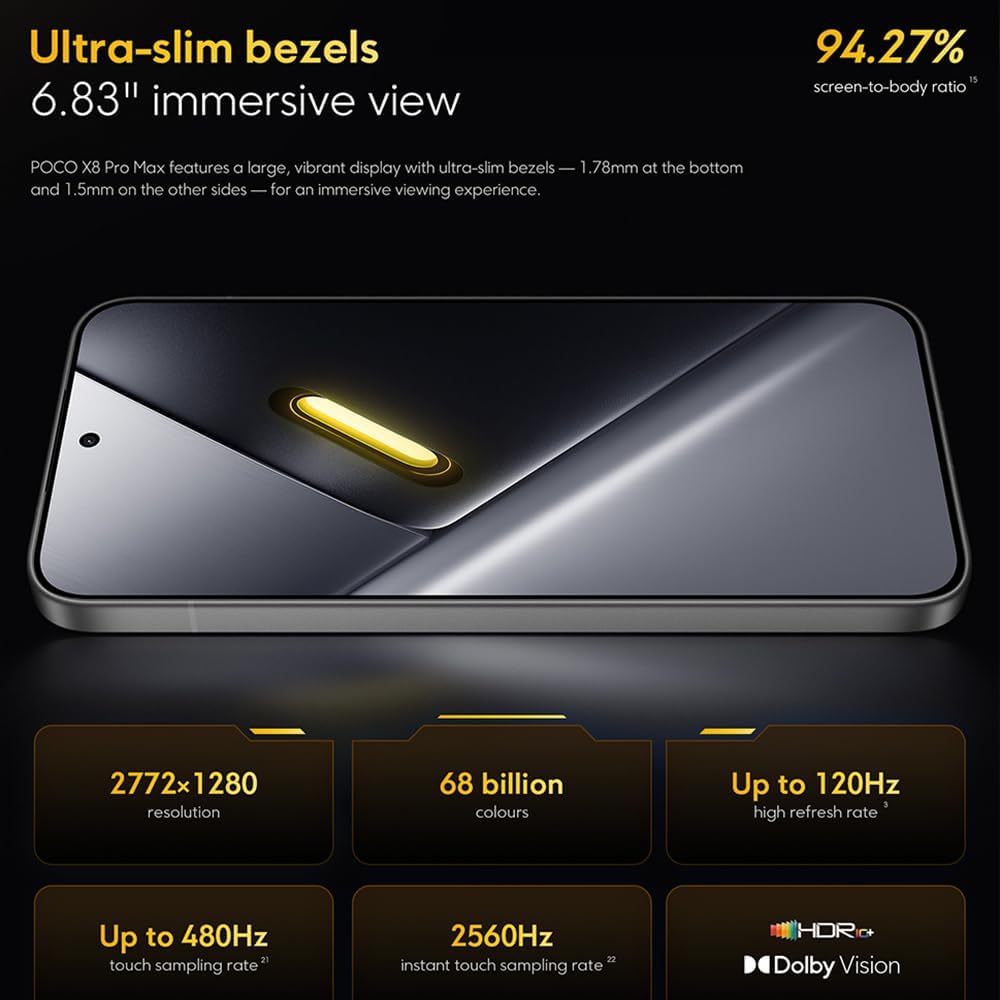
Image: The 6.83-inch 1.5K ultra-bright AMOLED display with minimal bezels.
4.2 Ukusebenza
Powered by the Mediatek Dimensity 9500s chipset (3nm, 4+4 All Big Core architecture, NPU890 AI processor), the POCO X8 Pro Max 5G delivers high performance. The POCO 3D IceLoop cooling system ensures efficient heat dissipation, maintaining optimal performance during intensive tasks like gaming.

Image: Diagram illustrating the Mediatek Dimensity 9500s flagship platform.

Image: Illustration of the 5800mm² ultra-large LHP area for cooling.
Uhlelo lwekhamera le-4.3
The device features a 50 MP Light Fusion 600 main camera with OIS (Optical Image Stabilization) and an 8 MP ultra-wide camera. It supports portrait mode with bokeh + HDR and dynamic video-to-still conversion.

Image: Close-up of the 50 MP main camera and 8 MP ultra-wide camera system.
4.4 Ibhethri nokushaja
Equipped with a massive 8500 mAh (typical) battery, the POCO X8 Pro Max 5G offers extended usage. It supports 100W HyperCharge, allowing for rapid recharging. A 16% ultra-high carbon-silicon content contributes to its high energy density.

Image: Illustration highlighting the massive 8500mAh battery capacity.

Image: Visual representation of the 100W HyperCharge technology.
4.5 Umsindo
The device features symmetrical dual stereo speakers (1115F) for a balanced and immersive audio experience.
Isoftware ye-4.6
The POCO X8 Pro Max 5G comes with Xiaomi HyperOS 3 installed, offering an optimized and user-friendly interface based on Android 16.
5. Isondlo
5.1 Ukuhlanza Idivayisi Yakho
- Sebenzisa indwangu ethambile, engena-lint ukuze usule isikrini nephaneli yangemuva.
- Gwema ukusebenzisa amakhemikhali anokhahlo, izinto ezilumayo, noma izifutho ze-aerosol.
- Kuma-smudge anenkani, kancane dampzu indwangu enamanzi noma isicoci sesikrini esiklanyelwe izinto zikagesi.
5.2 Dust and Water Resistance
The device is certified for IP68 dust and water resistance. This means it can withstand immersion in up to 2 meters of water for 30 minutes under specific laboratory conditions. However, water and dust resistance may deteriorate over time with normal wear and tear. The warranty does not cover liquid damage. Avoid exposing the device to hot water, saltwater, or other liquids.

Image: Visual representation of the IP68 dust and water resistance.
5.3 Ukuvuselelwa Kwesoftware
Hlola njalo futhi ufake izibuyekezo zesofthiwe ukuqinisekisa ukuthi idivayisi yakho inezici zakamuva, ama-patches okuphepha, kanye nokuthuthukiswa kokusebenza. Ngokuvamile ungathola le nketho ku Izilungiselelo > Mayelana nefoni > Isibuyekezo sesistimu.
6. Ukuxazulula izinkinga
6.1 Izinkinga Ezivamile Nezixazululo
- Idivayisi ayivuli: Ensure the battery is charged. Connect the device to the charger and wait a few minutes before attempting to power it on again.
- Isikrini asiphenduli: Try restarting the device by holding the power button for an extended period (e.g., 10-15 seconds) until it reboots.
- Izinhlelo zokusebenza ziyaphahlazeka: Sula inqolobane yohlelo lokusebenza oluyinkinga (Izilungiselelo > Izinhlelo zokusebenza > [Igama Lohlelo Lokusebenza] > Isitoreji > Sula inqolobane) or reinstall the app. Ensure your device software is up to date.
- Impilo yebhethri engeyinhle: Check background app usage, reduce screen brightness, disable unnecessary features like GPS or Bluetooth when not in use, and ensure your software is updated.
- Izinkinga zokuxhumeka kwenethiwekhi: Restart your device. Check if your SIM card is properly inserted. Toggle Airplane Mode on and off. Reset network settings (Amasethingi > Uhlelo > Hlela kabusha izinketho > Setha kabusha i-Wi-Fi, iselula ne-Bluetooth).
6.2 Ukusetha kabusha kwasefekthri
If you encounter persistent issues, a factory reset may be necessary. Isexwayiso: Lokhu kuzosula yonke idatha kudivayisi yakho. Yenza isipele sedatha ebalulekile ngaphambi kokuqhubeka. Iya ku- Izilungiselelo > Isistimu > Hlela kabusha izinketho > Sula yonke idatha (ukusetha kabusha kwasefekthri) bese ulandela imiyalelo esesikrinini.
7. Imininingwane
| Isici | Ukucaciswa |
|---|---|
| Ibhrendi | XIAOMI |
| Igama Lemodeli | POCO X8 Pro Max 5G |
| Isistimu esebenzayo | Android 16 (with Xiaomi HyperOS 3) |
| Amandla Okugcina Inkumbulo | 512 GB |
| Usayizi Wesikrini | 6.83 amayintshi |
| Uhlobo lokubonisa | AMOLED, 1.5K, 120Hz refresh rate |
| Ubuchwepheshe Beselula | 5G |
| Umbala | I-Noir (Emnyama) |
| Uhlobo Lwesixhumi | Uhlobo C lwe-USB |
| Ukuphepha kwe-Biometric | Fingerprint Recognition (Ultrasonic) |
| Amandla ebhethri | 8500 mAh (Lithium-polymer) |
| Iyashaja | 100W HyperCharge |
| Ikhamera Eyinhloko | 50 MP Light Fusion 600 with OIS |
| Ikhamera ebanzi kakhulu | 8 MP |
| Iphrosesa | Mediatek Dimensity 9500s |
| Ukumelana Nothuli Namanzi | IP68 |
| Unyaka Wemodeli | 2025 |
| Izwe azalelwe kulo | China |
8. Iwaranti kanye Nokusekela
For detailed warranty information and customer support, please refer to the warranty card included with your product or visit the official XIAOMI webindawo. Gcina ubufakazi bakho bokuthenga ngezimangalo zewaranti.
Online resources and FAQs may also be available on the XIAOMI support portal.