
1. Isingeniso
This manual provides comprehensive instructions for the DATOUBOSS 11KW Hybrid Solar Inverter and 48V 628Ah LiFePO4 Battery integrated system. This all-in-one unit combines a powerful hybrid inverter with a high-capacity lithium iron phosphate battery, designed for efficient home energy storage, off-grid solar installations, and emergency power supply. Please read this manual thoroughly before installation and operation to ensure safe and optimal performance.
2. Umkhiqizo Uphelileview
The DATOUBOSS integrated system is an all-in-one solution for energy storage, eliminating the need for separate inverter and battery purchases, and simplifying wiring and communication. It features a mobile pulley system at its base for easy relocation.
Izici Eziyinhloko:
- Integrated Hybrid Inverter and LiFePO4 Battery: Combines a 48V 11000W hybrid inverter with a 48V 628Ah LiFePO4 battery (32.15 kWh capacity).
- Isistimu Yokuphatha Ibhethri Ethuthukisiwe (BMS): Built-in BMS protects against overcharge, over-discharge, overcurrent, short circuit, over-temperature, and under-temperature, ensuring battery longevity and safety.
- Color Touch LCD Screen: Intuitive interface for monitoring power information, identifying issues, and accessing detailed solutions for error codes.
- Ukuhamba Okulula: Equipped with 360° swivel casters for effortless movement.
- Izimbobo Zokuxhumana: Supports RS232 and RS485 communication for system integration.
Ukuhlonza ingxenye:
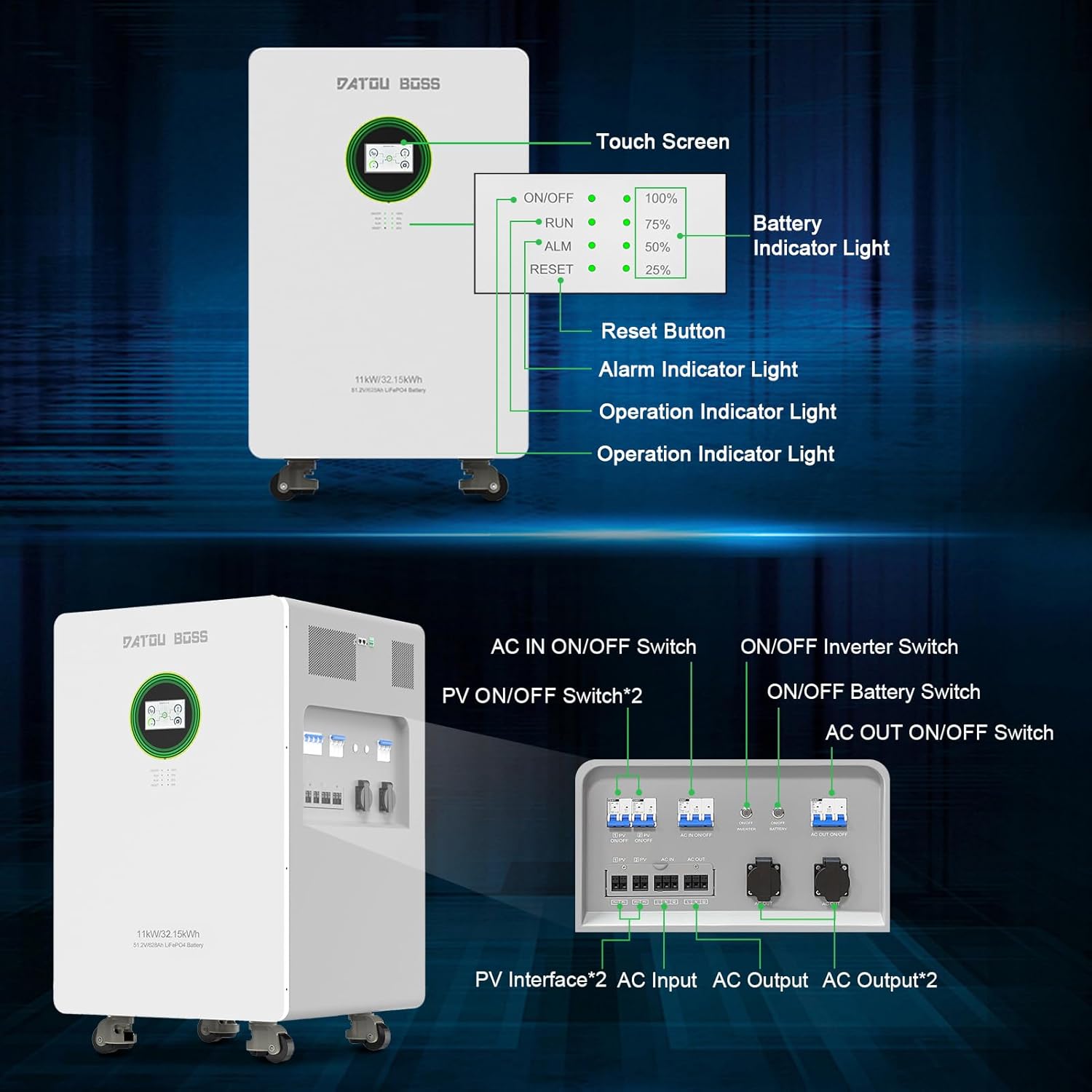

3. Ukusetha nokufakwa
Proper installation is crucial for the safe and efficient operation of your DATOUBOSS system. It is highly recommended that installation be performed by a qualified professional electrician.
3.1 Ukuqaqa kanye Nokuhlola
Before installation, carefully inspect the equipment for any signs of damage during transit. Ensure the packaging is intact. The package should contain the integrated home energy storage system and a user manual.
3.2 Location and Environment
- Install in a clean, dry environment, free from dangerous, flammable, or corrosive chemicals/vapors.
- Ambient temperature for optimal operation should be between 0°C and 55°C.
- Avoid installing near heat sources such as radiators or stoves.
- Ensure no children or pets are present in the immediate vicinity of the installation.
- Do not install the unit on flammable building materials.
- If wall-mounting, ensure it is installed vertically on a solid wall.
- Maintain adequate clearance around the unit for heat dissipation and filter removal.
- Install the unit at eye level for easy readability of the LCD display.
3.3 Amathuluzi adingekayo
- I-Phillips screwdriver
- I-torque wrench
- Rivet pliers (of appropriate size)
- Insulated tools and safety devices compliant with local electrical regulations.
3.4 Ukuxhunywa kukagesi
All electrical connections must be performed by qualified personnel. Ensure all wiring is properly grounded, twisted, tightened, and secured.
- Connect the battery using appropriate cables and terminals that match the battery pack's safety current and installation requirements.
- Ensure all circuit breakers are correctly installed to maintain solar power supply stability.

4. Iziqondiso Zokusebenza
4.1 Turning the System On/Off
To power on the device, first press the Battery ON/OFF switch, then the Inverter ON/OFF switch. The display will illuminate.

4.2 LCD Touchscreen Interface
The DATOUBOSS system features a color touch LCD screen for easy and intuitive operation. It allows you to monitor power information, system status, and navigate through various settings.


5. Isondlo
5.1 Ukunakekelwa Okuvamile
- Regularly inspect the unit for any visible damage or loose connections.
- Keep the unit clean and free from dust. Use a dry cloth for cleaning. Do not use spray cleaners, liquids, aerosols, or solvents that may damage the unit's finish.
- Qinisekisa ukungena komoya ngendlela efanele ezungeze iyunithi ukuvikela ukushisa ngokweqile.
5.2 Ukunakekelwa Kwebhethri
- Maintain the battery within its specified operating temperature range for stable performance and extended lifespan.
- The integrated BMS continuously monitors the battery's operational status and prevents it from operating beyond its design limits.
6. Ukuxazulula izinkinga
The LCD screen provides warning and error codes to help identify and resolve issues. Refer to the detailed solutions provided in the full product manual for specific error codes.
Izinkinga Ezivamile Nezixazululo:
- Isistimu Ayivuli: Ensure both the Battery ON/OFF and Inverter ON/OFF switches are engaged. Check all power connections.
- No Solar Input: Verify PV ON/OFF switches are on. Check solar panel connections and ensure sufficient sunlight.
- Ukushisa ngokweqile: Ensure adequate ventilation around the unit. Check ambient temperature.
- Amakhodi Ephutha: Consult the comprehensive manual for specific error code meanings and troubleshooting steps. If the issue persists, contact customer support.
7. Imininingwane
| Isici | Ukucaciswa |
|---|---|
| Imodeli Yomkhiqizo | JC-1132 |
| Uhlobo Lwebhethri | Ibhethri ye-LiFePO4 628 Ah |
| Amandla ebhethri | 32.15kw |
| Ubukhulu (L × W × H) | 580 x 580 x 937 mm |
| Isisindo | 239 kg |
| Okuzenzakalelayo Voltage | 51.2 V |
| Lifespan at 25°C | 8000 cycles, 70% (SOH) |
| Lifespan at 45°C | 3000 cycles, 70% (SOH) |
| Imodi yokushaja ye-PV | MPPT |
| Amandla Okufaka we-PV aphezulu | 2 * 7500W |
| Ibanga Lokulandela i-MPPT | 90-500 VDC |
| I-Optimal Voltage | 360-430 VDC |
| Ubuningi bokufaka kwe-PV Voltage | 500 VDC |
| Ubuningi Bokufaka Kwe-PV Kwamanje | 18 A |
| Maximum PV Charge Current | 150 A |
| Ubuningi Bokushaja I-AC Okwamanje | 150 A |
| Ukukhishwa Okuphezulu Kwamanje | 150 A |
| Ifomu Lokufaka | L+N+PE |
| Okokufaka Okuzenzakalelayotage | 220/230/240 VAC |
| Voltage Ibanga | 90-280 VAC 3V (normal mode), 170-280 VAC 3V (UPS mode) |
| I-Frequency Range | 50/60 Hz (adaptive) |
| Battery Inverter Rated Power | 11000 W |
| PV Inverter Rated Power | 12000 W |
| Okukhipha Umqtage | 220/230/240 VAC ±5% |
| Imvamisa Yokuphuma | 50/60 Hz ±0.1% |
| I-Waveform | I-Sine Wave |
| Switching Time (adjustable) | Computer equipment: 10 ms, Home appliances: 20 ms |
| Amandla Aphakeme | 22000 VA |
| Overload Capacity (Battery Mode) | 1s with 105-160% load; 2s with 120-200% load; 400ms with >200% load |
| Isikrini se-LCD | Displays operating modes, charge/input/output, etc. |
| Izinga Lokushisa Lokusebenza | -10 kuya ku-50 ° C |
| Relative Humidity (working environment) | 20% kuya ku-95% (okungafinyeleli) |
| Izinga Lokushisa Lesitoreji | -15 kuya ku-60 ° C |
| Ukuphakama | Max 1000 m without derating. Above 1000 m, power reduction required up to 4000 m (See IEC 62040). |
| Izinga Lomsindo | <50dB |
8. Imiyalelo Yezokuphepha Nezixwayiso
Read, understand, and follow all instructions and applicable documentation carefully before using or installing this product. Keep all manuals and documentation in a safe place for future reference.

- Always wear appropriate safety gear and use insulated tools during installation and maintenance.
- Installation must be carried out by qualified professionals in compliance with local and national electrical regulations.
- Qinisekisa ukuthi isistimu isekelwe kahle.
- Install the battery in a suitable position for the electronic device and maintain a safe operating temperature.
- Clean the battery with a suitable cleaner (e.g., dry cloth). Do not use spray cleaners, liquids, aerosols, or solvents that may damage the unit.
- Qinisekisa ukuthi zonke izinsimbi ziqiniswa kahle.
- Do not incinerate, crush, or puncture the battery.
- Do not place the battery in dangerous or flammable environments where it could contact corrosive chemicals or vapors.
- Do not store or install this product near radiators, heat collectors, or in areas exposed to prolonged overheating.
- Ungacwilisi umkhiqizo oketshezini.
- Risk of fire, explosion, or burns: In case of electrical odors or overheating, immediately disconnect the circuit breaker and contact the fire department.
- Keep away from damaged batteries and any liquid (electrolyte) or flammable gas leaks. In case of inhalation, evacuate the area and consult a doctor.
- In case of battery contact with eyes or skin, rinse the affected area with running water for 15 minutes and consult a doctor.
- Uma kwenzeka umlilo: Do not use water! Use only dry powder extinguishers. If possible, move the battery to a safe location before it ignites.
9. Iwaranti kanye Nokusekela
DATOUBOSS guarantees the quality of its products and offers a 5-year warranty on this multifunction device. We provide professional 24-hour customer service.
Ukwesekwa Kwamakhasimende:
- For any product-related questions, please do not hesitate to contact us.
- If you require the manual in a different language, please contact us via the Amazon backend, and we will provide an electronic version as soon as possible.
- Our friendly and patient customer assistance team is available to help.