
1. Isingeniso
Siyabonga ngokuthengaasing the Sharp PS-916 Bluetooth Party Speaker System. This system includes two identical portable Bluetooth speakers designed to deliver powerful audio with versatile connectivity options. Please read this manual carefully before using the product to ensure proper operation and to maximize your listening experience.
Okuqukethwe Kwephakheji:
- 2 x Sharp PS-916 Party Speakers
- 1 x Ikhebuli yokushaja
- 1 x Isilawuli kude
- 1 x Incwadi Yomsebenzisi

Image: The Sharp PS-916 system includes two speakers for a complete stereo experience.
2. Setha
2.1 Charging the Speakers
The PS-916 speakers are equipped with rechargeable batteries, providing up to 12 hours of playback. Before initial use, fully charge both speakers.
- Connect the charging cable to the DC IN port on the rear of each speaker.
- Plug the other end of the charging cable into a suitable power adapter (not included) or USB power source.
- The charging indicator light will illuminate. It will change color or turn off once charging is complete.
2.2 Ukuvula / Ukuvula
To power on or off each speaker, press and hold the ON/STAND BY INPUT inkinobho ebekwe kuphaneli yokulawula.
2.3 Bluetooth Pairing (Single Speaker)
- Ensure the speaker is powered on and in Bluetooth mode. The Bluetooth indicator will flash, indicating it is ready for pairing.
- Kudivayisi yakho yeselula, vula i-Bluetooth bese usesha amadivaysi atholakalayo.
- Select "Sharp PS-916" from the list of devices.
- Once connected, the Bluetooth indicator will stop flashing and remain solid.
2.4 True Wireless Stereo (TWS) Pairing (Two Speakers)
TWS allows you to connect two PS-916 speakers wirelessly for a stereo sound experience.
- Power on both PS-916 speakers.
- Ensure neither speaker is currently connected to a Bluetooth device.
- On one of the speakers (this will be the primary speaker), press the I-TWS button. The speaker will enter TWS pairing mode.
- The primary speaker will automatically search for the secondary speaker. Once connected, you will hear an audible confirmation, and the TWS indicator lights on both speakers will illuminate.
- Manje, xhuma idivayisi yakho yeselula kusipikha esiyinhloko nge-Bluetooth njengoba kuchaziwe esigabeni 2.3. Umsindo uzodlala kuzo zombili izipikha ku-stereo.
3. Ukusebenza
3.1 Iphaneli yokulawula iphelileview

Image: Main control panel for the Sharp PS-916 speaker.
- ON/STAND BY INPUT: Power on/off, switch input modes (Bluetooth, USB, TF, AUX, FM).
- PLAY/PAUSE (►/∕∕): Dlala noma misa kancane ukudlalwa komsindo.
- PREVIOUS (◀◀): Yeqela engomeni yangaphambilini.
- NEXT (▶▶): Yeqela engomeni elandelayo.
- IVolumu knob: Jikelezisa ukuze ulungise ivolumu eyinhloko.
- I-TWS: Initiate or disconnect True Wireless Stereo pairing.
- EQUALIZER: Cycle through preset equalizer modes.
- I-BASS: Activate or deactivate bass boost.
- UKUKHANYA: Change or turn off the LED light effects.
- MIC CONTROL: Adjust microphone volume or echo (if applicable).
3.2 Izimbobo Zokufaka
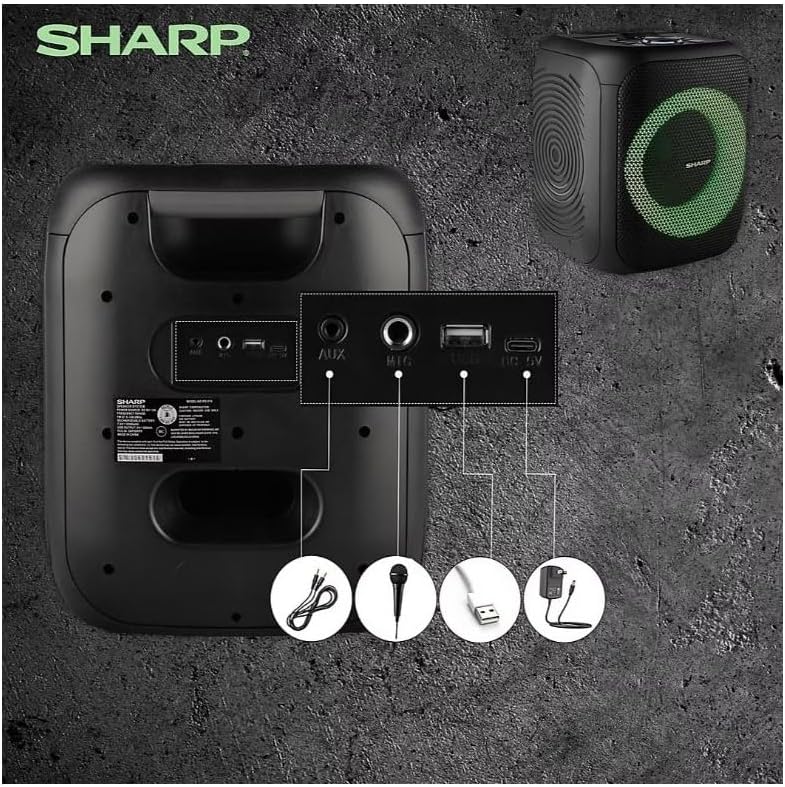
Image: Rear panel with various input and charging ports.
- I-AUX IN: Xhuma amadivayisi omsindo angaphandle usebenzisa ikhebula lomsindo elingu-3.5mm.
- I-MIC IN: Connect a microphone (sold separately) for karaoke or announcements.
- I-USB: Faka i-USB flash drive ukuze udlale umsindo.
- IKHADI LE-TF: Insert a TF (microSD) card for audio playback.
- I-DC IN: Connect the charging cable to power and charge the speaker.
3.3 Playing Audio from USB/TF Card
- Insert a USB flash drive or TF card into the corresponding port.
- Cindezela inkinobho ON/STAND BY INPUT button repeatedly until the display shows the USB or TF mode.
- Ukudlala kuzoqala ngokuzenzakalelayo. Sebenzisa DLALA/YIMISA, EDLULE, futhi OLANDELAYO izinkinobho zokulawula ukudlala.
3.4 Using AUX Input
- Connect one end of a 3.5mm audio cable to the AUX IN port on the speaker.
- Xhuma olunye uhlangothi ku-jack yama-headphone noma i-output yomsindo yedivayisi yakho yangaphandle.
- Cindezela inkinobho ON/STAND BY INPUT button repeatedly until the display shows AUX mode.
- Lawula ukudlala kanye nevolumu kusuka kudivayisi yakho yangaphandle.
3.5 Ukusebenza komsakazo we-FM

Image: The PS-916 features an integrated FM Tuner.
- Cindezela inkinobho ON/STAND BY INPUT button repeatedly until the display shows FM mode.
- Cindezela bese ubamba i DLALA/YIMISA inkinobho yokuskena ngokuzenzakalelayo futhi ugcine iziteshi ze-FM ezitholakalayo.
- Sebenzisa i- EDLULE futhi OLANDELAYO izinkinobho zokuhamba kuziteshi ezilondoloziwe.
3.6 Imiphumela Yokukhanya Kwe-LED
Cindezela inkinobho UKUKHANYA button to cycle through different LED light modes or to turn the lights off.
4. Isondlo
4.1 Ukuhlanza
- Always power off the speaker and disconnect it from the power source before cleaning.
- Sebenzisa indwangu ethambile, eyomile ukuze usule izindawo zangaphandle.
- Do not use liquid cleaners, aerosols, or solvents, as these may damage the finish or internal components.
4.2 Isitoreji
- Store the speakers in a cool, dry place away from direct sunlight and extreme temperatures.
- If storing for an extended period, charge the battery to approximately 50% every few months to maintain battery health.
5. Ukuxazulula izinkinga
If you encounter issues with your Sharp PS-916 speakers, please refer to the following common problems and solutions:
| Inkinga | Isixazululo Esingenzeka |
|---|---|
| Isipikha asikhanyisi. | Ensure the battery is charged. Connect the charging cable and try again. |
| Awukho umsindo ovela kusipika. | Check the volume level on both the speaker and your connected device. Ensure the correct input mode is selected. |
| Idivayisi ye-Bluetooth ayikwazi ukubhanqa. | Ensure the speaker is in Bluetooth pairing mode (indicator flashing). Move your device closer to the speaker. Disconnect from other Bluetooth devices. |
| Ukumatanisa kwe-TWS kwehlulekile. | Ensure both speakers are powered on and not connected to any other Bluetooth devices. Try initiating TWS pairing again. |
| Umsindo ohlanekezelwe. | Reduce the volume on both the speaker and your connected device. Ensure the audio source is not distorted. |
6. Imininingwane
| Isici | Imininingwane |
|---|---|
| Ibhrendi | Ibukhali |
| Igama Lemodeli | PS-916 |
| Ukucushwa kwesipikha | 8" Woofer, 1" Tweeter (per speaker) |
| Amandla Okukhiphayo Okuphakeme | Ama-watts angu-400 (ngesipikha ngasinye) |
| Amandla wokukhipha we-RMS | Ama-watts angu-40 (ngesipikha ngasinye) |
| Ubuchwepheshe bokuxhumana | I-Bluetooth |
| Okokufaka Okwengeziwe | USB, TF Card, 3.5mm AUX, Microphone Input |
| Impilo Yebhethri | Kufika emahoreni angu-12 |
| Izici ezikhethekile | True Wireless Stereo (TWS) Pairing, Bass Boost, LED Light Effects, FM Tuner |
| Umbala | Mnyama |
| Isisindo sento | Amakhilogremu angu-6.5 (ngesipikha ngasinye) |
| I-UPC | 728434122111 |
| I-GTIN | 728434122111 |
7. Iwaranti & Ukusekela
7.1 Ulwazi Lwewaranti
This Sharp PS-916 product comes with a 90-day limited warranty. This warranty covers manufacturing defects under normal use. It does not cover damage caused by misuse, accidents, unauthorized modifications, or normal wear and tear.
7.2 Ukwesekwa Kwamakhasimende
For technical assistance, warranty claims, or further inquiries, please refer to the contact information provided with your purchase documentation or visit the official Sharp support webindawo.