
1. Isingeniso
Thank you for choosing the Cooler Master ELITE Gold 1000W Power Supply Unit. This manual provides essential information for the safe and efficient installation, operation, and maintenance of your new power supply. The ELITE Gold 1000W is designed for daily gaming and PC building enthusiasts, fully supporting the latest ATX 3.1 standard and offering flexible compatibility with RTX 50 series GPUs and future upgrades.
2. Ulwazi Lokuphepha
Please read and understand all safety instructions before installing or operating this product. Failure to do so may result in personal injury or damage to the product or connected devices.
- Ingozi Yokuthuthumela Kagesi: Do not open the power supply unit casing. Ivolumu ephezulutages are present inside, even when the unit is turned off. There are no user-serviceable parts inside.
- Isisekelo Esifanelekile: Ensure the power supply is properly grounded using the provided power cord.
- Ukungenisa umoya: Do not block any ventilation openings of the power supply. Ensure adequate airflow around the unit to prevent overheating.
- Umswakama: Do not expose the power supply to water or excessive humidity.
- Umthombo wamandla: Connect the power supply only to a power source with the correct voltage and frequency as indicated on the unit's label.
- Ukuphathwa Kwekhebula: Route cables carefully to avoid pinching or damage.
- Izinga lokushisa: Operate the power supply within the specified temperature range (up to 40°C high-load environments).
3. Okuqukethwe Kwephakheji
Qinisekisa ukuthi zonke izinto zikhona kuphakheji yakho:
- Cooler Master ELITE Gold 1000W Power Supply Unit
- Modular Cable Set (including 12+4 Pin, ATX24 Pin, EPS 4+4 Pin, EPS 8 Pin, SATA + Peripheral 4 Pin connectors)
- AC Power Cord (A/JP cord)
- Izikulufa zokukhwela
- Imaniwali yosebenzisayo
4. Ukusetha nokufakwa
Follow these steps to install your Cooler Master ELITE Gold 1000W Power Supply Unit:
- Lungiselela Isistimu Yakho:
Before installation, ensure your computer is completely powered off and unplugged from the wall outlet. Discharge any residual power by pressing the power button a few times.
- Install the PSU into the PC Case:
Position the ELITE Gold 1000W PSU into the designated power supply bay in your PC case. The compact design (under 150mm) facilitates easy installation in various PC cases. Secure the PSU with the provided mounting screws.

Image: The Cooler Master ELITE Gold 1000W Power Supply Unit installed within a computer chassis, viewed from above, highlighting its compact form factor and top-mounted fan grill.
- Xhuma Amakhebula E-Modular:
The ELITE Gold 1000W features a full modular design. Connect only the necessary cables to the power supply unit first. Refer to the labels on the PSU for correct connector types (e.g., 10P MB, 18P MB, 8P PCI-E/CPU, 12V-2x6, 6P SATA/HDD).

Isithombe: A enemininingwane view of the Cooler Master ELITE Gold 1000W Power Supply Unit's modular cable interface, clearly showing labeled ports for various component connections such as motherboard, CPU, PCIe, and SATA/HDD.

Image: The Cooler Master ELITE Gold 1000W Power Supply Unit with its full suite of modular cables securely connected and neatly routed, demonstrating the full modular design.
- Connect to Components:
- Ibhodi lomama: Xhuma ikhebula le-ATX elinamaphini angu-24 ebhodini lakho lomama.
- CPU: Connect the 4+4 pin or 8-pin EPS cable(s) to your motherboard's CPU power connector(s).
- Ikhadi Lezithombe (GPU): Connect the appropriate PCIe power cables (e.g., 8-pin, 12+4 pin for ATX 3.1/PCIe Gen 5.1) to your graphics card(s). This unit is optimized for RTX 50 series GPUs.
- Amadivayisi Okugcina: Connect SATA power cables to your SSDs, HDDs, and optical drives.
- Amapheripherals: Connect peripheral 4-pin cables to any other devices requiring power.
- Xhuma Amandla e-AC:
Connect the provided AC power cord to the power supply unit and then to a grounded wall outlet. Ensure the power switch on the PSU is in the OFF position before connecting to the wall outlet.
5. Iziqondiso Zokusebenza
After successful installation, follow these steps to operate your system:
- Vula:
Flip the power switch on the back of the power supply unit to the ON (I) position.
- Ukuqala Kwesistimu:
Press the power button on your computer case to start your system. The ELITE Gold 1000W will provide stable and efficient power, thanks to its 80 Plus Gold certification and quiet, long-life rifle bearing fan.
- Cisha ugesi:
To power off your system, shut down your operating system normally. For complete power disconnection, flip the power switch on the back of the power supply unit to the OFF (O) position and unplug the AC power cord.
6. Isondlo
Proper maintenance ensures the longevity and optimal performance of your power supply unit.
- Ukuhlanza Uthuli: Periodically clean dust from the power supply's fan and ventilation grilles using compressed air. Ensure the system is powered off and unplugged before cleaning.
- Ukungenisa umoya: Ensure that the PC case has adequate airflow and that the power supply's fan intake and exhaust are not obstructed.
- Ukuhlolwa Kwekhebula: Regularly check all modular cables for any signs of wear, fraying, or damage. Replace damaged cables immediately.
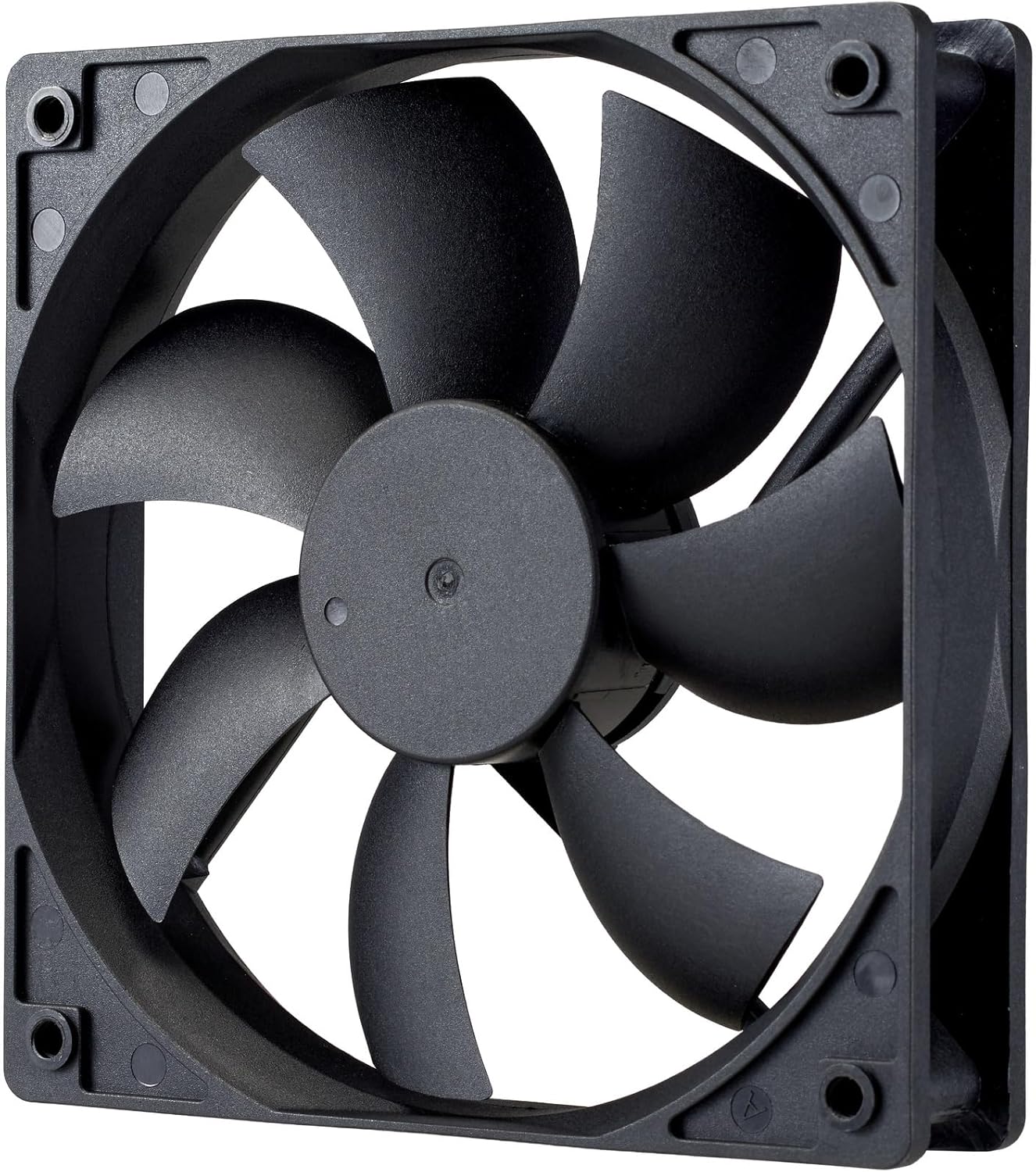
Isithombe: Ukuvala view of the power supply's cooling fan, featuring five blades designed for efficient airflow and quiet operation.
7. Ukuxazulula izinkinga
If you encounter issues with your power supply, refer to the following troubleshooting steps:
- Awekho Amandla:
- Qinisekisa ukuthi intambo kagesi ye-AC ixhunywe ngokuphephile kokubili kugesi kanye ne-outlet yodonga.
- Verify that the power switch on the back of the PSU is in the ON (I) position.
- Check all modular cables (24-pin ATX, EPS, PCIe) are firmly seated in both the PSU and the respective components.
- Test the wall outlet with another device to ensure it is functional.
- Ukungazinzi Kwesistimu/Ukuvalwa Okungahleliwe:
- Ensure adequate ventilation within your PC case to prevent overheating.
- Verify that your system's power requirements do not exceed the 1000W capacity of the PSU.
- Check for any loose cable connections.
- Imisindo Engajwayelekile:
- A quiet rifle bearing fan is designed for minimal noise. If you hear unusual grinding or rattling, ensure no cables are obstructing the fan.
- If the noise persists, contact Cooler Master support.
Uma lezi zinyathelo zingaxazululi inkinga, sicela uxhumane nosekelo lwamakhasimende lwe-Cooler Master ukuze uthole usizo olwengeziwe.
8. Imininingwane
Detailed technical specifications for the Cooler Master ELITE Gold 1000W Power Supply Unit:
| Igama Lemodeli | ELITE Gold |
| Inombolo Yemodeli Yomkhiqizi | MPX-A005-AFAG-BJP |
| Ibhrendi | Cooler Master |
| Okukhiphayo Wattage | 1000 Watts |
| 80 PLUS Isitifiketi | Igolide |
| Inguqulo ye-ATX | I-ATX 3.1 |
| Inguqulo ye-PCIe | I-PCIe Gen 5.1 |
| I-Form Factor | ATX |
| I-Power Design | I-Modular ephelele |
| Izinhlobo zezixhumi | 12+4 Pin, ATX24 Pin, EPS 4+4 Pin, EPS 8 Pin, SATA + Peripheral 4 Pin |
| Inani Labalandeli | 1 (Rifle Bearing Fan) |
| Ubuningi bokufaka Umqtage | 240 Volts (AC) |
| Ubuncane Bokufaka Ivolumutage | 100 Volts (AC) |
| Ubukhulu bomkhiqizo (L x W x H) | 14 x 15 x 8.6 cm |
| Isisindo Somkhiqizo | awu 2230g |
| Izinga Lokushisa Lokusebenza | Kufika ku-40°C |

Isithombe: Phezulu view of the Cooler Master ELITE Gold 1000W Power Supply Unit, showcasing its branding and honeycomb-patterned ventilation.

Image: The official 80 PLUS GOLD certification logo, indicating high power efficiency.
9. Iwaranti kanye Nokusekela
The Cooler Master ELITE Gold 1000W Power Supply Unit comes with a Iwaranti yonyaka ongu-5 kusukela ngedethi yokuthenga. Lesi siqinisekiso sihlanganisa amaphutha ezintweni zokwakha kanye nokusebenza ngaphansi kokusetshenziswa okuvamile.
For technical support, warranty claims, or further assistance, please visit the official Cooler Master website or contact your local Cooler Master distributor. Please have your product model number (MPX-A005-AFAG-BJP) and proof of purchase ready when contacting support.