
1. Isingeniso
The ThermoPro TP210B is a wireless thermometer system designed to monitor temperatures in refrigerators and freezers. It provides real-time temperature readings from up to two remote sensors to a central receiver unit. This system features a 500 ft (150 m) wireless range, high accuracy, and customizable temperature alerts to help maintain optimal storage conditions for food and other temperature-sensitive items.
Izici ezibalulekile zifaka:
- Ububanzi Obungenantambo Obunwetshiwe: Up to 500 ft (150 m) using updated RF technology for stable connection.
- Pre-Paired for Immediate Use: No complex setup required; units are ready to operate upon powering on.
- Ibanga Lokulinganisa Elibanzi: Accurate readings from -40°F to 158°F (-40°C to 70°C).
- Smart Temperature Alerts: Customizable high/low temperature alarms on the receiver.
- Isibonisi se-LCD esikhanyayo: Clear display of current, maximum, and minimum temperatures, visible day or night.
- Rechargeable Transmitter: Transmitter uses a rechargeable lithium battery, suitable for low-temperature environments.
- Ukubekwa Okuguquguqukayo: Multiple mounting options for both receiver and transmitters.
2. Okuqukethwe Kwephakheji
- 1 x Iyunithi yomamukeli
- 2 x Transmitter Units
- 2 x AAA Batteries (for Receiver)
- 1 x USB Charging Cable (for Transmitters)
- 1 x Incwadi Yomsebenzisi
3. Umdwebo Womkhiqizo
Familiarize yourself with the components of your ThermoPro TP210B system:

Image: The main receiver unit with its large display and control buttons (MODE, UP, DOWN, HISTORY/CLEAR, LIGHT °F/°C), alongside two smaller transmitter units.
Isamukeli Unit:
- Isibonisi se-LCD: Shows temperatures for both channels, Max/Min records, and battery status.
- Inkinobho ye-MODE: Cycles through settings and alarm modes.
- Izinkinobho PHEZULU/PHANSI: Adjust values in settings or alarm modes.
- HISTORY/CLEAR Button: Views and clears Max/Min temperature records.
- LIGHT °F/°C Button: Activates backlight and switches temperature units.
- Igumbi Lebhethri: Located on the back, for 2x AAA batteries.
Transmitter Units:
- Inzwa yezinga lokushisa: Measures ambient temperature.
- Inkomba ye-LED: Flashes to indicate data transmission.
- Inkinobho yamandla: Ivula/ivale isidlulisi.
- Imbobo yokushaja: USB-C port for recharging the internal lithium battery.
4. Setha
The ThermoPro TP210B units are pre-paired at the factory. Follow these steps for initial setup:
- Install Receiver Batteries: Open the battery compartment on the back of the receiver unit. Insert 2 AAA batteries, ensuring correct polarity (+/-). Close the compartment.
- Charge Transmitters: Connect the provided USB charging cable to the charging port on each transmitter unit and to a standard USB power source (e.g., phone charger, computer USB port). The LED indicator will show charging status. Charge fully before first use.
- Power On Transmitters: Press and hold the power button on each transmitter unit until the LED indicator flashes.
- Qinisekisa Uxhumo: The receiver unit should automatically display temperature readings from both transmitters. If not, refer to the Troubleshooting section for re-pairing instructions.

Isithombe: Ukuvala view illustrating the battery installation for the receiver unit and the USB charging process for a transmitter unit.
5. Iziqondiso Zokusebenza
5.1 Khombisa ngaphezuluview
The receiver's LCD displays the following information:

Image: The receiver's digital display, highlighting the current temperature readings for two channels, along with their respective maximum and minimum recorded temperatures and low battery indicators.
- Channel 1 Temperature: Typically for the refrigerator.
- Channel 2 Temperature: Typically for the freezer.
- I-Max/Min Records: Highest and lowest temperatures recorded since the last reset.
- Inkomba Yebhethri Eliphansi: Appears when receiver or transmitter batteries are low.
- Inkomba Yamandla Esiginali: Shows connection status to transmitters.
5.2 Temperature Unit Selection (°F/°C)
Ukuze ushintshe phakathi kuka-Fahrenheit (°F) ne-Celsius (°C), cindezela inkinobho LIGHT °F/°C button on the receiver unit.
5.3 Setting Temperature Alerts
The system allows you to set custom high and low temperature limits for each channel. An audible and visual alarm will activate if the temperature exceeds these limits.
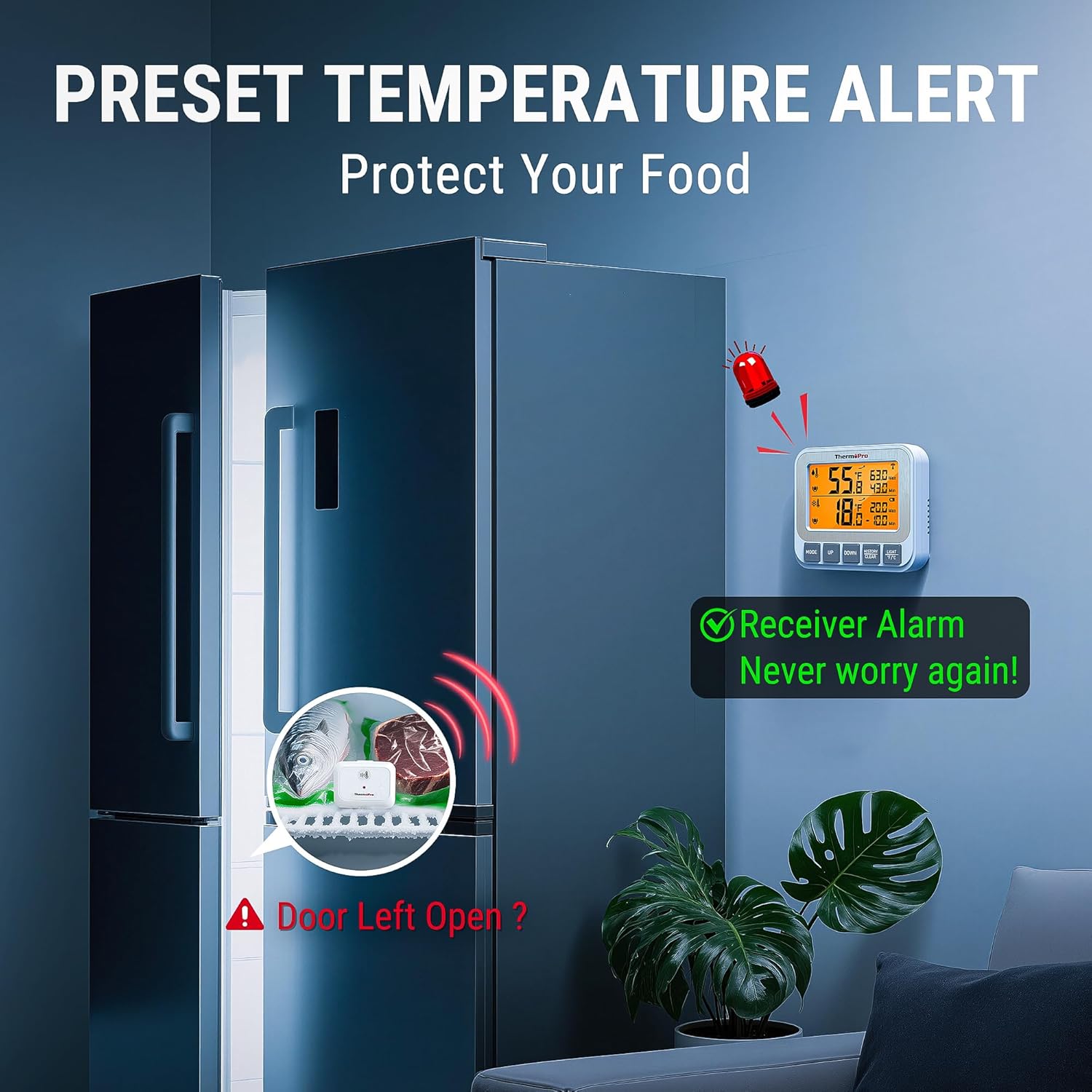
Image: The receiver unit showing an active alarm, with a visual representation of a refrigerator door left open and a transmitter inside, illustrating a scenario where a temperature alert would be triggered.
- Cindezela inkinobho IMODE button once to enter the alarm setting mode for Channel 1 (refrigerator). The high limit will flash.
- Sebenzisa i- UP or PHANSI buttons to adjust the desired high temperature limit.
- Cindezela IMODE again to set the low limit for Channel 1. Adjust with UP or PHANSI.
- Cindezela IMODE a third time to enter the alarm setting mode for Channel 2 (freezer). Repeat steps 2 and 3 for Channel 2.
- Cindezela IMODE again to exit alarm setting mode. The alarm icon will appear next to the channel if an alarm is active.
5.4 Viewing and Clearing Max/Min Records
The receiver automatically records the maximum and minimum temperatures for each channel since the last reset.
- Cindezela inkinobho HISTORY/CLEAR inkinobho kanye ukuze view the maximum recorded temperatures for both channels.
- Cindezela HISTORY/CLEAR futhi ku view the minimum recorded temperatures for both channels.
- To clear the Max/Min records, press and hold the HISTORY/CLEAR inkinobho imizuzwana emi-3 ngenkathi viewing the records. The display will reset to current temperatures.
5.5 Imihlahlandlela yokubeka
Optimal placement ensures accurate readings and reliable wireless communication.

Image: A visual guide demonstrating the versatility of the ThermoPro TP210B, showing the receiver magnetically attached to a fridge, standing on a table, and hanging from a hook, while transmitters are shown standing on a shelf and clipped to a rack inside a fridge.
- Ukubekwa komamukeli: The receiver can be placed on a countertop using its integrated stand, mounted magnetically to a metal surface (e.g., refrigerator exterior), or hung on a wall using the hanging hole. Position it within 500 ft (150 m) of the transmitters, minimizing obstructions.
- Ukubekwa Komthumeli: Place transmitters inside the refrigerator and freezer compartments. They can stand on a shelf or clip onto a rack. Ensure they are not directly exposed to cold air vents or heating elements, which could affect accuracy.

Image: A diagram showing the wireless signal path from transmitters inside a refrigerator and freezer to a receiver unit located in another room, emphasizing the 500-foot range.
6. Isondlo
- Ukuhlanza: Wipe the units with a damp indwangu. Ungacwilisi emanzini noma usebenzise izinto zokuhlanza abrasive.
- Battery Replacement (Receiver): When the low battery indicator appears for the receiver, replace the 2 AAA batteries.
- Ukushaja i-Transmitter: When the low battery indicator appears for a transmitter, recharge it using the provided USB cable. A full charge ensures reliable operation, especially in low-temperature environments.
- Isitoreji: If storing the device for an extended period, remove the AAA batteries from the receiver and ensure transmitters are fully charged before storage. Store in a dry, cool place.
7. Ukuxazulula izinkinga
- No Temperature Readings / Lost Connection:
- Ensure both the receiver and transmitters are powered on.
- Check battery levels for both units. Recharge or replace as needed.
- Move the receiver closer to the transmitters. Walls, metal appliances, and electronic devices can interfere with the wireless signal.
- Ukumatanisa kabusha: If connection is lost, try re-pairing. Power off all units. Power on the receiver. Then, power on each transmitter one by one. They should automatically reconnect.
- Ukufundwa Okungalungile:
- Ensure transmitters are not placed directly in front of cold air vents or near heat sources.
- Allow units to stabilize for 30 minutes after placement to get accurate readings.
- Compare readings with another known accurate thermometer if possible.
- I-alamu Ayikhali:
- Verify that the high/low temperature limits are set correctly for each channel.
- Ensure the alarm function is enabled (check for the alarm icon on the display).
8. Imininingwane
| Isici | Ukucaciswa |
|---|---|
| Inombolo Yemodeli | I-TP210B |
| Uhlobo olungenantambo | Kufika ku-500 ft (150 m) |
| Ukunemba kwezinga lokushisa | ±0.9°F (±0.5°C) from 32°F-122°F (0°C-50°C), otherwise ±1.8°F (±1.0°C) |
| Ibanga Lokulinganisa | -40°F ukuya ku-158°F (-40°C kuya ku-70°C) |
| Umamukeli Amandla | 2 x AAA Amabhethri (afakiwe) |
| Amandla Okudlulisa | Rechargeable Lithium Battery (charging cable included) |
| Bonisa | I-LCD ekhanyayo |
9. Ulwazi Lwewaranti
ThermoPro products are manufactured with high-quality materials and craftsmanship. This product is covered by a limited warranty against defects in materials and workmanship from the date of purchase. Please refer to the official ThermoPro website or contact customer support for specific warranty terms and conditions.
10. Ukusekela
For any questions, assistance, or troubleshooting not covered in this manual, please contact ThermoPro Customer Service:
- Webindawo: Visit the official ThermoPro webindawo yama-FAQ, ukubhaliswa komkhiqizo, kanye nemininingwane yokuxhumana.
- I-imeyili: Refer to your product packaging or the ThermoPro webisayithi lekheli le-imeyili lokusekelwa kwamakhasimende.
- Ucingo: Contact the customer support hotline if available in your region.
Please have your model number (TP210B) and purchase date ready when contacting support.