
Isingeniso
Thank you for choosing the Shadowhawk S1929 2-in-1 LED/UV Flashlight. This manual provides essential information for the safe and effective operation, maintenance, and troubleshooting of your device. Please read it thoroughly before use and retain it for future reference.
The Shadowhawk S1929 is a versatile lighting tool combining a powerful white LED beam with a dedicated UV light. It features high luminosity, adjustable zoom, multiple operating modes, and a robust design suitable for various outdoor and indoor applications.

Umfanekiso 1: Shadowhawk S1929 2-in-1 LED/UV Flashlight and its packaging, highlighting key features like LCD display, adjustable focus, high lumens, USB-C rechargeability, and dual switch.
Okuqukethwe Kwephakheji
Qinisekisa ukuthi zonke izinto ezibalwe ngezansi zikhona ephaketheni lakho:
- 1x Shadowhawk S1929 2-in-1 LED/UV Flashlight
- 1x Rechargeable Battery (5000mAh)
- 1x Ikhebuli yokushaja ye-USB-C
- 3x AAA Batteries with Adapter and Plastic Tube
- 1x Isikhwama
- 1x Incwadi Yomsebenzisi
- 1x Gift Box (packaging)

Umfanekiso 2: Visual representation of all included components: flashlight, holster, rechargeable battery, AAA batteries with adapter, USB-C cable, and user manual.
Setha
Ukufakwa Kwebhethri
- Khulula isivalo sangemuva sethoshi elikhanyayo ngokuphambene newashi.
- Insert the provided 5000mAh rechargeable battery with the positive (+) terminal facing towards the flashlight head.
- Alternatively, if using AAA batteries, place three AAA batteries into the provided adapter and insert the adapter into the flashlight.
- Sika isivalo somsila emuva ngendlela yewashi kuze kube yilapho siqine.
Inkokhelo Yokuqala
Before first use, fully charge the rechargeable battery.
- Connect the USB-C charging cable to the flashlight's USB-C port.
- Xhuma olunye uhlangothi lwekhebula emthonjeni wamandla we-USB (isb., i-adaptha yodonga, imbobo ye-USB yekhompyutha).
- The LCD display on the flashlight will show the charging progress. Charge until the display indicates 100%.
Imiyalelo yokusebenza
The Shadowhawk S1929 features a dual-switch system for independent control of white and UV light, along with adjustable focus and multiple modes.

Umfanekiso 3: The flashlight features two independent switches: one for UV light (left) and one for white light (right), allowing precise control over illumination type.
White Light Operation
- Vula/Vala: Press the white light switch (power symbol) to turn the flashlight on or off.
- Ukuhamba ngebhayisikili: With the white light on, press the white light switch repeatedly to cycle through modes: High, Low, Strobe.
- Ukufiphala Okuqhubekayo: To adjust brightness continuously, press and hold the white light switch while the light is on. Release the button when the desired brightness is reached.
- Instant Off: If the flashlight has been on for more than 15 seconds in any mode, a single press of the white light switch will turn it off directly, without cycling through other modes.

Umfanekiso 4: Illustration of the white light modes (High, Low, Strobe) and the continuous dimming feature, activated by pressing and holding the power button.
UV Light Operation
- Vula/Vala: Press the UV light switch (UV symbol) to turn the UV light on or off.
- Ukufiphala Okuqhubekayo: To adjust UV light intensity continuously, press and hold the UV light switch while the UV light is on. Release the button when the desired intensity is reached.

Umfanekiso 5: The UV light offers both a wide flood mode for general inspection (top) and a focused spot mode for detailed analysis (bottom).
Adjustable Zoom (Focus)
The flashlight features an adjustable zoom function to change the beam from a wide floodlight to a focused spotlight.
- To adjust the focus, gently push or pull the head of the flashlight.
- Extend the head for a narrow, long-distance spotlight.
- Retract the head for a wide floodlight, illuminating a larger area.
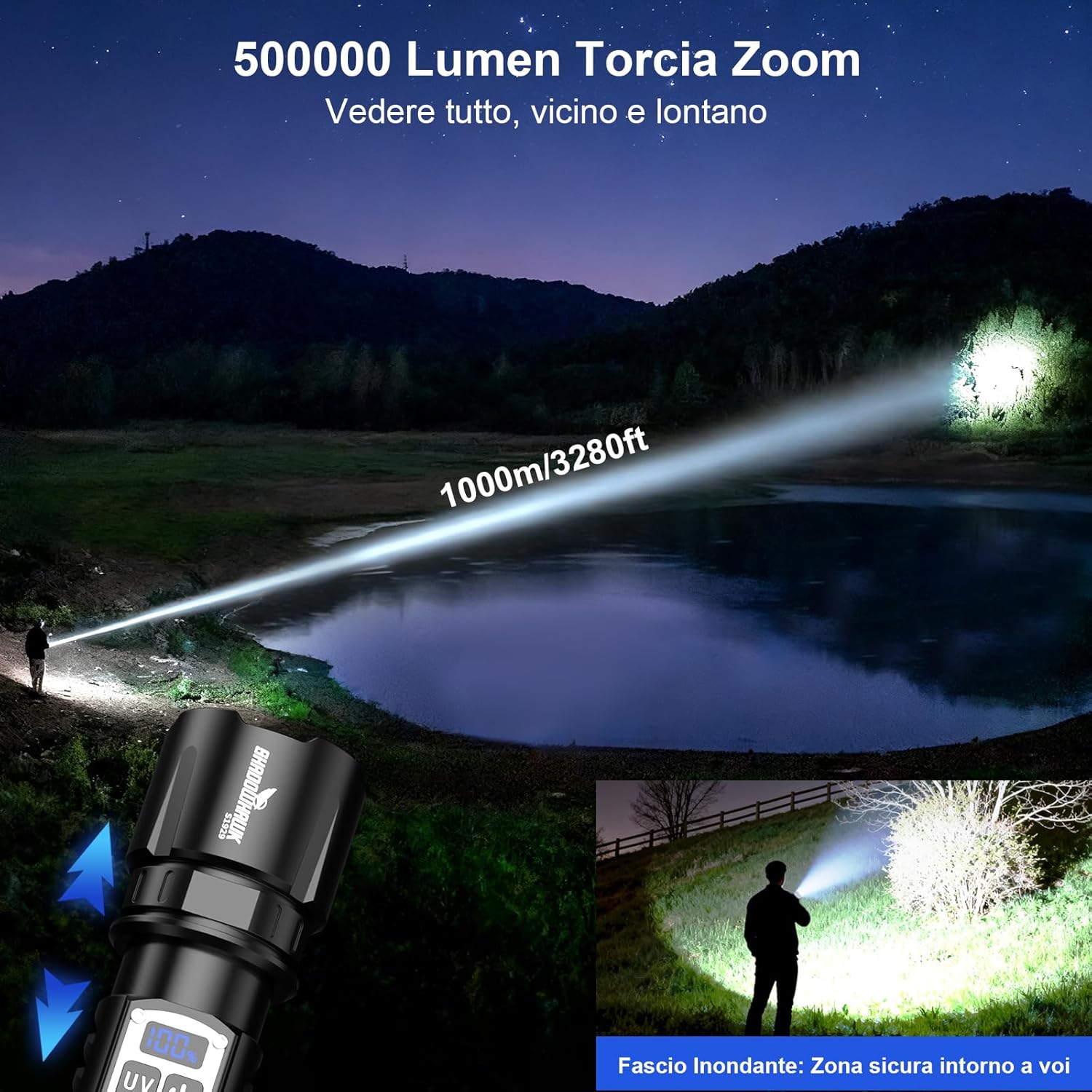
Umfanekiso 6: The flashlight's powerful 500,000 lumen output and adjustable zoom allow illumination up to 1000 meters, providing both wide-area floodlight and focused spotlight capabilities.
Ukushaja kanye nokusebenza kwebhange lamandla
Ukushaja ithoshi
The Shadowhawk S1929 is equipped with a USB-C input for convenient charging.
- Locate the USB-C port on the flashlight body.
- Connect the provided USB-C cable to the flashlight and a compatible USB power source.
- The integrated LCD display will show the battery percentage ngesikhathi sokushaja.
- A full charge typically takes several hours, indicated by 100% on the display.
Umsebenzi Webhange Lamandla
The flashlight can also function as a power bank to charge other devices via its USB-A output port.
- Connect your device's charging cable to the flashlight's USB-A output port.
- The flashlight's battery will then supply power to charge your connected device.
- Monitor the flashlight's LCD display for remaining battery percentage.

Umfanekiso 7: The flashlight's USB-C port allows for rapid charging (bottom), while the USB-A port enables it to act as a power bank for other devices (top). The LCD display shows the precise battery percentage.
Isondlo
Ukuhlanza
- Sula umzimba wethoshi ngesithambile, damp indwangu.
- Ungasebenzisi izinto zokuhlanza abrasive noma izincibilikisi.
- Clean the lens gently with a lens cloth to maintain optimal light output.
Ukunakekela Ibhethri
- If the flashlight will not be used for an extended period, remove the battery to prevent leakage.
- Gcina amabhethri endaweni epholile, neyomile.
- Recharge the battery periodically (every 3-6 months) even if not in use to maintain its lifespan.
Ukumelana Namanzi
The Shadowhawk S1929 is rated IP67 for water and dust resistance.
- This means it is protected from dust ingress and can withstand immersion in water up to 1 meter for 30 minutes.
- Ensure all ports are securely covered before exposing the flashlight to water.
- Do not intentionally submerge the flashlight for prolonged periods or at depths exceeding its rating.

Umfanekiso 8: The flashlight's dimensions are 17.3cm length, 4.9cm head diameter, 3.4cm body diameter, and it weighs 260g. It is IP67 waterproof, making it suitable for use in wet conditions.
Ulwazi Lokuphepha
- Ukuphepha Kwamehlo: Do not look directly into the LED light or shine it directly into the eyes of people or animals. The high intensity light can cause temporary vision impairment or permanent eye damage.
- Izingane: Gcina endaweni lapho izingane zingafinyeleleki khona.
- Ukushisa: The flashlight may become warm during prolonged use, especially on high settings. This is normal.
- Ukuphepha Kwebhethri: Use only recommended batteries. Do not mix old and new batteries, or different types of batteries. Do not dispose of batteries in fire.
- Ukuqaqa: Ungazami ukuqaqa noma ukuguqula ithoshi. Lokhu kuzovala iwaranti futhi kungase kubangele umonakalo noma ukulimala.
Ukuxazulula inkinga
| Inkinga | Imbangela Engenzeka | Isixazululo |
|---|---|---|
| I-flashlight ayivuli. | Ibhethri lifile noma lifakwe ngokungalungile. | Charge the battery or check its orientation. Ensure the tail cap is fully tightened. |
| Ukukhanya kufiphele noma kuyacwayiza. | Low battery charge. Loose connections. | Recharge the battery. Ensure the tail cap and head are securely tightened. |
| I-flashlight ayishaji. | Faulty cable or power source. USB-C port obstruction. | Try a different USB-C cable and power source. Check the port for debris. |
| Isibani se-UV asisebenzi. | UV switch not pressed. | Ensure you are pressing the dedicated UV light switch. Check battery charge. |
Imininingwane
| Isici | Imininingwane |
|---|---|
| Inombolo Yemodeli | IT-S1929 |
| Ibhrendi | I-Shadowhawk |
| Umthombo Wokukhanya | XHM90.2 LED (White Light), UV LED |
| Luminous Flux (White Light) | 500,000 Lumens |
| Ibanga le-Beam | Kufika kumamitha angu-1000 |
| Umthombo wamandla | Rechargeable Battery (5000mAh included) or 3x AAA Batteries (with adapter) |
| Imbobo yokushaja | Okokufaka kwe-USB-C |
| Okukhiphayo Kwebhange Lamandla | Ukukhishwa kwe-USB-A |
| Okubalulekile | Aeronautical Grade Aluminum |
| Ukumelana Namanzi | IP67 (Dustproof, submersible up to 1m for 30 min) |
| Ubukhulu | Flashlight: 17.3cm (length) x 4.9cm (head diameter) x 3.4cm (body diameter) |
| Isisindo | awu 260g |
| Izici ezikhethekile | Dual Light System (White & UV), Adjustable Zoom, Continuous Dimming, 4 White Light Modes (High, Low, Strobe), LCD Battery Display |
Iwaranti kanye Nokusekela
Shadowhawk products are designed for durability and performance. For specific warranty details, please refer to the warranty card included with your product or contact Shadowhawk customer support.
For technical assistance, troubleshooting, or warranty claims, please visit the official Shadowhawk webisayithi noma uxhumane nomnyango wabo wesevisi yamakhasimende. Gcina irisidi lakho lokuthenga njengobufakazi bokuthenga.
Ukusekelwa Kwe-inthanethi: Shadowhawk Official Store on Amazon