
VANBAR DC509
VANBAR DC509 4K Digital Inner Mirror Drive Recorder User Manual
Model: DC509 | Brand: VANBAR
1. Isingeniso
Siyabonga ngokuthengaasing the VANBAR DC509 4K Digital Inner Mirror Drive Recorder. This manual provides detailed instructions for installation, operation, and maintenance to ensure optimal performance and longevity of your device. Please read this manual thoroughly before use and keep it for future reference.
2. Izici zomkhiqizo
- Genuine Mirror Replacement Design: Replaces your vehicle's original rearview mirror for a seamless, integrated look and eliminates shaking during driving.
- 4K Ultra HD Recording: Ithwebula i-foo ecacile nenemininingwanetage with a high-resolution IMX415 sensor.
- Split Camera System: Front and rear cameras are separate, allowing flexible positioning for optimal viewing angles and preventing obstruction of the driver's view.
- Ukulungiswa Kokukhanya Okuzenzakalelayo: Equipped with a light sensor to automatically adjust screen brightness for clear visibility in various lighting conditions, day or night.
- HDR/WDR Technology: Enhances image quality in high-contrast environments, reducing overexposure and underexposure.
- I-GPS eyakhelwe ngaphakathi: Amarekhodi umzila wokushayela, isivinini, kanye nedatha yendawo.
- Ukuqapha Ukupaka: Provides 24-hour surveillance with impact detection and time-lapse recording, featuring battery protection.
- Electromagnetic Interference (EMI) Countermeasures: Designed to minimize interference with other vehicle electronics.
- LED Signal Light Compatible: Ensures proper recording of LED traffic signals.
- Anti-Glare Film & Anti-Dazzle Glass: Reduces reflections and glare for improved visibility.
- Waterproof Rear Camera: Durable design for outdoor use.
3. Okuqukethwe Kwephakheji
Sicela uhlole ukuthi zonke izinto zikhona futhi zisesimweni esihle:
- VANBAR DC509 Digital Inner Mirror Unit
- Front Camera (Split Type)
- Ikhamera yangemuva
- Dedicated Mount (Type 1, compatible with 90%+ Japanese car models)
- Power Cable with Built-in GPS Antenna
- Ikhebuli engemuva yekhamera
- Parking Monitoring Power Cable (with battery protection)
- 64GB ikhadi le-microSD
- Anti-Glare Film
- Incwadi Yomsebenzisi (le dokhumenti)
Note: If a different mount is required for your specific car model, please contact VANBAR customer support.
4. Ukusetha nokufakwa
4.1. Mirror Unit Installation
- Carefully remove your vehicle's original rearview mirror from its base.
- Align the dedicated mount with the mirror unit.
- Insert the screw from the mirror unit into the hole of the mounting bracket.
- Secure the mirror unit to the bracket using the provided fixing screw.
- Insert the screw into the bracket and fix it to the edge mount on your vehicle's windshield.

Image: Step-by-step guide for installing the main mirror unit.
The genuine mirror replacement design ensures a stable installation, eliminating vibrations during driving for clear recording.
4.2. Ukufakwa kwekhamera yangaphambili
- Attach the split front camera directly to the front windshield in an optimal position that does not obstruct your view.
- Adjust the camera angle as needed. The split design allows for flexible positioning.

Image: Illustrates the flexible installation of the split front camera, showing adjustable lens and stable image recording.
4.3. Ukufakwa Kwekhamera Yangemuva
- Mount the waterproof rear camera at the rear of your vehicle, typically above the license plate or on the rear window.
- Route the rear camera cable discreetly to the main mirror unit.
4.4. Izintambo kanye noxhumo lwamandla
- Connect the power cable (with built-in GPS antenna) to the mirror unit and route it to your vehicle's power source (e.g., cigarette lighter socket or fuse box).
- For parking monitoring, connect the dedicated parking monitoring power cable to the vehicle's fuse box (ACC, constant power, and ground). This cable includes battery protection to prevent discharge.
- Ensure all wiring is hidden for a clean installation and to prevent interference with driving.

Image: Comparison of traditional wiring vs. hidden wiring design for a neat setup.
4.5. Ukufakwa Kwekhadi Le-MicroSD
- Insert the provided 64GB microSD card into the designated slot on the mirror unit. Ensure it is inserted correctly until it clicks into place.
5. Iziqondiso Zokusebenza
5.1. Vula/Vala
- The device will automatically power on and begin recording when your vehicle's ignition is turned on.
- Izocisha ngokuzenzakalelayo uma ukushaja kucishiwe.
5.2. Ukusebenza Kwesikrini
- The 10-inch IPS touch screen allows for intuitive control.
- Swipe left or right to switch between front and rear camera views.
- Tap on the screen to access menu options and settings.
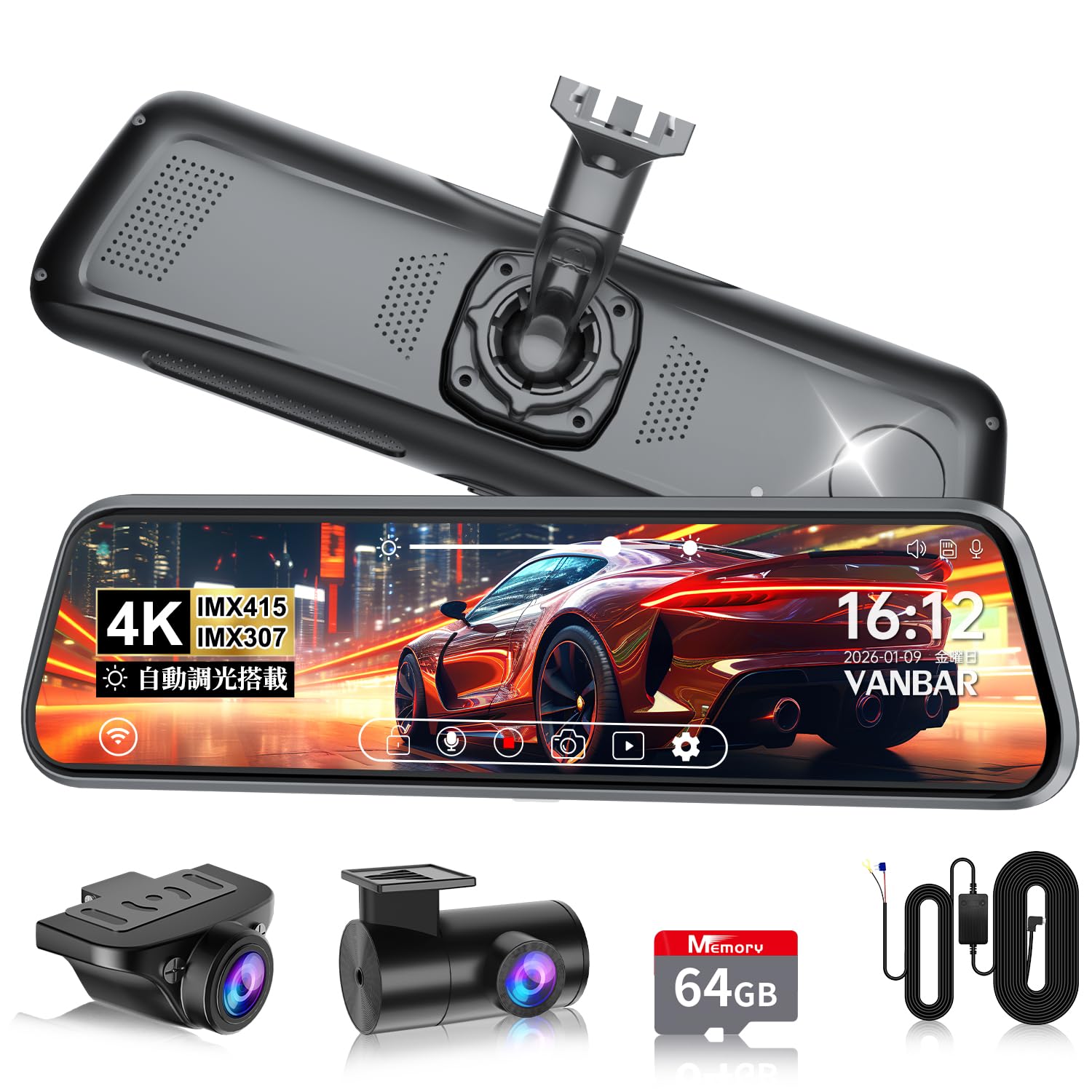
Image: The main display of the VANBAR DC509 showing the digital rearview umsebenzi wesibuko.
5.3. Automatic Brightness Adjustment
- The built-in light sensor automatically adjusts the screen brightness based on ambient light conditions. No manual adjustment is typically needed.
- This feature ensures clear visibility during bright daylight and prevents glare in tunnels or at night.

Image: Demonstrates the automatic brightness adjustment feature of the display.
5.4. Ukuqopha Amamodi
- Ukuqoshwa kwe-Loop: The device continuously records, overwriting the oldest files uma imemori khadi isigcwele.
- I-G-Sensor (Ukurekhoda Okuphuthumayo): In case of a sudden impact or collision, the built-in 3-axis G-sensor detects the event and automatically locks the current recording file to prevent it from being overwritten. Sensitivity is 10-level adjustable.
- Ukuqapha Ukupaka: When the vehicle is parked, the device can record impacts (impact detection) or use time-lapse recording for extended surveillance. The parking monitoring cable protects your car battery.

Image: Explains the 72-hour parking monitoring function with impact detection, time-lapse recording, and low voltagukuvikelwa.
5.5. Ukusebenza kwe-GPS
- The built-in GPS antenna records your vehicle's location, speed, and driving route.
- Le datha ingaba viewed using a dedicated player software on a computer, providing crucial evidence in case of an incident.

Image: Illustrates the GPS tracking feature, showing route and speed data on a map interface.
5.6. Reverse Assist
- When the vehicle is put into reverse gear, the screen automatically displays the rear camera view with adjustable guide lines to assist with parking.

Image: Shows the adjustable back guide lines feature for safe reversing.
6. Isondlo
- Ukuhlanza Ilensi: Use a soft, lint-free cloth to gently wipe the camera lenses. Avoid using abrasive cleaners or solvents.
- Ukuhlanza isikrini: Use a microfiber cloth specifically designed for electronic screens. Do not spray cleaning solutions directly onto the screen.
- Ukulungiswa Kwekhadi Le-MicroSD: Regularly format the microSD card (at least once a month) through the device's settings to ensure optimal recording performance and prevent data corruption. Back up any important files ngaphambi kokufometha.
- Ukuvuselelwa kwe-Firmware: Check the official VANBAR website periodically for firmware updates. Keeping your device's firmware up-to-date can improve performance and add new features.
7. Ukuxazulula izinkinga
| Inkinga | Imbangela Engenzeka | Isixazululo |
|---|---|---|
| Idivayisi ayivuli. | Akukho ukunikezwa kwamandla; ukuxhumana okuxekethile. | Check power cable connection. Ensure vehicle ignition is on. |
| Ukurekhoda kuyama noma kubanda. | MicroSD card error; card full; low-quality card. | Format the microSD card. Replace with a high-speed, reputable brand microSD card if issues persist. |
| Isithombe sifiphele noma asicacile. | I-lens engcolile; ifilimu yokuzivikela isakwilensi. | Clean camera lenses. Remove any protective films. |
| Isignali ye-GPS ayitholakali. | Poor satellite reception; device not positioned correctly. | Ensure the GPS antenna (integrated into the power cable) has a clear view of the sky. Avoid metallic obstructions. |
| Interference with radio/other electronics. | Ukuphazanyiswa kwe-electromagnetic. | The DC509 has EMI countermeasures. If interference occurs, try rerouting cables away from sensitive electronics or using ferrite cores. |
If you encounter problems not listed here or if solutions do not resolve the issue, please contact VANBAR customer support.
8. Imininingwane
| Isici | Imininingwane |
|---|---|
| Inombolo Yemodeli | DC509 |
| Usayizi Wesikrini | 10 amayintshi IPS |
| Ukukhanya Kwesikrini | 1200 cd/m² |
| Inzwa Yekhamera Yangaphambili | I-Sony IMX415 |
| Ukulungiswa kwevidiyo | 4K (Front), Full HD (Rear) |
| Ukuvula I-Lens | F1.8 |
| Viewing engela | Ngaphambili 170°, Ngemuva 150° |
| I-GPS | Kwakhelwe ngaphakathi |
| Inzwa ye-G | 3-axis, 10-level adjustable |
| Ukuqapha Ukupaka | Impact Detection, Time-lapse, Battery Protection |
| Isitoreji | Supports microSD card (64GB included) |
| Izici ezikhethekile | HDR/WDR, Automatic Brightness Adjustment, LED Signal Compatible, Electromagnetic Interference Countermeasures, Waterproof Rear Camera |
| Ubukhulu | 29.2 x 11 x 9.8 cm; 1.17 kg (Package Size) |
9. Iwaranti kanye Nokusekela
The VANBAR DC509 Digital Inner Mirror Drive Recorder comes with a Iwaranti yonyaka ongu-3 kusukela ngedethi yokuthenga. Lesi siqinisekiso sifaka amaphutha okukhiqiza kanye nokungasebenzi kahle ngaphansi kokusetshenziswa okuvamile.
For technical support, warranty claims, or inquiries regarding mount compatibility for your vehicle, please contact VANBAR customer support through the retailer where you purchased the product or visit the official VANBAR webindawo.
Please have your purchase receipt and product model number (DC509) ready when contacting support.