
Isingeniso
This manual provides detailed instructions for the safe installation, operation, and maintenance of your TCL 62-inch ceiling fan. Please read this manual thoroughly before installation and keep it for future reference. Ensure all safety precautions are followed to prevent injury or damage.
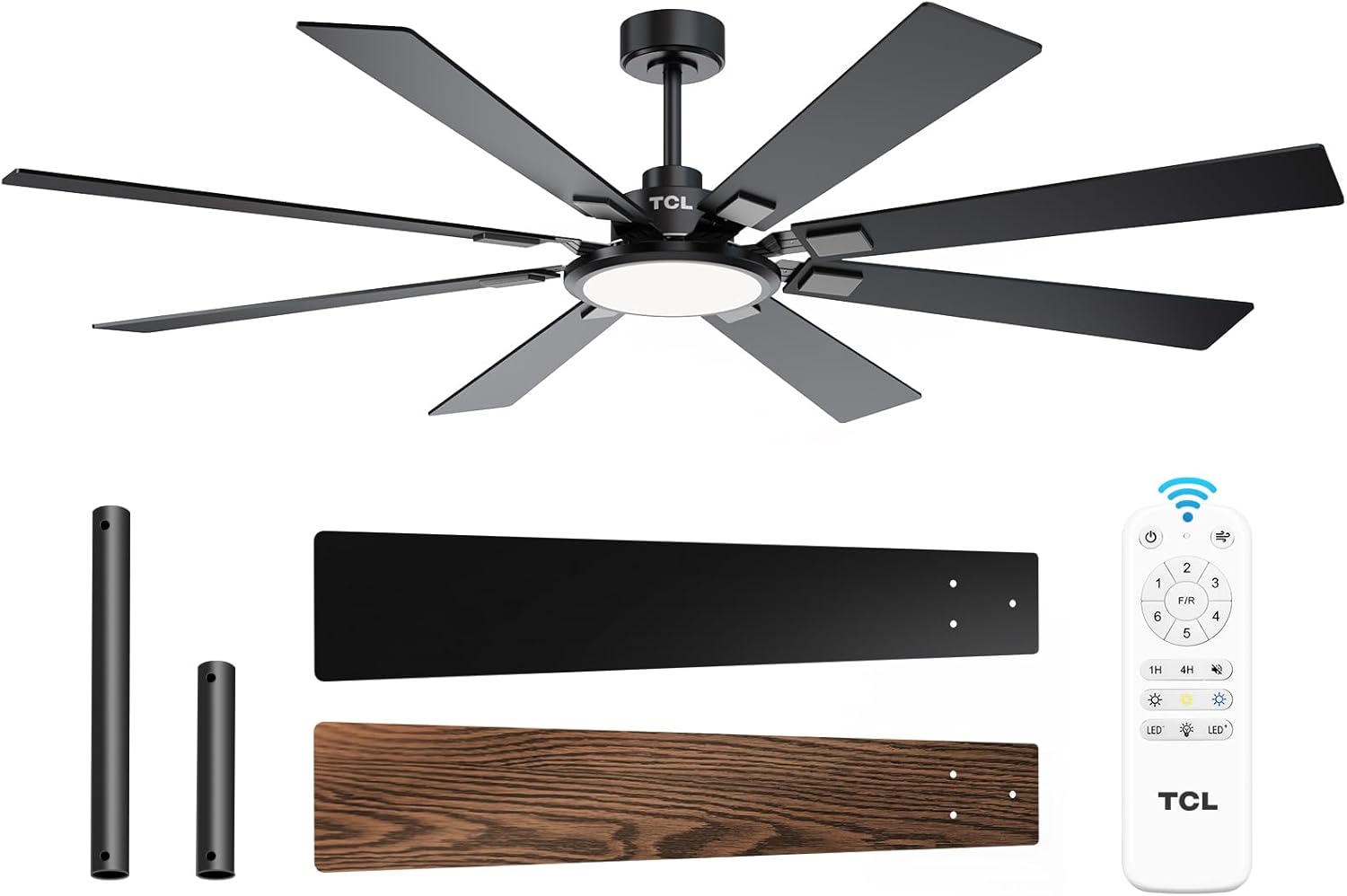
Figure 1: TCL 62-Inch Ceiling Fan Overview
Ulwazi Lokuphepha
Landela njalo izinyathelo zokuphepha eziyisisekelo lapho ufaka futhi usebenzisa le nto ukuze unciphise ingozi yomlilo, ukushaqeka kukagesi, kanye nokulimala komuntu.
- Funda yonke imiyalelo: Familiarize yourself with the fan's components and installation steps before beginning.
- Ukuphepha Kagesi: Ensure the power is turned off at the circuit breaker before installation or servicing. All wiring must be in accordance with national and local electrical codes.
- Ukukhweza: The fan must be mounted to a structurally sound ceiling joist or outlet box capable of supporting the fan's weight (12.4 lbs).
- I-Blade Clearance: Maintain a minimum clearance of 7 feet from the floor to the fan blades.
- Ukufakwa Kochwepheshe: Uma ungaqiniseki ngocingo noma ukufakwa, xhumana nochwepheshe kagesi oqeqeshiwe.
Ukusetha nokufaka
Izingxenye Ezihlanganisiwe
Before beginning installation, verify that all parts are present:
- 1 Ceiling Fan with 8 Blades
- Incwadi Yokufundisa (le dokhumenti)
- Isilawuli kude
- Downrods (10-inch and 5-inch switchable)

Figure 2: Fan Components and Features
Izinyathelo Zokufaka
- Vala Amandla: Disconnect power at the main circuit breaker to avoid electrical shock.
- Ukufakwa kukabakaki wokukhweza: Securely attach the mounting bracket to the ceiling outlet box or a structural support. Ensure it can safely hold the fan's weight.
- Hlanganisa i-Downrod: Choose the appropriate downrod (5-inch or 10-inch) and assemble it with the fan motor unit.
- I-Hang Fan: Phakamisa ngokucophelela ukuhlanganiswa kwefeni bese uyilengisa kubakaki abakhwezayo.
- Izintambo: Xhuma izintambo zikagesi ngokwedayagramu yezintambo enikezwe kumhlahlandlela wokufaka ohlukile. Qinisekisa ukuthi zonke izintambo ziphephile.
- Namathisela ama-Blades: Securely attach the 8 fan blades to the motor housing. Note that blades are reversible with black and wood-grain sides.
- Faka Ikhithi Yokukhanya: Connect and install the LED light panel to the bottom of the fan.
- Buyisela Amandla: Once installation is complete and all connections are checked, restore power at the circuit breaker.
Umhlahlandlela Wevidiyo Wokufaka
Video 1: Step-by-step guide on how to install the TCL ceiling fan, demonstrating the ease of assembly and mounting.
Imiyalelo yokusebenza
Your TCL ceiling fan is operated using the included remote control. Ensure batteries are correctly installed in the remote.
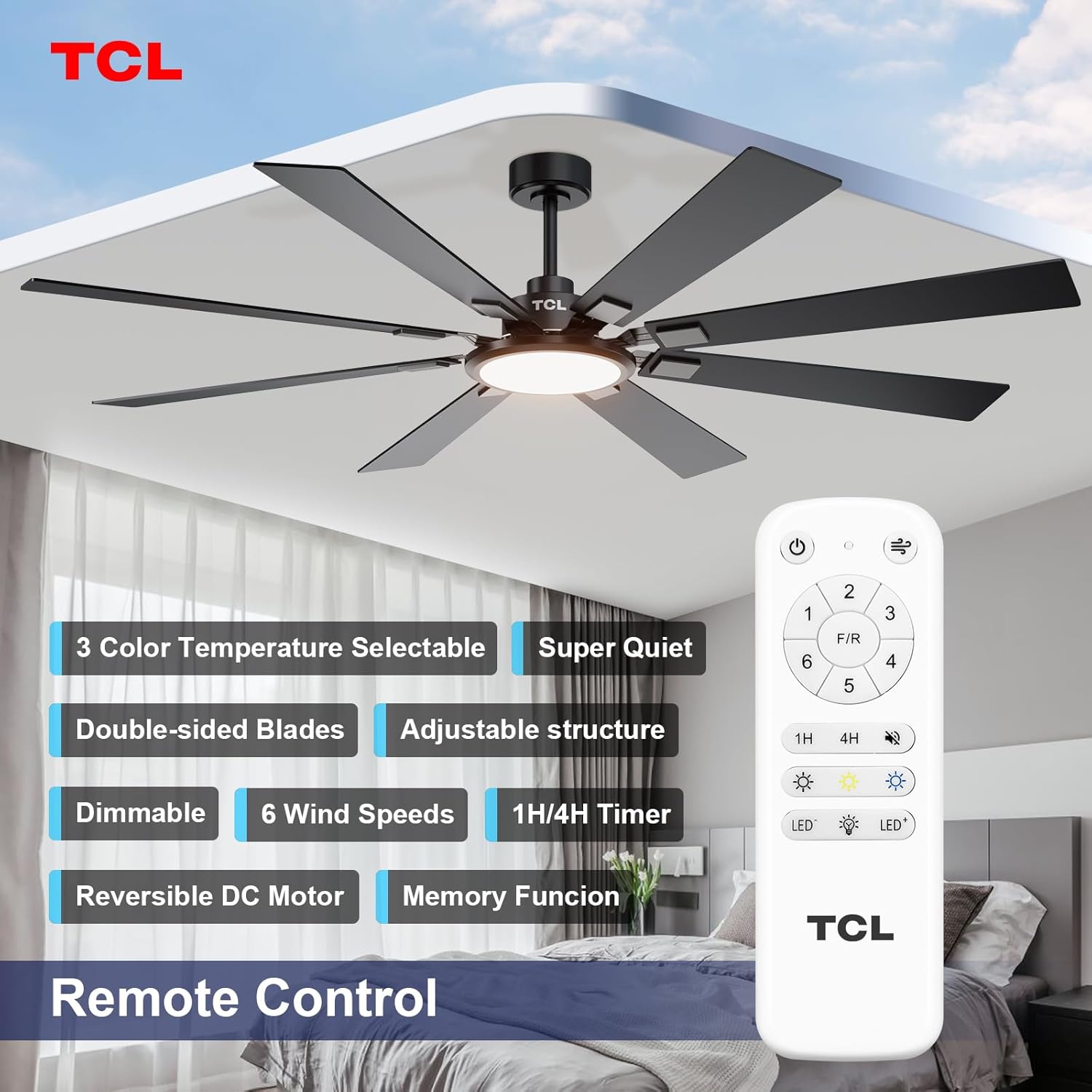
Umfanekiso 3: Ukuhlelwa Kwesilawuli Esikude
Ukulawula Isivinini Sabalandeli
The fan features 6 adjustable speeds to suit your comfort needs. Use the '1' through '6' buttons on the remote to select your desired speed.
- Amazinga 1-2: Low, comfortable wind for gentle air circulation.
- Amazinga 3-4: Medium, natural wind for moderate cooling.
- Amazinga 5-6: High, powerful wind for maximum cooling.
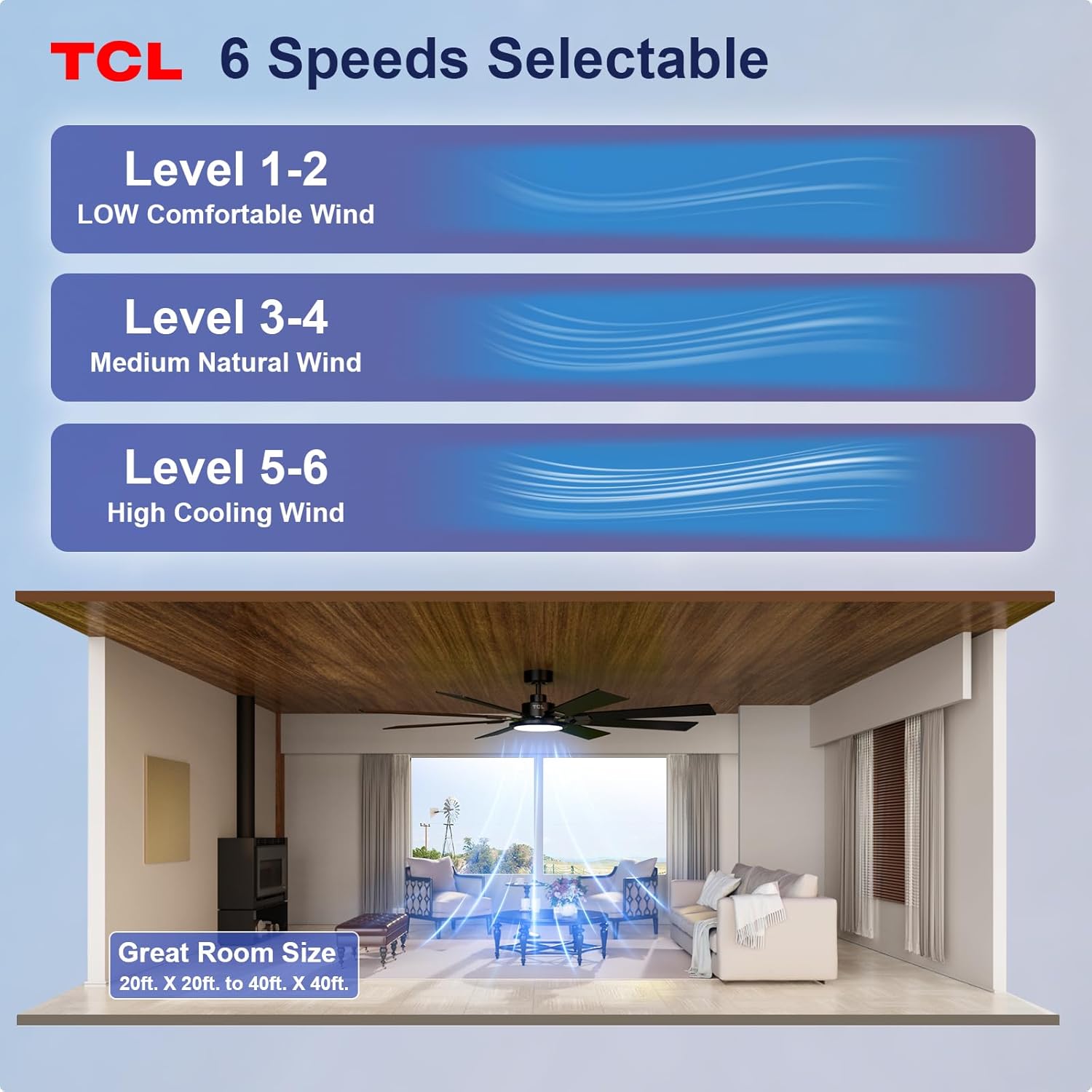
Figure 4: Fan Speed Settings
Ukusebenza Okulula
The integrated LED light offers dimmable brightness and 3 color temperature options:
- Khanyisa cisha: Use the light button on the remote to turn the light on or off.
- Ukucwilisa: Use the dimming buttons (up/down arrows) to adjust brightness from 10% to 100%.
- Izinga lokushisa lombala: Cycle through 3000K (Warm White), 4000K (Natural White), and 6000K (Cool White) using the color temperature button.
- Umsebenzi Wenkumbulo: The fan remembers your last light setting (brightness and color temperature) when turned off and on again. To ensure memory function works correctly, wait at least 20 seconds after turning off the light before turning it back on.

Figure 5: Customizable Light Settings
I-DC Motor Ehlehliswayo
The fan features a reversible DC motor, allowing you to change the direction of airflow for year-round comfort. Use the 'F/R' button on the remote control.
- Imodi Yasehlobo (Umoya Ohamba Phansi): Blades rotate counter-clockwise, creating a downward breeze that provides a cooling effect.
- Imodi Yasebusika (Umoya Ohamba Phezulu): Blades rotate clockwise, drawing cool air up and pushing warm air down from the ceiling, helping to balance indoor heating.

Figure 6: Reversible DC Motor Function
Umsebenzi Wesibali sikhathi
Set the fan to automatically turn off after a specified period using the timer buttons (1H/4H) on the remote control.
Ukusebenza Kuthule
The fan is designed for noiseless operation, ensuring a peaceful environment.

Figure 7: Noiseless Operation Comparison
Amavidiyo Okusebenza
Ividiyo 2: Ngaphezuluview of the TCL ceiling fan, highlighting its modern design and large size suitable for various rooms.
Video 3: Demonstrates the cooling power and stylish lighting features of the TCL ceiling fan.
Ividiyo 4: I-over ebanziview of the TCL ceiling fan's features and benefits.
Isondlo
Ukunakekelwa okuvamile kuqinisekisa ukusebenza kahle futhi kwandisa ubude bempilo yefeni lakho losilingi.
- Ukuhlanza: Hlanza ama-fan nezindlu zenjini ngezikhathi ezithile ngesithambile, damp indwangu. Ungasebenzisi izinto zokuhlanza abrasive noma izincibilikisi. Qinisekisa ukuthi amandla avaliwe ngaphambi kokuhlanza.
- Ukuhlolwa kwe-Blade: Check fan blades for any cracks or damage. Replace damaged blades immediately.
- Qinisa izikulufu: Over time, screws may loosen. Periodically check and tighten all screws on the motor housing and blade attachments.
- Isembozo Esikhanyayo: Ensure the light cover is securely fastened.
Ukuxazulula inkinga
Uma uhlangabezana nezinkinga nomlandeli wakho, bheka izinkinga nezixazululo ezilandelayo ezivamile:
| Inkinga | Imbangela Engenzeka | Isixazululo |
|---|---|---|
| Umlandeli akaqali | Akukho mandla kufeni; Ukuxhumeka kwentambo okuxegayo; Ibhethri lokulawula kude liphelile. | Hlola i-circuit breaker; Qinisekisa ukuthi zonke izintambo zixhumekile ziphephile; Buyisela amabhethri okulawula okude. |
| Ukukhanya akusebenzi | Loose wire connection; LED panel issue. | Check light kit wiring; Contact customer support if LED panel is faulty. |
| Ukuqhaqhazela ngokweqile | Ama-blade axegayo noma ihadiwe yokufaka; Ama-blade angalingani. | Ensure all blade screws and mounting screws are tight; Use a balancing kit (not included) if necessary. |
| Ukusebenza okunomsindo | Izikulufu ezixegayo; Inkinga yenjini. | Qinisa zonke izikulufo; Uma umsindo uqhubeka, xhumana nosekelo lwamakhasimende. |
Imininingwane
Detailed technical specifications for the TCL 62-inch ceiling fan:
| Isici | Imininingwane |
|---|---|
| Ibhrendi | I-TCL |
| Inombolo Yemodeli | HFSB-000000D |
| Usayizi | 62 amayintshi |
| Umbala | Mnyama |
| Okubalulekile | Insimbi, Izinkuni |
| Isitayela | Okwesimanje |
| Ukusetshenziswa Kwangaphakathi/Kwangaphandle | Ngaphakathi, Ngaphandle |
| Umthombo wamandla | DC |
| Indlela Yokulawula | Isilawuli kude |
| Umthombo Wokukhanya | I-LED |
| Inombolo Yemithombo Yokukhanya | 1 |
| Voltage | 120 volts |
| Umbala Okhanyayo | Warm to Cool White (2700K-6500K) |
| Wattage | 66 watts |
| Ukukhanya | I-Lumen ka-3000 (Ubukhulu) |
| Ukusebenza kahle | I-LED, Iyacimeka |
| Isisindo sento | 12.4 Amakhilogremu |
| Ubukhulu (L x W x H) | 72"L x 72"W x 20"H (Note: Product is 62-inch, this dimension might refer to overall span) |
| I-UPC | 846042019989 |
Iwaranti kanye Nokusekela
Ulwazi Lwewaranti
This TCL ceiling fan is covered by a limited manufacturer's warranty. Please refer to the warranty card included in your product packaging for specific terms, conditions, and duration. Retain your proof of purchase for warranty claims.
Ukwesekwa Kwamakhasimende
For technical assistance, troubleshooting not covered in this manual, or warranty inquiries, please contact TCL customer service. Contact information can typically be found on the product packaging or the official TCL webindawo.