
1. Isingeniso
This manual provides essential information for the safe and efficient operation of your DATOUBOSS 48V 300Ah LiFePO4 Powerwall Lithium Battery. Please read this manual thoroughly before installation and use, and retain it for future reference. This battery is designed for deep cycle energy storage in various applications including home backup, solar power systems, RVs, and off-grid setups.

Figure 1: DATOUBOSS 48V 300Ah LiFePO4 Powerwall Lithium Battery.
2. Ulwazi Lokuphepha
ISEXWAYISO: Ukwehluleka ukulandela lezi ziqondiso zokuphepha kungase kubangele ukushaqeka kukagesi, umlilo, ukulimala okubi kakhulu, noma ukufa.
- Always wear appropriate personal protective equipment (PPE) including insulated gloves and eye protection when handling batteries.
- Ungawafinyezi amatheminali ebhethri.
- Do not expose the battery to fire, high temperatures, or direct sunlight.
- Ungacwilisi ibhethri emanzini noma kolunye uketshezi.
- Qinisekisa ukungena komoya ngendlela efanele ngesikhathi sokufakwa nokusebenza.
- Gcina ibhethri likude nezingane nezilwane ezifuywayo.
- Only use compatible chargers and inverters.
- Do not attempt to open, disassemble, or repair the battery. Contact qualified personnel for service.
- Lahla amabhethri ngokwemithetho yendawo.
- Ensure the installation environment is free from flammable materials.

Umdwebo 2: Ngaphezuluview of the battery's multiple protection functions, including overvoltage, overcharge, overdischarge, short circuit, and temperature protections.
3. Umkhiqizo Uphelileview
3.1 Izici ezibalulekile
- High-Quality LiFePO4 Cells: Utilizes A-grade LiFePO4 cells for durability and long cycle life (up to 15,000 cycles).
- Advanced 210A BMS: Integrated Battery Management System provides comprehensive protection against various electrical faults.
- I-Smart LCD Display: Real-time monitoring of voltage, State of Charge (SOC), temperature, and BMS status.
- Izixhumi zokuxhumana: Equipped with RS485, CAN, and RS232 for wide inverter compatibility and remote monitoring.
- Scalable Energy Storage: Supports parallel connection of multiple units for increased capacity.
- Ukufakwa Okuguquguqukayo: Designed for both floor-standing and wall-mounted configurations.
- Mobility Design: Optional wheels/pulleys for easy relocation.
3.2 Okuqukethwe Kwephakheji
Qinisekisa ukuthi zonke izinto zikhona kuphakheji:

Figure 3: Contents of the product package, including the battery pack, mounting bracket, wall-mount brackets, battery connection cables, communication cable, screws, and instruction manual.
- Finished home energy storage battery pack (1 unit)
- Ibhulakhethi Yokufaka (iyunithi eli-1)
- Wall-Mount Brackets (2 units)
- Positive Battery Connection Cable (1 unit)
- Negative Battery Connection Cable (1 unit)
- Communication cable (1 unit)
- Screws (Set)
- Instruction manual (1 unit)
3.3 Ukuhlonza Ingxenye

Umfanekiso 4: Okuningiliziwe view of the battery's control panel and ports, including DIP switches, RS485, CAN, RS232 communication ports, reset switch, indicators, battery terminals, push button switch, and air switch.
- DIP Address: Switches for parallel communication address selection.
- RS485 (External Communication): Port for external communication.
- I-RS232: Reserve communication port.
- INGABE: External communication port.
- Setha kabusha Shintsha: Reboots or shuts down the unit when pressed.
- Switching Indicator: Shows switch status.
- Inkomba yokusebenza: Ibonisa isimo sokusebenza.
- Isikhombi se-alamu: Alerts for system issues.
- Inkomba Yebhethri: Shows remaining capacity.
- Battery Positive Terminal: Positive connection point.
- Battery Negative Terminal: Negative connection point.
- Ukushintsha Inkinobho Yokucindezela: Controls power on/off.
- Ukushintsha komoya: Disconnects input and output.
- I-LCD: Touchscreen display for monitoring and control.
4. Ukusetha nokufakwa
4.1 Ukukhetha Indawo Yokufaka
- Do not install the battery pack on flammable building materials.
- It should be installed on a solid surface.
- It is recommended to install the battery box at eye level for easy LCD display readability.
- The ambient temperature should be between 0°C and 55°C for optimal operation.
- It is recommended to install vertically on the wall.
- Ensure sufficient heat dissipation space and wiring removal space (at least 20cm/7.8in from sides, 50cm/19.6in from top/bottom).

Figure 5: Illustration of recommended clearances for wall-mounted installation, showing minimum distances from surrounding surfaces for proper ventilation and access.
4.2 Installation Steps (Wall Mount)
- First, fix the mounting bracket to the wall using expansion screws.
- Fix the wall-mount brackets to the back shell of the machine with short screws.
- Hang the battery unit onto the fixed wall bracket.
Note: Only suitable for installation on concrete or other non-flammable surfaces.
4.3 Ukuxhunywa kukagesi
Connect the positive and negative battery cables to your inverter or load according to the inverter's manual. Ensure all connections are secure and correctly polarized.
WARNING: Incorrect wiring can cause severe damage to the battery and connected equipment, and poses a fire hazard.
4.4 Ukuxhumana Okufanayo (Ongakukhetha)
Multiple units can be connected in parallel to increase total energy storage capacity. Up to 15 units can be connected in parallel.

Figure 6: Visual representation of how multiple DATOUBOSS battery units can be connected in parallel to expand energy storage capacity.
When connecting battery packs in parallel, use the DIP addressing function. If DIP6 is connected to ON, use the default automatic address assignment. Otherwise, use the DIP switch on the BMS to set the address to distinguish different data packets.

Figure 7: Explanation of DIP switch settings for addressing multiple battery units in a parallel configuration, including binary address assignments.

Figure 8: Diagram illustrating parallel wiring instructions and examples of automatic address assignment for multiple battery units.
5. Ukusebenza
5.1 Ukuvula / Ukuvula
To power on the battery, ensure the air switch is in the "ON" position, then press the push button switch. To power off, reverse the process.
5.2 LCD Display and Monitoring
The high-definition color LCD screen provides real-time information about the battery's status. You can switch between multiple pages for detailed data.
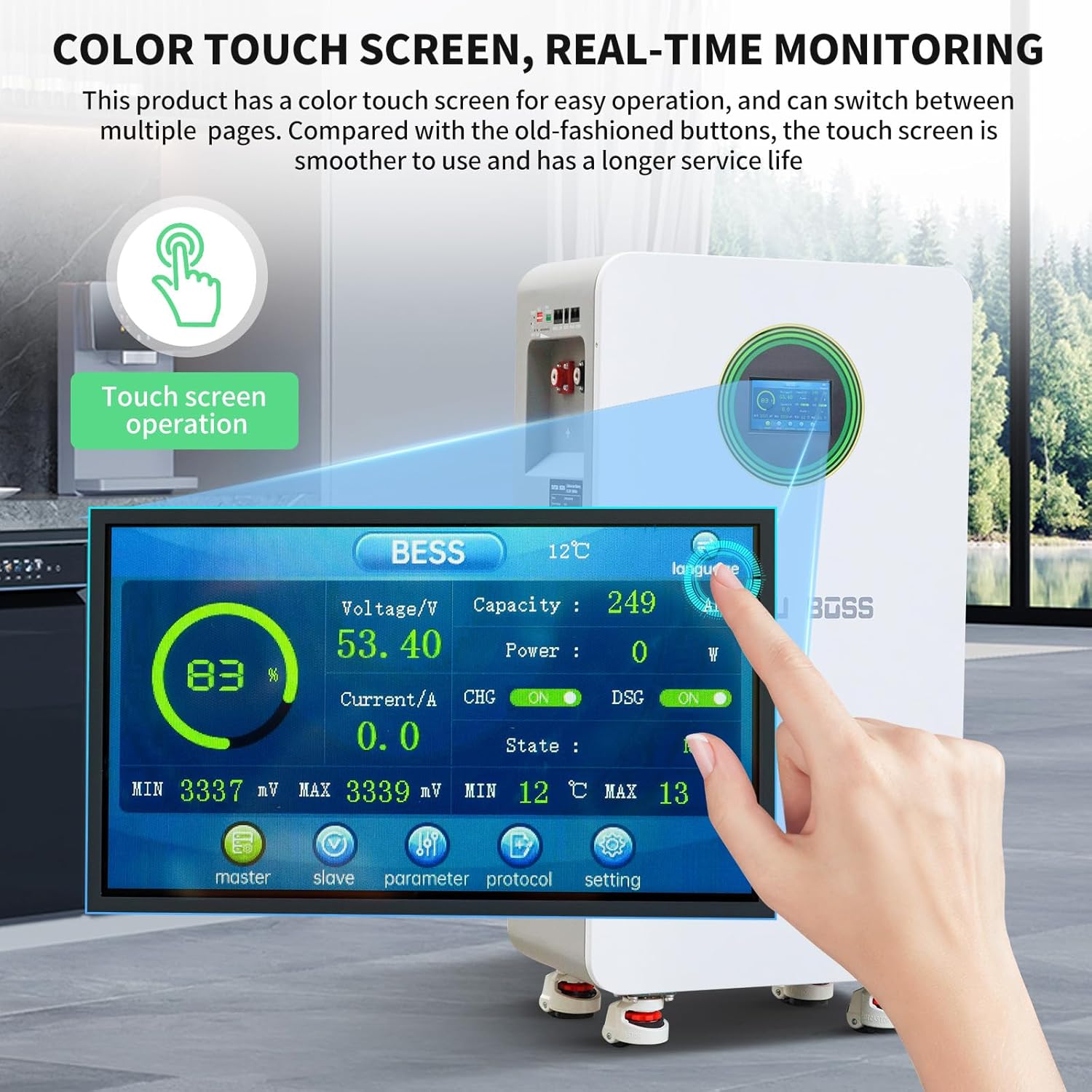
Figure 9: Close-up of the color touch screen displaying real-time battery parameters such as voltage, capacity, power, current, state of charge (SOC), and temperature.
Isibonisi sibonisa:
- Voltage (V)
- Capacity (SOC %)
- Amandla (W)
- Okwamanje (A)
- Izinga lokushisa (°C)
- BMS Status (CHG/DSG, ON/OFF)
5.3 Izixhumanisi Zokuxhumana
The battery supports RS485, CAN, and RS232 communication protocols for integration with various inverters and monitoring systems. This allows for remote monitoring, control, and parameter adjustments.

Figure 10: Diagram showing the RS485, CAN, and RS232 communication ports and a table defining the pin assignments for each interface.
Interface Definition Table:
| Izixhumi ezibonakalayo | RS485 | CAN | RS232 | RS485 | ||||
|---|---|---|---|---|---|---|---|---|
| Incazelo Esebenzayo | Connection to host computer or Inverter | Connection to host computer or Inverter | Ukuxhumana okuhambisanayo | Ukuxhumana okuhambisanayo | ||||
| Phina Izincazelo | I-PIN | Incazelo | I-PIN | Incazelo | I-PIN | Incazelo | I-PIN | Incazelo |
| 1, 8 | I-RS485-B1 | 1, 8 | NC | 1, 2, 6 | NC | 1, 8 | I-RS485-B2 | |
| 2, 7 | I-RS485-A1 | 2, 7 | NC | 3 | TX | 2, 7 | I-RS485-A2 | |
| 4 | NC | 4 | I-CANH1 | 4 | RX | 4 | NC | |
| 5 | NC | 5 | I-CANH1 | 5 | GND | 5 | NC(L)/OUT(R) | |
| 3, 6 | GND | 3, 6 | GND | 3, 6 | GND | |||
6. Isondlo
- Ukuhlola Okuvamile: Periodically check the battery for any physical damage, loose connections, or signs of overheating.
- Ukuhlanza: Keep the battery surface clean and free from dust and debris. Use a dry, soft cloth for cleaning. Do not use liquids.
- Ukungenisa umoya: Ensure that the ventilation openings are not obstructed to allow for proper heat dissipation.
- Izinga lokushisa: Operate the battery within the recommended temperature range (0°C to 55°C).
- Ukuvuselelwa kwe-Firmware: If available, regularly check for and apply firmware updates for the BMS to ensure optimal performance and security.
7. Ukuxazulula izinkinga
This section provides solutions to common issues. For problems not listed here, please contact customer support.
| Inkinga | Imbangela Engenzeka | Isixazululo |
|---|---|---|
| Battery not powering on | Air switch off, push button not pressed, low battery voltage, internal fault. | Ensure air switch is ON. Press the push button. Check battery voltage on LCD. If fault persists, contact support. |
| Awekho amandla okukhiphayo | Overload, short circuit, BMS protection activated, loose connections. | Reduce load. Check for short circuits. Verify all connections are secure. Check alarm indicator on LCD. Reset if necessary. |
| Communication error with inverter | Incorrect cable, wrong port, incompatible protocol, incorrect DIP switch settings. | Verify communication cable type and connection. Ensure correct port is used. Check inverter compatibility and protocol settings. Adjust DIP switches for parallel units. |
| Ibhethri lishisa ngokweqile | Poor ventilation, excessive load, high ambient temperature. | Ensure adequate clearance around the battery. Reduce load. Move to a cooler environment if possible. |
8. Imininingwane
The following table details the technical specifications of the DATOUBOSS 48V 300Ah LiFePO4 Lithium Battery.

Figure 11: Key technical specifications of the DATOUBOSS 48V 300Ah Lithium Iron Phosphate battery, including capacity, voltage, current, cycle life, and communication protocols.
| Ipharamitha | Inani |
|---|---|
| Imodeli | 48V 300Ah LiFePO4 Ibhethri Lithium |
| Amandla ebhethri | 15.36kWh (48V 300Ah) |
| Ikaliwe Ivolumu Yokusebenzatage | I-51.2V (DC) |
| Okukhiphayo Okuphezulu Kwamanje | 210A |
| Okokufaka Okujwayelekile Kwamanje | 150A (maximum 210A) |
| Imali Ephakeme Yamanje | 215A/2 imizuzwana |
| Ukuphakama Kokukhishwa Kwamanje | 215A/2 imizuzwana |
| Power-off Self Consumption | <300uA |
| Battery Cycle Life (25°C, 70% SOH) | ≥8000 imijikelezo |
| Battery Cycle Life (45°C, 70% SOH) | ≥3000 imijikelezo |
| Izivumelwano Zokuxhumana | RS232, RS485, CAN |
| Ubukhulu (L x W x H) | 453 x 260 x 879 mm (17.83 x 10.24 x 34.65 amayintshi) |
| Isisindo sento | 110 kg (242 pounds) |
| I-Overvoltage Ukuvikelwa | 58.4V |
| Ukubuyiselwa Kwemali Eningi Yokuvikela | 54.0V |
| Ukuvikelwa kokukhipha ngokweqile | 43.2V |
| Overdischarge Protection Recovery (within 30 seconds) | 48V (iyalungiseka) |
| Shaja Ukuvikelwa Kwezinga Lokushisa Eliphezulu | 50°C |
| Shaja Ukutholwa Kokuvikelwa Kwezinga Lokushisa Okuphezulu | 45°C (adjustable) |
| Shaja Ukuvikelwa Kwezinga Lokushisa Eliphansi | 0°C (adjustable) |
| Charge Cryoprotection Recovery | 5°C |
| Discharge Over-Temperature Protection | 50°C |
| Discharge Over-Temperature Protection Recovery | 45°C |
| Ukuvikelwa Kwezinga Lokushisa Eliphansi | -15°C |
| Low Temperature Protection Recovery | -10°C |
| Ishaja i-Overcurrent | 215A |
| Khipha Ukuvikelwa Kwesikhathi Esidlule | 215A |
| Ukuvikelwa Kwesifunda Esifushane | Recovery method: "Charge Removal, Load Removal" |
| Amount Of Electricity Shipped | 40% kuya ku-60% |
| Ukulinganisa | Passive equilibrium |
9. Iwaranti kanye Nokusekela
DATOUBOSS provides a Iwaranti yonyaka ongu-10 for this battery. This warranty covers quality issues under normal use and service conditions.
For any issues or inquiries, please contact DATOUBOSS customer support. We aim to respond and assist within 24 hours.

Figure 12: Image depicting professional customer support representatives, indicating available assistance for product inquiries.