
1. Isingeniso
The Radioddity X1 Walkie Talkies are designed for reliable two-way communication in various environments. Featuring an IP67 waterproof and dustproof rating, durable construction, and advanced noise reduction, these FRS radios are suitable for outdoor adventures, professional use, and emergency situations. They offer a long communication range and include essential features like NOAA weather alerts and voice-activated transmission (VOX).

Image: The Radioddity X1 Walkie Talkie, showcasing umklamo wayo oqinile.
2. Yini EseBhokisini
Upon opening your Radioddity X1 package, you should find the following items:
- 2 x Radioddity X1 Walkie Talkies
- 2 x Amabhethri Aphinde Ashajwe
- 1 x 2-in-1 USB-C Charging Cable
- 2 x Iziqeshana Zebhande
- 2 x Hand Straps
- 1 x Ama-adaptha
- 1 x Incwadi Yomsebenzisi (le dokhumenti)

Image: All components included in the Radioddity X1 package, including two radios, batteries, charging cable, belt clips, hand straps, and adapters.
3. Setha
3.1. Ukufakwa kwebhethri
- Qinisekisa ukuthi i-walkie talkie icishiwe.
- Thola indawo yebhethri ngemuva kweyunithi.
- Align the battery with the contacts and gently push it into the compartment until it clicks into place.
3.2. Ukushaja Ibhethri
The Radioddity X1 features a 2500mAh rechargeable lithium battery. For optimal performance, fully charge the battery before first use.
- Connect the provided USB-C charging cable to the charging port on the walkie talkie.
- Connect the other end of the USB-C cable to the adapter, and then plug the adapter into a standard power outlet. Alternatively, you can connect the USB-C cable to a compatible USB power source (e.g., computer, power bank).
- The battery indicator on the display will show charging status. A full charge typically takes several hours.
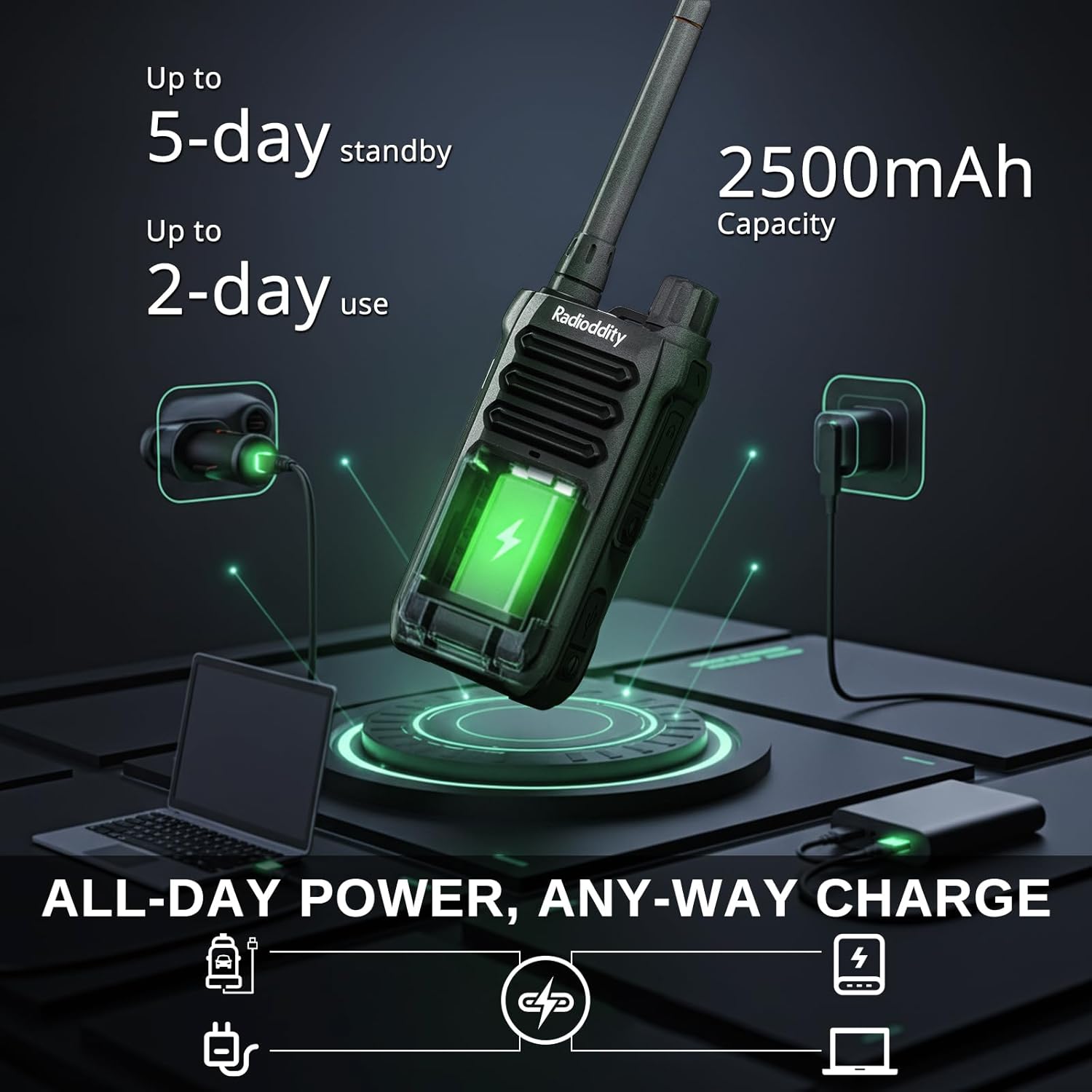
Image: The Radioddity X1 Walkie Talkie connected to a USB-C charger, illustrating the charging process.
3.3. Ukunamathisela Izesekeli
- Isiqeshana sebhande: Secure the belt clip to the designated slot on the back of the walkie talkie.
- Ibhande Lesandla: Thread the hand strap through the loop on the top or side of the walkie talkie for added security.
3.4. Ukuvula/Ukucisha
To power on or off the device, rotate the power/volume knob located on the top of the unit clockwise to turn on, and counter-clockwise until it clicks to turn off.
4. Iziqondiso Zokusebenza
4.1. Ukukhethwa Kwesiteshi
The Radioddity X1 comes pre-programmed with 22 FRS channels. To select a channel:
- Cindezela inkinobho IMENU inkinobho yokufaka imenyu.
- Sebenzisa i- Umcibisholo Waphezulu/Phansi buttons to navigate to the channel setting.
- Cindezela OK ukuze uqinisekise, bese usebenzisa i Umcibisholo Waphezulu/Phansi izinkinobho zokukhetha isiteshi osithandayo (1-22).
- Cindezela OK again to save the selection and IMENU ukuphuma.
4.2. Privacy Codes (CTCSS/DCS)
The radio supports 155 privacy codes (CTCSS/DCS) to filter out unwanted conversations on a channel. While not providing true privacy, these codes ensure you only hear transmissions from radios set to the same channel and code.
- Cindezela inkinobho IMENU inkinobho.
- Navigate to the CTCSS or DCS setting using the Umcibisholo Waphezulu/Phansi izinkinobho.
- Cindezela OK, then select your desired code.
- Cindezela OK ukusindisa futhi IMENU to exit. Ensure all radios in your group use the same channel and privacy code.
4.3. I-Push-to-Talk (PTT)
To transmit, press and hold the large I-PTT button on the side of the radio. Speak clearly into the microphone. Release the I-PTT inkinobho yokulalela.
4.4. VOX Function (Voice Operated Transmission)
The VOX function allows for hands-free operation. When activated, the radio transmits automatically when it detects your voice.
- Cindezela inkinobho IMENU inkinobho.
- Zulazulela ku- I-VOX ukulungiselelwa.
- Cindezela OK, then select an appropriate sensitivity level (higher numbers for lower sensitivity).
- Cindezela OK ukusindisa futhi IMENU ukuphuma.

Image: Icon representing the Voice Operated Transmission (VOX) function.
4.5. Izaziso Zesimo Sezulu se-NOAA
Stay informed with 10 built-in NOAA weather channels providing real-time alerts.
- Cindezela inkinobho IMENU inkinobho.
- Zulazulela ku- NOAA ukulungiselelwa.
- Cindezela OK, then select the desired NOAA channel or activate weather alerts.
- Cindezela OK ukusindisa futhi IMENU ukuphuma.

Image: Icon representing the NOAA Scan & Alert feature.
4.6. Recording Playback
The Radioddity X1 features a unique recording playback function for up to 20 messages.
- To record, press and hold the dedicated IREKHODI button (if available, or refer to specific menu options).
- To play back recorded messages, press the DLALA futhi inkinobho.

Image: The Radioddity X1 display showing the recording and replay functions, highlighting its audio safety net capability.

Image: Icon representing the Recording function.
4.7. Ukunciphisa Umsindo
The dual-way noise reduction feature ensures clear communication even in noisy environments.

Image: The Radioddity X1 in a construction setting, illustrating its noise reduction capabilities for clear communication.
5. Isondlo
5.1. IP67 Waterproof and Dustproof Care
The Radioddity X1 is rated IP67, meaning it is dustproof and can withstand submersion in up to 1 meter of water for 30 minutes. To maintain its integrity:
- Ensure all port covers (e.g., charging port, accessory port) are securely closed before exposure to water or dust.
- After exposure to water, wipe the radio dry with a clean cloth. Do not charge the radio if the charging port is wet.
- Avoid prolonged submersion beyond the specified depth and time.

Image: The Radioddity X1 Walkie Talkie submerged in clear water, demonstrating its IP67 waterproof capability.

Image: The Radioddity X1 Walkie Talkie partially covered in sand, highlighting its dustproof design.
5.2. Ukunakekelwa Kwebhethri
The 2500mAh battery provides up to 48 hours of average use. To prolong battery life:
- Avoid fully discharging the battery regularly.
- Gcina umsakazo endaweni epholile, eyomile uma ungasetshenziswa.
- Sebenzisa kuphela ikhebuli yokushaja enikeziwe kanye ne-adaptha.
5.3. Ukuhlanza
Sula umsakazo ngento ethambile, damp indwangu. Ungasebenzisi amakhemikhali anokhahlo noma izihlanzi ezilumayo.
6. Ukuxazulula izinkinga
| Inkinga | Imbangela Engenzeka | Isixazululo |
|---|---|---|
| Awekho amandla | Ibhethri liphansi noma alifakwanga kahle. | Charge the battery or re-install it. |
| Ayikwazi ukudlulisa noma ukwamukela | Incorrect channel or privacy code. Out of range. | Verify channel and privacy code settings. Move closer to the other radio. |
| Ikhwalithi yomsindo engeyinhle | Weak signal, interference, or volume too low. | Adjust volume. Move to an area with less obstruction. Check for interference sources. |
| Ibanga lokuxhumana elifushane | Obstructions (buildings, terrain), low power channel. | Move to an open area. Use channels 1-7 or 15-22 for higher power output. |
7. Imininingwane
| Isici | Imininingwane |
|---|---|
| Ibhrendi | I-Radioddity |
| Inombolo Yemodeli | X1 |
| Umbala | Mnyama |
| Inombolo Yeziteshi | 22 (FRS) |
| I-Frequency Range | FRS |
| Talking Range Maximum | 5 Miles (open areas), 2 Miles (urban settings) |
| Izinga Lokumelana Namanzi | IP67 Ingangeni manzi |
| Izici ezikhethekile | Dust Proof, Emergency Alarm (SOS), Long Range, Shockproof, Voice Operated Transmission (VOX), Noise Reduction, NOAA Weather Alerts, Recording Playback |
| Amandla ebhethri | I-2500mAh Lithium |
| Impilo Emaphakathi Yebhethri | Amahora angu-48 |
| Iyashaja | I-USB-C |
| Ubukhulu bomkhiqizo (D x W x H) | 1.1" x 2.4" x 7.1" |
| I-ID ye-FCC | 2AN62-X1 |

Image: Visual representation of the Radioddity X1's communication range, showing up to 5 miles in open areas and 2 miles in urban settings.

Image: The Radioddity X1 Walkie Talkie on the ground at a construction site, illustrating its durability and shockproof design after 1,000+ drop tests.
8. Iwaranti & Ukusekela
8.1. Ulwazi Lwewaranti
The Radioddity X1 Walkie Talkies come with an Iwaranti yezinyanga eziyi-18 from the date of purchase. This warranty covers manufacturing defects and ensures your product is free from material and workmanship flaws under normal use. Please retain your proof of purchase for warranty claims.
8.2. Ukwesekwa Kwamakhasimende
For technical assistance, troubleshooting, or warranty inquiries, please visit the official Radioddity website or contact their customer support team. You can find contact information and additional resources on their webindawo: www.radioddity.com.
9. Amavidiyo Omkhiqizo
Radioddity X1 | Built for Harsh Conditions
Video: This official Radioddity video demonstrates the X1's robust features, including its IP67 dustproof and waterproof capabilities, drop resistance, car-crush resistance, long-range communication, and noise-cancelling audio, highlighting its suitability for challenging environments.