
1. Isingeniso
This manual provides essential information for the safe and efficient operation of your DATOUBOSS 48V 6200W Hybrid Solar Inverter. This device is a pure sine wave inverter designed to convert 48V DC to 220/230V AC, featuring a 120A MPPT solar charge controller and support for 48V lithium batteries with BMS protection. It is suitable for various applications, including home use, RVs, yachts, and emergency power systems.
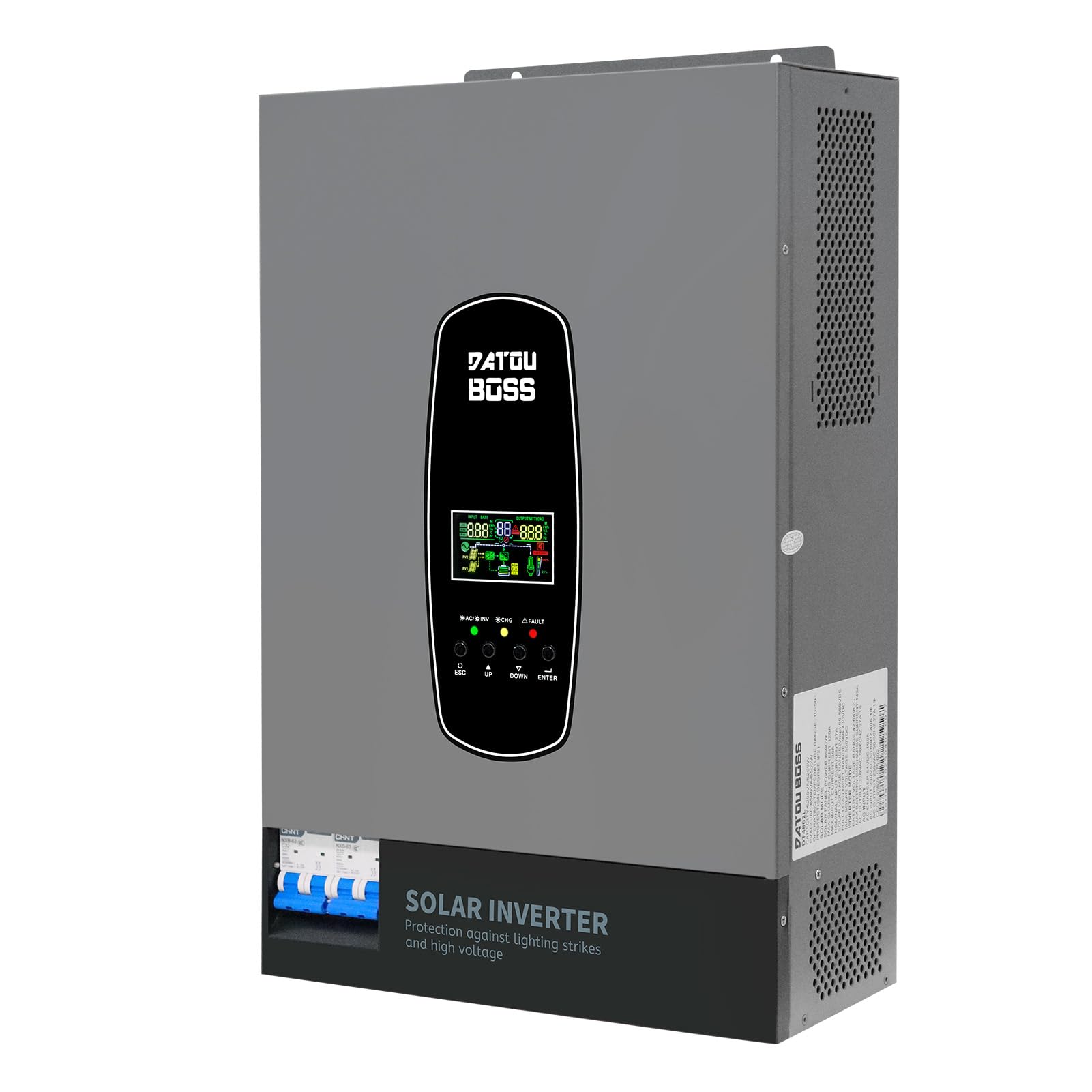
Image 1: DATOUBOSS 6200W Hybrid Solar Inverter. This image displays the front view of the inverter, highlighting its compact design and integrated display.
2. Ulwazi Lokuphepha
Read all instructions and warnings carefully before installation and operation. Failure to follow these instructions may result in electric shock, fire, or serious injury. Keep this manual for future reference.
- Ukuphepha Kagesi: Ensure all wiring is performed by qualified personnel. Disconnect all power sources (PV, battery, AC grid) before performing any maintenance or wiring.
- Ukungenisa umoya: Install the inverter in a well-ventilated area to prevent overheating. Maintain adequate clearance around the unit.
- Imvelo: Avoid installing the inverter in direct sunlight, high humidity, or dusty environments.
- Ukuphepha Kwebhethri: Always connect batteries with correct polarity. Ensure battery cables are securely fastened. This inverter supports lithium batteries with BMS protection.
- Lightning and Surge Protection: The inverter features built-in lightning and surge protection. However, additional external protection may be required depending on local regulations and installation environment.

Image 2: Illustration of the inverter's lightning and high-voltage protection features, showing a house with solar panels and the inverter shielded from lightning.
3. Umkhiqizo Uphelileview
The DATOUBOSS 48V 6200W Hybrid Solar Inverter is designed for optimal energy management. It integrates a powerful inverter, a high-efficiency MPPT solar charger, and a battery charger into a single unit. The unit features a clear LCD display for real-time system data and operational status, along with intuitive control buttons.
3.1 Izici ezibalulekile
- Okuphumayo kwe-Pure Sine Wave: Ihlinzeka ngamandla e-AC ahlanzekile futhi azinzile afanele izinto zikagesi ezibucayi.
- Amandla Aphezulu Amandla: 6200W battery inverter output, 6500W PV inverter output, with 8500W maximum PV input power.
- Advanced MPPT Controller: 120A MPPT solar charge controller with a wide PV voltagububanzi be-e (60-500VDC).
- Ukuhambisana Kwebhethri: Supports 48V lithium batteries with BMS protection and features a lithium battery activation function.
- Ukusebenza Kwamahhala: Capable of powering loads directly from PV/AC source without a battery.
- Ukuvikela Okuthuthukisiwe: Includes lightning protection, overvoltage protection, input/output safety switches, and EMI filtering.
- Isixhumi esibonakalayo esisebenziseka kalula: LCD display and LED indicators provide dynamic system data and error codes for easy troubleshooting.
3.2 Ukuhlonza Ingxenye

Isithombe 3: Okuningiliziwe view of the inverter's front, left, and right sides, showing the LCD display, safety switches, and various connection ports.
The inverter features an intuitive LCD display on the front panel for monitoring and configuration. The rear panel houses various connection terminals for AC input, AC output, PV input, battery connections, and communication ports (RS485, RS232). Safety switches are integrated for enhanced protection.
4. Setha
Proper installation is crucial for the inverter's performance and safety. Follow these steps carefully.
4.1 Ukuvula nokuhlola
Upon receiving your inverter, carefully open the packaging and inspect the unit for any signs of damage. Ensure all accessories listed in the packing list are present.
Video 1: This video demonstrates the unboxing and initial inspection of a DATOUBOSS inverter, showing the contents of the package and the physical appearance of the unit.
4.2 Ukufaka i-Inverter
Choose a suitable location for mounting, ensuring it is vertical, well-ventilated, and protected from direct sunlight and moisture. Use appropriate mounting hardware to secure the inverter firmly to a wall or sturdy surface.
4.3 Ukuxhunywa kukagesi
All electrical connections must comply with local and national electrical codes. It is highly recommended to have a licensed electrician perform the wiring.
- Uxhumano Lwebhethri: Connect the 48V battery bank to the designated BATTERY terminals on the inverter. Ensure correct polarity (+ to + and - to -). It is recommended to install a fuse or circuit breaker between the battery and the inverter.
- Ukuxhumeka Kokufaka kwe-PV: Connect your solar panel array to the PV INPUT terminals. Verify that the PV voltage and current are within the inverter's specifications (Max PV input: 8500W, MPPT voltage range: 60-500VDC).
- AC Input/Output Connection: Connect the AC grid input to the AC INPUT terminals and your household loads to the MAIN OUTPUT and SECOND OUTPUT terminals. Ensure proper grounding.

Image 4: The inverter with various cables connected to its input and output ports, illustrating a typical setup.
5. Iziqondiso Zokusebenza
Once installed, the inverter is ready for operation. The LCD display and control buttons allow you to monitor and configure the system.
5.1 Ukuvula / Ukuvula
- Ukuvula: Ensure all connections are secure. Turn on the battery breaker, then the PV breaker, and finally the AC input breaker. Press the power button on the inverter.
- Ukucisha: Reverse the power-on sequence: turn off the AC output breaker, then the AC input breaker, then the PV breaker, and finally the battery breaker.
5.2 Isibonisi se-LCD kanye nezinkomba
The LCD display shows real-time operational data such as input/output voltage, current, power, battery status, and charging/discharging modes. LED indicators provide quick status updates:
- I-AC/INV: Indicates AC input or inverter operation.
- I-CHG: Indicates battery charging status.
- IPHUTHA: Indicates a system fault or error.
5.3 Izilungiselelo zepharamitha yebhethri
For optimal performance and battery longevity, configure the battery parameters according to your battery type (especially for lithium batteries). This includes setting charging protection voltage, float charge voltage, and discharge protection voltage.
Video 2: This video provides a step-by-step guide on how to set lithium battery parameters on the inverter's display, including charging protection, float charge, and discharge protection voltages.
5.4 Charging and Discharge Modes
The inverter offers customizable charging and discharge modes:
- Izindlela zokushaja: Hybrid charging (solar and grid), limited solar charging, and pure solar charging.
- Discharge Modes: Solar priority (SUB), grid priority (USB), and battery priority (SBU).
6. Isondlo
Ukugcinwa njalo kuqinisekisa ukuthi i-inverter yakho ihlala isikhathi eside futhi isebenza kahle.
- Ukuhlanza: Periodically clean the inverter's exterior with a dry cloth. Ensure ventilation openings are free from dust and debris.
- Ukuhlola Ukuxhumana: Regularly check all electrical connections for tightness and signs of corrosion. Loose connections can cause overheating and damage.
- Ukuhlola Imvelo: Ensure the installation environment remains within the specified temperature and humidity ranges.
7. Ukuxazulula izinkinga
The inverter's LCD display will show corresponding error codes if a problem occurs. Refer to the full user manual for a comprehensive list of error codes and their solutions. Below are some general troubleshooting tips:
- Awekho Amandla: Check all circuit breakers and fuses. Verify battery connections and voltage.
- Akukho okukhiphayo kwe-AC: Check AC output connections and ensure the inverter is not in fault mode.
- Ibhethri Ayishaji: Verify PV input connections and voltage. Check battery parameters in the settings.
- Ukulayisha ngokweqile: Reduce the connected load. The inverter may automatically restart after an overload condition.
8. Imininingwane
Detailed technical specifications for the DATOUBOSS 48V 6200W Hybrid Solar Inverter:
| Isici | Ukucaciswa |
|---|---|
| Imodeli | DATOUBOSS-6200W |
| Battery Inverter Output Power | 6200 W |
| PV Inverter Output Power | 6500 W |
| Amandla Okufaka we-PV aphezulu | 8500 W |
| I-MPPT Voltage Ibanga | 60 VDC kuya ku-500 VDC |
| Max Open Circuit PV Voltage | 500 VDC |
| Max Solar Input Current | 27 A |
| Max Solar Charge Current | 120 A |
| Max AC Charge Current | 100 A |
| Max Charge Current (PV + AC) | 120 A |
| I-DC Voltage | 48 Volt |
| Umkhiqizo we-AC Voltage | 220/230 V |
| Ubukhulu (L x W x H) | 31 x 13.4 x 46.3 cm |
| Isisindo | 10.4 kg |

Image 5: A close-up of the inverter's specification label, detailing its capacity, operating temperature, protection degree, inverter mode, solar mode, and serial number. Serial:20250402 0077
9. Izicelo
The DATOUBOSS 48V 6200W Hybrid Solar Inverter is versatile and suitable for a wide range of power needs:
- Ukusetshenziswa Kwezindlu: Powering homes with solar energy, reducing reliance on the grid.
- Recreational Vehicles (RVs) & Boats: Providing reliable power for mobile and marine applications.
- Izinhlelo Ezingekho Kugridi: Ideal for remote cabins or locations without grid access.
- Emergency Backup Power: Automatically switches to battery/solar power during grid outages.
- Izicelo Zezentengiso: Suitable for small businesses or agricultural setups.

Image 6: A collage of images illustrating various applications of the hybrid inverter, including home use, RVs, yachts, PV rooftop systems, power generation, agriculture, indoor applications, commercial power, emergency power, and camping.
10. Iwaranti kanye Nokusekela
Your DATOUBOSS Hybrid Solar Inverter comes with a 5-year guarantee, reflecting our commitment to quality and reliability. We also offer a 10-year lifespan for the product. For any technical assistance or inquiries, please contact our specialized technical service team through your Amazon account's reserved area. We provide 24-hour response and have local warehouses for efficient support.