
1. Isingeniso
Thank you for choosing the Antec VCX300 ARGB ATX/M-ATX PC Case. This manual provides detailed instructions for the installation, operation, and maintenance of your new computer chassis. Please read this manual thoroughly before installation to ensure proper setup and optimal performance.
2. Ulwazi Lokuphepha
- Njalo nqamula ugesi ngaphambi kokufaka noma ukususa noma yiziphi izingxenye.
- Handle components with care to avoid damage from electrostatic discharge. Use an anti-static wrist strap if available.
- Keep the case away from water, moisture, and direct heat sources.
- Qinisekisa ukuthi umoya ungena kahle eduze kwekhava ukuze uvimbele ukushisa ngokweqile.
- Do not attempt to open or repair the power supply unit inside the case. Refer to qualified service personnel.
3. Okuqukethwe Kwephakheji
Sicela uqinisekise ukuthi zonke izinto zikhona ephaketheni lakho:
- Antec VCX300 ARGB ATX/M-ATX PC Case
- Accessory Box (Screws, standoffs, cable ties)
- Incwadi Yomsebenzisi (Le dokhumenti)
4. Umkhiqizo Uphelileview
Familiarize yourself with the various parts of your Antec VCX300 ARGB PC Case.
4.1 Iphaneli yangaphambili I/O
- Inkinobho Yamandla
- Setha kabusha Inkinobho
- Izimbobo ze-USB 3.0
- Izimbobo ze-USB 2.0
- Audio Jacks (Headphone/Microphone)
- LED Control Button (for ARGB lighting)
4.2 Ukuhlelwa Kwangaphakathi
The VCX300ARGB case supports ATX and Micro-ATX motherboards. It features multiple drive bays for storage and ample space for cooling solutions.
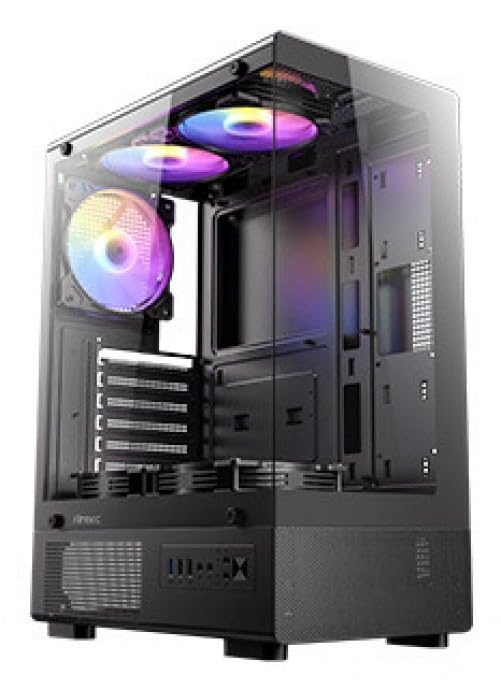
Umfanekiso 1: Ngaphambili view of the Antec VCX300 ARGB PC Case, showcasing the ARGB lighting elements and front panel I/O ports.
5. Ukusetha nokufakwa
Follow these steps to install your components into the Antec VCX300 ARGB PC Case.
5.1 Ukulungiselela Icala
- Beka isikhwama endaweni eyisicaba, eqinile.
- Remove the side panels by unscrewing the thumbscrews at the rear of the case and sliding the panels backward.
5.2 Ukufakwa Kwebhodi Yomama
- Faka isihlangu se-I/O ekuvuleni kwangemuva kwekesi.
- Align the motherboard with the pre-installed standoffs. Ensure the screw holes on the motherboard match the standoffs.
- Secure the motherboard with the provided screws from the accessory box.
5.3 Ukufakwa Kokunikezwa Kwamandla
- Position the power supply unit (PSU) in the designated compartment at the bottom rear of the case.
- Secure the PSU with screws from the outside rear of the case.
5.4 Ukufakwa Kwedrayivu Yesitoreji (i-HDD/i-SSD)
- Locate the drive bays. The VCX300ARGB typically features dedicated bays for 3.5" HDDs and 2.5" SSDs.
- For 3.5" HDDs, slide the drive into the bay and secure it with screws or tool-less clips if available.
- For 2.5" SSDs, mount the drive onto the designated brackets or trays and secure with screws.
5.5 Expansion Card Installation (GPU, etc.)
- Susa izembozo zesikhala sokunweba ezidingekayo ngemuva kwekesi.
- Insert the expansion card (e.g., graphics card) into the appropriate PCIe slot on the motherboard.
- Vikela ikhadi ngesikulufu.
5.6 Ukuphathwa Kwekhebula
Sebenzisa iziqeshana zokuqondisa ikhebula kanye nezindawo zokubopha ngemuva kwethreyi lebhodi lomama ukuphatha izintambo. Lokhu kuthuthukisa ukuhamba komoya kanye nobuhle.
- Connect all power cables from the PSU to the motherboard and components.
- Connect front panel I/O cables (USB, audio, power/reset switches, LED) to the corresponding headers on the motherboard.
- Connect ARGB cables from the case fans/strips to the motherboard's ARGB header or the integrated ARGB controller.
6. Ukusebenza
6.1 Iyavula
- Ensure all components are correctly installed and cables are connected.
- Close and secure the side panels.
- Xhuma ikhebula likagesi ku-PSU kanye ne-outlet yodonga.
- Flip the power switch on the PSU to the "ON" position.
- Press the Power Button on the front panel of the case.
6.2 Ukulawulwa Kokukhanyisa kwe-ARGB
The Antec VCX300 ARGB case features customizable ARGB lighting. You can control the lighting effects in two ways:
- Inkinobho yokulawula ye-LED: Press the dedicated LED control button on the front panel to cycle through various pre-set ARGB lighting modes and colors. Hold the button for a few seconds to turn off/on the lighting.
- Isofthiwe ye-Motherboard: If the ARGB cables are connected to a compatible motherboard ARGB header, you can synchronize and customize lighting effects using your motherboard's proprietary software (e.g., ASUS Aura Sync, MSI Mystic Light Sync, Gigabyte RGB Fusion, ASRock Polychrome Sync). Refer to your motherboard manual for specific instructions.
7. Isondlo
Ukugcinwa njalo kusiza ukuqinisekisa ukusebenza kahle kanye nobude besikhathi sezingxenye ze-PC yakho.
- Izihlungi Zothuli: The VCX300ARGB includes dust filters. Regularly remove and clean these filters to prevent dust buildup inside the case, which can impede airflow and cooling performance. Use compressed air or a soft brush.
- Ukuhlanza Kwangaphakathi: Periodically open the case and use compressed air to remove dust from fans, heatsinks, and other components. Ensure the system is powered off and unplugged before cleaning.
- Ukuhlanza Ingaphandle: Sula ingaphandle lekesi ngomshini othambile, damp indwangu. Gwema amakhemikhali anokhahlo noma izinto ezilumayo.
8. Ukuxazulula izinkinga
| Inkinga | Imbangela Engenzeka | Isixazululo |
|---|---|---|
| I-PC ayivuli. | Power cable disconnected, PSU switch off, front panel power button not connected, faulty PSU. | Check power cable connections. Ensure PSU switch is ON. Verify front panel power button cable is correctly connected to motherboard. Test PSU if possible. |
| ARGB lighting not working. | ARGB cables disconnected, incompatible motherboard header, LED control button issue. | Ensure ARGB cables are securely connected to the motherboard or controller. Try cycling modes with the LED control button. Verify motherboard ARGB header compatibility. |
| Poor airflow/overheating. | Dust buildup, incorrect fan orientation, obstructed vents. | Clean dust filters and internal components. Ensure fans are oriented correctly for optimal airflow (intake/exhaust). Check for any obstructions. |
9. Imininingwane
| Isici | Imininingwane |
|---|---|
| Igama Lemodeli | VCX300ARGB |
| Uhlobo Lwekesi | Mid Mid |
| Ukusekelwa Kwebhodi Lomama | ATX, Micro-ATX |
| Ubukhulu (D x W x H) | 14.57"D x 8.07"W x 17.72"H (370mm x 205mm x 450mm approx.) |
| Isisindo sento | 3.6 kg |
| I-Internal Drive Bays | 5 (combination of 3.5" HDD and 2.5" SSD) |
| Izimbobo zangaphambili ze-I / O | USB 3.0, USB 2.0, Audio In/Out, Power, Reset, LED Control Button |
| Izici ezikhethekile | Built-In Fan, Dust Filter, LED Control Button, Noise Reduction Technology, Partition Plate Cooling Technology, ARGB Lighting |
| Umbala | Mnyama |
10. Iwaranti kanye Nokusekela
Antec products come with a limited warranty. Please refer to the official Antec website or your regional distributor for specific warranty terms and conditions applicable to your product.
For technical support, product registration, or further inquiries, please visit the official Antec support page: www.antec.com/support
Importer Contact Information: Ariisto House, 5th Floor, Junction of N.S.Phadke Road, Telli Gali, Andheri (E), Mumbai- 400 069 Maharashtra, India