
1. Isingeniso
This manual provides essential information for the safe and efficient operation of your Tornado 65UA5300E 65-inch 4K Frameless Android Smart TV. Please read it thoroughly before using the product and retain it for future reference.

Isithombe 1.1: Ngaphambili view of the Tornado 65UA5300E Smart TV, showcasing its frameless design and included stand.
2. Ulwazi Lokuphepha
Landela njalo izinyathelo zokuphepha eziyisisekelo uma usebenzisa le thelevishini ukuze unciphise ingozi yomlilo, ukushaqeka kukagesi, kanye nokulimala.
- Ungayibeki i-TV emvuleni noma emswakama.
- Qinisekisa ukungena komoya ngendlela efanele; ungavimbi ukuvuleka komoya.
- Ungayibeki i-TV enqoleni engazinzile, isitendi, i-tripod, ubakaki, noma itafula.
- Khipha i-TV ngesikhathi seziphepho zombani noma uma ingasetshenziswa isikhathi eside.
- Thumela zonke izinsiza kubasebenzi benkonzo abaqeqeshiwe.
3. Okuqukethwe Kwephakheji
Qinisekisa ukuthi zonke izinto zikhona kuphakheji:
- Tornado 65UA5300E 65-inch 4K Frameless Android Smart TV
- Isilawuli kude
- Ikhebula Lamandla
- Isitendi se-TV (izingcezu ezi-2)
- Izikulufo zomhlangano weSitendi
- Incwadi Yomsebenzisi (le dokhumenti)
4. Setha
4.1 Ukuqaqa
Carefully remove the TV from its packaging. It is recommended to keep the original packaging for potential future transport or servicing.
4.2 Ukuhlanganisa Isitendi
If you are not wall-mounting the TV, attach the included stand pieces. Place the TV face down on a soft, flat surface to prevent screen damage. Align each stand piece with the corresponding slots on the bottom of the TV and secure them with the provided screws.
Isithombe 4.1: Phansi view of the TV, illustrating the designated areas for stand attachment.
4.3 Ukukhweza Udonga
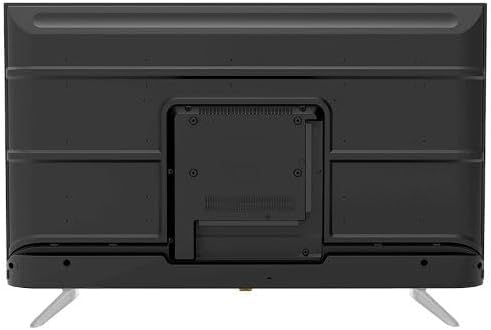
For wall mounting, remove the stand (if attached). Use a VESA-compatible wall mount (not included) that supports the TV's weight and dimensions. Consult a professional for wall mounting to ensure safety and proper installation.

Isithombe 4.2: Emuva view of the TV, highlighting the VESA mounting pattern and various input/output ports.
4.4 Ukuxhumanisa amaPheripheral
Xhuma amadivayisi akho angaphandle ku-TV usebenzisa ama-port afanele:
- I-HDMI: For high-definition devices like Blu-ray players, gaming consoles, or set-top boxes. The TV has 3 HDMI ports, one with ARC support.
- I-USB: For connecting USB storage devices to play media (video, photos, music). The TV has 2 USB ports.
- I-LAN: Ukuze uthole uxhumano lwe-inthanethi olunezintambo.
- Okokufaka kwe-RF: For connecting an antenna or satellite dish for the built-in digital receiver.
- I-Digital Audio Output (Optical): Ukuxhuma ohlelweni lomsindo lwangaphandle.
- I-Headphone Jack (3.5mm): Ngokuxhuma amahedfoni.

Isithombe 4.3: Uhlangothi view of the TV, illustrating the accessible side input ports.
4.5 Ukuqalisa Kokuvula Nokusetha Iwizadi
After connecting the power cable, press the power button on the remote control or TV. The TV will guide you through an initial setup wizard, including language selection, network connection (Wi-Fi or LAN), channel scanning, and Google account setup for Android TV features.
5. Ukusebenzisa i-TV
5.1 Isilawuli kude phezuview
The included remote control allows you to navigate the TV's functions. It features dedicated buttons for power, volume, channel, input selection, smart TV apps (Netflix, YouTube, Prime Video, Disney+), Google Assistant voice search, and menu navigation.
5.2 Imisebenzi Eyisisekelo
- Vula/Vala: Cindezela inkinobho yamandla.
- Ukulawula ivolumu: Sebenzisa izinkinobho ze-Volume Up/Down.
- Ukukhethwa Kwesiteshi: Use the Channel Up/Down buttons or numeric keypad.
- Umthombo Wokufaka: Press the 'Input' button to select between HDMI, AV, TV, etc.
5.3 Smart TV Features (Android 11)
Your TV runs on Android 11, providing access to a wide range of smart features:
- Izicelo: Access pre-installed apps like Netflix, YouTube, Prime Video, Disney+, Shahid VIP, and download more from the Google Play Store.
- Umsizi we-Google: Use voice commands via the remote control for search, control, and information.
- I-Chromecast eyakhelwe ngaphakathi: Sakaza okuqukethwe kusuka ku-smartphone noma kuthebhulethi yakho ngqo ku-TV.
- Web Isiphequluli: Phequlula i-inthanethi ngokuqondile ku-TV yakho.
- I-Bluetooth 5.0: Xhuma ama-headphone angenantambo, izipikha, noma amanye amadivayisi e-Bluetooth.
5.4 Izithombe Nezilungiselelo Zomsindo
Yenza eyakho viewulwazi lokulalela nokulalela ngemenyu yezilungiselelo ze-TV:
- Amamodi Esithombe: Select from Dynamic, Game, Sports, Cinema, or User-defined modes.
- Izinga lokushisa lombala: Adjust to Normal, Cool, or Warm.
- Izindlela Zomsindo: Choose from Smart, User, Game, Movie, Music, or News.
- I-Dolby Digital Plus: Enhanced audio processing for compatible content.
6. Isondlo
6.1 Ukuhlanza i-TV
- Isikrini: Sula kahle isikrini ngendwangu ethambile, engenantambo. Ukuze uthole amamaki anenkani, sebenzisa isihlanzi sesikrini esiklanyelwe ama-TV, esisetshenziswa endwangwini, hhayi esikrinini ngqo.
- Umzimba: Wipe the TV's frame and back panel with a soft, dry cloth. Do not use abrasive cleaners or solvents.
6.2 Ukuvuselelwa Kwesoftware
Ensure your TV's software is up to date for optimal performance and security. Connect the TV to the internet and check for updates periodically through the settings menu.
7. Ukuxazulula izinkinga
Uma uhlangabezana nezinkinga, bheka izixazululo ezilandelayo ezivamile:
| Inkinga | Isixazululo Esingenzeka |
|---|---|
| Awekho amandla | Check if the power cable is securely plugged into the TV and the wall outlet. Ensure the outlet is functional. |
| Asikho isithombe, kodwa umsindo ukhona | Hlola umthombo wokufaka. Qinisekisa ukuthi amadivayisi angaphandle avuliwe futhi axhunywe ngendlela efanele. |
| Awukho umsindo, kodwa isithombe sikhona | Check the volume level and mute status. Verify audio settings and external audio connections. |
| Isilawuli kude asisebenzi | Shintsha amabhethri. Qinisekisa ukuthi azikho izithiyo phakathi kwesilawuli kude kanye nenzwa ye-IR ye-TV. |
| Ayikwazi ukuxhuma ku-Wi-Fi | Hlola i-router yakho ne-modem. Faka kabusha iphasiwedi ye-Wi-Fi. Zama ukuqala kabusha i-TV ne-router. |
Uma inkinga iqhubeka, xhumana nokwesekwa kwamakhasimende.
8. Imininingwane
| Isici | Imininingwane |
|---|---|
| Inombolo Yemodeli | 65UA5300E |
| Usayizi Wesikrini | 65 amayintshi |
| Bonisa Ubuchwepheshe | I-LED |
| Isixazululo | I-4K UHD (3840 x 2160) |
| I-Aspect ratio | 16:9 |
| Viewing engela | 178 degrees |
| Ukukhanya | 250 cd/m² |
| Isilinganiso Sokuvuselela | 50/60 Hz |
| Ukusekelwa kwe-HDR | HDR10, HLG |
| Ubuchwepheshe bomsindo | Dolby Digital Plus, Surround Sound |
| Amandla Okukhipha Umsindo | I-10W x 2 |
| Isistimu esebenzayo | I-Android 11 |
| Inkumbulo Yangaphakathi | 16 GB |
| Ukuxhumana | Wi-Fi, Bluetooth 5.0, LAN |
| Okokufaka | RF Input (Digital) x1, Video Input x1, HDMI x3 (ARC), USB x2, LAN x1 |
| Imiphumela | Digital Audio Output (Optical) x1, Headphone Jack (3.5mm) x1 |
| Ukunikezwa kwamandla kagesi | I-AC 90-240V / 50Hz |
| Amandla Okulinda | 0.5W |
| Ubukhulu (W x H x D) ngaphandle kwesitendi | 1446 x 832 x 84 mm |
| Ubukhulu (W x H x D) nesitendi | 1446 x 892 x 305 mm |
| Isisindo sengqikithi | 15.32 kg |
| Isisindo esikhulu | 21.32 kg |
| Izwe azalelwe kulo | iGibhithe |
9. Iwaranti
This Tornado TV comes with a 3-year full free warranty. Please retain your proof of purchase for warranty claims. For specific terms and conditions, refer to the warranty card included with your product or contact Tornado customer service.
10. Ukusekela
For further assistance, technical support, or service inquiries, please contact Tornado customer service. Contact details can typically be found on the manufacturer's official webindawo noma ekhadini lewaranti.