
boAt Rockerz Trinity Gen 2
boAt Rockerz Trinity Gen 2 Bluetooth Neckband Earphones User Manual
Model: Rockerz Trinity Gen 2
Isingeniso
Thank you for choosing the boAt Rockerz Trinity Gen 2 Bluetooth Neckband Earphones. This manual provides essential information for setting up, operating, and maintaining your earphones. Please read it carefully to ensure proper use and to maximize your listening experience. These earphones are designed for extended audio playback, high-resolution sound, and clear communication.
Yini EseBhokisini
- boAt Rockerz Trinity Gen 2 Earphones
- Ikhebula lokushaja
- Imaniwali yosebenzisayo
The package includes the boAt Rockerz Trinity Gen 2 Earphones, a charging cable, and this user manual.
Umkhiqizo Uphelileview
The boAt Rockerz Trinity Gen 2 features a flexible neckband design with in-ear earbuds. It includes integrated controls for media playback, call management, and voice assistant activation. The neckband houses the battery and main electronics.
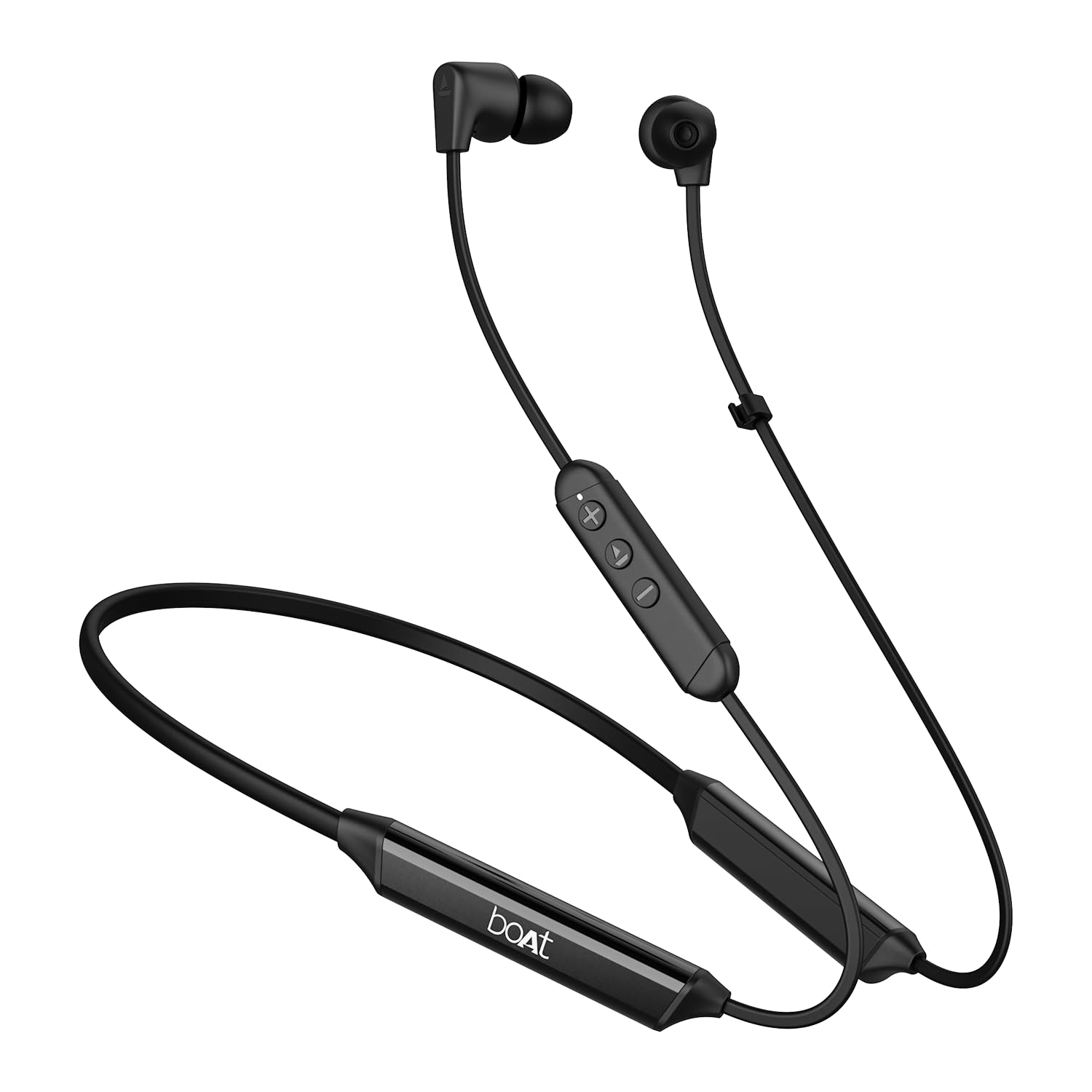
Image: The boAt Rockerz Trinity Gen 2 neckband earphones, highlighting the flexible neckband and in-ear design.

Isithombe: A enemininingwane view of the boAt Rockerz Trinity Gen 2 earbuds and the inline control panel, showing buttons for volume and playback.
Setha
1. Ukushaja ama-Earphone
Before first use, fully charge your earphones. Connect the provided charging cable to the charging port on the neckband and to a USB power source. The LED indicator will show charging status. A full charge provides up to 150 hours of playback. With ASAP Charge, 10 minutes of charging provides up to 24 hours of playback.
Image: The boAt Rockerz Trinity Gen 2 neckband, illustrating its long battery life with "150 HOURS PLAYBACK" text.
2. Ukuvula/Ukucisha
- Ukuvula: Press and hold the Multi-function button (usually the center button on the inline control) for approximately 3 seconds until the LED indicator flashes blue and you hear a power-on prompt.
- Ukucisha: Press and hold the Multi-function button for approximately 5 seconds until the LED indicator flashes red and you hear a power-off prompt.
3. Ukubhanqa kwe-Bluetooth
- Qinisekisa ukuthi ama-earphone acishiwe.
- Press and hold the Multi-function button for about 5-7 seconds until the LED indicator flashes red and blue alternately, indicating pairing mode.
- On your device (smartphone, laptop), enable Bluetooth and search for available devices.
- Select "boAt Rockerz Trinity Gen 2" from the list of found devices.
- Once connected, the LED indicator will flash blue slowly, and you will hear a confirmation tone.

Image: The boAt Rockerz Trinity Gen 2 earphones connected to both a smartphone and a tablet, illustrating the dual pairing feature.
4. Dual Pairing (Multipoint)
The Rockerz Trinity Gen 2 supports dual pairing, allowing connection to two devices simultaneously. After pairing with the first device, disable Bluetooth on that device. Put the earphones back into pairing mode and connect to the second device. Once connected to the second device, re-enable Bluetooth on the first device. The earphones will automatically connect to both devices, allowing seamless switching between them for calls and media.
Imiyalelo yokusebenza
Izilawuli Eziyisisekelo
- Dlala/Misa kancane: Cindezela inkinobho yeMulti-function kanye.
- Ivolumu ephezulu: Cindezela inkinobho ethi '+'.
- Ivolumu Phansi: Cindezela inkinobho ethi '-'.
- Ithrekhi Elandelayo: Cindezela bese ubamba inkinobho ethi '+'.
- Ithrekhi yangaphambilini: Cindezela bese ubamba inkinobho ethi '-'.
- Phendula/Phendula ikholi: Cindezela inkinobho yeMulti-function kanye.
- Yenqaba Ucingo: Cindezela bese ubamba inkinobho ye-Multifunction imizuzwana emi-2.
- Yenza kusebenze umsizi wezwi: Cindezela kabili inkinobho ye-Multi-function.
Hi-Res Audio with LDAC
The Rockerz Trinity Gen 2 supports Hi-Res Audio with LDAC codec, providing superior sound quality. Ensure your connected device also supports LDAC for the best audio experience. This feature allows for high-resolution audio transmission over Bluetooth, preserving more detail from your music.

Image: The boAt Rockerz Trinity Gen 2 earphones displaying the "Hi-Res Audio Wireless" and "LDAC" logos, indicating high-resolution audio support.
Izindlela ze-EQ ezimbili
Switch between different equalizer modes to customize your audio experience. Refer to the product's quick start guide or experiment with button combinations (often a triple-press of the Multi-function button or a combination with volume buttons) to cycle through available EQ presets. This allows you to adjust the sound profile ngokuncamelayo.

Image: A close-up of the boAt Rockerz Trinity Gen 2 earbuds, highlighting the availability of dual EQ modes for sound customization.
AI-ENx™ Technology for Clear Calls
The earphones feature AI-ENx™ technology, which enhances call clarity by eliminating background noise. This ensures your voice is heard clearly during calls, even in noisy environments.

Image: A close-up of a boAt Rockerz Trinity Gen 2 earbud, emphasizing the AI-ENx™ technology for clear voice calls.
BEAST™ Mode (Low Latency)
Activate BEAST™ Mode for a low-latency gaming experience (65ms). This mode synchronizes audio with visuals, providing a more immersive gaming session. To activate/deactivate BEAST™ Mode, refer to the specific instructions in your quick start guide, usually involving a dedicated button press or a combination.

Image: The boAt Rockerz Trinity Gen 2 earphones with "BEAST™ MODE 65ms Low Latency" text, depicted alongside gaming characters to illustrate its use for gaming.
Isondlo
Ukuhlanza
- Sula ama-earphone ngendwangu ethambile, eyomile, engenawo uboya.
- Ungasebenzisi amakhemikhali anamandla, izihlanzi zokuhlanza, noma izihlanzi ezinamandla.
- Regularly clean the ear tips to prevent wax buildup, which can affect sound quality.
Ukumelana Namanzi (IPX5)
The earphones are IPX5 rated, meaning they are resistant to sweat and light splashes of water. They are not designed for submersion in water. Avoid exposing them to heavy rain or direct water jets. Ensure the charging port cover is securely closed when not charging to maintain water resistance.

Image: The boAt Rockerz Trinity Gen 2 earbuds with water droplets on them, illustrating their IPX5 water resistance rating.
Isitoreji
Store the earphones in a cool, dry place away from direct sunlight and extreme temperatures. Avoid storing them with sharp objects that could damage the cables or earbuds.
Ukuxazulula inkinga
Awekho Amandla
- Qinisekisa ukuthi ama-earphone ashajwe ngokugcwele.
- Press and hold the Multi-function button for 3-5 seconds to power on.
Ayikwazi Ukumatanisa Nedivayisi
- Ensure the earphones are in pairing mode (LED flashing red and blue alternately).
- Make sure Bluetooth is enabled on your device and it is within range (typically 10 meters).
- Forget "boAt Rockerz Trinity Gen 2" from your device's Bluetooth list and try pairing again.
- Qala kabusha kokubili idivayisi yakho nama-earphone.
Low or Distorted Sound
- Adjust the volume on both the earphones and your connected device.
- Ensure the ear tips are clean and properly seated in your ears.
- Zama amathiphu ezindlebe ezinosayizi abahlukahlukene ukuze uthole uphawu olungcono.
- Sondela eduze kwedivayisi yakho exhunyiwe ukuze ugweme ukuphazamiseka.
Imakrofoni Ayisebenzi
- Qinisekisa ukuthi ama-earphone axhunywe kahle kudivayisi yakho.
- Check your device's audio settings to ensure the earphones are selected as the input device.
- Clean the microphone opening if it appears obstructed.
Imininingwane
| Ibhrendi | isikebhe |
| Igama Lemodeli | Rockerz Trinity Gen 2 |
| Ukubekwa Kwendlebe | Endlebeni |
| I-Form Factor | Endlebeni |
| Ukulawula Umsindo | AI-ENx™ Technology (for calls) |
| Ubuchwepheshe bokuxhumana | I-Bluetooth |
| Impilo Emaphakathi Yebhethri | Amahora angu-150 |
| Isikhathi sokushajwa kwebhethri | 10 Minutes (for 24 hours playback via ASAP Charge) |
| Uhlobo Lomshayeli Womsindo | Dynamic Driver (10mm, inferred from description) |
| I-Frequency Range | 20 Hz - 40,000 Hz |
| Ukumelana Namanzi | IPX5 |
| Izici ezikhethekile | Hi-Res Audio with LDAC, Dual EQ Modes, AI-ENx™ Technology, Dual Pairing, BEAST™ Mode (65ms Low Latency), ASAP Charge |
| Indlela Yokulawula | Izwi, Inkinobho |
| Isisindo sento | 60 amagremu |
Iwaranti kanye Nokusekela
Ulwazi Lwewaranti
The boAt Rockerz Trinity Gen 2 earphones come with a Iwaranti yonyaka ongu-1 from the date of purchase. This warranty covers manufacturing defects. Please retain your purchase receipt for warranty claims. The warranty does not cover damage caused by misuse, accidents, unauthorized modifications, or normal wear and tear.
Ukwesekwa Kwamakhasimende
For technical assistance, warranty claims, or any other inquiries, please contact boAt customer support:
- I-imeyili: info@imaginemarkengindia.com
- Umkhiqizi: Imagine Marketing Ltd
Please visit the official boAt webisayithi ukuze uthole ulwazi olusha kakhulu lokusekela kanye nemininingwane yokuxhumana.
Ask a question about this manual
Ask about setup, troubleshooting, compatibility, parts, safety, or missing instructions. Manuals+ will review the question and use this page’s manual context to help answer it.