
1. Imiyalelo Yezokuphepha Ebalulekile
Please read all instructions carefully before using the Defy DBF300 Bladeless Fan. Retain this manual for future reference.
- Njalo qiniseka ukuthi ifeni ibekwe endaweni ezinzile, elinganayo ukuze igweme ukugoba.
- Ungayisebenzisi ifeni ngentambo eyonakele noma ipulaki. Uma intambo ilimele, kufanele kushintshwe umenzi, i-ejenti yakhe yesevisi, noma abantu abafaneleke ngokufanayo ukuze bagweme ingozi.
- Keep hands, fingers, hair, and loose clothing away from the fan's air inlet and outlet openings.
- Ungacwilisi ifeni, intambo, noma uxhume amanzi noma olunye uketshezi.
- Unplug the fan from the power outlet when not in use, before cleaning, or before moving it.
- Lo mshini awuhloselwe ukusetshenziswa abantu (okuhlanganisa nezingane) abanekhono elincishisiwe lomzimba, lezinzwa noma lengqondo, noma abangenalo ulwazi nolwazi, ngaphandle uma benikezwe ukugadwa noma umyalelo ophathelene nokusetshenziswa kwento esebenza ngumuntu onesibopho sokuphepha kwabo.
- Izingane kufanele zigadwe ukuze kuqinisekiswe ukuthi azidlali ngalo mshini.
- Do not use the fan outdoors or in wet conditions.
- Do not block air openings or operate near curtains or other objects that could block airflow.
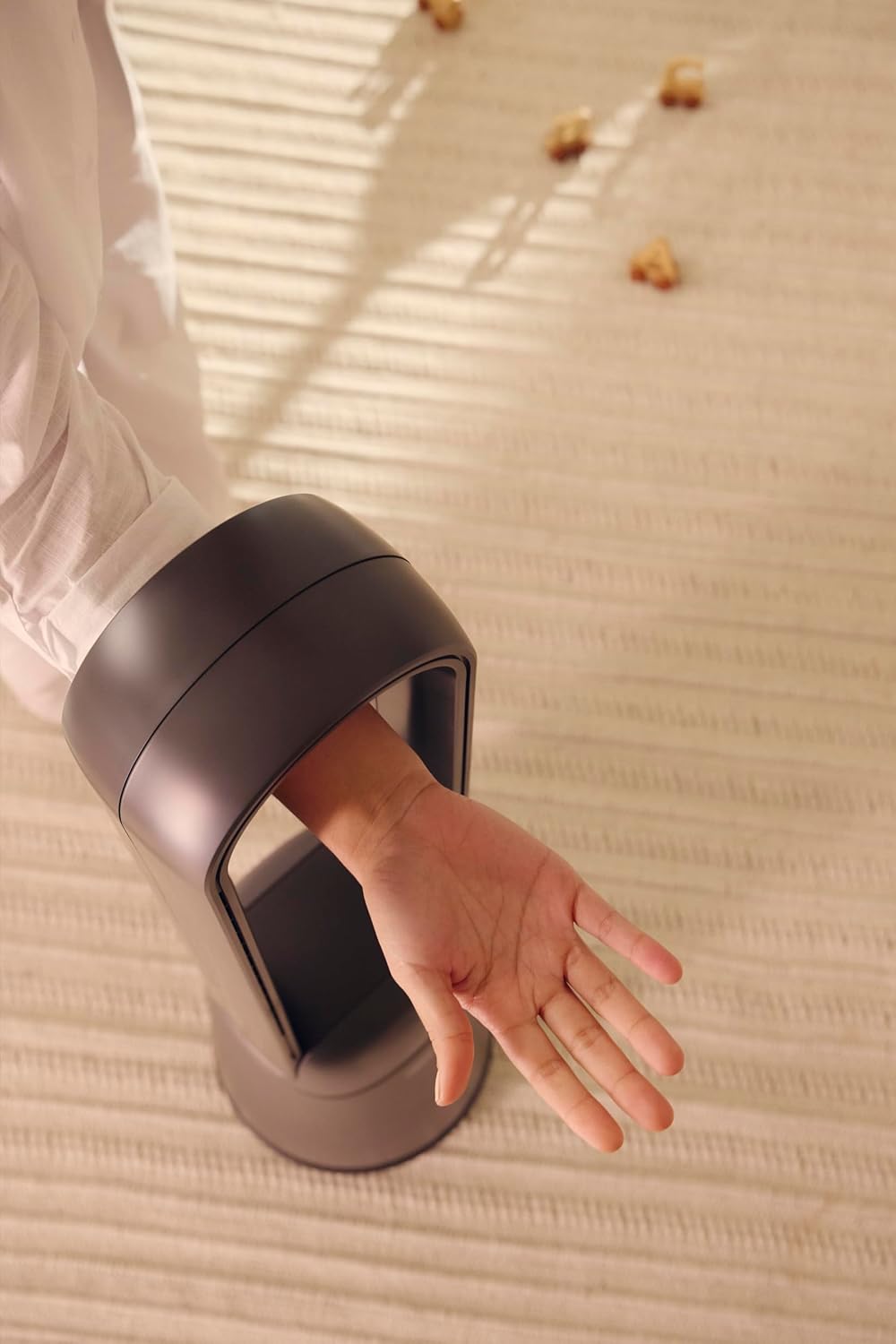
Figure 1: The bladeless design ensures safety, allowing a hand to pass through the air loop without obstruction.
2. Umkhiqizo Uphelileview
The Defy DBF300 is a bladeless fan designed for efficient and quiet air circulation. It features multiple speed settings, various wind modes, and convenient remote control operation.

Umfanekiso 2: Ngaphambili view of the Defy DBF300 Bladeless Fan.
Izici Eziyinhloko:
- Idizayini engenasici yokuphepha okuthuthukisiwe kanye nokuhlanza okulula.
- Up to 20 wind speed settings for precise airflow control.
- Multiple wind modes: Strong, Natural, Sleep, and Smart adaptive wind.
- Oscillation function with 4 modes for wide area coverage.
- Wireless remote control for convenient operation.
- Integrated touch-sensitive control panel on the unit.
- Timer function for automatic shut-off, adjustable up to 8 hours.
- Whisper-quiet operation.
3. Setha
3.1 Ukuqaqa
- Susa ifeni ngokucophelela ephaketheni layo.
- Check for any signs of damage during transit. If damaged, do not operate and contact customer support.
- Ensure all components are present: the main fan unit and the remote control.
3.2 Ukubekwa
- Place the fan on a firm, level, and stable surface.
- Ensure there is adequate space around the fan for optimal airflow, avoiding obstructions like walls, furniture, or curtains.
- Do not place the fan in direct sunlight or near heat sources.
- Keep the fan away from areas where it might be exposed to water or high humidity.
3.3 Ukuxhuma Amandla
- Before plugging in, ensure the power supply voltagi-e ifana nelebula lokulinganisa kufeni.
- Insert the power plug firmly into a suitable electrical outlet.
4. Iziqondiso Zokusebenza
The Defy DBF300 Bladeless Fan can be operated using the touch control panel on the unit or the provided remote control.
4.1 Iphaneli yokulawula iphelileview

Figure 3: The fan's touch control panel and digital display.
- Inkinobho Yamandla (①): Turns the fan On or Off.
- Speed Adjustment (②): Increases or decreases wind speed.
- Mode Selection (③): Cycles through Strong, Natural, Sleep, and Smart adaptive wind modes.
- Oscillation (④): Activates or deactivates the oscillation function.
- Timer (⑤): Sets the auto shut-off timer.
- Isibonisi Sedijithali: Shows current speed, mode, or timer setting.
4.2 Ukulawula okukude

Figure 4: The remote control for the Defy DBF300 Bladeless Fan.
The remote control duplicates all functions available on the fan's control panel. Ensure the remote has working batteries (typically 2x AAA, not included) and is pointed towards the fan's receiver for optimal operation.
- Inkinobho Yamandla: Turns the fan On or Off.
- Isivinini +/- Izinkinobho: Adjusts the wind speed (1-20).
- Inkinobho Yemodi: Cycles through Strong, Natural, Sleep, and Smart modes.
- Inkinobho Ye-Oscillation: Toggles oscillation On/Off.
- Inkinobho Yesibali sikhathi: Sets the auto shut-off timer (1-8 hours).
4.3 Ukusebenza Okujwayelekile
- Vula/Vala: Press the Power button on the control panel or remote. The digital display will illuminate.
- Ukulungisa Isivinini Somoya: Use the Speed adjustment buttons on the control panel or the +/- buttons on the remote. The display will show the current speed level (1-20).
- Selecting Wind Mode: Press the Mode button to cycle through the available modes:
- Imodi Eqinile: Provides a consistent, powerful airflow.
- Imodi Yemvelo: Simulates natural breezes by varying wind speed.
- Imodi yokulala: Operates at a lower, quieter speed, gradually decreasing over time for comfortable sleep.
- Smart Adaptive Wind: Adjusts airflow based on ambient conditions (if sensor equipped, otherwise maintains a gentle flow).
- Ukwenza kusebenze ukuzulazula: Press the Oscillation button. The fan will begin to rotate horizontally. Press again to stop oscillation. There are 4 oscillation modes, which can be cycled through by repeatedly pressing the oscillation button.
- Ukusetha Isikhathi: Press the Timer button. Each press will increase the timer setting by 1 hour, up to a maximum of 8 hours. The fan will automatically turn off after the set time. To cancel the timer, cycle through until '00' or 'OFF' is displayed, or turn the fan off.
5. Isondlo
Regular cleaning and proper storage will ensure the longevity and optimal performance of your Defy DBF300 Bladeless Fan.
5.1 Ukuhlanza
- Njalo khipha ifeni kusukela endaweni yokukhipha ugesi ngaphambi kokuhlanza.
- Sula ingaphandle le-fan ngento ethambile, damp indwangu. Ungasebenzisi izinto zokuhlanza abrasive noma izincibilikisi.
- For the air inlet and outlet, use a soft brush or a vacuum cleaner with a brush attachment to remove dust and debris. The bladeless design makes these areas easily accessible for cleaning.
- Ensure no water or liquid enters the internal components of the fan.
- Allow the fan to dry completely before plugging it back in and operating.
5.2 Isitoreji
- If storing the fan for an extended period, clean it thoroughly as per the instructions above.
- Gcina ifeni ephaketheni layo lokuqala noma uyimboze ukuze uyivikele othulini.
- Keep the fan in a cool, dry place, away from direct sunlight and extreme temperatures.
6. Ukuxazulula izinkinga
Ngaphambi kokuxhumana nokwesekwa kwamakhasimende, sicela ubheke umhlahlandlela wokuxazulula izinkinga olandelayo ngezinkinga ezivamile.
| Inkinga | Imbangela Engenzeka | Isixazululo |
|---|---|---|
| Ifeni ayivuli. | Akukho ukunikezwa kwamandla. Intambo yamandla ayixhunyiwe kahle. | Ensure the fan is plugged into a live electrical outlet. Hlola ukuxhumeka kwentambo yamandla. |
| Ukugeleza komoya okubuthakathaka noma okungekho nhlobo. | Ukungena/ukuphuma komoya kuvaliwe. Isivinini sabalandeli sisethwe siphansi kakhulu. | Check for obstructions and clear them. Khulisa ukulungiselelwa kwesivinini sabalandeli. |
| Isilawuli kude asisebenzi. | Amabhethri afile noma afakwe ngokungalungile. Ukuvimbana phakathi kwesilawuli kude kanye nefeni. | Replace batteries (2x AAA). Ensure correct polarity. Remove any objects blocking the signal path. Point remote directly at the fan. |
| Ifeni yenza umsindo ongajwayelekile. | Ifeni hhayi endaweni esezingeni. Internal obstruction or damage. | Beka ifeni endaweni ezinzile, esezingeni. Uma umsindo uqhubeka, yeka ukusebenzisa bese uxhumana nosekelo lwamakhasimende. |
7. Imininingwane
| Imodeli | DBF300 |
| Ibhrendi | Defy |
| Umbala | I-Metallic Gray |
| Amandla / Wattage | 36 watts |
| Ubukhulu bomkhiqizo (D x W x H) | 28D x 25W x 97H amasentimitha |
| Isisindo sento | 6.7 kg |
| Isici Esikhethekile | Bladeless, Oscillation, Remote Control, Timer |
| Umthombo wamandla | I-Corded Electric |
8. Iwaranti kanye Nokusekela
For detailed warranty information, please refer to the warranty card included with your product or visit the official Defy webindawo. Gcina ubufakazi bakho bokuthenga banoma yiziphi izimangalo zewaranti.
If you encounter any issues not covered in this manual or require further assistance, please contact Defy customer support. Contact details can typically be found on the Defy webisayithi noma ukupakishwa komkhiqizo wakho.
You can visit the Defy Store for more information: Defy Store on Amazon.