
1. Isingeniso
Thank you for choosing the THOMSON WS902DUO Cosy Bookshelf Speakers. These active stereo speakers deliver a powerful 150W audio experience with deep bass from two 10 cm woofers. They offer versatile connectivity options including Bluetooth 5.3, Optical, HDMI (ARC), RCA, and USB playback. The included remote control and side panel adjustments provide precise control over your audio. Please read this manual carefully before use to ensure proper operation and to maximize your listening experience.

Image 1.1: THOMSON WS902DUO Bookshelf Speakers in a living space, showcasing their elegant wood finish.
2. Imiyalelo Yezokuphepha Ebalulekile
- Read these instructions thoroughly before operating the product.
- Gcina le miyalo ukuze uyisebenzise esikhathini esizayo.
- Lalela zonke izixwayiso zomkhiqizo kanye nemiyalelo yokusebenza.
- Landela yonke imiyalelo.
- Ungasebenzisi lesi sisetshenziswa eduze namanzi.
- Hlanza kuphela ngendwangu eyomile.
- Ungavimbi noma yiziphi izimbobo zokungenisa umoya. Faka ngokuhambisana nemiyalelo yomkhiqizi.
- Ungafaki eduze kwanoma yimiphi imithombo yokushisa njengama-radiator, amarejista okushisa, izitofu, noma ezinye izinto ezisetshenziswayo (okuhlanganisa ampama-lifiers) akhiqiza ukushisa.
- Ungayehluli injongo yokuphepha yepulaki eyenziwe nge-polarized noma ephansi. Ipulaki eyenziwe nge-polarized inama-blade amabili anelinye elibanzi kunelinye. Ipulaki yohlobo oluphansi inama-blade amabili kanye ne-prong yesithathu yaphansi. I-blade ebanzi noma i-prong yesithathu inikezwe ukuphepha kwakho. Uma ipulaki enikeziwe ingangeni endaweni yakho yokukhipha, thintana nomuntu osebenza ngogesi ukuze athathele indawo engasenamsebenzi.
- Vikela intambo yamandla ekuhanjweni ngayo noma ekuncinzweni, ikakhulukazi kumapulaki, ezintweni ezisetshenziswayo, kanye nendawo lapho ziphuma khona ezinsizeni.
- Sebenzisa kuphela okunamathiselwe/izinsiza ezicaciswe umenzi.
- Sebenzisa kuphela inqola, isitendi, i-tripod, ubakaki, noma ithebula elicaciswe umkhiqizi, noma elithengiswa nge-apparatus. Uma kusetshenziswa inqola, qaphela lapho uhambisa inhlanganisela yekalishi/impahla ukuze ugweme ukulimala okuvela ekucekeleni phansi.
- Khipha lesi sisetshenziswa phakathi neziphepho zombani noma lapho singasetshenziswa isikhathi eside.
- Thumela zonke izinsiza kubasebenzi benkonzo abaqeqeshiwe. Ukuseviswa kuyadingeka lapho umshini wokusebenza ulimele nganoma iyiphi indlela, njengentambo yokuphakela amandla noma ipulaki lonakele, uketshezi luchithekile noma izinto ziwele emshinini, umshini uhlaselwe yimvula noma umswakama, awusebenzi ngendlela evamile. , noma ulahliwe.
3. Okuqukethwe Kwephakheji
Sicela uhlole ukuthi zonke izinto ezibalwe ngezansi zifakiwe kuphakheji yakho:
- THOMSON WS902DUO Bookshelf Speakers (2 units)
- Isilawuli kude
- Ikhebula Lamandla
- Ikhebuli Yokuxhuma Isipikha
- 3.5mm Jack to RCA Adapter Cable
- Incwadi Yomsebenzisi (le dokhumenti)

Image 3.1: Packaging of the THOMSON WS902DUO Bookshelf Speakers.
4. Umkhiqizo Uphelileview
4.1. Side Control Panel (Active Speaker)
The active speaker features a side control panel for easy access to essential functions.

Image 4.1: Side control panel.
- I-Bass Control: Ilungisa ukuphuma kwemvamisa ephansi.
- I-Treble Control: Ilungisa ukuphuma kwemvamisa ephezulu.
- Ukulawula ivolumu: Ilungisa ivolumu yomsindo iyonke.
- Ukushintshwa Kwamandla: Turns the speakers on or off.
- Inkomba ye-LED: Shows the current status or selected input.
4.2. Rear Panel (Active Speaker)
The rear panel of the active speaker provides all necessary input and output connections.
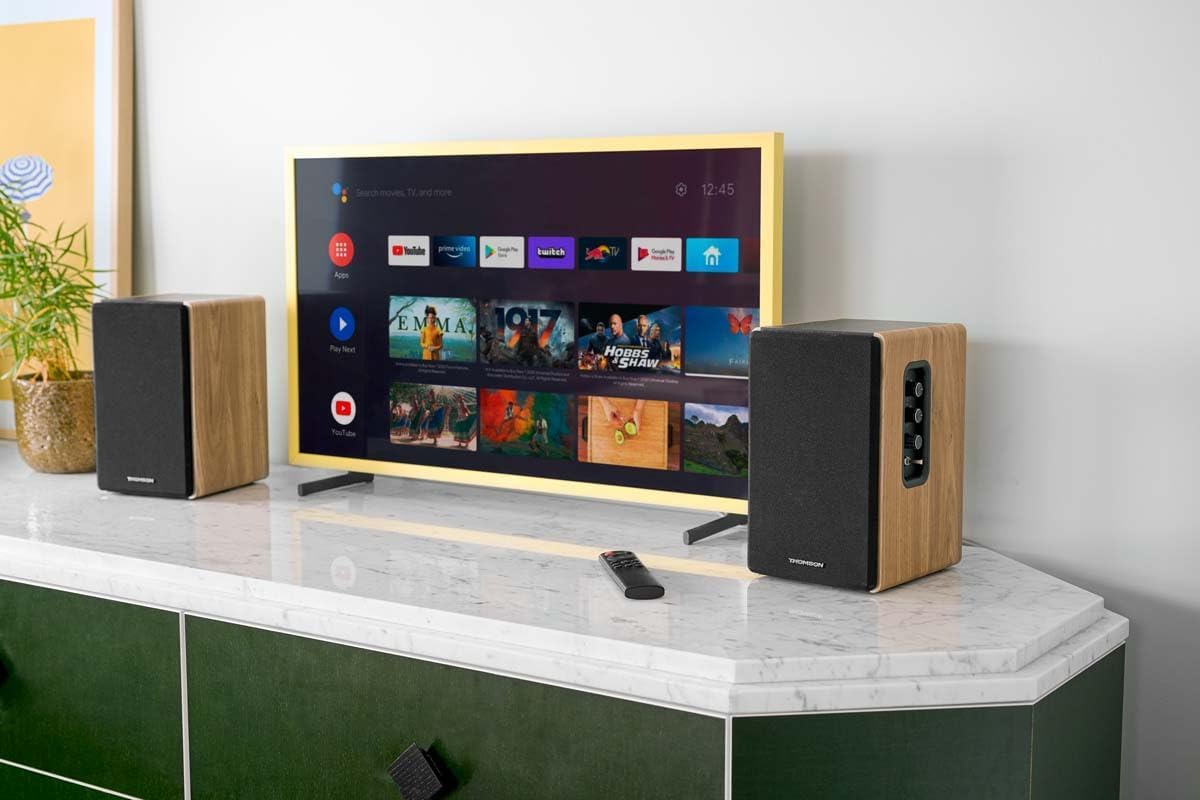
Image 4.2: Rear panel connections.
- Okokufaka kokubona: For connecting digital audio sources like TVs, game consoles, or Blu-ray players.
- I-Aux In (RCA): For connecting analog audio sources such as turntables, CD players, or PCs. A 3.5mm jack adapter is provided.
- TV Audio (HDMI ARC): For connecting to a TV's HDMI ARC port, allowing TV remote control of the speaker volume.
- Dlala i-USB: Eyokudlala iMP3 files ngqo kusuka ku-USB flash drive.
- Phuma: For connecting an external active subwoofer for enhanced bass.
- Okukhiphayo kwesipika: Ixhuma kusipikha esingasebenzi.
- Okokufaka kwamandla: Connects to the main power supply.
4.3. Isilawuli kude
The remote control provides convenient access to all speaker functions from a distance.

Image 4.3: Remote control.
- Inkinobho yamandla: Turns the speakers on/off.
- Inkinobho yokuthulisa: Ithulisa/ithulisa umsindo.
- Ivolumu +/-: Ilungisa izinga levolumu.
- Playback Controls (Play/Pause, Skip): Kokudlala nge-USB.
- Source Selection Buttons (OPT, BT, ARC, USB, LINE): Selects the audio input source.
- EQ Mode Buttons (MOVIE, MUSIC, DIALOG): Selects preset equalization modes.
5. Setha
5.1. Ukubekwa kwesikhulumi
Place the speakers on a stable, flat surface such as a bookshelf, desk, or speaker stands. For optimal stereo imaging, position the speakers equidistant from your listening position and at ear level. Ensure there is adequate space around the speakers for ventilation.
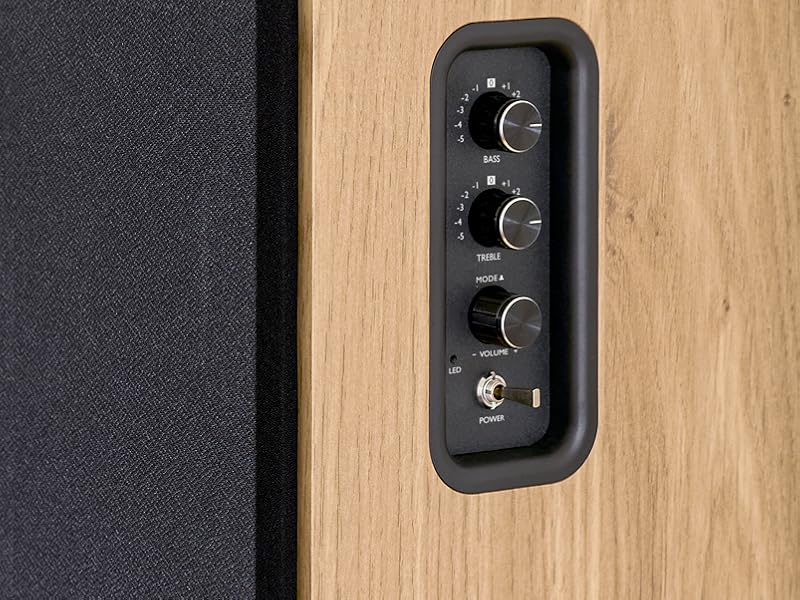
Image 5.1: Recommended speaker placement on a desk.
5.2. Ukuxhuma Izikhulumi
- Identify the active speaker (with controls and inputs) and the passive speaker.
- Connect the included speaker cable from the speaker output terminals on the active speaker to the input terminals on the passive speaker. Ensure correct polarity (+ to + and - to -).
5.3. Ukuxhumanisa Imithombo Yomsindo
Connect your desired audio sources to the active speaker using the appropriate cables.
- Okokufaka kokubona: Use an optical cable to connect your TV, game console, or Blu-ray player to the OPTICAL IN port.
- Okokufaka kwe-HDMI (ARC): Use an HDMI cable to connect your TV's HDMI ARC port to the TV AUDIO (HDMI) port on the speaker. This allows your TV remote to control the speaker volume.
- RCA (AUX) Input: Use an RCA cable (or the provided 3.5mm jack to RCA adapter) to connect devices like a turntable, CD player, or PC to the AUX IN (RCA) ports.
- Okokufaka kwe-USB: Faka i-USB flash drive equkethe i-MP3 files into the USB PLAY port.

Image 5.2: Speakers connected to a television via HDMI ARC.
5.4. Ukubhanqa kwe-Bluetooth
- Qinisekisa ukuthi izipikha zivuliwe.
- Press the 'BT' button on the remote control or the side panel to select Bluetooth input. The LED indicator will flash, indicating pairing mode.
- Ku-smartphone yakho, ithebhulethi, noma ikhompuyutha, vula i-Bluetooth bese usesha amadivayisi atholakalayo.
- Select "THOMSON WS902DUO" from the list of devices.
- Once paired, the LED indicator will stop flashing and remain solid. You can now stream audio wirelessly.
5.5. Subwoofer Connection (Optional)
If you wish to enhance bass further, connect an active subwoofer to the 'Sub Out' port on the rear panel of the active speaker using an RCA cable.
6. Iziqondiso Zokusebenza
6.1. Vula/Vala
Use the power switch on the side control panel or the power button on the remote control to turn the speakers on or off.
6.2. Ukukhetha Umthombo
Press the corresponding source button on the remote control (OPT, BT, ARC, USB, LINE) to switch between connected audio inputs. The LED indicator will change to reflect the selected source.
6.3. Ukulawulwa Kwevolumu
Adjust the volume using the 'Volume' knob on the side control panel or the 'VOL+/-' buttons on the remote control.
6.4. Ukulungiswa Komsindo
Fine-tune the sound to your preference:
- I-Bass/Treble: Use the 'Bass' and 'Treble' knobs on the side control panel to adjust the low and high frequencies.
- Izindlela ze-EQ: Press the 'MOVIE', 'MUSIC', or 'DIALOG' buttons on the remote control to select preset equalization settings optimized for different content types.
6.5. Ukudlala nge-USB
When a USB flash drive with MP3 files is inserted and USB source is selected, the speakers will automatically begin playing. Use the playback control buttons on the remote control (Play/Pause, Skip) to manage your music.
6.6. Ukusebenza kwe-Bluetooth
After successful pairing (see Section 5.4), you can stream audio from your Bluetooth device. Use your device's controls or the speaker's remote control for playback and volume adjustments.
7. Isondlo
Proper maintenance ensures the longevity and performance of your speakers.
- Ukuhlanza: Wipe the speaker surfaces with a soft, dry cloth. Do not use liquid cleaners or abrasive materials.
- Ukungenisa umoya: Qinisekisa ukuthi izimbobo zokungena komoya azivaliwe ukuvimbela ukushisa ngokweqile.
- Isitoreji: If storing the speakers for an extended period, unplug them from the power outlet and store them in a cool, dry place.
- Gwema Umswakama: Keep the speakers away from water and high humidity.
8. Ukuxazulula izinkinga
Uma uhlangabezana nanoma yiziphi izinkinga, bheka umhlahlandlela wokuxazulula izinkinga olandelayo:
| Inkinga | Imbangela Engenzeka | Isixazululo |
|---|---|---|
| Awekho amandla | Power cable not connected; Power switch off; Wall outlet not working. | Ensure power cable is securely connected. Turn on the power switch. Test the wall outlet with another device. |
| Awukho umsindo | Incorrect input source selected; Volume too low; Mute function active; Audio cable not connected properly. | Select the correct input source. Increase volume. Press Mute button on remote. Check all audio cable connections. |
| Ukumataniswa kwe-Bluetooth kwehlulekile | Speakers not in pairing mode; Device too far; Bluetooth disabled on source device. | Ensure speakers are in Bluetooth pairing mode (flashing LED). Move device closer to speakers. Enable Bluetooth on your source device. |
| Ukudlala i-USB akusebenzi | USB drive not formatted correctly; Files not MP3; USB drive not inserted properly. | Ensure USB drive is FAT32 formatted. Verify files are in MP3 format. Re-insert USB drive firmly. |
| Ukuhlanekezela komsindo | Volume too high; Source audio quality poor; Bass/Treble settings too extreme. | Lower the volume. Test with a different audio source. Adjust Bass and Treble controls. |
9. Imininingwane
| Isici | Ukucaciswa |
|---|---|
| Ibhrendi | UTHOMSON |
| Inombolo Yemodeli | I-WS902DUO |
| Amandla Okukhipha Isipikha Esiphezulu | 150 Watts |
| Impendulo Yemvamisa | 60 Hz |
| Ubuchwepheshe bokuxhumana | Bluetooth, HDMI (ARC), Optical, RCA, USB |
| Inguqulo ye-Bluetooth | 5.3 |
| Imodi Yokukhipha Umsindo | I-Stereo (iziteshi ezingu-2.0) |
| Okokufaka Voltage | 230 Volts (AC) |
| Uhlobo Lokukhweza | I-Shelf Mount |
| Uhlobo lwesipika | Multimedia Bookshelf |
| Izici ezikhethekile | Stereo Pairing, USB Port, Sub-Out, Remote Control, EQ Modes |
| Ukusetshenziswa Okunconyiwe | Smartphone, Tablet, PC, TV, Game Console, DVD Player, Turntable |
| Umbala | Izinkuni Zemvelo Qeda |
| Indlela Yokulawula | Remote Control, Side Panel Knobs |
| Usayizi Woofer | 10 Amasentimitha |
| Ubukhulu (H x W x D) | 28 cm x 24 cm x 47 cm (approximate, per speaker) |
| Isisindo | 5048 Grams (total for pair) |
| Inombolo Yezinto | 2 |
| Izwe azalelwe kulo | China |
10. Ulwazi Lwewaranti
This THOMSON WS902DUO product comes with a Iwaranti ekhawulelwe yeminyaka engu-1 kusukela ngosuku lokuthenga. Lesi siqinisekiso simboza amaphutha okukhiqiza kanye nobuciko ngaphansi kokusetshenziswa okuvamile. Asimbozi umonakalo obangelwe ukusetshenziswa kabi, izingozi, izinguquko ezingagunyaziwe, noma ukuguguleka okuvamile. Sicela ugcine ubufakazi bakho bokuthenga ukuze uthole izimangalo zesiqinisekiso.
11. Ukwesekwa Kwamakhasimende
For technical assistance, warranty claims, or any questions regarding your THOMSON WS902DUO speakers, please contact your retailer or visit the official THOMSON support website. Please have your model number (WS902DUO) and proof of purchase ready when contacting support.
Ukusekelwa Kwe-inthanethi: www.thomsonconsumer.com (Please check for regional support contacts)