
Phanteks G400A
Incwadi Yomsebenzisi Wekesi Lekhompyutha Le-Phanteks Eclipse G400A ATX Mid-Tower
Model: G400A | Brand: Phanteks
Isingeniso
The Phanteks Eclipse G400A is a high-performance ATX Mid-Tower computer case designed for optimal airflow and component compatibility. Featuring a tempered glass side panel and pre-installed D-RGB fans, it offers both aesthetic appeal and efficient cooling. This manual provides detailed instructions for setting up, operating, maintaining, and troubleshooting your Eclipse G400A case.

Figure 1: Phanteks Eclipse G400A ATX Mid-Tower Computer Case (White)
Umhlahlandlela Wokusetha
1. Ukuqaqa kanye Nokuhlola
Carefully remove the computer case from its packaging. Inspect the case for any signs of damage during transit. Ensure all accessories, including screws, cable ties, and the user manual, are present.
2. Ukufakwa kwengxenye
The Eclipse G400A is designed for easy installation of your PC components. Follow these general steps:
- Ukufakwa kwe-Motherboard: Install your ATX motherboard onto the pre-installed standoffs. Ensure proper alignment and secure it with screws. The case supports rear-side connector mainboards for a cleaner build.
- Ukufakwa Kweyunithi Yokunikezela Ngamandla (i-PSU): Install your PSU into the dedicated compartment at the bottom rear of the case. The case supports PSUs up to 270mm in length.
- Ukufakwa Kwedrayivu Yesitoreji: The case supports 2x 2.5" SSDs and 2x 3.5" HDDs. Utilize the dedicated storage brackets and cable management tray for a clean setup.

Figure 2: Internal layout with highlighted storage and cable management areas
- Ukufakwa Kwekhadi Lezithombe (GPU): Install your graphics card into the appropriate PCIe slot. The case supports large GPU cards and includes triple mid-plate 120mm fan locations for direct GPU cooling.
- Ukufakwa kwe-radiator kanye nefenisha: The case comes with 4x M25-140 Gen2 D-RGB fans pre-installed. It offers dedicated 360mm radiator support in the top without restrictions.
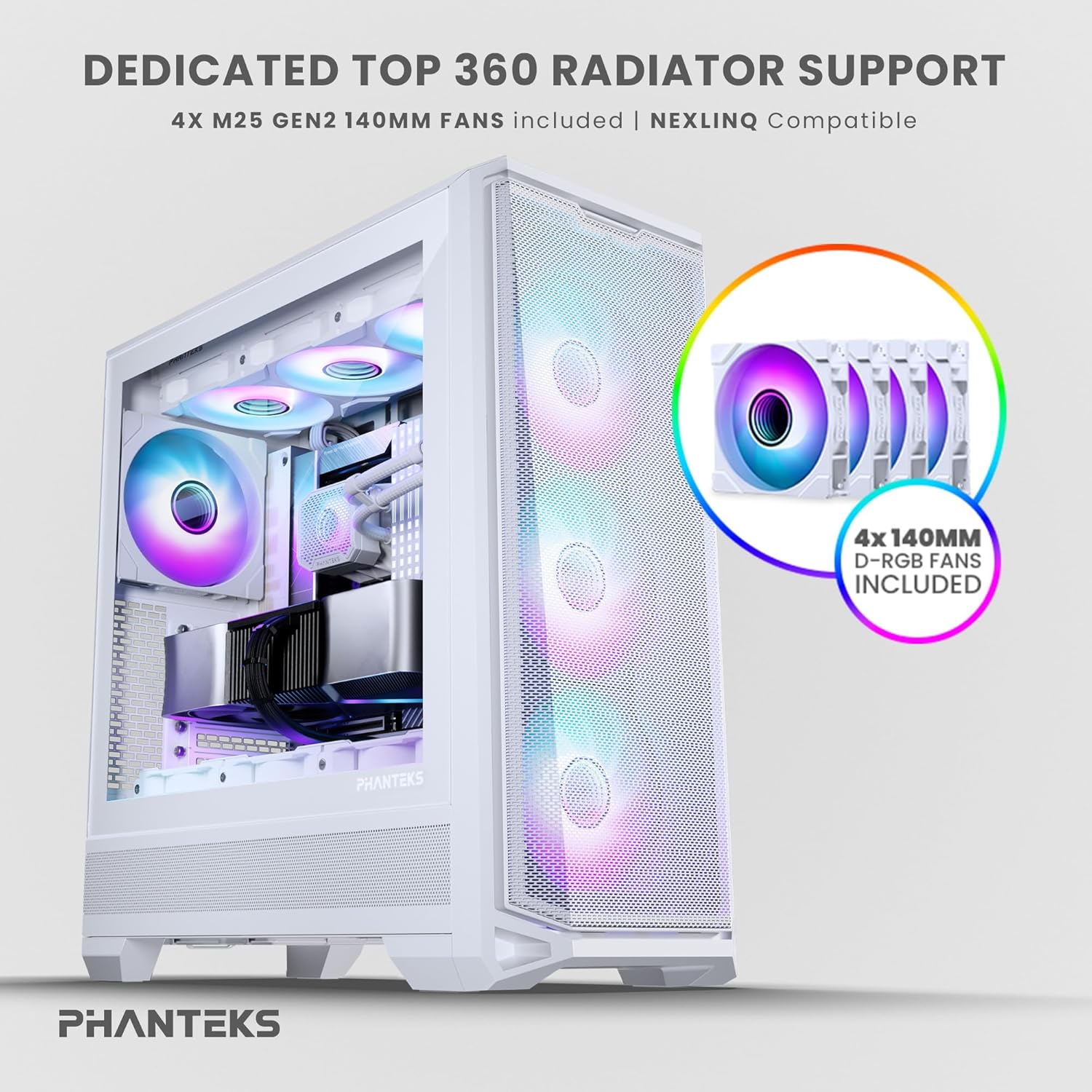
Figure 3: Top radiator support and pre-installed 140mm D-RGB fans

Figure 4: Dedicated 120mm fan positions for direct GPU cooling
3. Ukuphathwa Kwentambo
Utilize the dedicated cable management tool and Velcro ties provided to route and secure cables behind the motherboard tray. This ensures optimal airflow and a clean interior.
Imiyalelo yokusebenza
1. Ivula amandla
After connecting all internal components and external peripherals, connect the power cable to your PSU and a wall outlet. Press the power button located on the top I/O panel of the case to power on your system.

Figure 5: Front I/O Panel Layout
2. Ukulawula Ukukhanyisa kwe-RGB
The pre-installed M25-140 Gen2 D-RGB fans feature addressable RGB lighting. Control the lighting effects through your motherboard's RGB software (if compatible with D-RGB/ARGB) or a dedicated Phanteks RGB controller (sold separately).
Isondlo
1. Ukuhlanza
Regular cleaning helps maintain optimal performance and extends the lifespan of your components.
- Izihlungi Zothuli: The Eclipse G400A features ultra-fine performance mesh panels on the top, left, and right sides, acting as dust filters. Regularly remove and clean these filters using compressed air or a soft brush to prevent dust buildup.
- Ingaphandle: Sula ingaphandle ngethafa elithambile, damp indwangu. Gwema izinto zokuhlanza abrasive noma izincibilikisi.

Figure 6: Removable front mesh panel and dust filter for easy cleaning
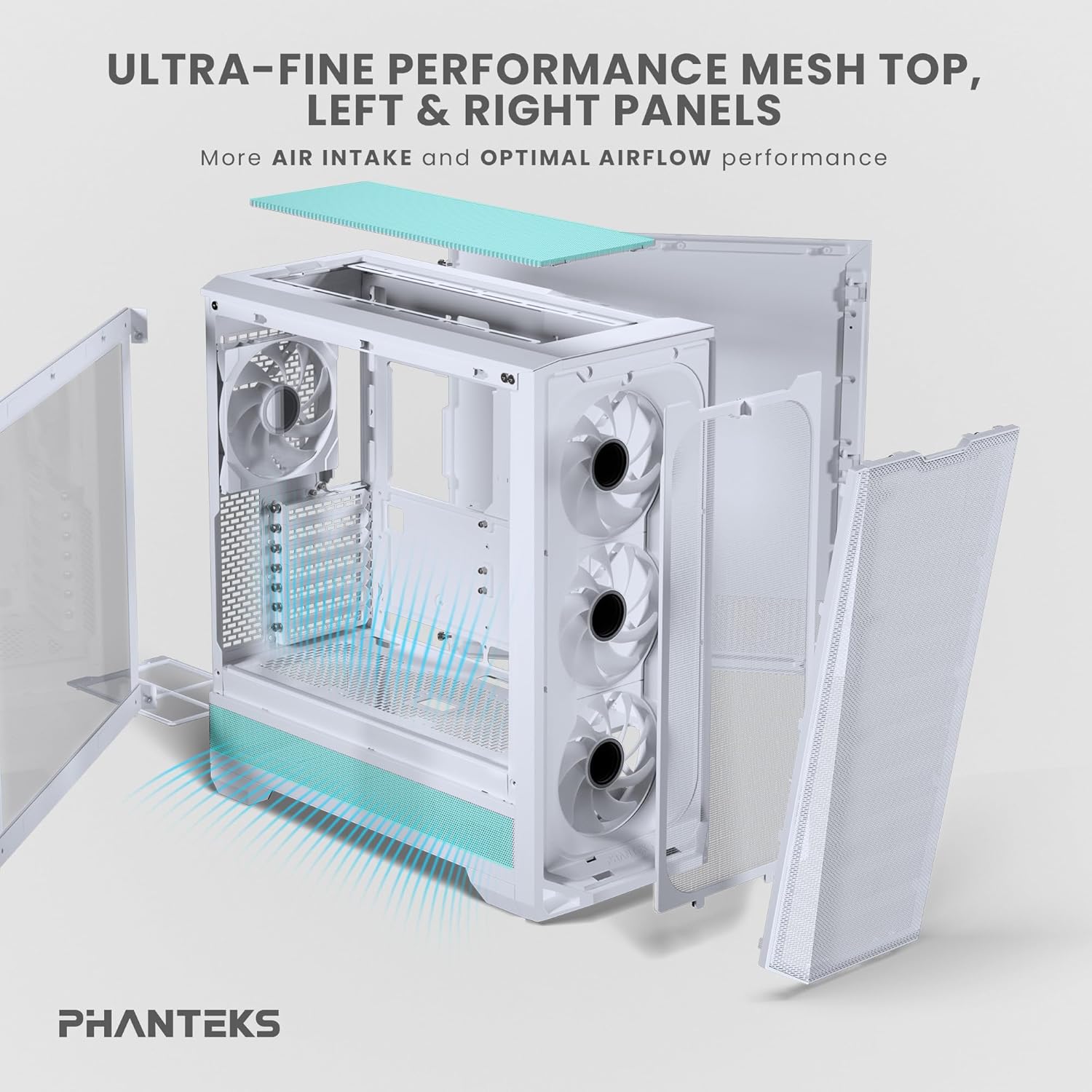
Figure 7: Disassembled panels demonstrating airflow and access for cleaning
2. Ukuthuthukiswa Kokuhamba Komoya
Ensure cables are neatly managed to avoid obstructing airflow. Periodically check fan operation to ensure they are spinning freely and quietly.
Ukuxazulula inkinga
- Isistimu Ayivuli:
- Check all power connections, including the PSU to wall outlet, PSU to motherboard (24-pin and CPU 8-pin), and front panel power switch header.
- Qinisekisa ukuthi iswishi ye-PSU isesimweni 'SOKUBANISWA'.
- Abalandeli Abaphenduki / I-RGB Ayikhanyisi:
- Verify fan and RGB cables are correctly connected to the motherboard headers or a dedicated RGB controller.
- Hlola izilungiselelo zebhodi le-BIOS/UEFI ukuze uthole ukulawula kwabalandeli kanye nezilungiselelo ze-RGB.
- Ukugeleza Komoya Okubi / Amazinga Okushisa Aphezulu:
- Clean all dust filters and fans.
- Ensure proper cable management to avoid airflow obstruction.
- Verify fan orientation (intake/exhaust) for optimal airflow path.
Imininingwane Yezobuchwepheshe
| Isici | Ukucaciswa |
|---|---|
| Ibhrendi | Phanteks |
| Igama Lemodeli | I-Eclipse G400A |
| Uhlobo Lwekesi | Mid Mid |
| Umbala | Emhlophe |
| Okubalulekile | Insimbi Engagqwali, Ingilazi Epholile |
| Ubukhulu (LxWxH) | 19.48"D x 9.05"W x 20.55"H (49.48 x 22.99 x 52.20 cm) |
| Isisindo sento | Amapondo ayi-19 (8.62 kg) |
| Abalandeli abafakwe ngaphambilini | 4x M25-140 Gen2 D-RGB 140mm Fans |
| Ukusekelwa kweRadiator | Kufika ku-360mm (Phezulu) |
| Ukusekelwa Kwesitoreji | 2x 2.5" SSD, 2x 3.5" HDD |
| Ngaphambili I/O | USB-C 3.2 Gen 2, 2x USB 3.0, Audio/Microphone, Power Button, Reset Button |
Iwaranti kanye Nokusekela
Phanteks products are manufactured to the highest quality standards. For warranty information and technical support, please refer to the official Phanteks webisayithi noma uxhumane nesevisi yabo yamakhasimende ngokuqondile. Gcina ubufakazi bakho bokuthenga ngezimangalo zewaranti.
For further assistance, visit the official Phanteks support page: www.phanteks.com/support.html
Ask a question about this manual
Ask about setup, troubleshooting, compatibility, parts, safety, or missing instructions. Manuals+ will review the question and use this page’s manual context to help answer it.