
1. Isingeniso
Thank you for choosing the roborock Q10 S5 Robot Vacuum and Mop Cleaner. This manual provides essential information for setting up, operating, and maintaining your device to ensure optimal performance and longevity. Please read this manual thoroughly before using the product and keep it for future reference.
2. Ulwazi Lokuphepha
To reduce the risk of injury, electric shock, fire, or damage, please observe the following safety precautions:
- Lo mshini ungasetshenziswa izingane ezineminyaka engu-8 nangaphezulu kanye nabantu abanekhono elincishisiwe lomzimba, izinzwa noma ingqondo noma abangenalo ulwazi nolwazi uma benikezwe ukugadwa noma iziyalezo eziphathelene nokusetshenziswa komshini ngendlela ephephile futhi baqonda izingozi ezihilelekile. .
- Izingane kufanele zigadwe ukuze kuqinisekiswe ukuthi azidlali ngalo mshini.
- Ukuhlanza nokugcinwa komsebenzisi akufanele kwenziwe izingane ngaphandle kokugadwa.
- Do not use the robot in areas with open flames or fragile objects.
- Qinisekisa ukuthi idokhi yokushaja ibekwe endaweni eqondile odongeni.
- Sebenzisa kuphela i-adaptha yamandla yokuqala enikezwe nedivayisi.
- Do not expose the robot to direct sunlight or moisture.
- Before cleaning, remove power cords, small objects, and fragile items from the floor.
3. Umkhiqizo Uphelileview
Familiarize yourself with the components of your roborock Q10 S5 robot vacuum.
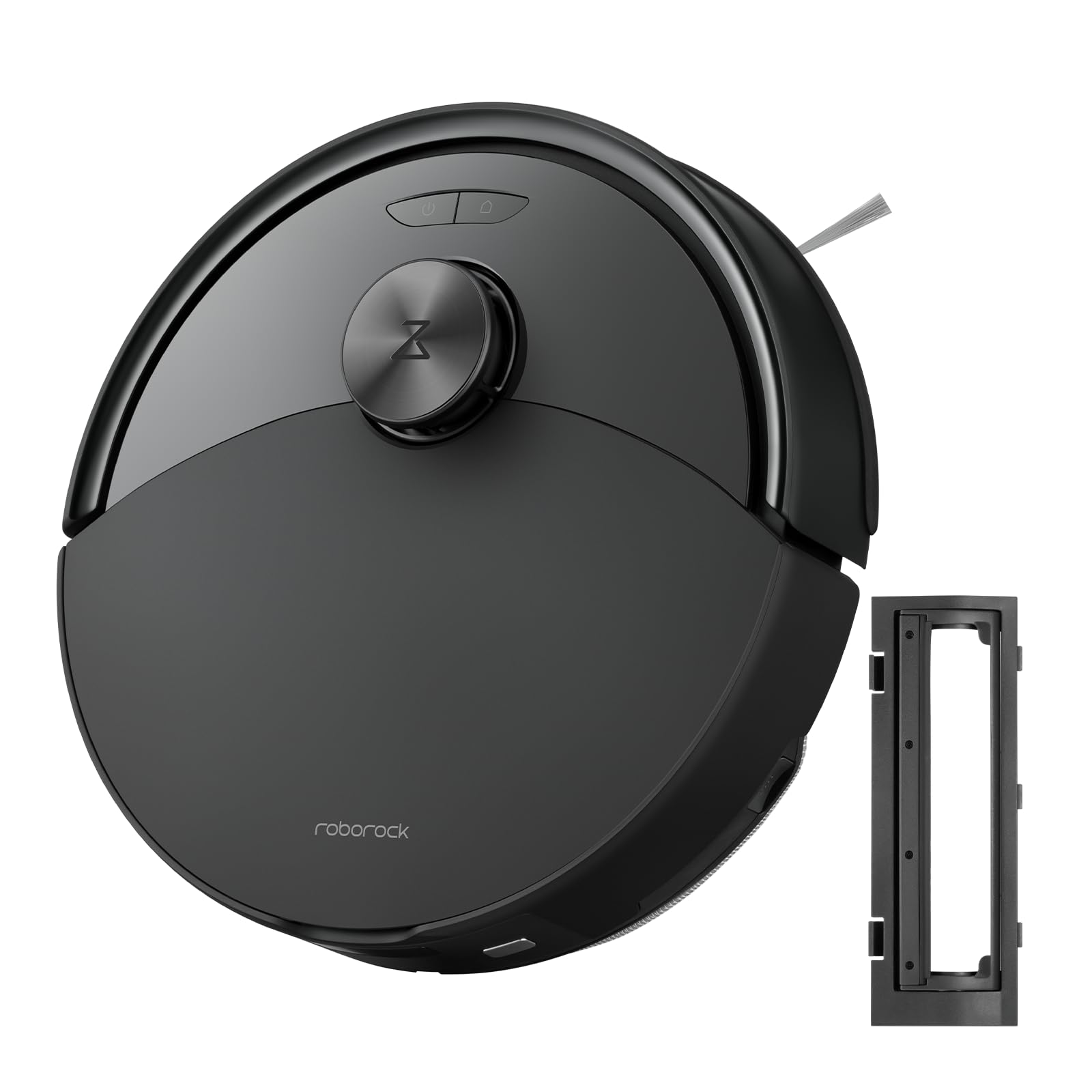
Umfanekiso 1: The roborock Q10 S5 Robot Vacuum and Mop Cleaner. This image shows the top view of the robot, highlighting its sleek black design and main control buttons.
Izingxenye zerobhothi:
- Ikhava ephezulu: Lifts to reveal the dustbin and Wi-Fi indicator.
- Inkinobho Yamandla/Ehlanzekile: Press to start/pause cleaning, hold to turn on/off.
- Dock/Spot Clean Button: Press to send the robot back to the dock, hold for spot cleaning.
- Inzwa ye-LDS: For navigation and mapping.
- Ibhampa: Detects obstacles.
- Ibhulashi Laseceleni: Sweeps debris from edges and corners.
- Ibhulashi Eliyinhloko: Collects dirt and debris from floors. Features a floating design for better contact.
- Isondo Eliqondisa Konke: For movement.
- Ishaja Oxhumana Nabo: Ixhuma nedokhi yokushaja.
- Izinzwa Ze-Cliff: Prevents the robot from falling down stairs.
- Water Tank & Mop Pad: For mopping functionality.
Idokhu yokushaja:
- Dock Location Beacon: Helps the robot locate the dock.
- Ishaja Oxhumana Nabo: Transfers power to the robot.
- Power Cable Port: Ixhuma i-adaptha yamandla.
4. Setha
- Khipha Irobhothi: Carefully remove the robot and all accessories from the packaging. Remove any protective films or shipping materials.
- Install the Side Brush: Press the side brush onto its post until it clicks into place.
- Beka iDokhi Yokushaja:
- Beka idokhi yokushaja endaweni eqinile, elinganayo odongeni.
- Ensure there is at least 0.5 meters (1.6 feet) of clear space on both sides and 1.5 meters (4.9 feet) in front of the dock.
- Connect the power cable to the charging dock and plug it into a wall outlet.
- Ukukhokhiswa kokuqala: Place the robot on the charging dock. The robot will automatically turn on and begin charging. For first-time use, fully charge the robot before operation (approximately 4-6 hours). The power indicator light will breathe white during charging and turn solid white when fully charged.
- Landa uhlelo lokusebenza: Cinga "Roborock" in the App Store or Google Play Store, or scan the QR code on the packaging to download and install the app.
- Xhuma ku-Wi-Fi:
- Open the Roborock app and follow the on-screen instructions to add your device.
- Qinisekisa ukuthi ifoni yakho ixhumeke kunethiwekhi ye-Wi-Fi engu-2.4 GHz.
- Cindezela bese ubamba i Idokhu futhi Amandla buttons simultaneously for 3 seconds until you hear the "Resetting Wi-Fi" voice alert.
- Follow the app's instructions to complete the connection.
5. Iziqondiso Zokusebenza
Ukuqala Ukuhlanza:
- Kusuka kuRobhothi: Cindezela inkinobho Amandla button once. The robot will start cleaning.
- Kusukela kuhlelo lokusebenza: Open the Roborock app and tap the "Clean" button.
Pausing/Resuming/Stopping:
- Misa isikhashana: Cindezela noma iyiphi inkinobho kurobhothi noma uthephe okuthi "Misa isikhashana" kuhlelo lokusebenza.
- Qalisa kabusha: Cindezela inkinobho Amandla button or tap "Resume" in the app.
- Ima: To stop a cleaning cycle, press the Idokhu button to send the robot back to the charging dock, or tap "Stop" in the app.
Umsebenzi we-Mopping:
- Gcwalisa ithangi lamanzi: Open the water tank cover, fill with clean water, and close securely.
- Namathisela i-Mop Pad: Wet the mop pad and wring it out. Slide it into the mop pad slot until it is securely attached.
- Start Mopping: The robot will automatically detect the mop module and switch to mopping mode. You can adjust water flow levels in the app.
Izici Zohlelo Lokusebenza:
- Ukuphathwa Kwemephu: Create and save maps, set no-go zones, virtual walls, and invisible barriers.
- Selective Room Cleaning: Choose specific rooms to clean.
- Ukuhlanza Okuhleliwe: Set cleaning schedules for different times and days.
- Custom Cleaning Modes: Lungisa amandla okumunca kanye namazinga okugeleza kwamanzi.
- Isilawuli kude: Lawula ukunyakaza kwerobhothi ngesandla.
6. Isondlo
Regular maintenance ensures your roborock Q10 S5 operates efficiently. Always turn off the robot and unplug the charging dock before performing any maintenance.
Dustbin and Filter (Weekly):
- Lift the top cover of the robot.
- Susa udoti.
- Vula isembozo sebhokisi likadoti bese uthulula okuqukethwe kwalo emgqonyeni kadoti.
- Remove the filter. Tap it gently to remove dust. The filter can be rinsed with water; ensure it is completely dry before reinstallation (allow 24 hours).
- Rinse the dustbin with water if necessary and allow it to dry completely.
- Reinstall the dry filter and dustbin.
Main Brush (Weekly):
- Vula irobhothi.
- Press the tabs to remove the main brush cover.
- Phakamisa ibhulashi eliyinhloko.
- Use the cleaning tool (if provided) or scissors to cut and remove any hair or debris tangled around the brush.
- Reinstall the main brush and cover, ensuring it clicks into place.
Side Brush (Monthly):
- Unscrew the side brush.
- Susa noma yiziphi izinwele noma udoti.
- Reattach and tighten the screw.
Sensors and Charging Contacts (Monthly):
- Sula zonke izinzwa (izinzwa ze-cliff, inzwa yodonga, ifasitela lezinzwa ze-LDS) kanye nokuxhumana kokushaja kokubili irobhothi kanye nedokhi ngendwangu ethambile, eyomile.
Mop Pad (After Each Use):
- Susa i-mop pad ethangini lamanzi.
- Rinse thoroughly with water and allow it to air dry completely before next use.
7. Ukuxazulula izinkinga
If you encounter issues with your robot, please refer to the following table before contacting support.
| Inkinga | Imbangela Engenzeka | Isixazululo |
|---|---|---|
| Irobhothi alivuli. | Ibhethri liphansi noma alishajiwe. | Beka irobhothi endaweni yokushaja bese uqinisekisa ukuthi liyashaja. |
| Irobhothi alikwazi ukuxhuma ku-Wi-Fi. | Incorrect Wi-Fi password, 5GHz network, or poor signal. | Ensure correct 2.4GHz Wi-Fi, reset Wi-Fi on robot, move closer to router. |
| Irobhothi libhajwa njalo. | Izithiyo, izintambo eziboshiwe, noma izinzwa ezingcolile. | Clear floor, clean sensors, use no-go zones in app. |
| Ukusebenza kabi kokuhlanza. | Full dustbin, dirty filter, tangled brushes. | Empty dustbin, clean/replace filter, clean main/side brushes. |
| Robot makes unusual noise. | Debris in main brush, side brush, or wheels. | Inspect and clean all brushes and wheels for obstructions. |
If the problem persists, please refer to the Roborock app for more detailed error messages or contact customer support.
8. Imininingwane
| Isici | Imininingwane |
|---|---|
| Imodeli | Q10 S5 |
| Ubukhulu | Cishe. 353 x 350 x 96.5 mm (13.9 x 13.8 x 3.8 amayintshi) |
| Isisindo | Cishe. 3.7 kg (8.16 lbs) |
| Ibhethri | Lithium-Ion (Capacity not specified, typical for robot vacuums) |
| Amandla Alinganiselwe | Approx. 60W (Typical for robot vacuums) |
| I-Dustbin Amandla | Approx. 470 ml (Typical for robot vacuums) |
| Amandla Ethangi Lamanzi | Approx. 300 ml (Typical for robot vacuums) |
| Amandla Okumunca | Up to 10,000 Pa (HyperForce Suction Power from feature bullets) |
| Ukuxhumana kwe-Wi-Fi | 2.4 GHz |
Qaphela: Imininingwane ingashintsha ngaphandle kwesaziso.
9. Iwaranti kanye Nokusekela
roborock products are manufactured to the highest quality standards. For detailed warranty information, please refer to the warranty card included in your product packaging or visit the official roborock website. For technical support, troubleshooting assistance, or to purchase replacement parts, please contact roborock customer service through the app or their official webindawo.
Esemthethweni Webindawo: www.katalo.net