
1. Ngaphezuluview
The Google Pixel 10 Pro is an advanced unlocked Android smartphone designed for seamless performance and intelligent features. It integrates the powerful Gemini AI, boasts an exceptional triple rear camera system, offers fast-charging capabilities with a 24+ hour battery life, and features a vibrant 6.3-inch Super Actua Display. This manual provides essential information for setting up, operating, and maintaining your device.

Image: The Google Pixel 10 Pro, showcasing its modern design and prominent camera bar.
2. Yini EseBhokisini
Your Google Pixel 10 Pro package includes the following items:
- Google Pixel 10 Pro Cell Phone
- USB-C Cable (1 meter, USB-C to USB-C 2.0)
- Support, Safety & Warranty Booklet
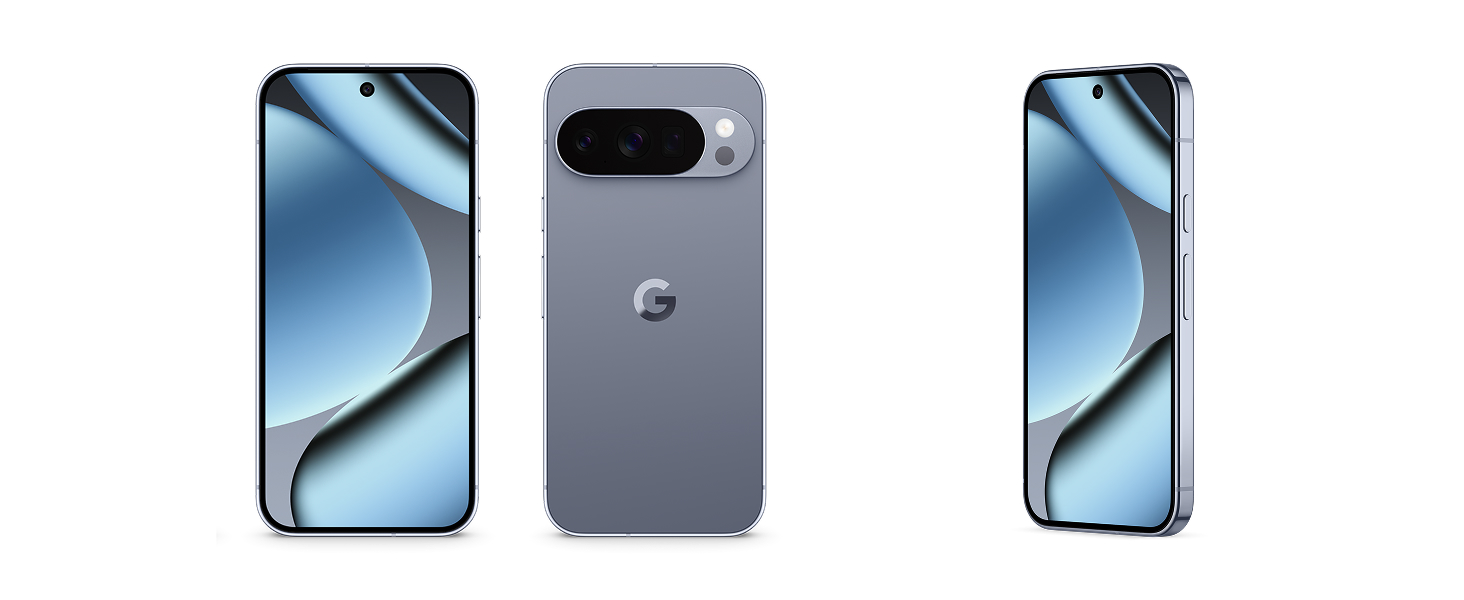
Image: The Google Pixel 10 Pro phone and its accompanying USB-C cable, as typically found in the product packaging.
3. I-Physical Overview
Familiarize yourself with the key physical components of your Pixel 10 Pro:
- Bonisa: 6.3-inch Super Actua Display with 120 Hz refresh rate and 1280 x 2856 pixel resolution.
- Camera Bar: Houses the triple rear camera system (50 MP main, 48 MP ultrawide, 48 MP telephoto) and flash.
- Ikhamera yangaphambili: 42 MP front photo sensor.
- Izinkinobho: Power button and volume rocker on the side.
- Amachweba: USB Type-C port for charging and data transfer.
- Isikhala se-SIM: eSIM only, no physical SIM card slot.
- Ukuqina: Built with durable aluminum and Corning Gorilla Glass Victus 2, offering scratch and drop resistance.

Isithombe: Eduze view of the Google Pixel 10 Pro highlighting its durable construction and the integrated camera bar.
4. Setha
Follow these steps to set up your new Google Pixel 10 Pro:
- Vula: Press and hold the Power button until the Google logo appears.
- Ukucushwa Kwasekuqaleni: Follow the on-screen prompts to select your language, connect to Wi-Fi, and accept terms and conditions.
- Vula i-eSIM: The Pixel 10 Pro is eSIM-only. During setup, you will be guided to activate your eSIM digitally. This allows you to switch plans and store multiple numbers without a physical SIM card.
- I-akhawunti ye-Google: Sign in with your Google Account or create a new one to access Google services and apps.
- Ukudluliswa Kwedatha: You can transfer data from your old phone during the setup process. This typically takes about 20 minutes.
- Ukusethwa Kwezokuphepha: Configure your preferred biometric security features, such as fingerprint recognition.
Image: A close-up of the Google Pixel 10 Pro's back, emphasizing its eSIM capability for digital plan switching.
5. Ukusebenzisa Idivayisi Yakho
The Pixel 10 Pro runs on Android 16, offering an intuitive and customizable user experience.
- Ukuzulazula: Use gestures or on-screen buttons to navigate the interface.
- Izingcingo kanye nemiyalezo: Make calls and send messages using the default phone and messaging apps.
- Ukufinyelela i-Inthanethi: Connect to Wi-Fi or use 5G cellular technology for internet browsing.
- Ukuphathwa kohlelo lokusebenza: Landa futhi uphathe izinhlelo zokusebenza kusuka ku-Google Play Store.
- Ukwenza kube ngokwakho: Customize your home screen, widgets, and settings to suit your preferences.
Ividiyo: Isiqephu esifushaneview of the Google Pixel 10 Pro's interface and general operation, demonstrating its responsiveness and ease of use.
6. Uhlelo lwekhamera
The Pixel 10 Pro features a powerful triple rear camera system (50 MP Wide, 48 MP Ultrawide, 48 MP Telephoto) and a 42 MP front camera, enhanced by advanced Google AI models.
- 100x Pro Res Zoom: Capture incredible details from a distance with Pixel's best zoom quality ever.
- Super Steady Videos: The upgraded 50 MP camera can transform high-motion scenes into stable, cinematic 8K videos.
- Camera Coach: Utilize Gemini to receive helpful suggestions for framing and capturing your best photos.
- Ukusebenza Kokukhanya Okuphansi: The camera system excels in low-light conditions, ensuring amazing results.

Image: A visual representation of the Google Pixel 10 Pro's 100x Pro Res Zoom, showing a distant object captured with high clarity.

Image: A dynamic shot illustrating the Google Pixel 10 Pro's ability to record super steady videos, even during high-motion activities.
7. Umsizi we-Gemini AI
The Pixel 10 Pro integrates Gemini, Google's advanced AI, to enhance your daily interactions and productivity.
- Gemini Live: Engage in natural, free-flowing conversations with Gemini. Point your camera at objects to get information or chat with Gemini to brainstorm ideas and complete tasks across apps.
- Google Tensor G5 Chip: The next-gen Google Tensor G5 chip powers breakthrough AI performance, making your device faster and more responsive.

Image: A user interacting with Gemini Live on the Google Pixel 10 Pro, pointing the camera at a shark in an aquarium to receive real-time information.
Video: A short demonstration of the Google Pixel 10's "Pixelsnap" feature, showcasing its AI capabilities and seamless user experience.
8. Ukuphepha Nobumfihlo
The Pixel 10 Pro is designed with robust security features to protect your data and privacy:
- Spam, Scams, and Phishing Protection: Pixel helps protect you against unwanted and malicious communications.
- Izibuyekezo Zokuvikela: Receive regular security and software updates for 7 years, ensuring your device remains protected against emerging threats.
- Lost or Stolen Device Protection: Your phone will automatically lock if it's lost or stolen, safeguarding your personal information.
- Izici Eziphuthumayo: Pixel has you covered in case of emergency, even when offline.

Image: Icons representing the security features of the Google Pixel 10, including protection against spam, regular updates, and lost device locking.
9. Ukuphathwa Kwebhethri
The Google Pixel 10 Pro is equipped with a 4870 mAh battery, providing over 24 hours of usage on a single charge. With Extreme Battery Saver, it can last over 30 hours.
- Ukushaja Ngokushesha: Isekela ukushaja okusheshayo ukuze inike amandla idivayisi yakho ngokushesha.
- PixelSnap Wireless Charging: Compatible with Qi2-certified PixelSnap wireless charging for convenient power-ups.
- Ukuthuthukisa Ibhethri: The device intelligently adapts to your usage patterns to optimize battery life.

Image: The Google Pixel 10 Pro being wirelessly charged, illustrating its long-lasting battery and efficient power management.
10. Ukuxhumana
Your Pixel 10 Pro offers versatile connectivity options:
- Iselula: Supports 5G cellular technology for fast mobile data. It is unlocked for all major carriers including Google Fi, Verizon, T-Mobile, and AT&T.
- I-Wi-Fi: Integrated Wi-Fi for high-speed internet access.
- I-Bluetooth: Connect to wireless accessories like headphones and smartwatches.
- I-NFC: Near Field Communication for contactless payments and quick pairing.
- I-USB Type-C: Ukushaja kanye nokudlulisa idatha ngentambo.
11. Isondlo Nokunakekela
To ensure the longevity and optimal performance of your Pixel 10 Pro, follow these care guidelines:
- Ukuhlanza: Sebenzisa indwangu ethambile, engenantambo ukuhlanza isikrini nomzimba. Gwema amakhemikhali anokhahlo.
- Ukumelana Namanzi: The device is water resistant, but not waterproof. Avoid prolonged exposure to water or submersion.
- Izinga lokushisa: Sebenzisa idivayisi ngaphakathi kwamazinga okushisa anconyiwe ukuze uvimbele umonakalo.
- Izibuyekezo zesofthiwe: Regularly install software updates to benefit from performance improvements and security enhancements.
12. Ukuxazulula izinkinga
If you encounter issues with your Pixel 10 Pro, try these common troubleshooting steps:
- Qala kabusha Idivayisi: Ukuqalisa kabusha okulula kungaxazulula izinkinga eziningi ezincane zesofthiwe.
- Hlola izibuyekezo: Qinisekisa ukuthi isofthiwe yedivayisi yakho isesikhathini.
- Sula inqolobane: If an app is misbehaving, try clearing its cache.
- Ukusetha kabusha kwefekthri: As a last resort, a factory reset can resolve persistent software issues (back up your data first).
- Xhumana Nosekelo: For complex issues, refer to the Warranty & Support section.
13. Imininingwane
| Isici | Imininingwane |
|---|---|
| Ibhrendi | |
| Igama Lemodeli | I-Pixel 10 Pro |
| Isistimu esebenzayo | I-Android 16 |
| Imodeli ye-CPU | I-Google Tensor G5 |
| Isivinini se-CPU | 3.78 GHz |
| Inkumbulo ye-RAM | 16 GB |
| Umthamo Wesitoreji | 256 GB (up to 1TB options available) |
| Usayizi Wesikrini | 6.3 amayintshi |
| Uhlobo lokubonisa | OLED Super Actua Display |
| Isixazululo | 1280 x 2856 pixels (3118 x 1440 max) |
| Isilinganiso Sokuvuselela | 120 Hz |
| Ikhamera yangemuva | 50 MP (Wide), 48 MP (Ultrawide), 48 MP (Telephoto) |
| Ikhamera yangaphambili | 42 MP |
| Ukulungiswa kokuthwebula ividiyo | 8K |
| Amandla ebhethri | 4870 mAh (24+ hour average life) |
| I-SIM Card Slot | I-eSIM |
| Ukuxhumana | 5G, Bluetooth, NFC, Wi-Fi |
| Izinga Lokumelana Namanzi | Ukumelana Namanzi (IP68) |
| Ukuphepha kwe-Biometric | Ukuqashelwa kwezigxivizo zeminwe |
| Unyaka Wemodeli | 2025 |
14. Iwaranti kanye Nokusekela
Your Google Pixel 10 Pro comes with a 1-Year Manufacturer Warranty. For detailed warranty information, troubleshooting, and additional support, please refer to the included Warranty Booklet or visit the official Google Pixel support webindawo.
Ukusekelwa Kwe-inthanethi: g.co/pixel/support
Ulwazi Lwezomthetho: g.co/pixel/legal