
1. Siyakwamukela
Thank you for choosing the AWEI T1 Pro Wireless Bluetooth Headphones. This manual provides detailed instructions for setting up, operating, and maintaining your new earbuds. Please read this manual carefully before use to ensure optimal performance and longevity of your device.
2. Umkhiqizo Uphelileview
2.1. Okuqukethwe Kwephakheji
- Ama-Earbud Angenantambo (Kwesobunxele nakwesokudla)
- Ikesi lokushaja
- Ikhebula lokushaja le-USB
- Izindlebe (osayizi abahlukahlukene)
- Imaniwali yosebenzisayo
2.2. Earbud and Charging Case Components
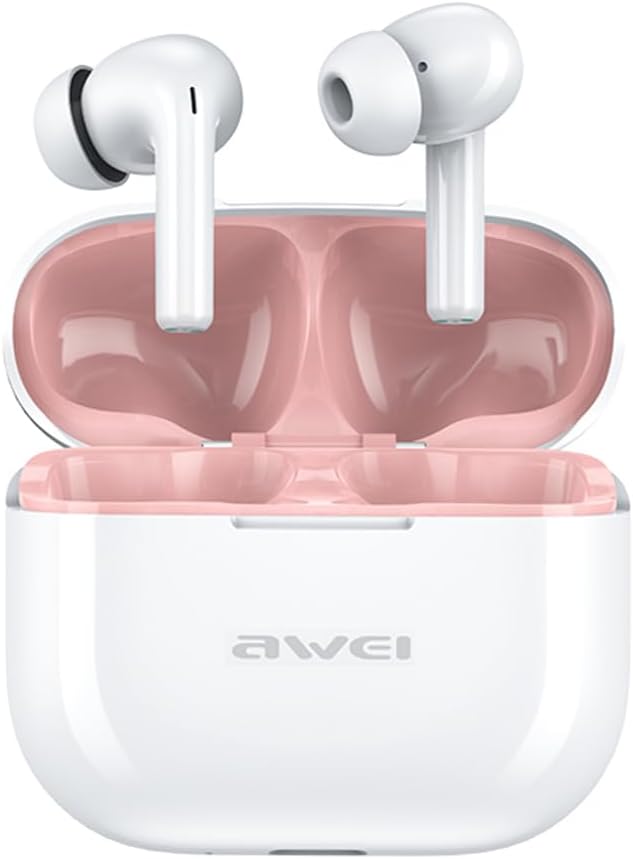
Image: The AWEI T1 Pro wireless earbuds are shown in their open charging case. The earbuds are white with a stem design, and the interior of the charging case is a light pink color. The AWEI logo is visible on the front of the white charging case.
The AWEI T1 Pro earbuds feature an ergonomic in-ear design for a comfortable and secure fit. The compact charging case not only protects the earbuds but also provides multiple charges on the go.
2.3. Izici Eziyinhloko
- Ikhwalithi yomsindo we-Hi-Fi: Equipped with 13mm speakers for an immersive audio experience and clear call performance.
- I-Bluetooth 5.4 Ubuchwepheshe: Ensures a faster, more stable signal transmission with low latency and a wireless range of up to 10 meters. (Note: Some packaging may indicate Bluetooth 5.3, but the device supports 5.4 for enhanced performance).
- I-Smart Touch Control: Intuitive touch sensors on each earbud allow for easy control of music playback, calls, and voice assistant activation.
- Impilo ende yebhethri: Enjoy up to 7 hours of continuous playback per charge. The 300mAh charging case extends total playtime to 36 hours in dual-ear mode or up to 60 hours in single-ear mode. The case fully charges in approximately 1 hour via Type-C.
- IPX6 Idizayini engangeni manzi: Resistant to sweat and rain, making them suitable for sports and outdoor activities.

Image: A detailed diagram illustrating the internal components of an earbud speaker, labeled as 'Drive Units HiFi Stereo', highlighting the layered structure of the audio driver for high-fidelity sound.

Image: A stylized depiction of a microchip labeled '5.3 Bluetooth', surrounded by circuit board elements, emphasizing lower latency and increased stability in wireless communication.

Image: A black earbud is shown next to a smartphone displaying a music player interface. Text indicates 'Touch Control Wake up Voice Assistant', illustrating how touch gestures on the earbud can control phone functions like answering calls or activating a voice assistant.

Image: A smartphone displaying a music player is shown alongside a transparent block, symbolizing extended power. Text highlights 'Full of Energy Long Battery Life', indicating the 300mAh charging case provides 7 hours of continuous use per charge.

Image: Two black earbuds are depicted, one dry and the other surrounded by water droplets, illustrating the 'No Fear of Sweat & Rain IPX6 Waterproof Rate' feature, which prevents water penetration during sports.
3. Setha
3.1. Ukushaja Kwasekuqaleni
- Before first use, place both earbuds into the charging case.
- Connect the provided USB Type-C charging cable to the charging port on the case and a power source (e.g., USB wall adapter, computer USB port).
- The indicator lights on the charging case will show charging status. A full charge for the case takes approximately 1 hour.
- Ensure the earbuds are fully charged before initial pairing.
3.2. Ukumatanisa nedivayisi
- Vula ikesi lokushaja. Ama-earbud azovula ngokuzenzakalelayo futhi angene kumodi yokumatanisa.
- Edivayisini yakho (i-smartphone, ithebhulethi, ikhompyutha ephathekayo), vula i-Bluetooth.
- Cinga amadivaysi e-Bluetooth atholakalayo.
- Select "AWEI T1 Pro" from the list of devices.
- Uma usuxhunyiwe, uzozwa ithoni yokuqinisekisa, futhi ama-earbud azobe elungele ukusetshenziswa.
- Ama-earbud azoxhuma kabusha ngokuzenzakalelayo kudivayisi yokugcina ebhangqiwe uma ekhishwa ebhokisini, uma i-Bluetooth ivuliwe kudivayisi.
4. Iziqondiso Zokusebenza
4.1. Vula/Vala
- Vula: Vula isikhwama sokushaja, noma cindezela isikhathi eside indawo yokuthinta kuzo zombili izindlebe imizuzwana emi-3.
- Cisha ugesi: Buyisela ama-earbud ebhokisini lokushaja bese uvala isivalo, noma ucindezele isikhathi eside indawo yokuthinta kuwo womabili ama-earbud imizuzwana emi-5.
4.2. Izilawuli zokuthinta
| Umsebenzi | Isenzo |
|---|---|
| Dlala/Misa kancane Umculo | Ukuthepha okukodwa kunoma iyiphi i-earbud |
| Iculo Elilandelayo | Thepha kabili ku-earbud engakwesokudla |
| Ingoma Edlule | Thepha kabili ku-earbud engakwesokunxele |
| Ivolumu phezulu | Thepha kathathu ku-earbud engakwesokudla |
| Ivolumu Phansi | Thepha kathathu ku-earbud engakwesokunxele |
| Phendula/Qeda ucingo | Ukuthepha okukodwa kunoma iyiphi i-earbud |
| Yenqaba Ucingo | Cindezela isikhathi eside kunoma iyiphi i-earbud imizuzwana emi-2 |
| Vula Umsizi Wezwi | Long press on either earbud for 2 seconds (when not on a call) |
4.3. Ukushaya nokwamukela izingcingo
When a call comes in, you can answer or reject it using the touch controls as described above. During a call, a single tap will end the conversation.
4.4. Ukudlala Komculo
Control your music directly from the earbuds. Use single, double, or triple taps to play, pause, skip tracks, or adjust volume.
5. Isondlo
5.1. Ukuhlanza
- Hlanza njalo ama-earbud nekesi lokushaja ngendwangu ethambile, eyomile, engena-lint.
- Ungasebenzisi izinto zokuhlanza abrasive, utshwala, noma izincibilikisi zamakhemikhali.
- Gently remove any earwax or debris from the earbud mesh and charging contacts using a dry cotton swab or a small, soft brush.
5.2. Isitoreji
- When not in use, always store the earbuds in their charging case to protect them from dust and damage.
- Gcina idivayisi endaweni epholile, eyomile, kude namazinga okushisa aphezulu kanye nelanga eliqondile.
5.3. Ukumelana Namanzi
The AWEI T1 Pro earbuds are rated IPX6 waterproof, meaning they are protected against high-pressure water jets from any direction. This makes them suitable for workouts and light rain. However, they are not designed for swimming or submersion in water. Ensure the earbuds are dry before placing them back into the charging case to prevent damage.
6. Ukuxazulula izinkinga
6.1. Izinkinga Ezivamile Nezixazululo
- Ama-earbud awamataniswa nedivayisi:
Ensure both earbuds are charged. Turn off and on your device's Bluetooth. Forget "AWEI T1 Pro" from your device's Bluetooth list and try pairing again. - I-earbud eyodwa kuphela esebenzayo:
Place both earbuds back into the charging case, close the lid, wait a few seconds, then open the lid and take them out. This should reset their connection. If the issue persists, try resetting the earbuds (refer to manufacturer's webisayithi ukuthola imiyalelo ethile yokusetha kabusha uma kudingeka). - Awukho umsindo noma ivolumu ephansi:
Check the volume level on both your device and the earbuds. Ensure the earbuds are properly seated in your ears. Try cleaning the earbud mesh for any obstructions. - Ikesi elishajayo alikhokhisi:
Ensure the USB cable is securely connected to both the case and the power source. Try a different charging cable or power adapter. - Ama-earbud awashaji uma kwenzeka:
Ensure the charging contacts on both the earbuds and the case are clean and free of debris. Make sure the earbuds are correctly seated in the case.
7. Imininingwane

Image: A graphic displaying the technical specifications of the AWEI T1 Pro, including basic information, horn details, Bluetooth version, and battery capacities.
| Ulwazi oluvamile | |
|---|---|
| Igama Lemodeli | I-T1 Pro |
| Uhlobo Lomkhiqizo | Ama-Earbud e-Stereo TWS |
| Isisindo sengqikithi | 36g |
| Ubukhulu (Ikesi) | 58*50*24mm |
| Ukubekwa Kwendlebe | Endlebeni |
| Uhlobo Lokulawula | Ukulawula Ukuthinta |
| Izinga Lokumelana Namanzi | IPX6 Ingangeni manzi |
| Ukulawula Umsindo | Ukukhansela Umsindo Okuguquguqukayo |
| Imininingwane Yomsindo | |
| Ububanzi besipikha | 13 mm |
| Ukuzwela | 100±3dB |
| Ibanga Lokuphendula Imvamisa | 20Hz ~ 20,000Hz |
| Impedance | 32 ohm |
| Ukuxhumana | |
| Inguqulo ye-Bluetooth | 5.4 (Image shows 5.3) |
| Uhlobo olungenantambo | Kufika kumamitha angu-10 |
| Amaphrothokholi Asekelwe | HSP, HFP, A2DP, AVRCP |
| Amadivayisi Ahambisanayo | Laptops, Tablets, Mobile Phones |
| Ibhethri nokushaja | |
| Ibhethri yekesi yokushaja | 300mAh / 3.7V |
| Amandla we-Earbud Battery | 45mAh * 2 |
| Isikhathi Sokudlala Umculo | Kufika emahoreni angu-7 (ngokushaja ngakunye) |
| Isikhathi Sokukhuluma | Kufika emahoreni angu-8 |
| Isikhathi sokulinda | Kufika emahoreni angu-300 |
| Isikhathi sokushaja (Ikesi) | Cishe ihora elingu-1 |
| Imbobo yokushaja | I-USB Type-C |
8. Iwaranti kanye Nokusekela
AWEI products are designed and manufactured to the highest quality standards. For information regarding warranty coverage, please refer to the warranty card included in your product packaging or visit the official AWEI website. If you encounter any issues or require technical assistance, please contact AWEI customer support through the contact information provided on the official webindawo noma inkundla yakho yokuthenga.