
1. Isingeniso
This manual provides essential instructions for setting up, operating, maintaining, and troubleshooting your HONOR 400 5G smartphone. Please read this guide thoroughly to ensure proper use and to maximize the performance of your device.
The HONOR 400 is a powerful 5G smartphone featuring a 6.55-inch AMOLED display, a Qualcomm Snapdragon 7 Gen 3 processor, 12GB of RAM, and 512GB of internal storage. It operates on Android 15 and is equipped with a 5300mAh battery, a 200MP main camera, and dual-SIM capabilities.
2. Yini EseBhokisini
Upon unboxing your HONOR 400 smartphone, verify that all items are present:
- HONOR 400 5G I-smartphone
- Ikhebula le-USB
- (Other accessories such as a charger, SIM ejector tool, or protective case may vary by region and package contents.)
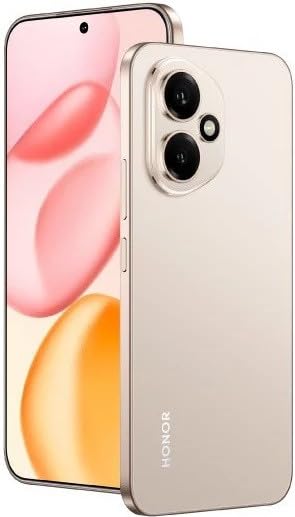
Umfanekiso 2.1: The HONOR 400 5G Smartphone. This image displays the device's sleek design and the main screen.
3. Idivayisi Ngaphezuluview
Familiarize yourself with the physical components of your HONOR 400 smartphone.
3.1 Ngaphambili View
- Bonisa: 6.55-inch AMOLED screen with 1264 x 2736 pixels resolution.
- Ikhamera yangaphambili: 50 MP, f/2.0 (wide) for selfies and video calls.
- Isendlebe: Located at the top edge of the display.
An illustration of the front view would typically show the display, front camera, and earpiece.
3.2 Ngemuva View
- Main Camera System:
- 200 MP, f/1.9 (wide), 1/1.4", PDAF, OIS
- 12 MP, f/2.2, 112° (ultrawide), AF
- I-Flash: I-LED flash yokuthatha izithombe ezinokukhanya okuphansi.
- HONOR Logo: Ukuhlonza umkhiqizo.
An illustration of the rear view would typically highlight the camera module and brand logo.
3.3 Uhlangothi Views kanye namachweba
- Inkinobho yamandla: Typically on the right side, used to power on/off and wake/sleep the device.
- Izinkinobho zevolumu: Typically on the right side, above the power button, for adjusting volume.
- Imbobo yohlobo C ye-USB: Itholakala phansi, isetshenziselwa ukushaja nokudlulisa idatha.
- Ithreyi yekhadi le-SIM: Location varies, typically on the side or bottom, for inserting Nano-SIM cards.
- Microphones & Speakers: Strategically placed for calls and audio output.
Illustrations of the device's sides would show the placement of buttons, ports, and the SIM tray.
4. Setha
4.1 Ukufaka ama-SIM Card
- Thola ithreyi ye-SIM khadi kudivayisi yakho.
- Faka ithuluzi le-SIM ejector (uma likhona) embotsheni encane eduze kwethreyi bese uliphusha kancane kuze kuvele ithreyi.
- Place your Nano-SIM card(s) into the designated slots on the tray. The HONOR 400 supports Dual-SIM (Nano-SIM + ESIM OR Nano-SIM + Nano-SIM). Ensure the gold contacts face downwards.
- Faka futhi ngokucophelela ithreyi ocingweni.
An image demonstrating SIM card insertion would be helpful here.
Okubalulekile: Ngaphambi kokuthengaasing, verify network compatibility with your service provider. This device supports GSM networks (2G, 3G, 4G LTE, and 5G SA/NSA) but does not support CDMA networks.
4.2 Ukuqalisa Kokuvula Nokusetha Iwizadi
- Press and hold the Power button until the HONOR logo appears.
- Follow the on-screen instructions to complete the initial setup, which includes selecting your language, connecting to Wi-Fi, setting up your Google account, and configuring security features.
5. Ukusebenzisa Idivayisi Yakho
5.1 Uhlelo lokusebenza lwe-Android 15
Your HONOR 400 runs on Android 15, offering a user-friendly interface and access to a vast ecosystem of applications via the Google Play Store. Navigate using gestures or on-screen buttons, customize your home screen, and manage notifications.
5.2 Imisebenzi Eyisisekelo
- Ukushaya izingcingo: Thinta isithonjana Sefoni, faka inombolo, bese ucindezela inkinobho yokushaya ucingo.
- Ithumela Imilayezo: Use the Messaging app to send SMS/MMS.
- Ukuphequlula ku-inthanethi: Vula a web browser (e.g., Chrome) to access the internet via Wi-Fi or mobile data.
- Ukuphathwa kohlelo lokusebenza: Download, install, and uninstall apps from the Google Play Store.
5.3 Ukusetshenziswa kwekhamera
The HONOR 400 features a versatile camera system:
- Ikhamera yangemuva: Utilize the 200 MP main sensor for high-resolution photos and the 12 MP ultrawide lens for expansive shots. Features include PDAF and Optical Image Stabilization (OIS).
- Ikhamera yangaphambili: The 50 MP wide-angle front camera is ideal for selfies and video conferencing.
- Ukuqoshwa kwevidiyo: Capture videos in up to 4K resolution at various frame rates (30, 60, 120 fps).
A diagram of the camera interface or tips for photography modes could be included here.
5.4 Ukuxhumana
Your device supports multiple connectivity options:
- I-5G/4G LTE: High-speed mobile data connectivity.
- I-Wi-Fi: Xhuma kumanethiwekhi angenawaya ukuze ufinyelele ku-inthanethi.
- I-Bluetooth: Hlanganisa nama-headphone angenantambo, izipikha, namanye amadivayisi.
- I-USB Type-C: For charging and connecting to a computer for data transfer.
6. Isondlo
6.1 Ukunakekelwa Kwebhethri
- The HONOR 400 is equipped with a 5300mAh non-removable battery.
- To prolong battery life, avoid extreme temperatures and fully discharging the battery frequently.
- Use the provided USB cable and a compatible charger for optimal charging.
6.2 Ukuvuselelwa Kwesoftware
Regularly check for and install software updates to ensure your device has the latest features, security patches, and performance improvements. You can usually find this option in your phone's Settings menu under "System & updates" or "About phone."
6.3 Ukuhlanza Idivayisi Yakho
Sebenzisa indwangu ethambile, engenantambo ukuhlanza isikrini nomzimba wefoni yakho. Gwema ukusebenzisa amakhemikhali anokhahlo noma izinto ezilumayo.
7. Ukuxazulula izinkinga
This section addresses common issues you might encounter with your HONOR 400 smartphone.
7.1 Idivayisi Ayivuliwe
- Qinisekisa ukuthi ibhethri lishajwe. Xhuma ifoni kushaja okungenani imizuzu eyi-15 ngaphambi kokuzama ukuyivula futhi.
- Try a forced restart by holding the Power button for an extended period (e.g., 10-15 seconds).
7.2 Izinkinga Zokuxhumaniseka Kwenethiwekhi
- Hlola ukuthi i-SIM khadi yakho ifakwe kahle yini.
- Verify that mobile data is enabled in your phone's settings.
- Qala kabusha idivayisi yakho.
- Confirm with your service provider that your plan is active and there are no network outagendaweni yangakini.
- Ensure your device is compatible with your network's frequencies (GSM only, no CDMA).
7.3 Izinhlelo Zokusebenza Ziyaphahlazeka noma Ukubanda
- Vala futhi uvule uhlelo lokusebenza.
- Sula i-cache kanye nedatha yohlelo lokusebenza kuzilungiselelo > Izinhlelo zokusebenza.
- Qinisekisa ukuthi uhlelo lokusebenza lubuyekezelwa enguqulweni yalo yakamuva.
- Qala kabusha ifoni yakho.
7.4 Ukusebenza Okunensayo
- Close unnecessary background apps.
- Sula inqolobane futhi okwesikhashana files.
- Ensure you have sufficient free storage space (512GB internal storage).
- Qala kabusha idivayisi yakho njalo.
8. Imininingwane
| Isici | Imininingwane |
|---|---|
| Igama Lemodeli | Inhlonipho 400 |
| Isistimu esebenzayo | I-Android 15.0 |
| Iphrosesa | Qualcomm SM7550-AB Snapdragon 7 Gen 3 (4 nm), Octa-core (1x2.63 GHz Cortex-A715 & 3x2.4 GHz Cortex-A715 & 4x1.8 GHz Cortex-A510) |
| RAM | 12 GB |
| Isitoreji Sangaphakathi | 512 GB (akunwebeki) |
| Bonisa | 6.55 Inches AMOLED, 1B colors, 1264 x 2736 pixels |
| Ikhamera yangemuva | 200 MP (wide, OIS) + 12 MP (ultrawide) |
| Ikhamera yangaphambili | 50 MP (ububanzi) |
| Ukulungiswa kokuthwebula ividiyo | 4K (30, 60, 120 fps) |
| Amandla ebhethri | 5300 millionamp Hours (non-removable) |
| Ikhadi le-SIM | Dual-SIM (Nano-SIM + ESIM OR Nano-SIM + Nano-SIM) |
| Ukuxhumana | 5G, GSM, LTE, Wi-Fi, Bluetooth, USB Type-C |
| Ubukhulu | 156.5 x 74.6 x 7.3 mm (6.16 x 2.94 x 0.29 in) |
| Isisindo | 202 Amagremu (6.49 oz) |
| Umbala | Desert Gold (as per product listing, actual color may vary by variant) |
9. Iwaranti kanye Nokusekela
9.1 Iwaranti yomkhiqizi
The HONOR 400 smartphone comes with a Iwaranti Yomkhiqizi Yonyaka ongu-1. Lesi siqinisekiso sihlanganisa amaphutha ezintweni zokwakha kanye nokusebenza ngaphansi kokusetshenziswa okuvamile. Sicela ugcine ubufakazi bakho bokuthenga izimangalo zewaranti.
For specific terms and conditions of the warranty, please refer to the warranty card included with your product or visit the official HONOR support webindawo.
9.2 Ukwesekwa Kwamakhasimende
For further assistance, technical support, or service inquiries, please contact HONOR customer support through their official webisayithi noma imininingwane yokuxhumana enikezwe emaphaketheni omkhiqizo wakho.
You can typically find support resources, FAQs, and contact details on the official HONOR webindawo: www.usihon.com