
1. Isingeniso
This manual provides detailed instructions for the installation, operation, and maintenance of your Kviflon 36-inch Modern Flush Mount Ceiling Fan with Light. This fan features a low-profile design, 5 reversible curved blades, 6 speed settings, 3 CCT dimmable LED lights, and convenient control via remote or smartphone application. Please read this manual thoroughly before installation and use to ensure safe and efficient operation.
2. Ulwazi Olubalulekile Lokuphepha
Ngaso sonke isikhathi landela izinyathelo zokuphepha eziyisisekelo lapho ufaka futhi usebenzisa izinto zikagesi ukuze unciphise ingozi yomlilo, ukushaqeka kukagesi, nokulimala komuntu siqu.
- Qinisekisa ukuthi ugesi ucinyiwe ku-circuit breaker ngaphambi kokufaka noma ukulungisa.
- Zonke izintambo kufanele zihambisane namakhodi kagesi kazwelonke nawendawo.
- Consult a qualified electrician if you are unsure about wiring or installation.
- Mount the fan to a ceiling joist or support structure capable of supporting the fan's weight.
- Do not operate the fan if any part is damaged.
- Keep hands, hair, and clothing away from moving blades.
3. Yini EseBhokisini
Qinisekisa ukuthi zonke izingxenye zikhona ngaphambi kokuqala ukufakwa:
- Umhlangano Wezimoto Zabalandeli
- I-Hanging Board
- 5 Ama-Fan Blades
- Lampumthunzi
- Umamukeli
- Isilawuli kude
- Isikulufa Isikhwama
- Incwadi Yeziqondiso
Umfanekiso 1: Included components of the Kviflon 36-inch ceiling fan. This image displays the fan body assembly, hanging board, five fan blades, lampshade, receiver, remote control, screw bag, and the instruction manual.
4. Ukusetha nokufakwa
Follow these steps for proper installation. It is recommended to install the fan blades and light fixtures first, then mount the fan to the ceiling.
- Lungisa Umzimba Wefeni: Attach the LED light board to the fan motor assembly using the provided screws. Ensure the screws are tightened securely.
- Namathisela ama-Fan Blades: The screws for the blades are pre-installed on the motor. Align each of the 5 fan blades with the designated holes on the motor assembly and secure them.
- Faka i-Lampumthunzi: Beka ngokucophelela i-lampshade onto the fan body, twisting or clicking into place as per the design.
- Mount the Hanging Board: Secure the hanging board to the ceiling junction box using appropriate screws. Ensure it is firmly attached to a structural support.
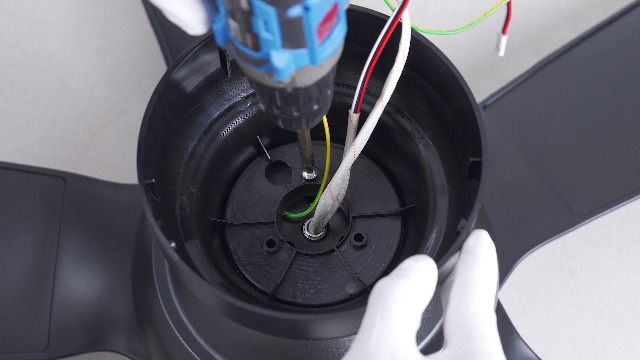
- Izixhumanisi zezintambo: Connect the household wiring to the fan's wiring. Typically, this involves connecting live, neutral, and ground wires. Refer to the wiring diagram in the included instruction manual for specific color codes.
- Lengisa Ifeni: Carefully lift the fan assembly and hang it onto the safety hook of the ceiling mounting bracket. This allows for hands-free wiring.
- Vikela Ifeni: Once wiring is complete, align the fan body with the hanging board and secure it with the remaining screws.
- Wall Control Compatibility: This fan is designed for use with conventional wall switches for light on/off control. It is hhayi compatible with dimmer switches or fan gear switches.
Ifilimu 1: Installation steps for the Kviflon 8922 ceiling fan light, demonstrating LED board and blade attachment.

Umfanekiso 2: Okuningiliziwe view of the fan's components and wiring connections for installation.

Umfanekiso 3: Illustration of wall switch compatibility. The fan works with standard on/off switches but not dimmer or gear switches.
5. Iziqondiso Zokusebenza
Your Kviflon ceiling fan can be controlled using the included remote control or the dedicated smartphone application.
5.1 Ukulawula okukude
The remote control allows for easy adjustment of fan speed, light settings, and other functions from anywhere in the room.

Umfanekiso 4: Layout of the remote control, detailing buttons for power, light on/off, fan off, 6 speed settings, color temperature adjustment, night light, brightness control, forward/reverse function, 2-hour timer, and code matching.
- Vula/Vala: Cindezela inkinobho yamandla ukuze uvule ifeni futhi ukhanyise noma uvale.
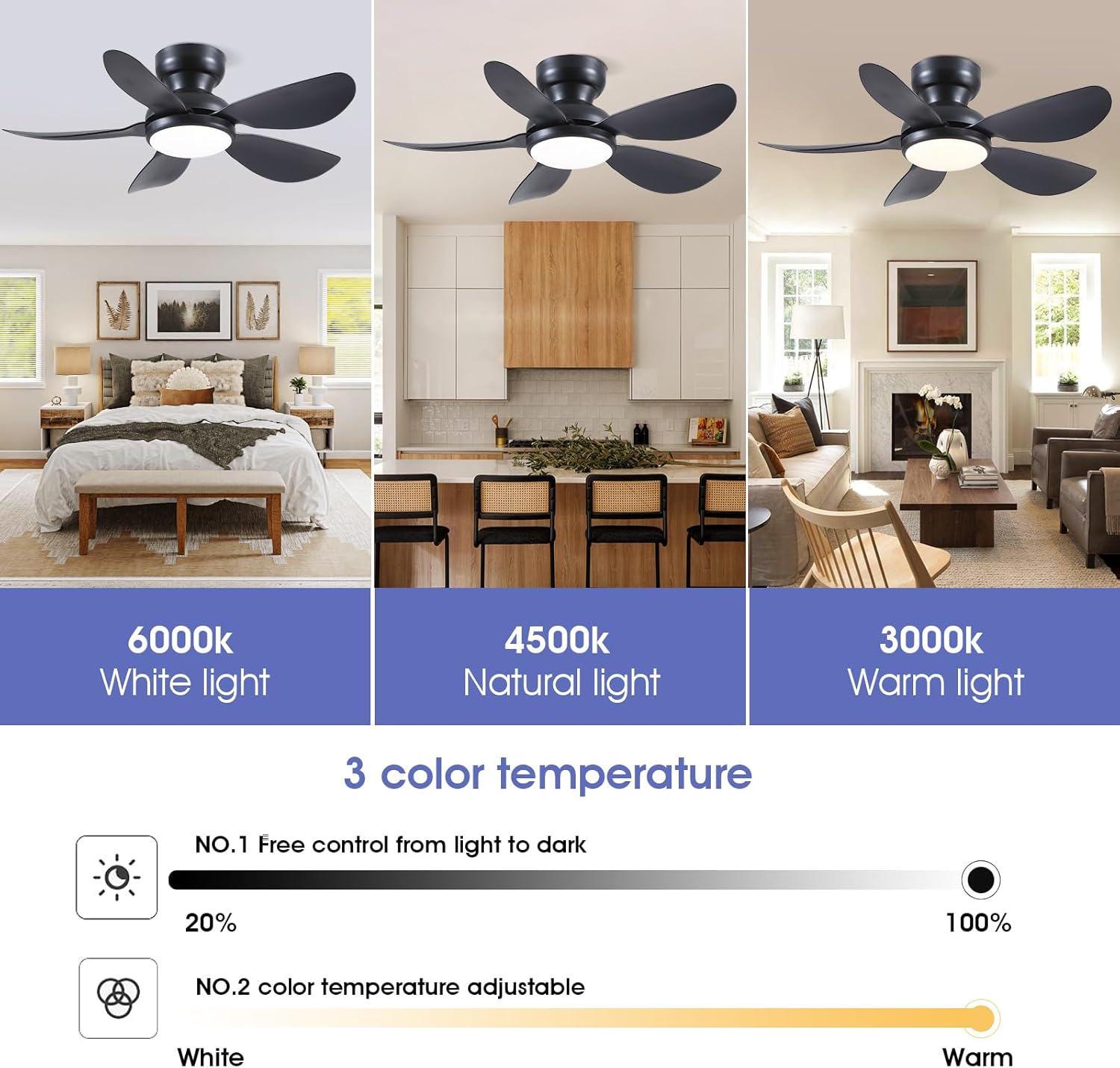
- Ukulawula Ukukhanya: Use the light on/off button to toggle the light. Adjust brightness (20%-100%) and color temperature (3000K Warm, 4500K Natural, 6000K White) using the dedicated buttons. A night light mode is also available.
- Isivinini saphephela: Select from 6 fan speeds using the numbered buttons (1-6). Speed 1-2 is suitable for sleep, 3-4 for leisure, and 5-6 for fitness/strong airflow.
- Umsebenzi wokuhlehlisa: Press the F/R (Forward/Reverse) button to change the direction of the fan blades. This function helps circulate air efficiently in both summer (downward airflow) and winter (upward airflow to redistribute warm air). The fan will stop completely for 5-8 seconds before reversing direction.
- Isikhathi: Set the fan to turn off automatically after 2 hours using the 2H timer button.

Umfanekiso 5: The fan's LED light offers three color temperatures (Warm, Natural, Cool) and adjustable brightness from 20% to 100%.
Umfanekiso 6: The fan provides 6 adjustable speeds to suit various activities and comfort levels.

Umfanekiso 7: Reversible motor function for year-round comfort, providing downward airflow in summer and upward airflow in winter.
5.2 Ukulawulwa kohlelo lokusebenza
Control your fan conveniently from your smartphone using the "Fan Lamp Pro" application.
- Landa uhlelo lokusebenza: Scan the QR code provided in the manual or on the product page to download the "Fan Lamp Pro" app. You can also visit http://www.jasonghost.com/fanlamppro/.
- Nika amandla i-Bluetooth: Vula i-Bluetooth ku-smartphone yakho.
- Vula uhlelo lokusebenza bese ungeza idivayisi: Open the "Fan Lamp Pro" app, navigate to the main page, and tap the "+" icon to add a new fan lamp.
- Ukumatanisa: Turn on the main power to the fan. Within 5 seconds, repeatedly click the connecting button in the app until the fan light blinks twice or beeps, indicating a successful connection.
- Imisebenzi yokulawula: Once paired, you can control fan speed, light brightness, color temperature, and set timers directly from the app interface.
Ifilimu 2: Demonstrates the process of connecting and controlling the ceiling fan via the smartphone application.
6. Isondlo
Ukugcinwa njalo kuqinisekisa ukuthi ifeni yakho yophahla ihlala isikhathi eside futhi isebenza kahle.
- Ukuhlanza: To avoid damage to the finish, clean the fan with a soft, damp indwangu. Ungasebenzisi izinto zokuhlanza abrasive noma izincibilikisi.
- Ukuhlanza i-Blade: Vuthela ama-fan blades njalo ukuze uvimbele ukwakheka kothuli, okungathinta ukuhamba komoya kanye nokulinganisela.
- Qinisa izikulufu: Periodically check all screws for tightness. Due to the fan's movement, some connections may loosen over time.
- Ukukhanya kwe-LED: The integrated LED light is designed for long-term use and is not user-replaceable.
7. Ukuxazulula izinkinga
If you encounter issues with your fan, refer to the following common solutions:
| Inkinga | Imbangela Engenzeka | Isixazululo |
|---|---|---|
| Umlandeli akaqali | No power to the fan; loose wiring; remote/app not paired. | Check circuit breaker. Ensure all wiring connections are secure. Re-pair remote/app following instructions in Section 5. |
| Ukukhanya akusebenzi | No power to the light; incorrect light setting; remote/app issue. | Check power supply. Verify light is turned on via remote/app. Ensure brightness is not set to minimum. |
| Umlandeli uyavevezela | Loose blades; improper mounting; unbalanced blades. | Ensure all blade screws are tight. Verify mounting bracket is securely fastened to the ceiling. Check for bent or damaged blades. |
| Isilawuli kude/Uhlelo lokusebenza aluphenduli | Low battery in remote; app not connected; interference. | Replace remote batteries. Re-pair the app with the fan. Ensure no strong interference sources are nearby. |
| Umlandeli ubanga umsindo | Loose screws; motor issue; blades hitting an obstruction. | Check all screws for tightness. Ensure no objects are in the path of the blades. If noise persists, contact customer support. |
8. Imininingwane
| Isici | Imininingwane |
|---|---|
| Ibhrendi | Kviflon |
| Inombolo Yemodeli | 8922 |
| Ubukhulu bomkhiqizo | 36"D x 36"W x 9.8"H |
| Idizayini yabalandeli bakagesi | Ceiling Fan |
| Umthombo wamandla | DC |
| Isitayela | Okwesimanje |
| Izici ezikhethekile | App Operable, LED Light, Remote Control, Reversible |
| Uhlobo Lokukhweza | Intaba eshisayo |
| Uhlobo lwesilawuli | App Control, Button Control, Remote Control |
| Inombolo Yezivinini | 6 |
| Izinga Lomsindo | 30 Decibel |
| Wattage | 24 watts |
| Inombolo yama-Blades | 5 |
| Voltage | 110 volts |
| Okubalulekile | Insimbi, Ipulasitiki |
| I-Blade Material | Ipulasitiki |
9. Ulwazi Lwewaranti
This Kviflon ceiling fan comes with a Iwaranti ekhawulelwe yeminyaka engu-1 from the date of purchase. This warranty covers manufacturing defects in materials and workmanship under normal use. It does not cover damage resulting from improper installation, accident, misuse, abuse, or unauthorized modifications. Please retain your proof of purchase for warranty claims.
10. Ukwesekwa Kwamakhasimende
For further assistance, technical support, or warranty inquiries, please contact Kviflon customer service:
- I-imeyili: support@kviflon.com
- Webindawo: Vakashela i- Kviflon Store on Amazon ukuze uthole imibuzo evame ukubuzwa kanye nezinsiza ezengeziwe.