
InMotion ANC True Wireless Earbuds
InMotion ANC True Wireless Earbuds User Manual
Model: ANC True Wireless Earbuds
Brand: InMotion
1. Isingeniso
Thank you for choosing the InMotion ANC True Wireless Earbuds. This manual provides essential information for setting up, operating, and maintaining your earbuds to ensure optimal performance and longevity. Please read this manual thoroughly before use.
These earbuds feature Active Noise Cancelling (ANC) for an immersive audio experience, true wireless connectivity for freedom of movement, and intuitive touch controls. They are designed for comfort with suction tips and offer up to 6 hours of use on a single charge.
Ulwazi Lokuphepha
- Ungabeki ama-earbud noma ikesi lokushaja emazingeni okushisa aphezulu, umswakama, noma uketshezi.
- Gwema ukuwisa noma ukubeka idivayisi emithonyeni enamandla.
- Do not attempt to disassemble or modify the earbuds or charging case.
- Gcina endaweni lapho izingane zingafinyeleleki khona.
- Sebenzisa kuphela ikhebuli yokushaja enikeziwe noma okulinganayo okuqinisekisiwe.
2. Yini EseBhokisini
Qinisekisa ukuthi zonke izinto zikhona kuphakheji yakho:
- InMotion ANC True Wireless Earbuds (Left and Right)
- Charging Carry Case
- Ikhebuli yokushaja ye-USB-C
- Incwadi Yomsebenzisi (le dokhumenti)

Image: The InMotion ANC True Wireless Earbuds resting inside their open charging case, showcasing the sleek design and charging indicators.
3. Setha
3.1 Ukushaja ama-Earbud nekesi
Ngaphambi kokusebenzisa okokuqala, shaja ngokugcwele ama-earbud nekesi lokushaja.
- Faka ama-earbud ebhokisini lokushaja, uqinisekise ukuthi ahlezi kahle.
- Xhuma ikhebula lokushaja le-USB-C embobeni yokushaja ekhasethini bese kuthi elinye icala libe nomthombo wamandla we-USB (isb., i-adaptha yodonga, imbobo ye-USB yekhompyutha).
- The indicator lights on the case will show charging status. Once fully charged, the lights will indicate completion or turn off.
A full charge provides up to 6 hours of earbud use. The charging case provides multiple additional charges.
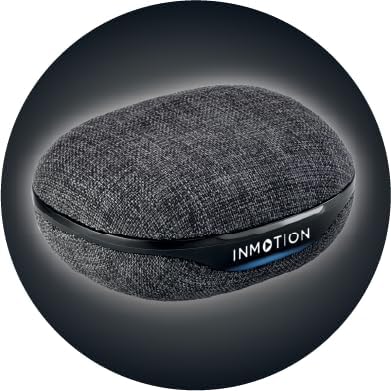
Isithombe: Ngaphambili view of the InMotion ANC True Wireless Earbuds charging case, highlighting the charging port and indicator lights.
3.2 Ukubhanqa Nedivayisi Yakho (Ukubhanqa Ngesinyathelo Esisodwa)
The InMotion ANC True Wireless Earbuds feature one-step pairing for quick and easy connection.
- Qinisekisa ukuthi ama-earbud ashajiwe futhi angaphakathi kwekesi lokushaja.
- Vula isivalo sekesi lokushaja. Ama-earbud azongena ngokuzenzakalelayo kumodi yokumatanisa.
- Kudivayisi yakho (i-smartphone, ithebhulethi, i-laptop), iya kuzilungiselelo ze-Bluetooth bese uvula i-Bluetooth.
- Cinga "InMotion ANC Earbuds" (or similar name) in the list of available devices.
- Select the earbuds to connect. Once connected, you will hear an audible confirmation, and the indicator lights on the earbuds may change.
Ama-earbud azoxhuma kabusha ngokuzenzakalelayo kudivayisi yokugcina ebhangqiwe uma esuswa ebhokisini, uma i-Bluetooth ivuliwe kudivayisi.
4. Iziqondiso Zokusebenza
4.1 Izilawuli zokuthinta
The earbuds are equipped with intuitive touch controls on each earbud. Specific functions may vary slightly by device, but common controls include:
- Dlala/Misa kancane: Ukuthepha okukodwa kunoma iyiphi i-earbud.
- Ithrekhi Elandelayo: Thepha kabili ku-earbud engakwesokudla.
- Ithrekhi yangaphambilini: Thepha kabili ku-earbud engakwesokunxele.
- Phendula/Phendula ikholi: Ukuthepha okukodwa kunoma iyiphi i-earbud ngesikhathi socingo olungenayo.
- Yenqaba Ucingo: Cindezela futhi ubambe kunoma iyiphi i-earbud ngesikhathi socingo olungenayo.
- Yenza kusebenze umsizi wezwi: Thepha kathathu kunoma iyiphi i-earbud.
- Guqula imodi ye-ANC/Transparency: Press and hold on either earbud (duration may vary, refer to specific product details if available).

Isithombe: Side view of a single InMotion ANC True Wireless Earbud, illustrating its ergonomic design and the touch-sensitive area.
4.2 Active Noise Cancelling (ANC)
The Active Noise Cancelling feature reduces ambient noise, allowing for a more immersive listening experience. To activate or deactivate ANC, use the designated touch control gesture (typically a press and hold). Some models may also feature a Transparency Mode, which allows you to hear your surroundings while still enjoying your audio.
5. Isondlo
Proper maintenance ensures the longevity and performance of your InMotion ANC True Wireless Earbuds.
5.1 Ukuhlanza
- Sula kahle ama-earbud nekesi lokushaja ngendwangu ethambile, eyomile, engena-lint.
- Ungasebenzisi izinto zokuhlanza abrasive, utshwala, noma izincibilikisi zamakhemikhali.
- Carefully remove any earwax or debris from the ear tips and speaker mesh using a small, soft brush or cotton swab.
5.2 Isitoreji
When not in use, store the earbuds in their charging case to protect them from dust, dirt, and damage. Store the case in a cool, dry place away from direct sunlight and extreme temperatures.

Isithombe: Emuva view of the InMotion ANC True Wireless Earbuds charging case, showing its compact and portable design.
6. Ukuxazulula izinkinga
Uma uhlangabezana nezinkinga ngama-earbud akho, zama izixazululo ezilandelayo:
| Inkinga | Isixazululo |
|---|---|
| Ama-earbud awamatanisi/awaxhumeki. |
|
| Akukho msindo ovela kwelinye noma kuzo zombili izindlebe. |
|
| Ikesi lokushaja alikhokhisi. |
|
| I-ANC ayisebenzi kahle. |
|
7. Imininingwane
| Isici | Imininingwane |
|---|---|
| Igama Lemodeli | I-ANC True Wireless Earbuds |
| Ukulawula Umsindo | Ukukhansela Umsindo Okuguquguqukayo |
| Ubuchwepheshe bokuxhumana | Okungenantambo (Bluetooth) |
| Izingxenye Ezihlanganisiwe | Ishaja yokuphatha ikesi |
| Amadivayisi Ahambisanayo | Laptops, Smartphone, Tablets |
| Indlela Yokulawula | Thinta |
| Uhlobo Lomshayeli Womsindo | I-Dynamic Driver |
| Isici Esikhethekile | Ucingo Luphendula |
| Umkhiqizi | I-InMotion |
| Isisindo sento | 3.2 amakhilogremu |
| Umbala | Mnyama |
| Ukubekwa Kwendlebe | Endlebeni |
| I-Form Factor | Endlebeni |
| Impedance | 16 ohm |
| Impilo Yebhethri (Earbuds) | Kufika emahoreni angu-6 |
| Isikhathi sokushaja | Approx. 1.5 hours (for earbuds and case) |
8. Iwaranti kanye Nokusekela
InMotion products are manufactured with high-quality standards. For warranty information and customer support, please refer to the warranty card included with your product or visit the official InMotion website. You can also contact InMotion customer service through their Amazon store page:
Visit the InMotion Store on Amazon
InMotion is committed to providing excellent customer service and support for their products.
Ask a question about this manual
Ask about setup, troubleshooting, compatibility, parts, safety, or missing instructions. Manuals+ will review the question and use this page’s manual context to help answer it.