
Ulwazi Lokuphepha Olubalulekile
Please read all safety instructions before using this product to ensure proper and safe operation.
- Do not expose the earbuds or charging case to extreme temperatures.
- Gwema ukuwisa noma ukusebenzisa amandla amaningi ocingweni.
- Gcina endaweni lapho izingane nezilwane ezifuywayo zingafinyeleleki khona.
- Use only a 5V adapter to charge the charging case to prevent battery damage.
- Do not use the earbuds in the bath or while swimming.
Okuqukethwe Kwephakheji
Qinisekisa ukuthi zonke izinto zikhona kuphakheji yakho:
- ZIUTY A1 Wireless Earbuds (x1 pair)
- Portable Charging Case (x1)
- Ikhebuli yokushaja ye-USB-C (x1)
- Eartips (pre-installed size M, plus 2 extra pairs in sizes S & L)
- Incwadi Yomsebenzisi (le dokhumenti)
Umkhiqizo Uphelileview
Familiarize yourself with the components of your ZIUTY A1 Wireless Earbuds.
Ama-earbud nekesi lokushaja
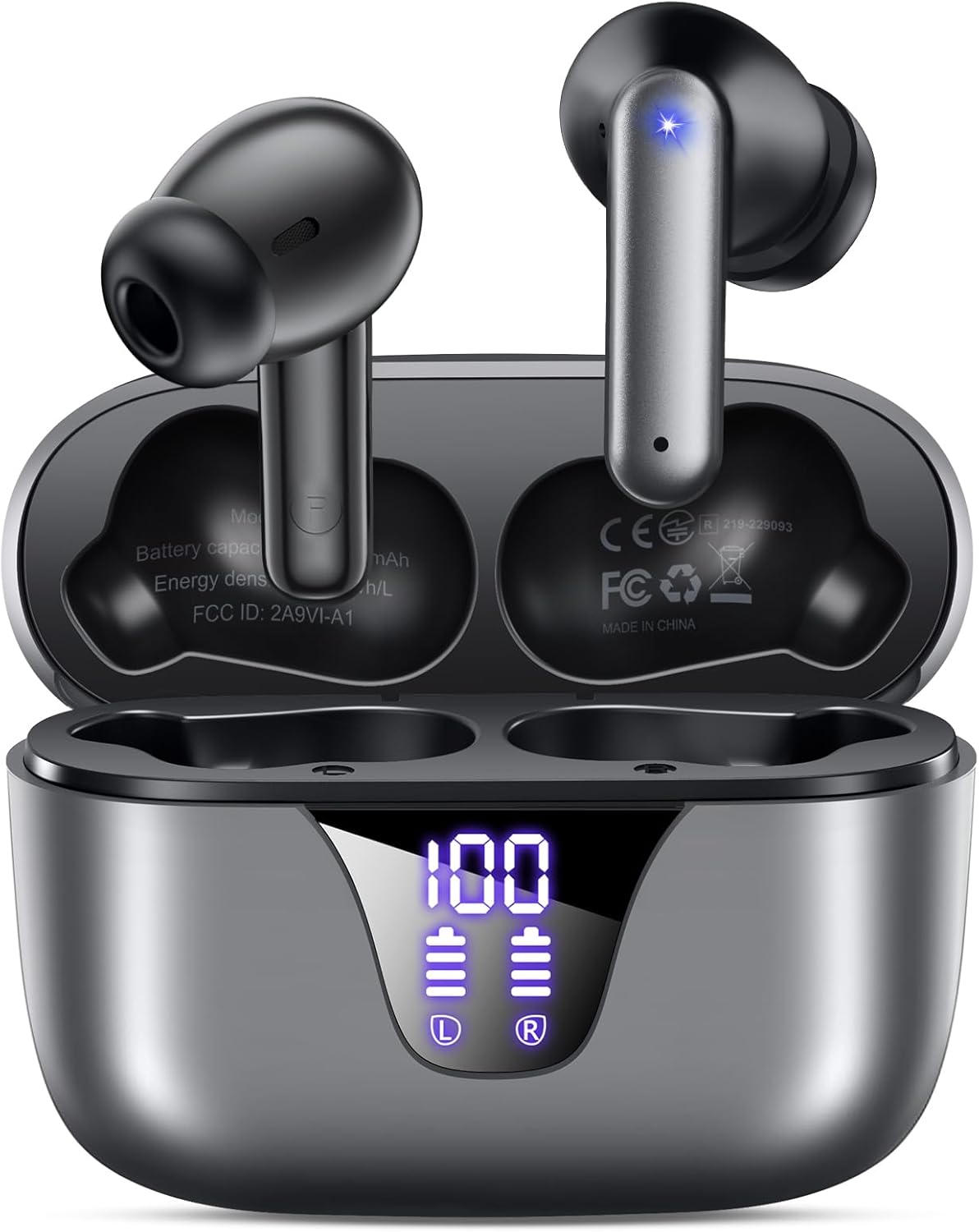
Image: ZIUTY A1 Wireless Earbuds shown inside their open charging case. The case features an LED digital display indicating battery levels for both the case and individual earbuds.
Isibonisi Samandla E-LED

Image: Close-up of the ZIUTY A1 charging case's LED display, showing '100' for the case battery and individual battery icons for the left (L) and right (R) earbuds.
The charging case features an LED digital display that shows the exact remaining power percentage (0-100%) for the case and individual battery levels for each earbud.
Setha
1. Ukushaja ama-Earbud nekesi
Ngaphambi kokusebenzisa okokuqala, shaja ngokugcwele ama-earbud nekesi lokushaja.
- Faka ama-earbud ekesini lokushaja. Qinisekisa ukuthi zihlezi kahle ezindaweni zazo (L kwesobunxele, R kwesokudla).
- Connect the USB-C charging cable to the charging port on the case and the other end to a 5V USB power adapter (not included).
- The LED display on the case will show the charging status. A full charge typically takes approximately 2 hours.

Image: ZIUTY A1 earbuds resting in their charging case, with the LED display showing battery levels.

Image: Diagram illustrating how to connect the USB-C cable to the charging case and a 5V power adapter for charging.
2. Ukugqoka ama-Earbud
For optimal sound quality and comfort, select the correct ear tip size and ensure a secure fit.
- Choose the ear tips (S, M, L) that provide the best seal and comfort for your ears.
- Insert the earbuds into your ears, gently twisting them to find a snug and stable position.
- The ergonomic semi-in-ear design is intended for a comfortable fit during various activities.

Image: Diagram showing the ergonomic design of the earbuds and the three available ear tip sizes (S, M, L) for a customized fit.

Image: Step-by-step visual guide on how to correctly insert and adjust the earbuds for a secure fit.
3. Ukumatanisa nedivaysi ye-Bluetooth
The earbuds will automatically enter pairing mode when removed from the charging case.
- Open the charging case and remove both earbuds. They will automatically power on and attempt to pair with each other.
- Edivayisini yakho (i-smartphone, ithebhulethi, ikhompuyutha ephathekayo), vula i-Bluetooth bese usesha amadivaysi atholakalayo.
- Select "A1" from the list of found devices.
- Uma usuxhunyiwe, uzozwa isiqinisekiso esizwakalayo, futhi ama-earbud azobe elungele ukusetshenziswa.
- Ama-earbud azoxhuma kabusha ngokuzenzakalelayo kudivayisi yokugcina ebhangqiwe uma esuswa ebhokisini.

Image: Illustration showing the ZIUTY A1 earbuds connecting via Bluetooth 5.3 to a smartphone, indicating a stable and fast connection.

Image: Diagram demonstrating the one-step auto-pairing process when the earbuds are removed from the charging case.
Imiyalelo yokusebenza
Izilawuli zokuthinta
The ZIUTY A1 earbuds feature intuitive touch controls for managing audio playback and calls.

Image: Diagram illustrating the touch control area on the earbuds and various functions like Play/Pause, Voice Assistant, Answer/Hang up, Previous/Next Track, and Volume adjustment.

Image: A more detailed visual guide to the touch controls, showing specific tap and hold gestures for different commands.
| Isenzo | Umsebenzi |
|---|---|
| Ukuthepha Okukodwa (L/R) | Dlala/Misa kancane Umculo, Phendula/Phelisa ucingo |
| Thepha kabili (L) | Ithrekhi Edlule |
| Thepha kabili (R) | Ithrekhi Elandelayo |
| Ukuthepha Kathathu (L/R) | Yenza kusebenze i-Voice Assistant (i-Siri, i-Google Assistant) |
| Press and Hold (L) | Ivolumu Phansi |
| Press and Hold (R) | Ivolumu phezulu |
| Press and Hold (L/R) during incoming call | Yenqaba Ucingo |
Ukushaya nokwamukela izingcingo
Use the touch controls to manage your phone calls:
- Phendula/Phendula ikholi: Thepha okukodwa noma i-earbud.
- Yenqaba Ucingo: Cindezela bese ubamba noma iyiphi i-earbud ngesikhathi socingo olungenayo.

Image: Illustration showing a user interacting with a voice assistant (Siri) via the earbuds for clear call support.
Umsizi Wezwi
Activate your device's voice assistant by triple-tapping either earbud. This allows you to issue commands such as making calls or checking information hands-free.
Isondlo
Ukuhlanza
Ukuhlanza njalo kusiza ukugcina ukusebenza kahle kanye nokuhlanzeka.
- Clean the charging contacts on both the earbuds and inside the charging case with a dry cotton swab or alcohol pad.
- Gently clean the mesh of the ear tips to remove any dust or earwax that might affect sound volume.
- Wipe the exterior of the earbuds and case with a soft, dry cloth.

Image: Visual guide demonstrating how to clean the earbud charging contacts and ear tip mesh to resolve potential volume or charging issues.
Isitoreji
Uma ingasetshenziswa, gcina ama-earbud kukesi lawo lokushaja ukuze uwavikele futhi uqinisekise ukuthi ahlala eshajiwe.
Ukuxazulula inkinga
If you encounter issues with your ZIUTY A1 earbuds, refer to the following common solutions:
- Earbuds not pairing with each other: Place both earbuds back into the charging case, close the lid, wait a few seconds, then open the lid and remove them again. They should automatically pair.
- Earbuds not connecting to device: Ensure Bluetooth is enabled on your device and the earbuds are in pairing mode. Forget the device from your Bluetooth list and attempt to re-pair.
- Awukho umsindo noma ivolumu ephansi: Check the volume levels on both your device and the earbuds. Ensure the ear tips are clean and properly seated in your ears. Refer to the cleaning instructions in the Maintenance section.
- Izinkinga zokushaja: Ensure the charging cable is securely connected and the power adapter is 5V. Clean the charging contacts on both the earbuds and the case.
- Accidental touch control activation: When adjusting the earbuds in your ear, grasp them by the sides to avoid touching the control area.
Imininingwane
Key technical specifications for the ZIUTY A1 Wireless Earbuds:
| Isici | Ukucaciswa |
|---|---|
| Igama Lemodeli | A1 |
| Ubuchwepheshe bokuxhumana | Okungenantambo (Bluetooth 5.3) |
| I-Bluetooth Range | Kufika kumamitha ayi-15 (49 amafidi) |
| Impilo Yebhethri Ye-Earbud | Kufika emahoreni angu-8 |
| Isikhathi sokudlala esiphelele (kanye nekesi) | Kufika emahoreni angu-50 |
| Ikesi lokushaja Amandla ebhethri | 500 mAh |
| Isikhathi sokushaja | Cishe amahora angama-2 |
| Usayizi Womshayeli Womsindo | 14.5 mm Umshayeli Onamandla |
| I-Frequency Range | 20 Hz - 20,000 Hz |
| Izinga Lokumelana Namanzi | IPX7 (Ingazweli Amanzi) |
| Uhlobo Lokulawula | Ukulawula Ukuthinta |
| Isisindo se-Earbud | Approximately 0.14 oz (3.9g) per earbud |
| Izingxenye Ezihlanganisiwe | Earbuds, Charging Case, USB-C Cable, Eartips, User Manual |
Iwaranti kanye Nokusekela
Ulwazi Lwewaranti
ZIUTY provides an 18-month battery promise for this product. This warranty covers defects in materials and workmanship under normal use.
Ukwesekwa Kwamakhasimende
For any questions, technical assistance, or warranty claims, please contact ZIUTY customer service. Refer to the product packaging or the official ZIUTY webindawo yemininingwane yokuxhumana yamanje.