
Isingeniso
Welcome to your Angrox Universal Replacement Remote Control. This manual provides detailed instructions for setting up and operating your new remote, designed for seamless compatibility with various Philips Smart 4K UHD Android TVs. Please read this manual thoroughly to ensure optimal performance and longevity of your remote control.
1. Setha
1.1 Ukufakwa kwebhethri
The remote control requires two AAA alkaline batteries (not included).
- Thola ikhava yengxenye yebhethri ngemuva kwesilawuli kude.
- Press down on the tab and slide the cover downwards to open.
- Faka amabhethri amabili e-AAA, uqinisekise ukuthi amatheminali amahle (+) nangalungile (-) ahambisana kahle nezimpawu ezingaphakathi kwegumbi.
- Shelelisela ikhava yebhethri emuva endaweni ize ichofoze ngokuvikelekile.
1.2 Ukuxhumana kokuqala
This Angrox replacement remote control is designed for immediate use with compatible Philips Smart TVs. No programming or pairing is required. Simply insert the batteries, and the remote is ready to operate your television.
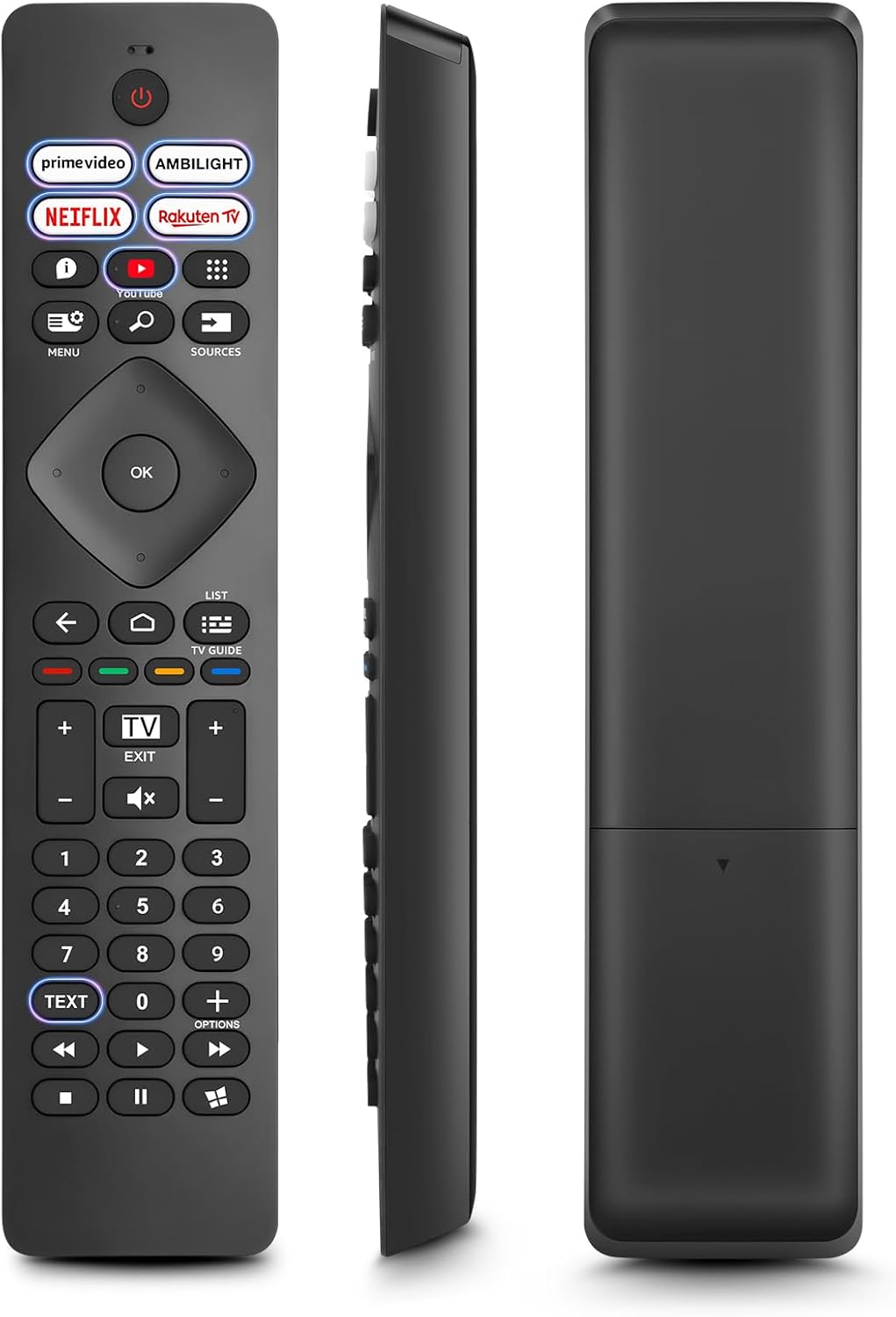
Image: Front, side, and back views of the Angrox Universal Replacement Remote Control. This image illustrates the physical design and battery compartment location.
2. Iziqondiso Zokusebenza
2.1 Imisebenzi Yenkinobho Iphelileview
Familiarize yourself with the remote control's buttons and their primary functions.
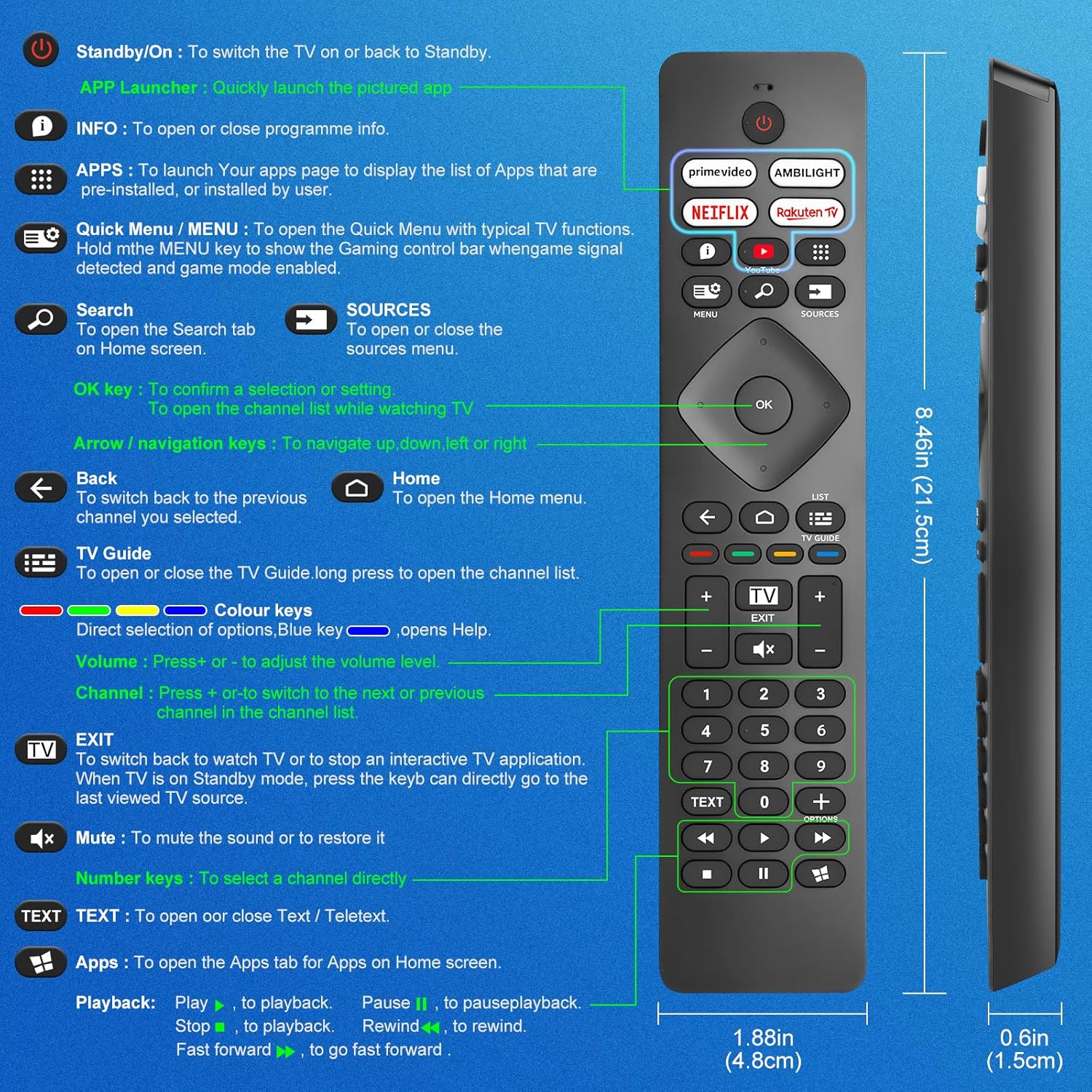
Image: A detailed diagram illustrating each button on the Angrox remote control and its corresponding function.
Detailed Button Descriptions:
- Standby/On (Power Button): Ukuze uvule noma ubuyisele i-TV kokubekwe eceleni.
- APP Launcher: Quickly launch the pictured app.
- ULWAZI: To open or close programme info.
- IZINHLELO ZOKUSEBENZA: To launch your apps page to display the list of apps that are pre-installed or installed by the user.
- Quick Menu / MENU: To open the Quick Menu with typical TV functions. Hold the MENU key to show the Gaming control bar when game signal detected and game mode enabled.
- Sesha: To open the Search tab on Home screen.
- IMITHOMBO: To open or close the sources menu.
- Ukhiye we-OK: To confirm a selection or setting. To open the channel list while watching TV.
- Arrow/Navigation keys: Ukuze uzulazule uye phezulu, phansi, kwesokunxele noma kwesokudla.
- Emuva: Ukuze ubuyele esiteshini sangaphambilini osikhethile.
- Ikhaya: To open the Home menu.
- Umhlahlandlela we-TV: To open or close the TV Guide. Long press to open the channel list.
- Colour keys (Red, Green, Yellow, Blue): Direct selection of options. Blue key opens Help.
- Ivolumu +/-: Ukulungisa izinga levolumu.
- Isiteshi +/-: Ukushintshela esiteshini esilandelayo noma sangaphambilini ohlwini lweziteshi.
- PHUMA: To switch back to watch TV or to stop an interactive TV application. When TV is on Standby mode, press the key to directly go to the last viewed TV source.
- Thulisa: Ukuthulisa umsindo noma ukuwubuyisela.
- Okhiye Benombolo (0-9): Ukukhetha isiteshi ngokuqondile.
- UMBHALO: To open or close Text / Teletext.
- Apps (Netflix, Prime Video, Rakuten TV, YouTube): Quick access to dedicated streaming applications.
- Izilawuli Zokudlala (Dlala, Misa Isikhashana, Misa, Buyisela Emuva, Ukudlulisela Ngokushesha): For media playback.
2.2 Izinkinobho Ezinqamulelayo
The remote features dedicated shortcut buttons for popular streaming services and Ambilight control.

Image: The Angrox remote control with highlighted shortcut buttons for Prime Video, Ambilight, Netflix, Rakuten TV, and YouTube.
- Ividiyo Eyinhloko: Direct access to Amazon Prime Video.
- Ambilight: Control Philips Ambilight features.
- I-Netflix: Direct access to Netflix.
- I-Rakuten TV: Direct access to Rakuten TV.
- I-YouTube: Direct access to YouTube.
3. Ukuhambisana
This Angrox replacement remote control is universally compatible with a wide range of Philips Smart TVs, including:

Image: Visual representation of the Angrox remote's compatibility with Philips 4K Ambilight TV, 4K Ultra HD TV, LED 4K TV, and OLED 4K TV.
- I-4K Ambilight TV
- I-4K Ultra HD TV
- I-LED 4K TV
- I-OLED 4K TV
It is designed to function with all Philips Smart TV models that utilize an infrared remote control.
4. Izici Zokusebenza

Image: Graphics indicating a 0.2-second fast response and a 10-meter transmitting distance for the remote control.
- Impendulo esheshayo: Enjoy a quick response time of approximately 0.2 seconds for button presses.
- Ibanga lokudlulisa: Effective operating range up to 10 meters (approximately 33 feet).
5. Isondlo
- Ukuhlanza: Use a soft, dry cloth to clean the remote control. Avoid using liquid cleaners or abrasive materials.
- Ukunakekelwa kwebhethri: If the remote will not be used for an extended period, remove the batteries to prevent leakage and potential damage. Replace batteries when the remote's response becomes sluggish or inconsistent.
- Isitoreji: Gcina irimothi endaweni epholile, neyomile kude nelanga eliqondile kanye namazinga okushisa aphezulu.
6. Ukuxazulula izinkinga
6.1 Ukude Akuphenduli
- Hlola Amabhethri: Ensure batteries are inserted correctly with the correct polarity (+/-). Replace old or depleted batteries with new AAA alkaline batteries.
- Umugqa Wokubona: Make sure there is a clear line of sight between the remote control and the TV's infrared sensor. Obstructions can block the signal.
- Inzwa yesilawuli kude: Ensure the TV's infrared sensor is not blocked or dirty.
6.2 Limited Functionality
- While this remote is broadly compatible, some specific advanced functions unique to certain original Philips remote models might not be replicated. Verify the button functions against the provided diagram.
6.3 Ambilight Functionality
Some user reviews indicate that Ambilight functionality might vary. If your Ambilight button does not work as expected, ensure your TV's Ambilight feature is enabled and configured correctly in your TV settings.
7. Imininingwane
| Isici | Imininingwane |
|---|---|
| Ibhrendi | I-angrox |
| Imodeli | pour Philips TV |
| Amadivayisi Ahambisanayo | Philips Smart TV (4K Ambilight, 4K UHD, LED 4K, OLED 4K) |
| Isici Esikhethekile | Universal |
| Uhlobo Lwesixhumi | I-infrared |
| Uhlobo Lwebhethri | 2 x AAA Alkaline (ayifakiwe) |
| Ubukhulu bento | 22.7 x 6.2 x 2.4 cm |
| Isisindo sento | 60 g |
| Umbala | Mnyama |
Qaphela: Imininingwane ingashintsha ngaphandle kwesaziso sangaphambili.
8. Iwaranti kanye Nokusekela
For product support or warranty inquiries, please contact your retailer or the manufacturer, Angrox, directly. Please refer to your purchase documentation for specific warranty terms and contact information.
Umkhiqizi: I-angrox
ASIN: B0F83X2FQG