
WUBEN PL01
WUBEN PL01 Pen Light Instruction Manual
Imodeli: PL01
1. Isingeniso
The WUBEN PL01 is a compact, high-performance pen light designed for various applications including home use, outdoor activities, emergencies, and inspections. It features a bright 650-lumen output, dual power options (rechargeable battery or AAA batteries), IP68 waterproof rating, and a durable aluminum alloy construction. This manual provides detailed instructions for its safe and effective use.

Image 1.1: The WUBEN PL01 Pen Light, showcasing its sleek design and compact size.
2. Yini EseBhokisini
Sicela uqinisekise ukuthi zonke izinto zikhona lapho uvula iphakheji:
- WUBEN PL01 Pen Light x 1
- Rechargeable Battery (pre-installed or separate) x 1
- Ikhebuli yokushaja yohlobo C x 1
- Imisila yenkomo x 1
- Ama-O-rings angeziwe x 2
- User Manual (this document) x 1

Image 2.1: Contents of the WUBEN PL01 package, including the pen light, charging cable, lanyard, and spare O-rings.
3. Setha
3.1 Ukufakwa kwebhethri
The WUBEN PL01 supports two power sources: the included rechargeable battery or two standard AAA batteries (not included). Ensure correct polarity during installation.
- Khumula ikepisi lomsila wethoshi.
- Insert the rechargeable battery or two AAA batteries with the positive (+) end facing towards the head of the flashlight.
- Securely re-screw the tail cap until it is fully tightened.

Image 3.1: Illustration of the dual power options for the WUBEN PL01, showing both the rechargeable battery and AAA battery configuration.
3.2 Ukushaja Ibhethri Elishajwa kabusha
The included rechargeable battery features a built-in USB-C charging port. The flashlight itself does not have an integrated charging port.
- Unscrew the tail cap and remove the rechargeable battery from the flashlight.
- Connect the provided USB-C charging cable directly to the charging port on the battery.
- Xhuma olunye uhlangothi lwekhebula le-USB-C emthonjeni wamandla we-USB ohambisanayo (isb., i-adaptha yodonga, imbobo ye-USB yekhompyutha).
- A red indicator light on the battery signifies that it is charging.
- Isibani senkomba sizoshintsha sibe luhlaza uma ibhethri selishajwe ngokugcwele.
- Ukushaja ngokuvamile kuthatha cishe amahora amathathu.
- Once charged, reinsert the battery into the flashlight and secure the tail cap.
4. Iziqondiso Zokusebenza
4.1 Vula/Vala amandla
To turn the WUBEN PL01 on or off, perform a full press of the tail switch button.
4.2 Ukushintsha Imodi
With the light turned on, half-press the tail switch button to cycle through the available brightness modes in the following sequence:
- Inyanga: 1 Lumen
- Phansi: 50 Lumens
- Okumaphakathi: 150 Lumens
- Phezulu: 650 Lumens
The flashlight features a mode memory function, meaning it will activate in the last used brightness mode when turned on again.
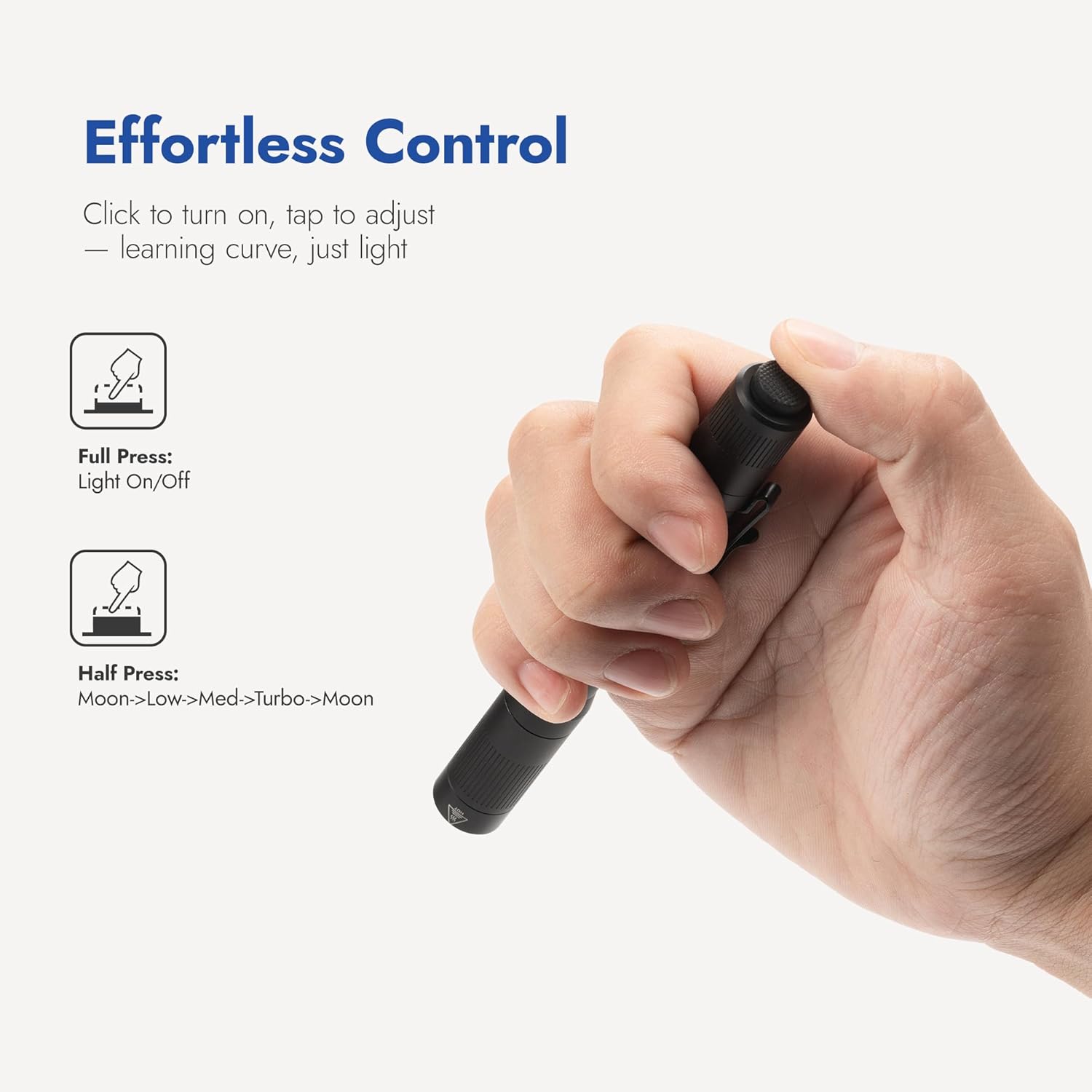
Image 4.1: Diagram illustrating the tail switch operation for power on/off and mode cycling.

Isithombe 4.2: Eksamples of the WUBEN PL01's four brightness modes in various practical scenarios, from facial examination to night walking.
4.3 Dual-Direction Clip Usage
The WUBEN PL01 is equipped with a versatile two-way clip, allowing for secure attachment to various items for hands-free lighting.
- Pocket Carry: Attach the clip to a shirt pocket or pants pocket for easy access.
- Backpack Strap: Secure the flashlight to a backpack strap for illumination during hikes or walks.
- Cap Mount: Clip the flashlight to the brim of a cap to convert it into a temporary headlamp.

Image 4.3: Demonstrates the versatility of the dual-direction clip, showing the flashlight attached to a pocket, backpack strap, and cap.
5. Isondlo
5.1 Ukuhlanza
Ukuze kugcinwe ukusebenza kahle kanye nokubukeka okuhle:
- Hlanza umzimba wethoshi nge-d ethambile, ethambileamp indwangu. Gwema amakhemikhali anokhahlo noma izinto ezilumayo.
- For the lens, use a clean, soft cloth specifically designed for optical surfaces.
5.2 O-ring Replacement
The PL01's IP68 waterproof rating relies on properly sealed O-rings. Periodically inspect them for any signs of wear, cracks, or damage.
- If O-rings appear damaged, replace them with the provided spare O-rings.
- Apply a thin layer of silicone grease to the O-rings to ensure a better seal and prevent drying.
5.3 Ukunakekelwa Kwebhethri
- If the flashlight will not be used for an extended period, remove the batteries to prevent potential leakage and damage.
- For the rechargeable battery, recharge it every 3-6 months to maintain its overall lifespan and capacity.

Image 5.1: The WUBEN PL01's Type III hard-anodized aluminum body, highlighting its scratch, rust, and impact resistance.

Image 5.2: The WUBEN PL01 demonstrating its IP68 waterproof and 2-meter impact resistance, suitable for demanding environments.
6. Ukuxazulula izinkinga
If you encounter issues with your WUBEN PL01, please refer to the following common problems and solutions:
- Ukukhanya akuvuli:
- Ensure the batteries are installed with correct polarity.
- Check if the rechargeable battery is charged, or if AAA batteries are new.
- Verify that the tail cap is fully tightened. A loose tail cap can prevent electrical contact.
- Clean the battery contacts and the contact points inside the flashlight with a clean cloth.
- Light flickers or dims unexpectedly:
- The battery level may be low. Recharge the included battery or replace AAA batteries.
- Qinisekisa ukuthi isivalo somsila siqiniswe kahle.
- Clean battery contacts and internal contact points.
- Water ingress (if exposed to water):
- Immediately turn off the flashlight and remove the batteries.
- Inspect the O-rings for any damage, tears, or improper seating. Replace if necessary.
- Ensure the tail cap was fully tightened before exposure to water.
- Allow the flashlight to dry completely before reassembling and attempting to use it.
If the problem persists after attempting these solutions, please contact WUBEN customer support.
7. Imininingwane
| Isici | Imininingwane |
|---|---|
| Imodeli | I-PL01 |
| Amamodi Okukhiphayo | High (650 Lumens), Medium (150 Lumens), Low (50 Lumens), Moon (1 Lumen) |
| Isikhathi sokusebenza | High: 1 hour, Medium: 2.5 hours, Low: 7 hours, Moon: 125 hours |
| Uhlobo Lwebhethri | Rechargeable (Included) / 2 x AAA Battery (Not Included) |
| Ibanga le-Beam | 110 Amamitha |
| Ukuphakama Kwe-Beam Beam | Idatha ye-3000 CD |
| I-LED | 1 x 315D |
| Isilinganiso Sokungangeni Manzi | IP68 (Submersible in 2m water for 1 hour) |
| Ukumelana Nomthelela | 2 Amamitha |
| Isisindo | 1.59 oz (nebhethri) |
| Ubukhulu (L x D) | 5.31 amayintshi x 0.59 amayintshi |
| Okubalulekile | I-Aluminium ye-Anodized |
| Ukushisa Kombala | 5000 Kelvin |

Image 7.1: Diagram illustrating the internal components of the WUBEN PL01, focusing on the 315D LED emitter and optical system.
8. Ulwazi Lwewaranti
WUBEN products typically come with a manufacturer's warranty. For specific warranty terms, conditions, and registration details, please refer to the official WUBEN webnoma uxhumane nosekelo lwabo lwamakhasimende. Gcina irisidi lakho lokuthenga njengobufakazi bokuthenga kwanoma yiziphi izimangalo zewaranti.
9. Ukwesekwa Kwamakhasimende
For further assistance, product inquiries, or technical support, please visit the official WUBEN website or contact their customer service department. You can often find FAQs, troubleshooting guides, and contact information on their webindawo.
Official WUBEN Store: WUBEN Store on Amazon
Ask a question about this manual
Ask about setup, troubleshooting, compatibility, parts, safety, or missing instructions. Manuals+ will review the question and use this page’s manual context to help answer it.