
1. Isingeniso
This manual provides detailed instructions for the installation, operation, and maintenance of your GIGABYTE B550M DS3H AC R2 motherboard. This micro-ATX motherboard is designed to support AMD Ryzen 5000, 4000, and 3000 series CPUs on the AM4 socket, offering a robust platform for various computing needs. Please read this manual thoroughly before beginning installation to ensure proper setup and functionality.
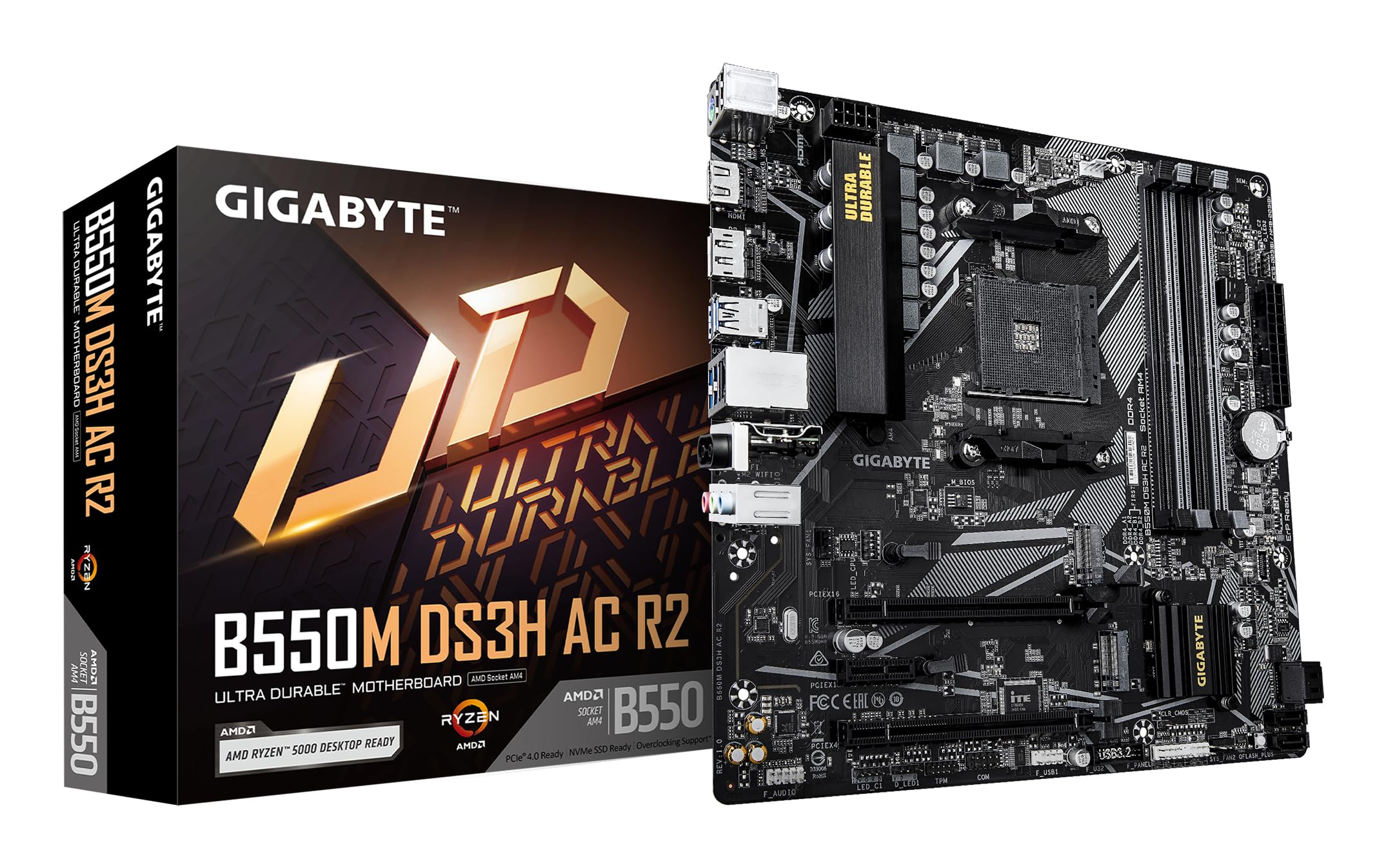
Umfanekiso 1.1: Phezulu-phansi view of the GIGABYTE B550M DS3H AC R2 Motherboard, showcasing its layout including the CPU socket, DIMM slots, and various connectors.
2. Izici Eziyinhloko
- I-AMD B550 Chipset: Supports AMD Ryzen 5000, 4000, and 3000 series CPUs with AM4 socket.
- High-Speed DDR4 Memory: Dual-channel support for up to 4733MHz (O.C.) across 4 DIMM slots.
- Advanced Storage Options: Includes one PCIe 4.0 M.2 slot and one PCIe 3.0 M.2 slot, alongside PCIe slots for graphics and expansion.
- Integrated Connectivity: Features Wi-Fi 5, Bluetooth 5.0, and 1GbE LAN for reliable network connections.
- Flexible Display Outputs: Equipped with HDMI and DisplayPort for multi-monitor configurations.
- Smart Cooling System: Smart Fan 6 with multiple temperature sensors ensures efficient thermal management.
- I-Q-Flash Plus: Allows BIOS updates without the need for CPU, memory, or graphics card installation.
3. Ukusetha nokufakwa
3.1 Ukufakwa kwe-CPU
- Ensure the CPU socket lever is in the open position.
- Carefully align the triangular mark on the AMD Ryzen CPU with the mark on the AM4 socket.
- Faka kahle i-CPU kusokhethi ngaphandle kokuyiphoqa.
- Yehlisa i-lever ukuze uvikele i-CPU endaweni.
- Faka i-CPU cooler ngokwemiyalelo yomenzi wayo.
3.2 Ukufakwa Kwememori (i-RAM)
- Vula iziqeshana kuzo zombili iziphetho zezikhala ze-DIMM.
- Hlanganisa i-notch ku-module yememori ye-DDR4 nokhiye osesikhala se-DIMM.
- Insert the memory module firmly until the clips snap into place. For dual-channel operation, refer to the motherboard manual for recommended slot configurations.
3.3 Ukufakwa Kwedivayisi Yesitoreji
This motherboard supports both M.2 NVMe SSDs and SATA drives.
- M.2 SSD: Locate the M.2 slots (one PCIe 4.0, one PCIe 3.0). Insert the M.2 SSD at an angle and secure it with the provided screw.
- Amadrayivu e-SATA: Connect SATA data cables from your SSDs/HDDs to the SATA ports on the motherboard. Connect power cables from your power supply to the drives.
3.4 Ukufakwa Kwekhadi Lokukhulisa
Install your graphics card or other PCIe expansion cards into the appropriate PCIe slots. Ensure they are seated firmly and secured with the case screw.
3.5 Ukuxhunywa kwamandla
- Xhuma isixhumi samandla esikhulu se-ATX esinamaphini angu-24 kusuka kugesi wakho kuya kubhodi lomama.
- Connect the 8-pin ATX 12V CPU power connector to the motherboard.
3.6 Rear I/O Panel Overview

Figure 3.1: The rear I/O panel of the GIGABYTE B550M DS3H AC R2 motherboard, showing various ports including USB, HDMI, DisplayPort, LAN, and audio jacks.
The rear I/O panel provides connectivity for external devices. It includes USB 2.0, USB 3.2 Gen 1, HDMI, DisplayPort, 1GbE LAN, Wi-Fi antenna connectors, and audio jacks. Refer to the detailed diagram in the physical manual for specific port identification.
4. Iziqondiso Zokusebenza
4.1 Ukusethwa kwe-BIOS
The BIOS (Basic Input/Output System) is firmware that initializes hardware during the booting process. To enter BIOS Setup, press the DEL key during the Power-On Self-Test (POST). Here you can configure system settings, boot order, and monitor hardware status.
4.2 I-Q-Flash Plus
I-Q-Flash Plus ikuvumela ukuthi ubuyekeze i-BIOS ngaphandle kokufaka i-CPU, imemori, noma ikhadi lehluzo. Mane nje ulande i-BIOS yakamuva file kusukela ku-GIGABYTE website, rename it to GIGABYTE.bin, save it to a USB flash drive, and insert it into the designated Q-Flash Plus USB port. Press the Q-Flash Plus button to initiate the update.
4.3 Ukufakwa komshayeli
After installing your operating system, install the necessary drivers for the motherboard chipset, audio, LAN, Wi-Fi, and other integrated components. These drivers are typically provided on a support DVD or can be downloaded from the official GIGABYTE webindawo.
5. Isondlo
5.1 Ukuhlanza
Regularly clean your computer's interior to prevent dust buildup, which can lead to overheating and reduced performance. Use compressed air to remove dust from components, especially heatsinks and fans. Ensure the system is powered off and unplugged before cleaning.
5.2 Ukuvuselelwa kwe-BIOS
Hlola i-GIGABYTE ngezikhathi ezithile website for BIOS updates. Updates can improve system stability, add support for new hardware, or fix known issues. Follow the instructions provided by GIGABYTE carefully when performing a BIOS update.
5.3 I-Smart Fan 6
Utilize the Smart Fan 6 utility in the BIOS or GIGABYTE's software to monitor system temperatures and adjust fan speeds. Proper fan configuration helps maintain optimal operating temperatures and extends component lifespan.
6. Ukuxazulula izinkinga
- Isistimu Yehluleka Ukuqalisa: Check all power connections (24-pin ATX, 8-pin CPU), ensure RAM modules are properly seated, and verify the CPU is correctly installed. Try clearing the CMOS.
- Akukho okukhiphayo kokubonisa: Confirm the graphics card is fully seated in its PCIe slot and connected to power (if required). Ensure your monitor cable is connected to the graphics card, not the motherboard's integrated graphics ports (unless using an APU).
- Izinkinga Zemingcele: If USB devices or other peripherals are not working, ensure drivers are installed and check BIOS settings for port enablement.
- Ukungazinzi Kwesistimu/Ukuphahlazeka: This can be caused by outdated drivers, overheating, or faulty hardware. Update drivers, monitor temperatures, and test components individually if possible.
- Ukwehluleka Kokubuyekezwa kwe-BIOS: If a BIOS update fails, use the Q-Flash Plus feature to recover the BIOS.
7. Imininingwane
| Isici | Ukucaciswa |
|---|---|
| Ibhrendi | I-GIGABYTE |
| Igama Lemodeli | I-B550M DS3H AC R2 |
| CPU Socket | Isokhethi AM4 |
| Amaprosesa Ahambisanayo | Uchungechunge lwe-AMD Ryzen 3000, Uchungechunge lwe-AMD Ryzen 4000, Uchungechunge lwe-AMD Ryzen 5000 |
| Uhlobo lwe-Chipset | I-AMD B550 |
| RAM Memory Technology | I-DDR4 |
| Isivinini sewashi lememori | Up to 4733 MHz (O.C.) |
| Memory Slots Iyatholakala | 4 |
| Imemori ye-RAM Usayizi Ophezulu | 128 GB |
| I-Interface Yekhadi Lezithombe | I-PCI Express 4.0 |
| Total PCIe Ports | 1 (PCIe 4.0 x16 for GPU) + other PCIe slots |
| M.2 Slots | 1x PCIe 4.0 M.2, 1x PCIe 3.0 M.2 |
| Total SATA Ports | 4 |
| Ukuxhumana Okungenantambo | I-Wi-Fi 5, i-Bluetooth 5.0 |
| I-LAN | I-1GbE LAN |
| Isamba samachweba we-USB | 6 (Rear I/O) + Internal Headers |
| Bonisa Okukhiphayo | I-HDMI engu-1x, i-DisplayPort engu-1x |
| I-Form Factor | I-Micro ATX |
| Ubukhulu bento L x W x H | 24.4L x 24.4W x 3.5H Amasentimitha |
| Isisindo sento | 980 amagremu |
8. Ulwazi Lwewaranti
The GIGABYTE B550M DS3H AC R2 motherboard comes with a 3-YEAR Manufacturer Warranty. Please retain your proof of purchase for warranty claims. For detailed terms and conditions, refer to the official GIGABYTE warranty policy available on their webindawo.
9. Ukusekela kanye Xhumana
Ukuze uthole usekelo lobuchwepheshe, ukulanda abashayeli, izibuyekezo ze-BIOS, kanye nolwazi olwengeziwe lomkhiqizo, sicela uvakashele i-GIGABYTE esemthethweni website. You can also contact GIGABYTE customer service for assistance.
Imininingwane Yokuxhumana Nomkhiqizi:
GIGABYTE Technology (India) Pvt. Ltd.
Unit No. 807 & 808, 8th Floor, Naman Midtown B-Wing,
Elphinstone Road, Mumbai – 400013, India
For the most up-to-date contact details and support resources, please refer to the GIGABYTE official webindawo: www.gigabyte.com