
1. Isingeniso
This manual provides essential information for setting up, operating, and maintaining your Hisense 65E7Q PRO 65-inch QLED 4K 144Hz Smart TV. Please read these instructions carefully before using your television to ensure proper functionality and safety. Keep this manual for future reference.
2. Yini EseBhokisini
Qinisekisa ukuthi zonke izingxenye ezilandelayo zifakiwe kuphakheji yakho:
- Umabonakude
- Ikhebula Lamandla
- Isilawuli kude
- Imaniwali yosebenzisayo
3. Setha
3.1 Ukufakwa ngokomzimba
Carefully unpack the television. You can install the TV on its included stand or mount it on a wall (wall mount sold separately). Ensure the TV is placed on a stable, level surface or securely mounted according to the wall mount instructions.

Ngaphambili view of the Hisense TV with its stand, illustrating the display and bezel design.

Side profile of the Hisense TV, showing its slim design.
3.2 Amandla okuxhuma
Xhuma ikhebula lamandla kokufakwayo kwamandla kwe-TV bese uxhumanisa ne-othomathikhi yodonga. Ungayixhumi i-TV kuze kube yilapho konke okunye ukuxhumeka sekwenziwe.
3.3 Iseluleki Sokuqala Sokusetha
Upon first power-on, the TV will guide you through an initial setup process. This includes language selection, network connection (Wi-Fi or Ethernet), channel scanning, and acceptance of terms and conditions for smart features.
4. Iziqondiso Zokusebenza
4.1 Imisebenzi yokulawula kude
The included remote control allows you to navigate the TV's menus, adjust settings, and access smart features. Familiarize yourself with the button layout for optimal use.
The Hisense TV remote control, highlighting dedicated buttons for popular streaming services and voice control.
4.2 Smart TV Interface (VIDAA U8)
Your Hisense TV features the VIDAA U8 operating system, providing access to a wide range of internet applications such as Netflix, Prime Video, Disney+, YouTube, and more. Navigate using the remote control's directional pad and OK button.

Screenshot of the Hisense VIDAA U8 Smart TV interface, showing various applications and content recommendations, along with icons for Apple HomeKit, AirPlay, Alexa Built-in, and VIDAA Voice.
4.3 Ukulawula Izwi
The TV supports voice control through Alexa Built-in and VIDAA Voice. Use the dedicated voice button on your remote to issue commands for searching content, controlling playback, and managing smart home devices.
5. Izici Eziyinhloko
5.1 QLED Display Technology
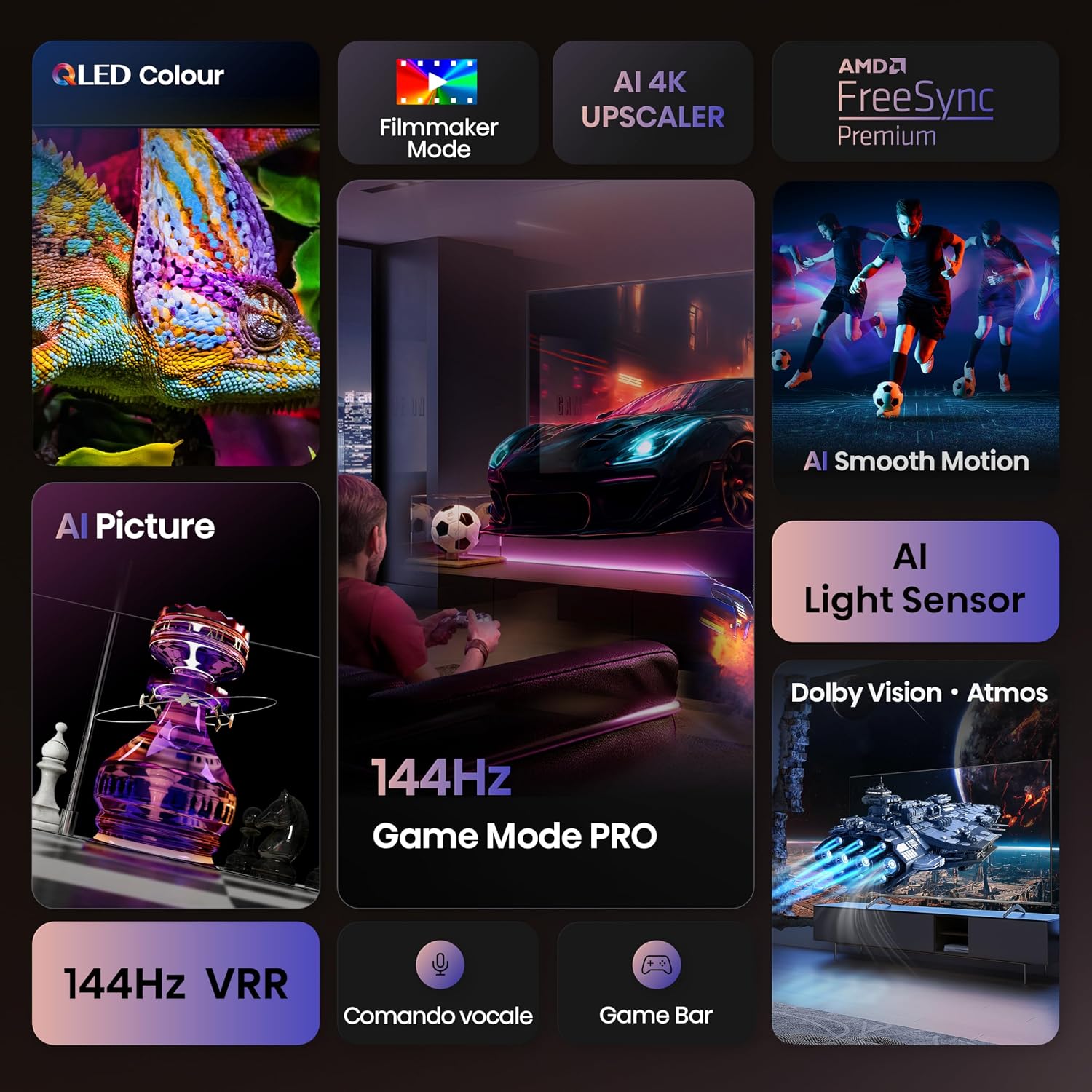
Experience over a billion shades of color with the QLED display technology, delivering vibrant and lifelike images with enhanced brightness and contrast.

Close-up image of a chameleon on the Hisense QLED display, demonstrating the vibrant and rich color reproduction.
5.2 144Hz Game Mode PRO
Designed for gamers, the 144Hz Game Mode PRO offers a native 144Hz Variable Refresh Rate (VRR), ensuring ultra-smooth gameplay with minimal input lag and screen tearing. This feature is ideal for high-performance gaming consoles and PCs.

Image depicting a person playing a racing video game on the Hisense TV, emphasizing the 144Hz Game Mode PRO for smooth gaming.
5.3 Dolby Vision IQ, HDR 10+ Adaptive & Dolby Atmos
Enjoy a cinematic experience with support for Dolby Vision IQ and HDR 10+ Adaptive, which optimize picture quality based on content and ambient light. Dolby Atmos provides immersive, multi-dimensional audio that flows around you.

Image showing a spaceship scene on the Hisense TV, illustrating the immersive visual and audio experience with Dolby Vision IQ and Dolby Atmos.
5.4 AI 4K Upscaler
The AI 4K Upscaler intelligently analyzes and enhances lower-resolution content to near 4K quality, ensuring a sharp and detailed viewing experience regardless of the source.

Diagram illustrating the AI 4K Upscaler technology, showing how lower-resolution images are enhanced to near 4K quality, with a tiger's eye as an example.
5.5 AI Smooth Motion
AI Smooth Motion technology reduces motion blur and judder in fast-moving scenes, providing a clearer and more fluid picture, especially beneficial for sports and action movies.

Image of soccer players in motion on the Hisense TV, demonstrating the AI Smooth Motion feature for clear, blur-free fast-paced scenes.
6. Ukuxhumana
The Hisense 65E7Q PRO offers a variety of connectivity options for your devices:
- I-HDMI 2.1 Izimbobo: 4 ports for connecting gaming consoles, Blu-ray players, and other high-definition devices.
- Izimbobo ze-USB: 2 ports for connecting USB flash drives for media playback.
- I-Ethernet (LAN): Ukuze uthole uxhumano lwe-inthanethi olunentambo oluzinzile.
- I-Wi-Fi: Built-in wireless connectivity for internet access.
- I-Bluetooth: For connecting wireless headphones, soundbars, and other compatible devices.
- Umsindo Wedijithali Uphumile: Okokuxhuma kumasistimu omsindo angaphandle.
- Okokufaka kwe-AV: Ukuxhuma amadivayisi amadala.
- I-Headphone Jack: Okokulalela kwangasese.
- I-CI Card Slot: Kwamamojula okufinyelela okunemibandela.
- ANT (Antenna) Inputs: For DVB-T2/S2 broadcast systems.

Okuningiliziwe view of the Hisense TV's rear panel, showing various input and output ports including USB, CI Card Slot, HDMI 2.1, Ethernet, Digital Audio Out, AV Input, and Headphone jack.
7. Isondlo
7.1 Ukuhlanza i-TV
Ukuze uhlanze isikrini, sisule ngobumnene ngendwangu ethambile, engenantambo. Ukuze uthole amamaki anenkani, kancane dampen the cloth with water or a screen-cleaning solution. Avoid using harsh chemicals or abrasive materials. Clean the TV body with a soft, dry cloth.
7.2 Ukuvuselelwa Kwesoftware
Your TV may receive software updates to improve performance and add new features. Ensure your TV is connected to the internet and check for updates periodically through the settings menu. It is recommended to allow automatic updates.
8. Ukuxazulula izinkinga
Uma uhlangabezana nezinkinga nge-TV yakho, bheka izixazululo ezilandelayo ezivamile:
- Awekho Amandla: Ensure the power cable is securely connected to both the TV and the wall outlet. Try plugging another device into the same outlet to confirm it is working.
- Asikho Isithombe/Umsindo: Check that the correct input source is selected. Verify all HDMI or other input cables are securely connected.
- Isilawuli kude asisebenzi: Shintsha amabhethri. Qinisekisa ukuthi azikho izithiyo phakathi kwesilawuli kude kanye nenzwa ye-IR ye-TV.
- Izinkinga Zokuxhumaniseka Kwenethiwekhi: For Wi-Fi, check your router and ensure the TV is within range. For Ethernet, ensure the cable is connected and your router is functioning. Try restarting both the TV and your router.
- Ikhwalithi Yesithombe Engalungile: Lungisa izilungiselelo zesithombe (ukukhanya, ukuqhathanisa, ubukhali, umbala). Qinisekisa ukuthi umthombo wokufaka unikeza isignali yekhwalithi ephezulu.
For more detailed troubleshooting, consult the full user manual PDF or contact Hisense customer support.
9. Imininingwane
| Isici | Ukucaciswa |
|---|---|
| Ibhrendi | Hisense |
| Igama Lemodeli | Hisense 65E7Q PRO |
| Inombolo Yemodeli | Idatha ye-65E7Q PRO |
| Usayizi Wesikrini | 65 amayintshi |
| Ubuchwepheshe Besikrini | QLED |
| Isixazululo | I-4K (3840x2160) |
| Isilinganiso Sokuvuselela | 144 Hz |
| Maximum Display Brightness | 1000 NIT Coating |
| Supported HDR Format | I-Dolby Vision |
| Image Quality Enhancement Technology | QLED Colour, Dolby Vision, Smooth Motion AI |
| Integrated Surround Sound Format | I-Dolby Atmos |
| Amandla Okukhipha Isipikha aphezulu | 20 Watts |
| Inombolo Yeziteshi Zomsindo | 5.1 |
| Amasistimu Okusebenza | I-VIDAA U |
| Isamba samachweba we-HDMI | 4 |
| Isamba samachweba we-USB | 2 |
| Ubuchwepheshe bokuxhumana | I-Bluetooth, i-Ethernet, i-HDMI, i-USB, i-Wi-Fi |
| I-VESA Mounting Standard | 400 x 400 mm |
| Isisindo sento | 15.2 kg |
| Ubukhulu bomkhiqizo (DxWxH) | 30P x 145.3l x 89.7H cm |
| Izwe azalelwe kulo | China |
Ulwazi lwamandla

The EU Energy Label for the Hisense 65E7Q PRO TV.
Ishidi Lokwaziswa Lomkhiqizo

Page 1 of the Hisense 65E7Q PRO product information sheet.

Page 2 of the Hisense 65E7Q PRO product information sheet.
For more details, visit the official EPREL database: https://eprel.ec.europa.eu/qr/2171187
10. Iwaranti kanye Nokusekela
10.1 Iwaranti Yomkhiqizo
The Hisense 65E7Q PRO TV comes with a Iwaranti elinganiselwe yomkhiqizi yonyaka owodwa. Please retain your proof of purchase for warranty claims. The warranty covers manufacturing defects under normal use. For specific terms and conditions, refer to the warranty documentation included with your product.
10.2 Izinsiza Ezengeziwe
For a comprehensive guide and further assistance, you can download the official User Manual in PDF format:
- Landa Incwadi Yomsebenzisi (PDF)
- Download Data Transparency Declaration (PDF)
- Landa Ulwazi Lokuphepha (PDF)
Note: No official product videos with 'Seller' creator type and m3u8 format were found in the provided data to embed.


