
1. Umkhiqizo Uphelileview
The Hisense 65E7Q QLED Smart TV offers a premium viewing experience with its 65-inch QLED display. This television integrates advanced technologies such as Dolby Vision and Dolby Atmos for immersive audio-visuals, AI Smooth Motion for fluid images, and dedicated modes for gaming and sports. Powered by the VIDAA operating system, it provides easy access to a wide range of streaming content and smart features, including voice control.

Ngaphambili view of the Hisense 65E7Q QLED Smart TV.
Izici Eziyinhloko:
- QLED Colour: Experience rich, vibrant, and realistic colors.
- Ukunyakaza Okubushelelezi kwe-AI: Advanced MEMC and 3D Noise Reduction for fluid, blur-free images.
- I-Dolby Vision ne-Dolby Atmos: Cinematic picture and immersive sound for an enhanced entertainment experience.
- I-Game Mode Plus: Reduces input lag to 16ms, with 60Hz VRR and ALLM for ultra-fluid gaming.
- Imodi yezemidlalo ye-AI: Optimizes picture and sound for sports content, reducing motion blur and enhancing stadium-like audio.
- I-AI 4K Upscaler: Enhances blurry images to near-4K quality.
- VIDAA Smart TV OS: Fast, secure, and intuitive operating system with access to popular streaming applications.
- Ukulawulwa Kwezwi: Integrated Alexa and VIDAA Voice for convenient operation.
2. Ulwazi Lokuphepha
Please read all safety instructions carefully before using your TV. Keep this manual for future reference. Always ensure the TV is placed on a stable surface to prevent tipping. Do not expose the TV to rain or moisture. Refer to the full safety guidelines in the included safety manual.
3. Okuqukethwe Kwephakheji
Qinisekisa ukuthi zonke izinto zikhona ebhokisini:
- Hisense 65E7Q QLED Smart TV
- Ikhebula Lamandla
- Isilawuli kude (esinebhethri elilodwa le-AAAA)
- Isitendi se-TV (izingcezu ezi-2)
- Izikulufo zomhlangano weSitendi
- Incwadi Yomsebenzisi (le dokhumenti)
- Ikhadi lewaranti
4. Setha
4.1 Ukuhlanganisa Isitendi
- Beka ngokucophelela isikrini se-TV endaweni ethambile, eyisicaba ukuze uvimbele umonakalo.
- Qondanisa izingcezu zokuma nezikhala ezihambisanayo phansi kwe-TV.
- Vikela izingcezu zokuma usebenzisa izikulufu ezinikeziwe. Qinisekisa ukuthi ziqiniswe ngokuqinile.

Diagram illustrating TV dimensions and stand installation points.
4.2 Ukukhweza Udonga
If you plan to wall mount your TV, ensure you use a VESA-compatible wall mount kit (not included). The Hisense 65E7Q supports a VESA mounting standard of 600 x 400 mm. Follow the instructions provided with your wall mount kit for safe installation.
4.3 Ukuxhumanisa amaPheripheral
Connect your external devices to the TV's ports as needed. Refer to the port diagram below:

Ngemuva view showing available ports and connections.
- Izimbobo ze-HDMI (x3): Connect Blu-ray players, game consoles, and other HDMI devices. One port supports eARC for enhanced audio return.
- Izimbobo ze-USB (x2): Connect USB flash drives for media playback. (1x USB 3.0, 1x USB 2.0)
- Antenna Inputs (x2): Connect your terrestrial or cable antenna.
- I-Ethernet (LAN): Ngoxhumano lwenethiwekhi enezintambo.
- I-Optical Audio Out: Connect to a soundbar or audio receiver for digital audio.
- I-Headphone Jack: Okokulalela kwangasese.
- Okokufaka kwe-AV: Okokuxhumanisa amadivaysi amadala kusetshenziswa izintambo zevidiyo ne-stereo audio.
4.4 Amandla Okuqala Avuliwe
- Xhuma ikhebula lamandla ku-TV bese uxhume endaweni yamandla.
- Cindezela inkinobho yamandla kusilawuli kude noma ku-TV.
- Landela imiyalelo esesikrinini ukuze uqedele ukusetha kokuqala, okuhlanganisa ukukhetha ulimi, uxhumano lwenethiwekhi, kanye nokuskena iziteshi.
5. Ukusebenzisa i-TV yakho
5.1 Ukulawula okukude
The included remote control allows you to navigate the TV's features. Insert the provided AAAA battery into the remote. The remote supports voice control for convenient operation.
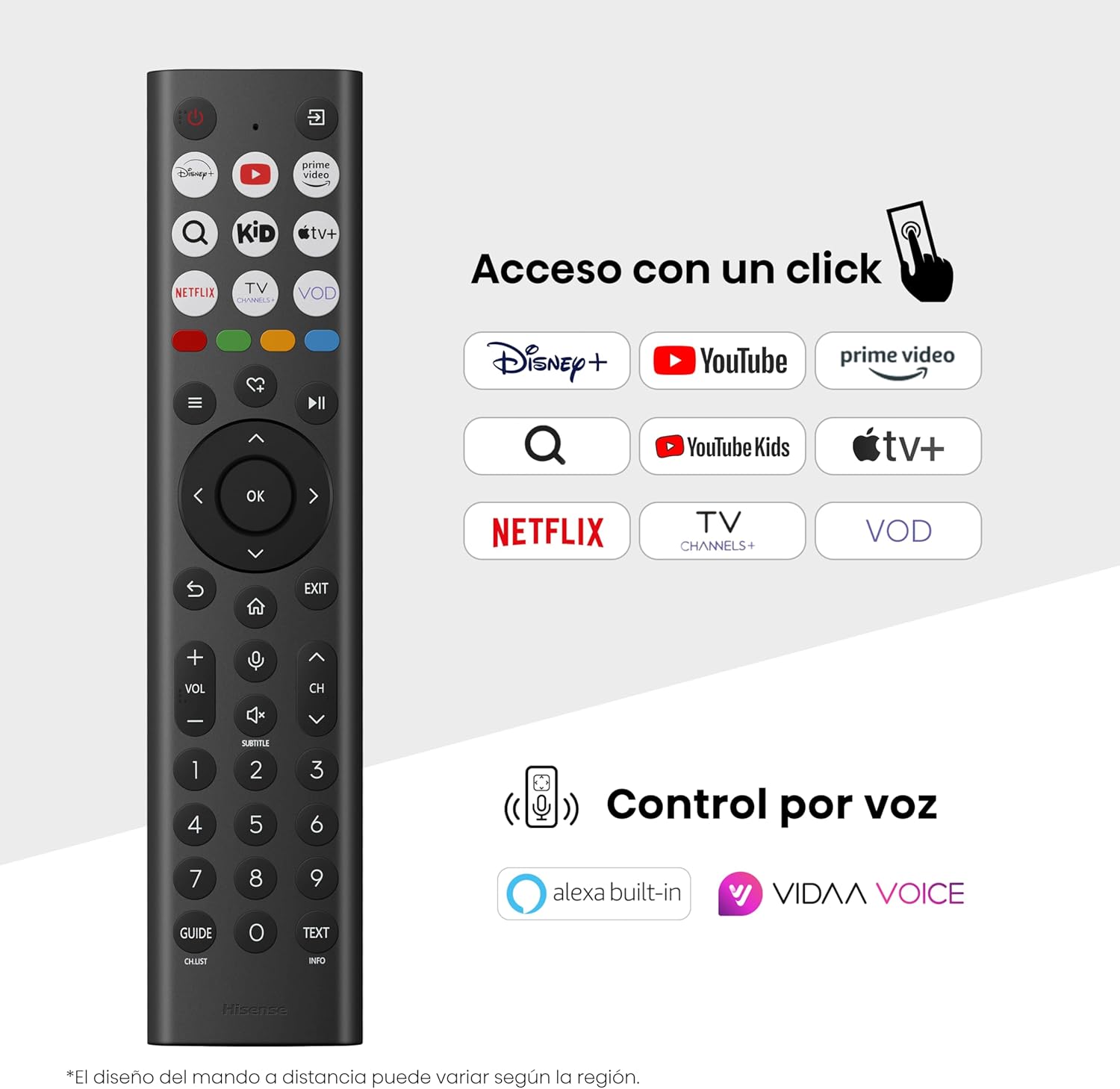
Hisense Smart TV remote control with dedicated app buttons and voice control.
5.2 Izici ze-Smart TV (VIDAA OS)
Your Hisense TV runs on the VIDAA operating system, offering a user-friendly interface for accessing various applications and services.

The VIDAA Smart TV interface with popular streaming applications.
- Izicelo: Access pre-installed apps like Netflix, YouTube, Prime Video, and more.
- Ukulawulwa Kwezwi: Use the remote's voice function to search for content, adjust settings, or interact with Alexa built-in and VIDAA Voice.
- Screen Mirroring (AirPlay): Share content from your Apple devices directly to the TV.
- Share to TV: Easily send content from your mobile devices to the TV.
5.3 Amasethingi Esithombe
Lungiselela eyakho viewing experience with various picture enhancement technologies:
- QLED Colour: Delivers over a billion shades of vibrant, lifelike colors.
- I-AI 4K Upscaler: Automatically enhances lower-resolution content to near-4K quality.
- Ukunyakaza Okubushelelezi kwe-AI: Reduces motion blur in fast-paced scenes, ensuring clear and fluid visuals.
- I-Dolby Vision: Provides stunning brightness, contrast, and color for a dramatic visual experience.
- Imodi yomenzi wefilimu: Preserves the original aspect ratio, colors, and frame rates to display movies as intended by the director.
- Inzwa Yokukhanya Kwe-AI: Intelligently adjusts screen brightness based on ambient light for optimal viewing and energy efficiency.
- Eye Care Mode: Reduces blue light emission to minimize eye strain.
- Imodi Yokulondoloza Amandla: Optimizes power consumption without significantly compromising picture quality.

QLED technology delivers over a billion vibrant color tones.

AI 4K Upscaler enhances lower resolution content to near 4K clarity.

AI Smooth Motion ensures fluid images without blur, especially in fast-moving scenes.

Filmmaker Mode presents content exactly as the director intended.
5.4 Izilungiselelo zomsindo
Enhance your audio experience with:
- I-Dolby Atmos: Immersive, multi-dimensional sound that fills your room.
- Isipikha Esihlanganisiwe: Built-in speakers with a maximum output of 1 Watt per channel.
- I-EzPlay: Seamlessly control compatible Hisense soundbars directly from your TV screen.

Dolby Vision and Dolby Atmos combine for a spectacular audio-visual experience.
5.5 Izici Zokudlala
For gamers, the TV offers:
- I-Game Mode Plus: Reduces input lag to 16ms, ensuring responsive gameplay.
- 60Hz VRR (Variable Refresh Rate): Synchronizes the TV's refresh rate with the game console's output to prevent screen tearing.
- I-ALLM (Imodi yokubambezela ephansi ezenzakalelayo): Automatically switches the TV to low-latency mode when a game is detected.
- Ibha Yegeyimu: An integrated control center for quick access to game settings and real-time performance monitoring.

Game Mode Plus provides ultra-fluid, lag-free gaming.

The Game Bar offers centralized control for game settings.
5.6 Izici Zezemidlalo
- Imodi yezemidlalo ye-AI: Automatically detects sports content and optimizes picture and sound settings for a stadium-like experience, enhancing clarity and audio effects.
6. Isondlo
6.1 Ukuhlanza i-TV
- Njalo khipha i-TV ngaphambi kokuhlanza.
- Use a soft, dry, lint-free cloth to gently wipe the screen and TV body.
- Ukuze uthole amamaki anenkani, kancane dampFaka indwangu ngamanzi noma isihlanzi sesikrini esikhethekile (ungasifuthi ngqo esikrinini).
- Gwema ukusebenzisa izihlanzi ezihudulayo, utshwala, i-benzene, noma izithina, njengoba lokhu kungalimaza ubuso be-TV.
6.2 Ukuvuselelwa Kwesoftware
Your TV may receive software updates periodically to improve performance and add new features. Ensure your TV is connected to the internet to receive these updates. You can usually check for updates manually in the TV's settings menu.
7. Ukuxazulula izinkinga
Uma uhlangabezana nezinkinga nge-TV yakho, bheka izixazululo ezilandelayo ezivamile:
- Awekho Amandla: Check if the power cable is securely connected and the power outlet is working. Try a different outlet.
- Asikho Isithombe/Umsindo: Ensure the correct input source is selected. Check all cable connections (HDMI, antenna).
- Isilawuli kude asisebenzi: Check the battery (1 AAAA battery). Ensure there are no obstructions between the remote and the TV.
- Izinkinga Zokuxhumaniseka Kwenethiwekhi: Verify your Wi-Fi password or Ethernet cable connection. Restart your router.
- Ikhwalithi Yesithombe Engalungile: Lungisa izilungiselelo zesithombe (ukukhanya, ukuqhathanisa, ubukhali). Qinisekisa ukuthi umthombo wokufaka unikeza isignali yekhwalithi ephezulu.
- Ukuhlanekezelwa komsindo: Check audio settings. If using external speakers, ensure they are connected correctly.
For more detailed troubleshooting, consult the full electronic user manual or contact Hisense customer support.
8. Imininingwane
Detailed technical specifications for the Hisense 65E7Q QLED Smart TV:
| Isici | Ukucaciswa |
|---|---|
| Inombolo Yemodeli | 65E7Q |
| Usayizi Wesikrini | 65 amayintshi |
| Bonisa Ubuchwepheshe | QLED |
| Isixazululo | 4K (3840 x 2160) |
| Isilinganiso Sokuvuselela | 60 Hz |
| Ukusekelwa Kwefomethi ye-HDR | I-Dolby Vision |
| Motion Enhancement Technology | I-AI Smooth Motion |
| Ukuthuthukiswa Kwekhwalithi Yesithombe | AI 4K Upscaler, AI Smooth Motion, QLED Colour |
| Isikhathi sokuphendula | 100 amasekhondi |
| Ukucushwa kwe-Backlight | Direct Illumination, Dimming |
| Incazelo yesipika | Integrated speaker with Dolby Atmos |
| Amandla Okukhipha Isipikha Esiphezulu | 1 Watt |
| Iziteshi zomsindo | Iziteshi eziningi |
| Surround Sound Format | I-Dolby Atmos |
| Isistimu esebenzayo | I-VIDAA |
| Amandla Okugcina Inkumbulo | 1 GB |
| Indlela Yokulawula | Izwi |
| Ubuchwepheshe bokuxhumana | I-Bluetooth, i-HDMI, i-Wi-Fi |
| Internet Applications | Netflix, YouTube, Prime Video, AirPlay 2 |
| Izimbobo ze-HDMI | 3 (including HDMI 2.1 with eARC) |
| Izimbobo ze-USB | 2 (1x USB 3.0, 1x USB 2.0) |
| Ubuchwepheshe obungenantambo | I-Wi-Fi |
| Screen Mirroring Technology | I-AirPlay |
| I-VESA Mounting Standard | 600 x 400 mm |
| Ubukhulu bomkhiqizo (DxWxH) | 7.6 x 145.3 x 83.8 cm |
| Isisindo Somkhiqizo | 15.2 kg (ngesitendi) |
| I-Energy Efficiency Class | E |
| Ukusetshenziswa Kwezamandla Ngonyaka | 84 kWh/1000h (SDR), 160 kWh/1000h (HDR) |
| Amandla | 1 Watt (standby) |
| Voltage | 100-240 VCA 50-60 Hz |
| Izingxenye Ezihlanganisiwe | Ikhebula Lamandla, Isilawuli kude, Isitendi |
| Unyaka Wemodeli | 2025 |
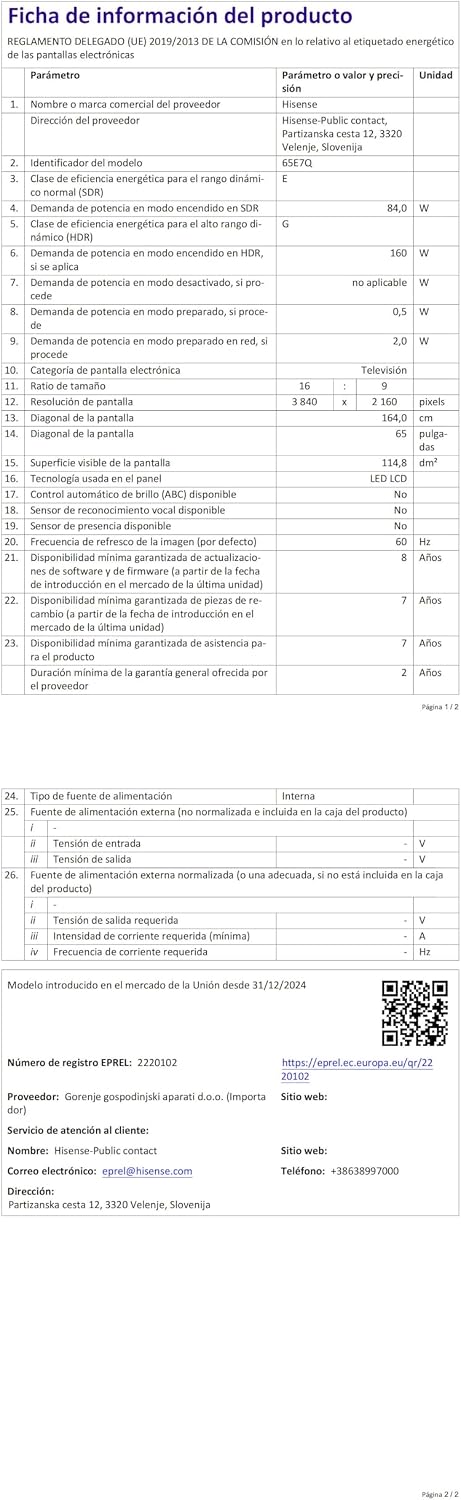
Energy label for the Hisense 65E7Q TV.
For more detailed product information, please refer to the EPREL database: https://eprel.ec.europa.eu/qr/2220102
9. Iwaranti kanye Nokusekela
9.1 Iwaranti Yomkhiqizo
Le TV ye-Hisense iza ne- Iwaranti yomkhiqizo yeminyaka engama-3. Sicela ugcine ubufakazi bakho bokuthenga izimangalo zewaranti.
9.2 Ukutholakala Kwezingxenye Ezisele
Spare parts for this model are guaranteed to be available in the EU for a duration of 10 iminyaka from the product's market introduction.
9.3 Ukwesekwa Kwamakhasimende
For technical assistance, troubleshooting, or warranty service, please contact Hisense customer support. Refer to the contact information provided in your warranty card or visit the official Hisense webindawo yesifunda sakho.