
ASD A-LFM12D20SRGBW-N-4p
ASD 12 Inch Smart RGBW Flush Mount Ceiling Light Instruction Manual
Ibhrendi: ASD | Imodeli: A-LFM12D20SRGBW-N-4p
1. Isingeniso
Thank you for choosing the ASD 12 Inch Smart RGBW Flush Mount Ceiling Light. This fixture combines a stylish minimalist design with efficient, versatile lighting solutions. Featuring multicolor RGBW capabilities, smart app control, and remote operation, it offers a wide range of lighting effects for your space. This manual provides essential information for safe installation, effective operation, and proper maintenance of your new lighting fixture.

Figure 1.1: ASD 12 Inch Smart RGBW Flush Mount Ceiling Light with accessories.
2. Ulwazi Lokuphepha
Sicela ufunde yonke imiyalelo ngokucophelela ngaphambi kokufaka nokusebenzisa. Gcina leli bhukwana ukuze lisetshenziswe esikhathini esizayo.
- Ukuphepha Kagesi: Always turn off power at the circuit breaker before installing, cleaning, or servicing the fixture. Consult a qualified electrician if you are unsure about wiring.
- Ukusetshenziswa Kwangaphakathi Kuphela: This fixture is designed for indoor use in dry and damp locations. Do not expose to direct water spray or immerse in water.
- Voltage: Qinisekisa ukuthi unikezwa amandla ngevolthitage matches the fixture's requirements (120V).
- Ukukhweza: Mount the fixture securely to a standard electrical outlet box.
- Ukuphatha: Handle the fixture with care to avoid damage to components.
3. Okuqukethwe Kwephakheji
Qinisekisa ukuthi zonke izingxenye zikhona ngaphambi kokuqala ukufakwa:
- ASD 12 Inch Smart RGBW Flush Mount Ceiling Light Fixture (4 units)
- Isilawuli kude
- I-Mounting Hardware (izikulufu, amantongomane)
- Incwadi Yeziqondiso
4. Imininingwane
| Isici | Imininingwane |
|---|---|
| Ibhrendi | ASD |
| Igama Lemodeli | I-LOFT |
| Inombolo Yengxenye | A-LFM12D20SRGBW-N-4p |
| Umbala | 12" | Nickel | RGBW |
| Okubalulekile | Alloy Steel, Acrylic |
| Isitayela | Okwesimanje |
| Ubukhulu bomkhiqizo | 11.3"L x 11.3"W x 3.4"H |
| Ukusetshenziswa Okuthize | Ukusetshenziswa kwangaphakathi kuphela |
| Umthombo wamandla | I-hardwire |
| Uhlobo Lomthombo Wokukhanya | I-LED |
| Qeda Uhlobo | Pendiwe |
| I-Shade Material | Ipulasitiki |
| Voltage | 120 volts |
| Wattage | 20 watts |
| Uhlobo Lokukhweza | I-Flushmount |
| Impilo Emaphakathi | Amahora angu-50,000 |
| Izici ezikhethekile | 1064/1220LM, Remote Control, RGBW, Smart App, CCT Adjustable 2700-6500K |

Umfanekiso 4.1: Ubukhulu bomkhiqizo nezici ezibalulekile.
5. Ukufakwa
Follow these steps to install your ASD Smart RGBW Flush Mount Ceiling Light:
- Lungiselela Ukufakwa: Turn off power at the circuit breaker before starting. Ensure the mounting surface is clean and stable.
- Remove the Lens: Gently remove the lens from the fixture by rotating it clockwise. This will expose the mounting holes and wiring connections.
- Mount the Fixture: Attach the fixture's base to the electrical outlet box using the provided screws. Ensure it is securely fastened.
- Uxhumano Lwezintambo: Connect the wires: Black to Black (Live), White to White (Neutral), and Ground to Ground. Secure all connections with wire nuts. Carefully tuck all wires back into the outlet box.
- Namathisela ilensi: Once wiring is complete and secure, attach the lens by aligning it with the fixture and rotating it counter-clockwise until it locks into place.
- Buyisela Amandla: Vula amandla futhi ku-circuit breaker.
- Download ASD SMART App: For smart control features, download the "ASD SMART" application from your smartphone's app store. Scan the QR codes below or click the links to download.
I-Google Play Isitolo (Android)
I-Apple App Store (i-iOS) - Add Fixture to App: Follow the in-app instructions to add your new ceiling light to the ASD SMART app. This typically involves putting the light into pairing mode and connecting it to your Wi-Fi network.

Figure 5.1: Initial installation steps: removing the lens and wiring.
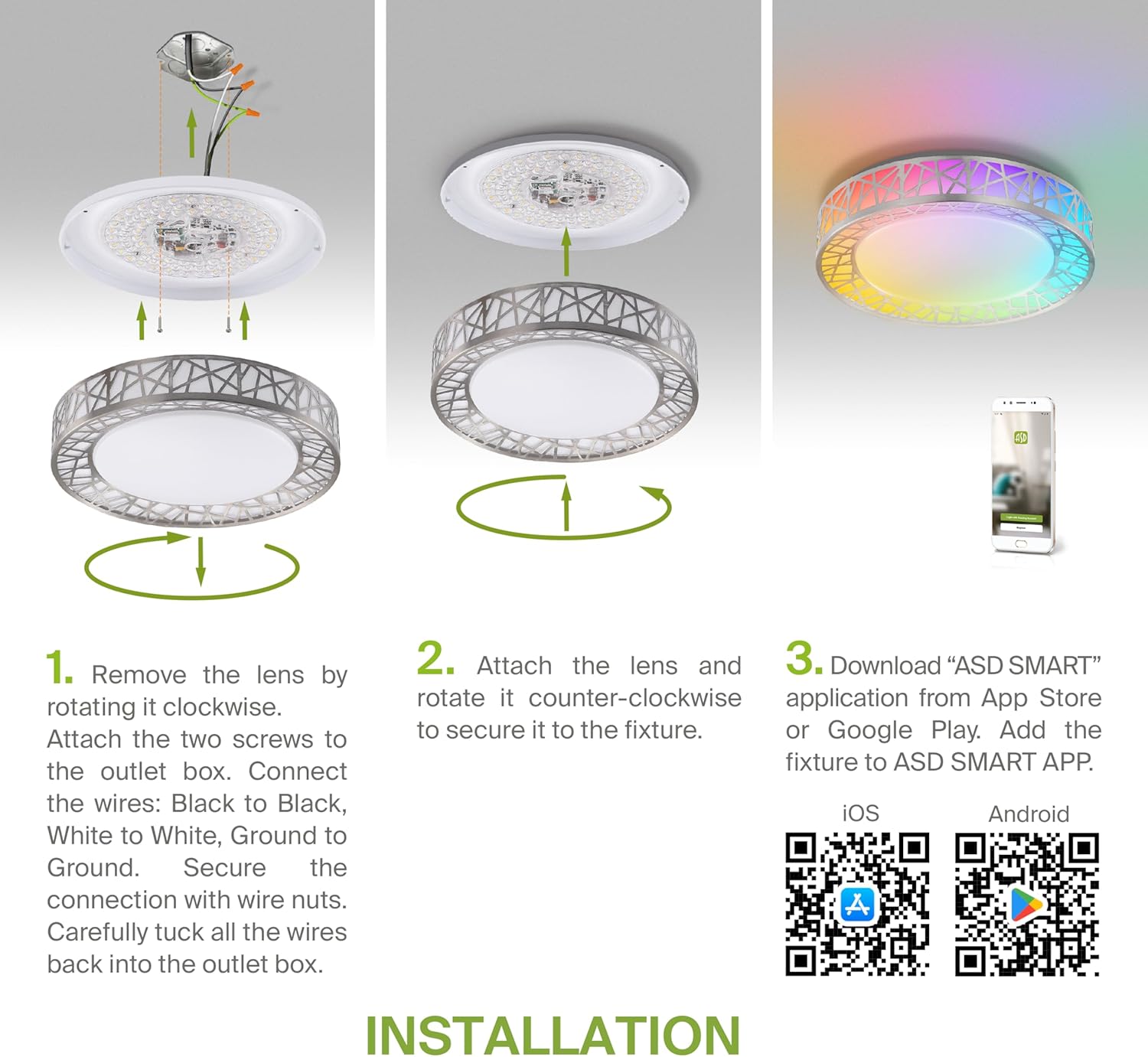
Figure 5.2: Complete installation overview including app download.
6. Iziqondiso Zokusebenza
Your ASD Smart RGBW Flush Mount Ceiling Light offers multiple control methods:
6.1 Ukulawula okukude
The included remote control allows for basic functions:
- Khanyisa cisha: Vula noma ucime isibani.
- Ukucwilisa: Adjust brightness levels smoothly.
- Ukulungiswa kwe-CCT: Change color temperature (e.g., from warm white to cool white).
- Ukukhetha Umbala we-RGB: Cycle through or select specific RGB colors.
6.2 ASD SMART App Control
The ASD SMART app provides full control and advanced features:
- Imibala eyizigidi eziyi-16.7: Choose any color from the full RGBW spectrum.
- Smooth Dimming & CCT: Precisely adjust brightness and color temperature (2700K-6500K).
- Lighting Patterns: Select pre-set or custom lighting scenes and effects.
- Ukuhlanganisa: Control multiple fixtures simultaneously.
- Ukuhlela: Set timers for lights to turn on/off or change settings automatically.

Figure 6.1: RGBW color capabilities.

Figure 6.2: Control via remote and smart app.

Figure 6.3: Seamless dimming functionality.
6.3 Ukulawula Izwi (i-Alexa kanye nomsizi we-Google)
The fixture is compatible with Amazon Alexa and Google Assistant for convenient voice commands:
- Ensure your ASD SMART app is linked to your Alexa or Google Home account.
- Use commands such as "Alexa, turn on the living room light" or "Hey Google, set the bedroom light to blue."

Figure 6.4: Compatibility with Alexa and Google Assistant.
7. Isondlo
To ensure the longevity and optimal performance of your ceiling light:
- Ukuhlanza: Nqamula ugesi ngaphambi kokuhlanza. Sula isithako ngendwangu ethambile neyomile. Ungasebenzisi izihlanzi ezirhabaxa noma izinyibilikisi.
- Ukushintshwa kwe-Bulb: This fixture uses integrated LED technology and does not require bulb replacement.
8. Ukuxazulula izinkinga
Uma uhlangabezana nezinkinga ngokukhanya kophahla lwakho, bheka izinkinga ezilandelayo nezisombululo:
| Inkinga | Imbangela Engenzeka | Isixazululo |
|---|---|---|
| Ukukhanya akukhanyi | No power, loose wiring, faulty switch | Hlola i-circuit breaker. Qinisekisa ukuthi zonke izintambo zixhumekile ziphephile. Hlola iswishi yodonga. |
| Isilawuli kude asisebenzi | Dead battery, out of range, interference | Replace remote battery. Ensure you are within range. Remove any obstructions. |
| App cannot connect to light | Incorrect Wi-Fi password, light not in pairing mode, 5GHz Wi-Fi network | Verify Wi-Fi password. Reset light to pairing mode (refer to app instructions). Ensure you are on a 2.4GHz Wi-Fi network. |
| Ukulawulwa kwezwi akuphenduli | App not linked to voice assistant, incorrect device name | Check linking in ASD SMART app and voice assistant app. Verify device name in voice assistant app. |
9. Iwaranti kanye Nokusekela
I-ASD inikeza a Iwaranti ekhawulelwe yeminyaka engu-5 for this product, guaranteeing top quality and safety. The fixture is ETL certified, ensuring compliance with North American safety standards.
For technical support, warranty claims, or any questions not covered in this manual, please contact ASD customer service. Refer to the product packaging or the official ASD webindawo yolwazi lokuxhumana.
Ask a question about this manual
Ask about setup, troubleshooting, compatibility, parts, safety, or missing instructions. Manuals+ will review the question and use this page’s manual context to help answer it.