
1. Isingeniso
Welcome to the user manual for your new XIAOMI Redmi Note 14 Pro+ 5G Smartphone. This guide provides essential information on setting up, operating, and maintaining your device. Please read it carefully to ensure optimal performance and longevity of your smartphone.
2. Okuqukethwe Kwephakheji
Qinisekisa ukuthi iphakheji yakho iqukethe izinto ezilandelayo:
- I-XIAOMI Redmi Note 14 Pro+ 5G Smartphone
- Ikhebula le-USB
- Umhlahlandlela Wokuqala Osheshayo (ungahluka ngendawo)
- SIM Eject Tool (may vary by region)
Note: A charger is not included in the package. Please use a compatible 120W HyperCharge adapter for optimal charging.
3. Idivayisi Ngaphezuluview
Familiarize yourself with the physical components of your Redmi Note 14 Pro+ 5G.
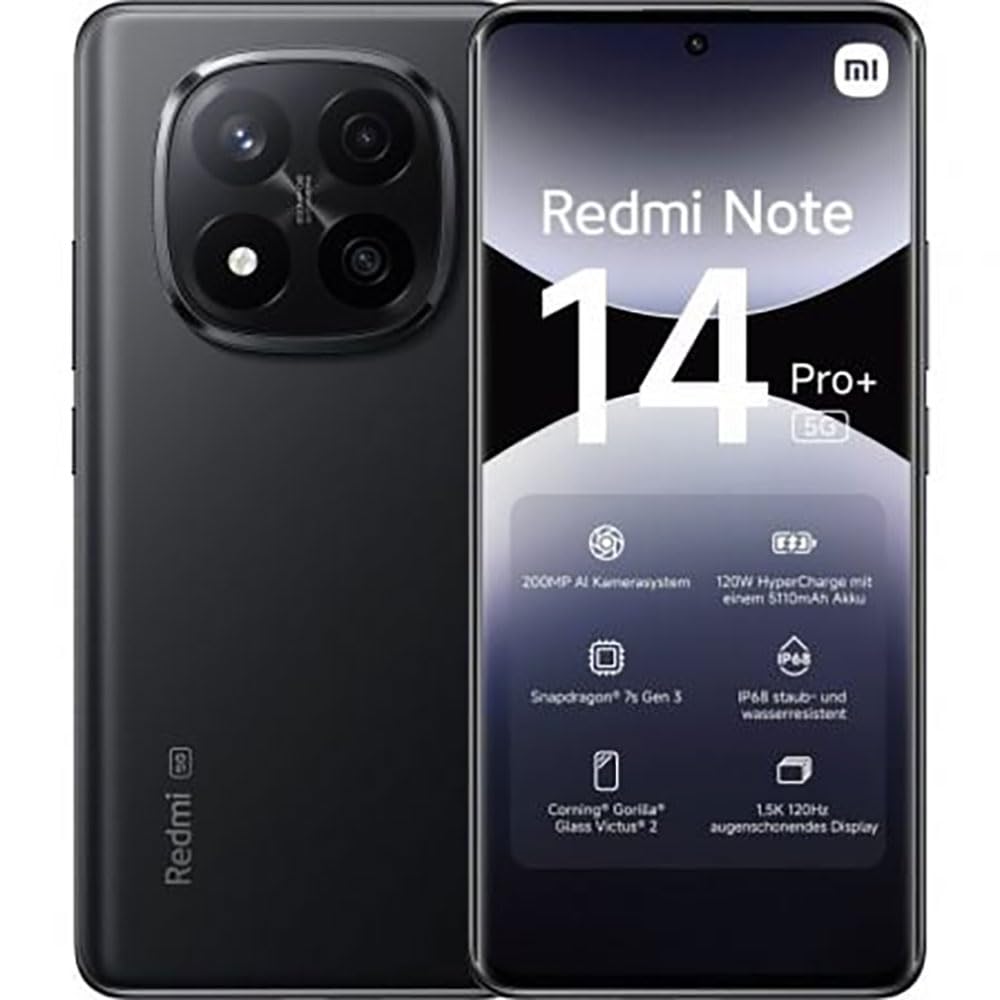
The image displays the front and back of the XIAOMI Redmi Note 14 Pro+ 5G smartphone. The front shows the display with 'Redmi Note 14 Pro+ 5G', '200 Megapixels', and '256 GB' text. The back features a prominent camera module with multiple lenses and the 'Redmi 5G' branding.
Izingxenye Ezibalulekile:
- Isibonisi Sangaphambili: 6.67-inch 1.5K 120Hz AMOLED display with Corning Gorilla Glass Victus 2.
- Imojuli yekhamera yangemuva: Houses the 200MP Pro-Grade AI Camera system.
- Inkinobho yamandla: Located on the side, used to power on/off and wake/sleep the device.
- Izinkinobho zevolumu: Itholakala ohlangothini, isetshenziselwa ukulungisa imidiya kanye nevolumu yocingo.
- Imbobo yohlobo C ye-USB: Ukushaja nokudluliswa kwedatha.
- Isikhala sekhadi le-SIM: Supports Dual SIM Nano SIM cards.
- Izipikha: Stereo speakers for audio output.
4. Setha
4.1. Ukufaka iSIM khadi
- Thola ithreyi ye-SIM khadi eceleni kwedivayisi yakho.
- Faka ithuluzi lokukhipha i-SIM emgodini omncane eduze kwethreyi bese ucindezela ngokuqinile kuze kube yilapho ithreyi iphuma.
- Faka i-Nano SIM khadi yakho ethreyini izinto ezisagolide zibheke phansi. Qinisekisa ukuma okulungile.
- Phusha kancane ithreyi uyibuyisele ku-slot ize ichofoze endaweni yayo.
4.2. Ukufaka amandla Kudivayisi Yakho
Cindezela bese ubamba i Inkinobho Yamandla on the side of the phone until the XIAOMI logo appears on the screen. Follow the on-screen instructions to complete the initial setup, including connecting to Wi-Fi, setting up your Google account, and configuring security features like fingerprint recognition.
4.3. Inkokhelo Yokuqala
It is recommended to fully charge your device before first use. Connect the USB Type-C cable to the phone and a compatible 120W HyperCharge adapter (not included) to a power outlet.
5. Ukusebenzisa i-smartphone Yakho
5.1. Ukuhamba Okuyisisekelo
- Isikrini sokuthinta: Thepha ukuze ukhethe, swayipha ukuze uskrole, ncinza ukuze usondeze.
- Isikrini Sasekhaya: Ihabhu yakho emaphakathi yezinhlelo zokusebenza namawijethi.
- Iphaneli Yezaziso: Swayiphela phansi kusukela phezulu kwesikrini ukuze ufinyelele izaziso nezilungiselelo ezisheshayo.
- Ikhabethe lohlelo lokusebenza: Swipe up from the bottom of the screen (or tap the app drawer icon) to view zonke izinhlelo zokusebenza ezifakiwe.
5.2. Vula/Vala bese uqala kabusha
- Kuya Cisha ugesi: Press and hold the Power Button until the power menu appears, then select "Power off."
- Kuya Qala kabusha: Press and hold the Power Button until the power menu appears, then select "Restart."
5.3. Izici Zokuphepha
Your device supports various security options:
- Ukubonwa kwezigxivizo zeminwe: Bhalisa izigxivizo zakho zeminwe ukuze uvuleke ngokushesha nangokuphephile.
- Ukuvula ngobuso: Use your face to unlock the device.
- I-PIN/Iphethini/Iphasiwedi: Standard security methods.
Access these settings via Izilungiselelo > Ukuphepha nobumfihlo.
6. Izici zekhamera
The Redmi Note 14 Pro+ 5G features a powerful 200MP Pro-Grade AI Camera system designed to enhance your photography experience.
- 200MP Ikhamera Eyinhloko: Capture highly detailed images with optical image stabilization (OIS).
- Amamodi Ekhamera Amaningi: Includes automatic, scene, portrait, and manual modes for versatile shooting.
- Dual LED Flash: Provides enhanced lighting in low-light conditions.
- Ikhamera yangaphambili: A 20MP front sensor for high-quality selfies and video calls.
- Ukuqoshwa kwevidiyo: Supports up to 8K video capture at 120 fps.
7. Izici ze-AI
Leverage the integrated AI functionalities for a smarter user experience:
- AI Erase Pro: Intelligently remove unwanted objects or people from your photos.
- AI Image Expansion: Expand the boundaries of your images using AI.
- AI Notes: Smart note-taking capabilities.
- Imibhalo engezansi ye-AI: Generate subtitles for videos or audio in real-time.
- AI Recorder: Enhanced voice recording with AI features.
- Umhumushi we-AI: Ukuhumusha kolimi kwesikhathi sangempela.
- Gemini: Integrated AI assistant.
- Circle to Search by Google: Quickly search for information by circling objects on your screen.
8. Iyashaja
Your Redmi Note 14 Pro+ 5G supports 120W HyperCharge technology for rapid charging.
- Amandla ebhethri: 5110mAh Lithium-polymer battery.
- Iyashaja: Use the provided USB Type-C cable with a compatible 120W power adapter (sold separately) for optimal charging speeds.
- Impilo Yebhethri: Expect up to 20 hours of talk time. Actual battery life may vary based on usage.
Always use certified charging accessories to prevent damage to your device.
9. Isondlo
9.1. Ukumelana Namanzi Nothuli
The device features an Isilinganiso se-IP68 for dust and water resistance. This means it is protected against dust ingress and can withstand immersion in water up to 1.5 meters for 30 minutes. However, this resistance is not permanent and may decrease over time with normal wear. Avoid exposing the device to hot water, saltwater, or other liquids.
9.2. Ukuhlanza Idivayisi Yakho
- Sebenzisa indwangu ethambile, engenantambo ukuhlanza isikrini nomzimba.
- Gwema ukusebenzisa izihlanzi ezihudulayo, izinyibilikisi, noma izifutho ze-aerosol.
- If the device gets wet, wipe it thoroughly with a clean, dry cloth before charging or using ports.
9.3. Ukuvuselelwa Kwesoftware
Hlola njalo futhi ufake izibuyekezo zesofthiwe ukuze uqinisekise ukuthi idivayisi yakho inezici zakamuva, iziqephu zokuphepha, nokuthuthukiswa kokusebenza. Iya ku Izilungiselelo > Mayelana nefoni > Inguqulo ye-MIUI ukuhlola izibuyekezo.
10. Ukuxazulula izinkinga
Uma uhlangabezana nezinkinga ngedivayisi yakho, zama izixazululo ezilandelayo ezivamile:
- Idivayisi ayivuli: Ensure the battery is charged. Connect to a charger for at least 15 minutes, then try powering on.
- Izinhlelo zokusebenza ziyaphahlazeka noma ziyaqandisa: Vala uhlelo lokusebenza olunenkinga bese uluvula kabusha. Uma inkinga iqhubeka, qala kabusha ifoni yakho.
- Uxhumo lenethiwekhi olubi: Check your SIM card is correctly inserted. Try toggling Airplane Mode on and off. If the issue persists, contact your network provider.
- Ibhethri liyaphela ngokushesha: Nciphisa ukukhanya kwesikrini, vala izinhlelo zokusebenza ezingasetshenziswanga, futhi ukhubaze izici ezingadingekile njenge-GPS noma i-Bluetooth uma zingasetshenziswa.
- Isikrini asiphenduli: Force restart your device by holding the Power Button for approximately 10-15 seconds.
Ukuze uthole izinkinga eziyinkimbinkimbi, bheka ukwesekwa okusemthethweni kwe-XIAOMI webisayithi noma xhumana nesevisi yamakhasimende.
11. Imininingwane
| Isici | Ukucaciswa |
|---|---|
| Ibhrendi | XIAOMI |
| Igama Lemodeli | I-Redmi Note 14 Pro+ 5G |
| Isistimu esebenzayo | I-Android 14 |
| Imodeli ye-CPU | I-Snapdragon 7 Gen 3 |
| RAM | 8 GB |
| Umthamo Wesitoreji | 256 GB |
| Usayizi Wesikrini | 6.67 amayintshi |
| Bonisa Ukulungiswa | 2712 x 1220 amaphikseli |
| Isilinganiso Sokuvuselela | 120 Hz |
| Ukulungiswa Kwekhamera Yangemuva | 200 Megapixels (with OIS) |
| Ukulungiswa Kwekhamera Yangaphambili | 20 megapixels |
| Amandla ebhethri | 5110 mAh |
| Ubuchwepheshe bokushaja | 120W HyperCharge |
| Ukumelana Namanzi | IP68 |
| Ubuchwepheshe Beselula | 5G |
| Uhlobo lwekhadi le-SIM | Nano SIM (Dual SIM) |
| Ukuxhumana | I-USB Type-C |
12. Iwaranti kanye Nokusekela
12.1. Iwaranti Yomkhiqizi
Your XIAOMI Redmi Note 14 Pro+ 5G Smartphone comes with a Iwaranti yomkhiqizi yonyaka ongu-2. Lesi siqinisekiso sihlanganisa amaphutha ezintweni zokwakha kanye nokusebenza ngaphansi kokusetshenziswa okuvamile. Sicela ugcine ubufakazi bakho bokuthenga izimangalo zewaranti.
The warranty does not cover damage caused by accidents, misuse, unauthorized modifications, or normal wear and tear.
12.2. Ukwesekwa Kwamakhasimende
For technical assistance, warranty claims, or further information, please visit the official XIAOMI support website or contact their customer service department. Contact details can typically be found on the XIAOMI webnoma ekhadini lewaranti elifakwe nomkhiqizo wakho.