
1. Isingeniso
This manual provides instructions for the safe and efficient use of your boogostore PS-618 Solar Charger Power Bank. This device is designed to provide portable power for various electronic devices, featuring multiple charging methods including solar, hand-crank, and traditional wall charging, along with an integrated LED flashlight for outdoor and emergency situations.
2. Izici zomkhiqizo
- Amandla aphezulu: 63200mAh Li-polymer battery for extended power supply.
- Multiple Charging Inputs: Dual input ports (Type-C and Micro USB) for fast charging the power bank.
- Emergency Charging Options: Integrated solar panel and hand-crank for emergency power generation.
- Ukushaja kwamadivayisi amaningi: Dual USB outputs and built-in cables (Lightning, Micro USB, USB-C) for charging various devices simultaneously.
- I-Flashlight ye-LED ehlanganisiwe: 4 LED flashlights with 3 modes (lighting, flashing, SOS) for illumination and signaling.
- Idizayini Eqinile: Constructed from professional ABS material, offering waterproof (IPX66), dropproof, and dustproof capabilities.
- Ukuvikelwa Kwezokuphepha: Automatic output adjustment to prevent overcharging, over-current, over-voltage, namasekethe amafushane.
- Ubude bempilo: Designed for over 1600 charge life cycles.
3. Okuqukethwe Kwephakheji
Qinisekisa ukuthi zonke izinto zikhona kuphakheji yakho:
- 1x boogostore PS-618 Solar Charger Power Bank
- 1x Ikhebuli yokushaja ye-USB Type-C
- 1x Lanyard
- 1x Incwadi Yomsebenzisi (le dokhumenti)

Image: Contents of the product package, including the power bank, Type-C cable, lanyard, and user manual.
4. Umkhiqizo Uphelileview
Zijwayeze izingxenye zebhange lakho lamandla:
- Iphaneli yelanga: Located on the front surface for passive solar charging.
- Izibani ze-LED: Four bright LEDs on one end for illumination.
- Inkinobho yamandla: Controls power and flashlight modes.
- I-Hand Crank: Foldable crank on the side for manual power generation.
- Charging Ports (under protective cover):
- 2x USB Type-A Output ports
- 1x USB Type-C Input/Output port
- 1x Micro USB Input port
- Built-in Charging Cables: Integrated cables for Lightning, Micro USB, and USB-C devices.
- Izibani zezinkomba zebhethri: LEDs indicating remaining battery capacity.

Isithombe: Kuphelileview of the power bank's multiple charging methods: USB, solar, and hand crank.

Isithombe: Ngemininingwane view of the Micro USB and Type-C input ports, solar panel, and hand-crank mechanism.
5. Initial Setup and Charging the Power Bank
It is highly recommended to fully charge the power bank via a wall charger before its first use to ensure optimal battery performance.
5.1. Wall Charging (Recommended)
- Open the protective cover on the side of the power bank to reveal the charging ports.
- Connect the provided USB Type-C cable to the Type-C input port on the power bank. Alternatively, use a Micro USB cable with the Micro USB input port.
- Connect the other end of the USB cable to a compatible USB wall adapter (not included) and plug it into a power outlet.
- Izibani zesibonakaliso sebhethri zizokhanya ukuze zibonise inqubekela phambili yokushaja. Zonke izibani zizoqina uma zishajwe ngokugcwele.
- Charging time via wall adapter is approximately 9-12 hours.
5.2. Solar Charging (Emergency Use Only)
The solar panel is designed for emergency charging and maintaining battery levels, not as a primary charging source. Direct sunlight is required for effective solar charging.
- Beka ibhange lamandla lapho iphaneli yelanga ibheke khona ilanga eliqondile.
- The solar charging indicator light will illuminate when charging via solar power.
- For best results, ensure no obstructions block the solar panel from sunlight.
5.3. Hand-Crank Charging (Emergency Use Only)
The hand-crank feature provides an alternative emergency charging method when no other power sources are available.
- Locate the foldable hand crank on the side of the power bank.
- Unfold the crank handle.
- Rotate the crank clockwise at a steady pace to generate power. The battery indicator lights will show charging activity.
- Continuous cranking is required to provide a meaningful charge.

Image: Demonstrates hand-crank charging, useful in emergencies without electricity or sunlight.
6. Ukushaja Amadivayisi Angaphandle
The power bank can charge multiple devices simultaneously using its various output options.
6.1. Using Built-in Cables
- Pull out the desired built-in charging cable (Lightning, Micro USB, or USB-C) from its storage slot on the back of the power bank.
- Connect the cable to your electronic device.
- The power bank will automatically begin charging your device. If not, press the power button once to activate charging.
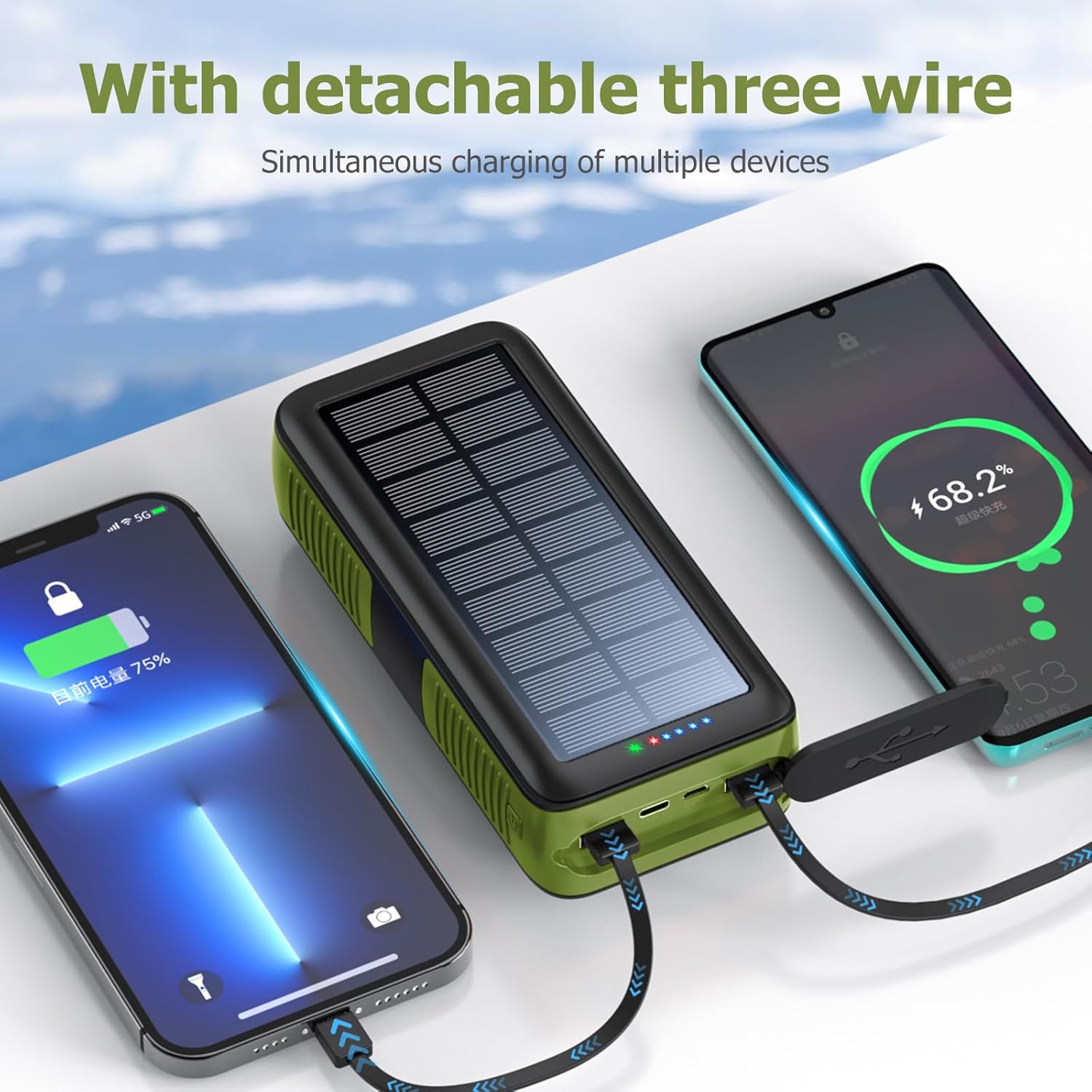
Image: The power bank's built-in cables charging multiple devices simultaneously.
6.2. Using USB Output Ports
- Open the protective cover on the side of the power bank.
- Connect your device's charging cable to one of the USB Type-A output ports or the USB Type-C output port.
- Connect the other end of your cable to your electronic device.
- The power bank will automatically begin charging your device. If not, press the power button once to activate charging.

Image: The power bank's built-in cables charging multiple devices simultaneously.
7. LED Flashlight Operation
The integrated LED flashlight offers multiple lighting modes for different situations.
- Vula/Vala: Double-press the power button on the side of the power bank to turn the flashlight on or off.
- Amamodi Omjikelezo: While the flashlight is on, single-press the power button to cycle through the modes:
- Ukukhanya Okukhanyayo
- Fiphalisa Ukukhanya
- SOS Mode (flashing)
- Warning Light (rapid flashing)

Image: The power bank's LED flashlight demonstrating its various modes for different uses.
8. Imininingwane
| Isici | Imininingwane |
|---|---|
| Inombolo Yemodeli | PS-618 |
| Amandla ebhethri | 63200 millionamp Hours (Li-polymer) |
| Ubukhulu bomkhiqizo | 6.7 x 3 x 2 amayintshi |
| Isisindo sento | 1.74 amakhilogremu |
| Izimbobo zokufaka | Micro USB, USB Type-C, Solar Panel, Hand Crank |
| Amachweba okukhiphayo | 2x USB Type-A, 1x USB Type-C, Built-in Cables (Lightning, Micro USB, USB-C) |
| Izici ezikhethekile | Built-in Cables, Flashlight, Solar Charging, Hand Crank, Waterproof (IPX66), Dropproof, Dustproof |
| Umkhiqizi | Shenzhen Ente Intelligent Co., Ltd |
9. Isondlo
- Keep the power bank away from extreme temperatures, direct heat, and open flames.
- Avoid dropping or subjecting the device to severe impacts, despite its durable design.
- Clean the exterior with a soft, dry cloth. Do not use harsh chemicals or abrasive cleaners.
- Ensure protective covers for ports are securely closed when not in use to maintain water and dust resistance.
- Gcina ibhange lamandla endaweni epholile, eyomile uma lingasetshenziswa isikhathi eside.
10. Ukuxazulula izinkinga
- I-Power Bank Ayishaji:
- Qinisekisa ukuthi ikhebula lokushaja lixhunywe ngokuphephile kokubili echwebeni lokufaka lebhange lamandla kanye nomthombo wamandla.
- Verify the wall adapter and power outlet are functional.
- For solar charging, ensure the panel is in direct, strong sunlight. Remember solar charging is slow and for emergencies.
- For hand-crank charging, ensure continuous and steady rotation.
- Idivayisi Ayishaji kusuka ku-Power Bank:
- Press the power button once to activate the power bank's output.
- Ensure your device's charging cable is properly connected to an output port or using one of the built-in cables.
- Check if the power bank has sufficient battery charge.
- Try a different output port or cable.
- I-Flashlight ayisebenzi:
- Double-press the power button to turn the flashlight on.
- Ensure the power bank has sufficient battery charge.
11. Ulwazi Lokuphepha
- Ungawuqedi, ulungise, noma ulungise idivayisi ngokwakho.
- Do not expose the power bank to water or moisture for prolonged periods, or immerse it in water, despite its water-resistant rating.
- Avoid extreme temperatures (above 60°C/140°F or below -10°C/14°F).
- Gcina endaweni lapho izingane zingafinyeleleki khona.
- Lahla ibhange lamandla ngokwemithetho yendawo yokulahlwa kukagesi.
12. Iwaranti kanye Nokusekela
Your boogostore PS-618 Solar Charger Power Bank comes with a user manual and lifetime friendly customer service. If you have any questions or encounter issues after purchasing our products, please feel free to contact us. We are committed to providing you with the most satisfactory solution.
For support, please refer to the contact information provided with your purchase or visit the official boogostore webindawo.