
Isingeniso
Thank you for choosing the CREATE Speaker Retro. This portable Bluetooth speaker combines a classic retro design with modern audio technology, offering versatile connectivity and powerful sound. This manual will guide you through the setup, operation, and maintenance of your new speaker to ensure optimal performance and longevity.

Image: The CREATE Speaker Retro, highlighting its elegant retro aesthetic and compact form factor.
Imiyalelo Ebalulekile Yezokuphepha
- Funda yonke imiyalelo ngokucophelela ngaphambi kokusebenzisa umkhiqizo.
- Gcina leli bhukwana ukuze lisetshenziswe esikhathini esizayo.
- Do not expose the speaker to water or excessive moisture. This product is hhayi amanzi.
- Do not place near heat sources such as radiators, heat registers, stoves, or other apparatus (including ampama-lifiers) akhiqiza ukushisa.
- Sebenzisa kuphela okunamathiselwe/izinsiza ezicaciswe umenzi.
- Khipha lesi sisetshenziswa phakathi neziphepho zombani noma lapho singasetshenziswa isikhathi eside.
- Thumela zonke izinsiza kubasebenzi benkonzo abaqeqeshiwe.
Okuqukethwe Kwephakheji
The CREATE Speaker Retro package includes:
- CREATE Speaker Retro Portable Bluetooth Speaker (1 unit)
- Ikhebuli yokushaja ye-USB-C
- Incwadi Yomsebenzisi (le dokhumenti)
Controls and Ports Overview
Familiarize yourself with the speaker's controls and connection ports:

Isithombe: Ngemininingwane view of the speaker's top control panel.
- Ivolumu Knob: Ilungisa ivolumu yomsindo iyonke.
- I-Bass Knob: Ilungisa izinga lebhesi.
- I-Treble Knob: Ilungisa ileveli ye-treble.
- Ukushintsha Isikhethi Sokufaka: Toggles between AUX, Bluetooth (BT), and USB input modes.
- Ukushintshwa Kwamandla: Ivula/Cima isipikha.
- Okokufaka kwe-AUX (3.5mm): For connecting external audio devices via an audio cable.
- Imbobo ye-USB: Ukuze kudlaleke idrayivu ye-USB.
- Imbobo ye-DC-IN 5V: Ukushaja isipikha.
- Ukukhanya Kwenkomba: Ibonisa isimo samandla, isimo sokushaja, kanye nesimo sokubhanqa se-Bluetooth.
Setha
1. Ukushaja uSomlomo
Before first use, fully charge the speaker. Connect the provided USB-C charging cable to the DC-IN 5V port on the speaker and the other end to a compatible USB power adapter (not included) or a computer's USB port. The indicator light will show the charging status. A full charge takes approximately 4-5 hours.
- Iyashaja: Indicator light glows (color may vary).
- Ishajwe Ngokugcwele: Indicator light turns off or changes color.
2. Ukuvula/Ukucisha
To power on the speaker, flip the Ukushintsha Amandla to the "ON" position. To power off, flip the switch to the "OFF" position.
Imiyalelo yokusebenza
1. Imodi ye-Bluetooth
The speaker features Bluetooth 5.2 for wireless audio streaming with a range of up to 10 meters.
- Amandla kusipika.
- Setha i- Ukushintsha Isikhethi Sokufaka to "BT/AUX" and then ensure it's in Bluetooth mode (indicator light will blink, indicating pairing mode).
- Ku-smartphone yakho, ithebhulethi, noma enye idivayisi esebenzisa i-Bluetooth, vula i-Bluetooth bese usesha amadivayisi atholakalayo.
- Select "CREATE Speaker Retro" from the list.
- Once paired, the indicator light will stop blinking and remain solid. You can now play music wirelessly.
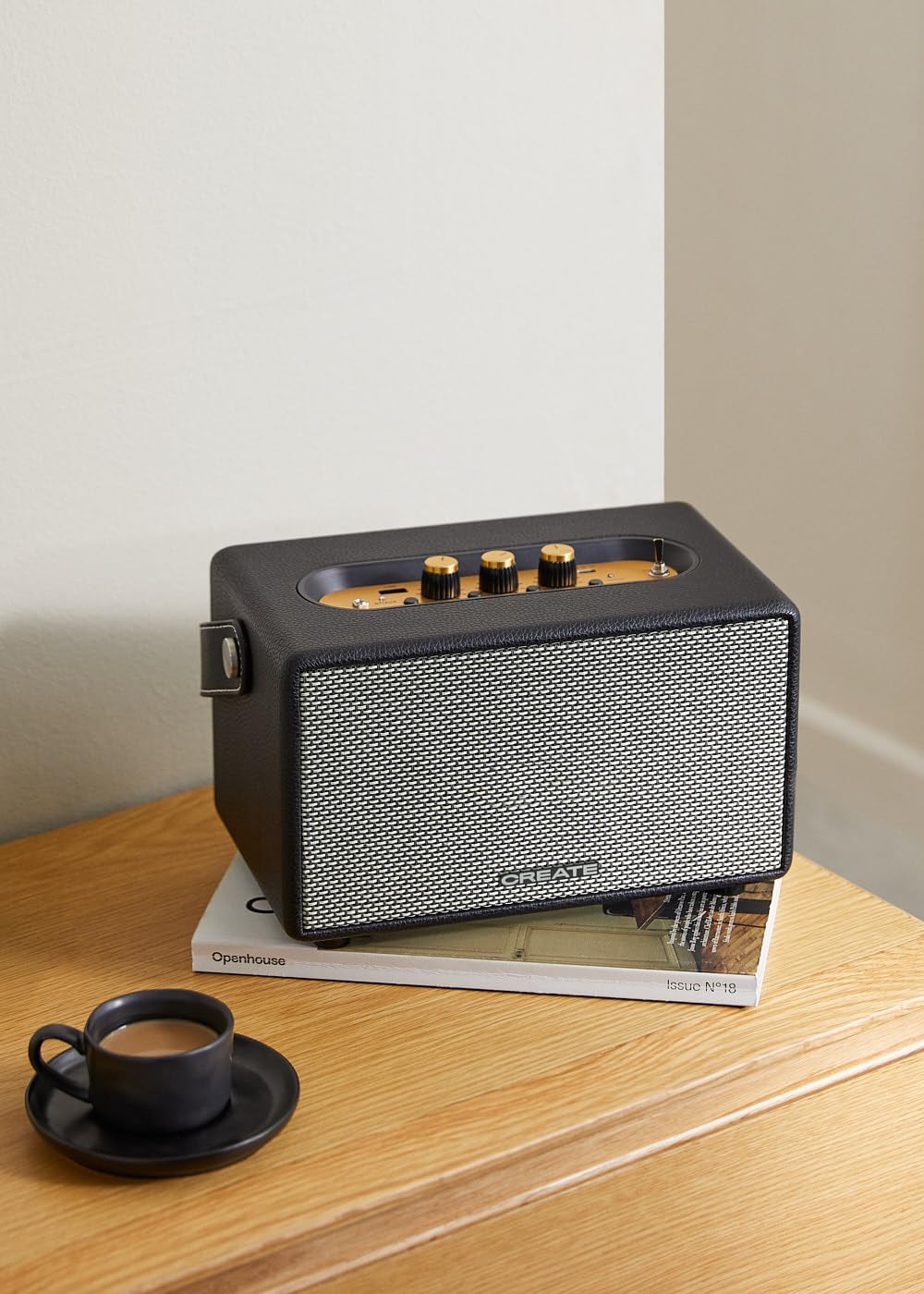
Image: Connecting to the speaker via Bluetooth from a mobile device.
2. USB Playback Mode
Dlala umsindo files ngqo kusuka ku-USB flash drive.
- Amandla kusipika.
- Faka i-USB flash drive equkethe umsindo files kwe Imbobo ye-USB.
- Setha i- Ukushintsha Isikhethi Sokufaka to "USB". The speaker will automatically begin playing music from the USB drive.

Image: Inserting a USB drive for direct audio playback.
3. Imodi Yokufaka ye-AUX
Xhuma amadivayisi omsindo angaphandle usebenzisa ikhebula lomsindo elingu-3.5mm.
- Amandla kusipika.
- Xhuma uhlangothi olulodwa lwekhebula lomsindo elingu-3.5mm (alifakiwe) ku- Okokufaka kwe-AUX itheku esipikheni.
- Connect the other end of the cable to the headphone jack or audio output of your external device (e.g., MP3 player, laptop).
- Setha i- Ukushintsha Isikhethi Sokufaka to "AUX". The speaker will now play audio from your connected device.
4. Ukulungisa Umsindo
Use the dedicated knobs on the control panel to fine-tune your audio experience:
- Zungezisa i- Ivolumu Knob to increase or decrease the overall sound level.
- Zungezisa i- IBass Knob to adjust the low-frequency sounds.
- Zungezisa i- I-Treble Knob to adjust the high-frequency sounds.
Isondlo
Ukuhlanza
Ukuze uhlanze isipikha, sebenzisa indwangu ethambile neyomile. Ungasebenzisi izihlanzi ezirhabaxa, ama-wax, noma izinyibilikisi ngoba zingalimaza isiphetho. Gwema ukufafaza uketshezi ngqo esipikheni.
Isitoreji
When not in use for extended periods, store the speaker in a cool, dry place away from direct sunlight and extreme temperatures. Ensure the speaker is fully charged before storing to preserve battery health.
Ukunakekela Ibhethri
The speaker is equipped with a built-in rechargeable battery. To maximize battery life:
- Gwema ukukhipha ibhethri ngokugcwele njalo.
- Recharge the battery regularly, even if the speaker is not used often.
- Ungabeki isipikha emazingeni okushisa angaphezu kuka-45°C (113°F) noma ngaphansi kuka-0°C (32°F).
Ukuxazulula inkinga
If you encounter any issues with your CREATE Speaker Retro, please refer to the following common problems and solutions:
| Inkinga | Imbangela Engenzeka | Isixazululo |
|---|---|---|
| Isipikha asikhanyisi. | Ibhethri liphelile. | Charge the speaker for 4-5 hours using the USB-C cable. |
| Awukho umsindo ovela kusipika. | Ivolumu iphansi kakhulu; imodi yokufaka engalungile; idivayisi ayixhunyiwe kahle. | Increase volume. Ensure the correct input mode (BT, USB, AUX) is selected. Reconnect Bluetooth device or AUX cable. |
| Ukubhangqa kwe-Bluetooth kwehluleka. | Isipikha asikho kwimodi yokubhangqa; idivayisi ingaphandle kwebanga; ukuphazamiseka. | Ensure speaker is in Bluetooth pairing mode (blinking indicator). Move device closer to speaker (within 10m). Turn off other Bluetooth devices. |
| Ukudlala kwe-USB akusebenzi. | Incorrect input mode; USB drive not formatted correctly or no compatible files. | Ensure "USB" input mode is selected. Check USB drive for compatible audio files (e.g., MP3). Try a different USB drive. |
| Play/Pause button not responding. | Potential hardware issue or software glitch. | Restart the speaker. If the issue persists, contact customer support. (Note: A user review mentioned this issue.) |
Imininingwane
| Igama Lemodeli | SPEAKER RETRO |
| Inombolo Yemodeli | 181643_452174 |
| Ubukhulu (D x W x H) | 17 x 26 x 15 cm |
| Isisindo | 2.5 kg |
| Max. Speaker Output Power | 40 W |
| Imodi Yokukhipha Umsindo | I-Stereo (isiteshi esingu-2.0) |
| Ubuchwepheshe bokuxhumana | Bluetooth 5.2, USB, AUX (3.5mm) |
| I-Bluetooth Range | Kufika kumamitha angu-10 |
| Amandla ebhethri | 3000 mAh |
| Impilo Yebhethri | Kufika emahoreni ayi-5 (kuya ngokusetshenziswa) |
| Isikhathi sokushaja | Cishe. 4-5 amahora |
| Indlela Yokulawula | Touch (knobs and switches) |
| Umbala | Mnyama |
| Ingangeni manzi | Cha |
Iwaranti kanye Nokusekela
Ulwazi Lwewaranti
The CREATE Speaker Retro comes with a standard manufacturer's warranty. Please retain your proof of purchase for warranty claims. The warranty covers defects in materials and workmanship under normal use. It does not cover damage caused by misuse, accidents, unauthorized modifications, or exposure to water.
For specific warranty terms and conditions, please refer to the warranty card included with your product or contact CREATE customer service.
Ukwesekwa Kwamakhasimende
If you have any questions, require technical assistance, or need to report an issue that cannot be resolved using the troubleshooting guide, please contact CREATE customer support.
You can find more information and contact details on the official CREATE webiwebhusayithi noma ngesitolo sabo semikhiqizo ye-Amazon: