
Umkhiqizo Uphelileview
The ASHATA 10X25 Binoculars with Camera combine the functionality of binoculars, a camera, a digital video recorder, and a computer camera. This device is designed for adults and suitable for various outdoor activities such as bird watching, concerts, and general outdoor observation, allowing for both photography and video recording.
Izici ezibalulekile zifaka:
- 10x magnification with 25mm objective lens diameter.
- 101m field of view at 1000m.
- Ability to capture HD photos and videos.
- Support for small memory cards up to 32GB (not included).
- Isebenza ngamabhethri amabili e-AA (awafakiwe).
- Idizayini ehlangene futhi engasindi yokuphatheka.
Okuqukethwe Kwephakheji
Lapho uvula iphakheji, qiniseka ukuthi zonke izinto ezilandelayo zikhona:
- 1 x Digital Binoculars
- 1 x Ikhebula le-USB
- 1 x Indwangu Yokuhlanza
- 1 x Incwadi Yeziqondiso (le dokhumenti)
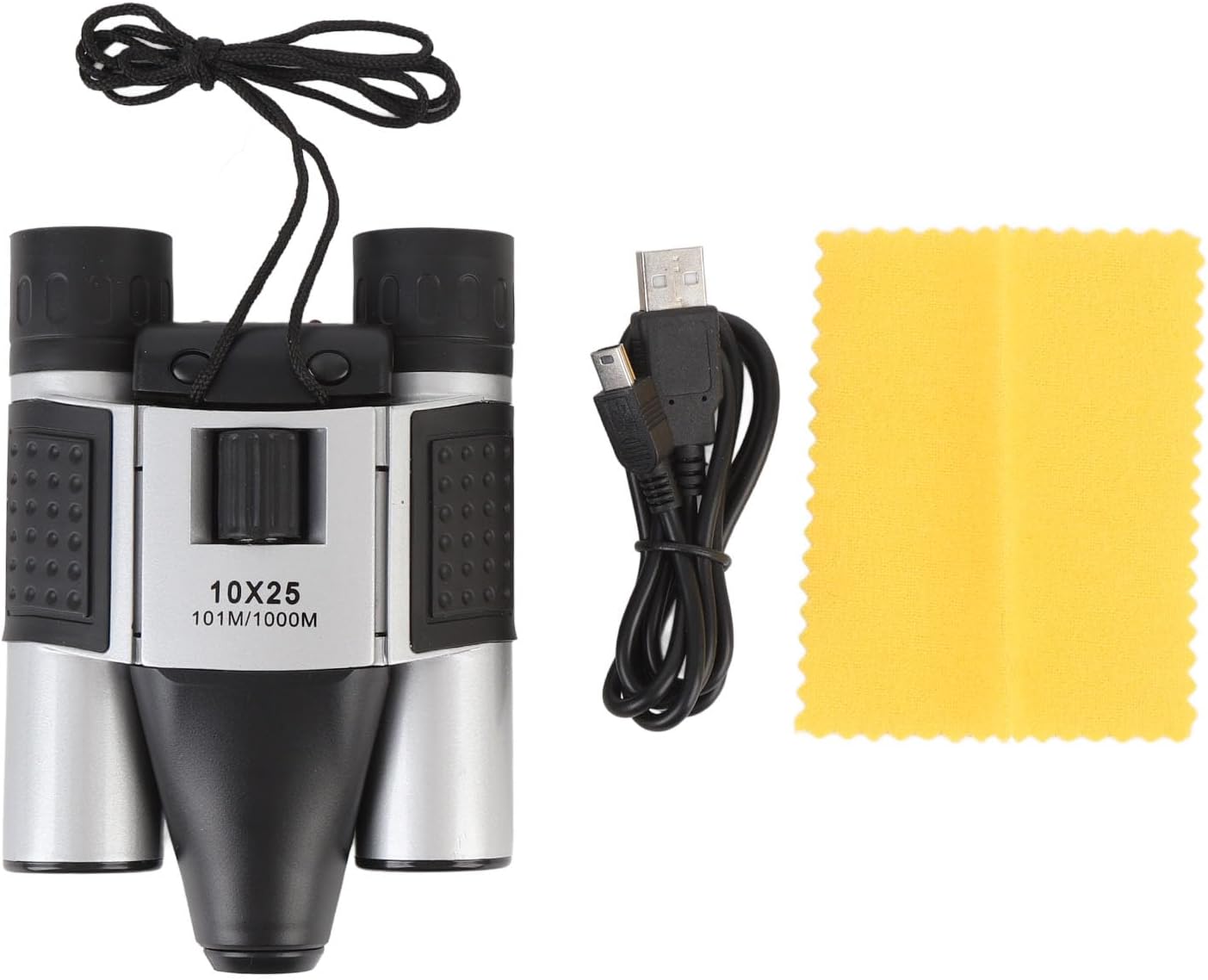
Image: The ASHATA 10X25 Binoculars, a USB cable, and a yellow cleaning cloth, representing the typical package contents.
Ukuhlonza Ingxenye
Familiarize yourself with the various parts of your ASHATA 10X25 Binoculars with Camera:

Isithombe: A enemininingwane view of the binoculars with labels pointing to the Focus ring, Video button, Camera/OK key, Blue light indicator, Red light indicator, Micro USB Port, Micro Storage Card Slot, and Eyepiece.
- I-Focus Ring: Adjusts the focus for clear viewing.
- Inkinobho yevidiyo: Iqala futhi iyeke ukuqoshwa kwevidiyo.
- Camera/OK Key: Captures photos and confirms selections.
- Ukukhanya Okuluhlaza: Indicator for various operational states.
- Ukukhanya Okubomvu: Indicator for various operational states, often charging or recording.
- Imbobo ye-Micro USB: For connecting to a computer or charging (if rechargeable batteries are used).
- Micro Storage Card Slot: Insert a small memory card (up to 32GB) for storing photos and videos.
- Isiqephu samehlo: Where you look through to view izinto.
Setha
1. Ukufakwa kwebhethri
The device requires 2 AA batteries (not included). Locate the battery compartment, typically on the underside or side of the central unit. Open the compartment, insert the batteries according to the polarity markings (+/-), and close the cover securely.
2. Ukufakwa Kwekhadi Lememori
To store photos and videos, a small memory card (up to 32GB) is required (not included). Locate the Micro Storage Card Slot (refer to Component Identification). Gently insert the memory card until it clicks into place. Ensure it is inserted in the correct orientation.
3. Ukuvula/Ukucisha
After installing the batteries, press the power switch (often integrated with the Camera/OK key or a separate button) to turn on the device. The blue or red indicator light may illuminate. To turn off, press and hold the power switch again.
Imiyalelo yokusebenza
1. Adjusting the Binoculars
Hold the binoculars to your eyes. Adjust the focus ring until the image appears clear and sharp. The binoculars feature 10x magnification, allowing you to bring distant objects closer into view.

Image: The ASHATA 10X25 Binoculars positioned for viewing, with a deer visible in the background, illustrating its use for observation.

Image: A visual representation showing the 10x magnification of the binoculars, with a deer and a duck in separate magnified views, demonstrating the clarity and zoom capability.
2. Ukuthatha Izithombe
With the device powered on and a memory card inserted, aim the binoculars at your desired subject. Press the Camera/OK Key once to capture a still photograph. The indicator light may flash to confirm the photo has been taken.
3. Ukuqopha amavidiyo
Ukurekhoda ividiyo, cindezela i Inkinobho Yevidiyo. The indicator light will typically change or blink to signify that recording has started. Press the Inkinobho Yevidiyo again to stop recording. Ensure you have sufficient space on your memory card for video files.
4. Ixhuma Kukhompyutha
Ukudlulisa files or use the binoculars as a computer camera, connect the device to your computer using the provided USB cable. Insert the micro USB end into the Micro USB Port on the binoculars and the standard USB end into an available USB port on your computer. The device should be recognized as a removable storage device or a webcam, depending on the mode selected (if applicable).
Isondlo
1. Ukuhlanza Amalensi
Use the provided cleaning cloth or a soft, lint-free cloth specifically designed for optical lenses. Gently wipe the objective lenses and eyepieces to remove dust and smudges. Avoid using abrasive materials or harsh chemicals, which can damage the lens coatings.
2. Ukunakekelwa Okujwayelekile
- Store the binoculars in a dry, cool place when not in use.
- Gwema ukubeka idivayisi emazingeni okushisa aphezulu noma elangeni eliqondile isikhathi eside.
- Protect the binoculars from impacts and drops.
- Susa amabhethri uma idivayisi ingeke isetshenziselwe isikhathi eside ukuvimbela ukuvuza.
Ukuxazulula inkinga
Idivayisi Ayivuliwe
- Qinisekisa ukuthi amabhethri afakwe ngendlela efanele ne-polarity efanele.
- Shintsha amabhethri amadala ngamabhethri e-AA amasha.
- Check if the battery compartment cover is securely closed.
Cannot Take Photos/Record Videos
- Verify that a small memory card is inserted correctly.
- Check if the memory card has sufficient free space.
- Qinisekisa ukuthi idivayisi ivuliwe.
Unclear Image Through Binoculars
- Lungisa indandatho yokugxila kuze kube yilapho isithombe sibukhali.
- Ensure the lenses are clean and free from smudges or dust.
Computer Not Recognizing Device
- Ensure the USB cable is securely connected to both the binoculars and the computer.
- Zama imbobo ye-USB ehlukile kukhompuyutha yakho.
- Qala kabusha ikhompuyutha yakho bese uzama ukuxhuma futhi.
Imininingwane
| Isici | Ukucaciswa |
|---|---|
| Ibhrendi | ASHATA |
| Inombolo Yemodeli | ASHATA16z7f8aegy |
| Ukukhuliswa | 10x |
| Ububanzi benhloso | 25 mm |
| Inkambu ye View | 101m ku-1000m |
| Ukusekelwa Kwekhadi Lesitoreji | Small Memory Card, Maximum 32GB (not included) |
| Ulwazi Lwebhethri | 2 x AA Amabhethri (awafakiwe) |
| Okubalulekile | Ipulasitiki |
| Isisindo sento | 12.7 ama-ounces (cishe 360g) |
| Ubukhulu bephakheji | 6.81 x 5.43 x 2.6 amayintshi (cishe. 17.3 x 13.8 x 6.6 cm) |
Ividiyo Yomkhiqizo
Ividiyo: Kuphelileview of the ASHATA 10X25 Binoculars with Camera, demonstrating its features and usage. This video provides a visual guide to the product's design and functionality.
Iwaranti kanye Nokusekela
For warranty information and customer support, please refer to the retailer's policy or contact ASHATA customer service directly. Keep your purchase receipt as proof of purchase.