
1. Isingeniso
The DATOUBOSS PSW-E-12V 2000W Pure Sine Wave Inverter is designed to convert 12V DC battery power into stable 220V-230V 50Hz AC power. This inverter provides a clean and reliable power source for various electronic devices, making it ideal for use in RVs, boats, solar power systems, and during emergency power outages.
Its pure sine wave output ensures compatibility with sensitive electronics, reducing noise and electrical interference. The robust aluminum casing offers durability and protection for both domestic and outdoor applications.
Okufakiwe:
- 1 x DATOUBOSS 12V 220V Pure Sine Wave 2000W Inverter
- Amakhebula ebhethri angu-2 (abomvu namnyama)
- 1 x Incwadi Yomsebenzisi
2. Iziyalezo Zokuphepha
Please read all safety instructions carefully before installing and operating the inverter. Failure to follow these instructions may result in electric shock, fire, or serious injury.
- Ukungenisa umoya: Ensure adequate ventilation around the inverter. Do not block ventilation openings.
- Imvelo: Install the inverter in a dry, cool, and well-ventilated area, away from direct sunlight, heat sources, and flammable materials.
- Ukuchayeka emanzini: Do not expose the inverter to water, rain, or moisture.
- Izixhumanisi: Ensure all connections are tight and secure to prevent loose connections, which can cause overheating and fire.
- Ukubeka phansi: The inverter must be properly grounded.
- Izingane: Gcina i-inverter ikude nezingane.
- Abasebenzi Abafanelekile: Ukufaka nokunakekela kufanele kwenziwe kuphela izisebenzi eziqeqeshiwe.
- Amandla okulayisha: Do not exceed the inverter's rated power capacity.
- Ibhethri Voltage: Qinisekisa ukuthi ibhethri ivolumutage matches the inverter's input voltage (12V DC).
Isexwayiso: Ivolumu ephezulutage inside. Do not open the inverter casing.
3. Umkhiqizo Uphelileview
The DATOUBOSS PSW-E-12V 2000W inverter features a compact design with multiple output ports and an intelligent cooling system.
Izici Eziyinhloko:
- Pure Sine Wave Output: Provides stable and clean power for sensitive electronics.
- High Efficiency: Conversion efficiency greater than 92%.
- Multiple Output Ports: 2 EU AC sockets, 1 USB 2.1A port, and 1 Type-C port.
- LCD Display: Real-time monitoring of input/output voltage, power, frequency, and fault indications.
- Comprehensive Protection: Overload, overheating, high/low voltage, short circuit, reverse polarity protection.
- Intelligent Cooling Fan: Automatically activates based on internal temperature to prevent overheating and ensure quiet operation.
Ukuhlonza ingxenye:
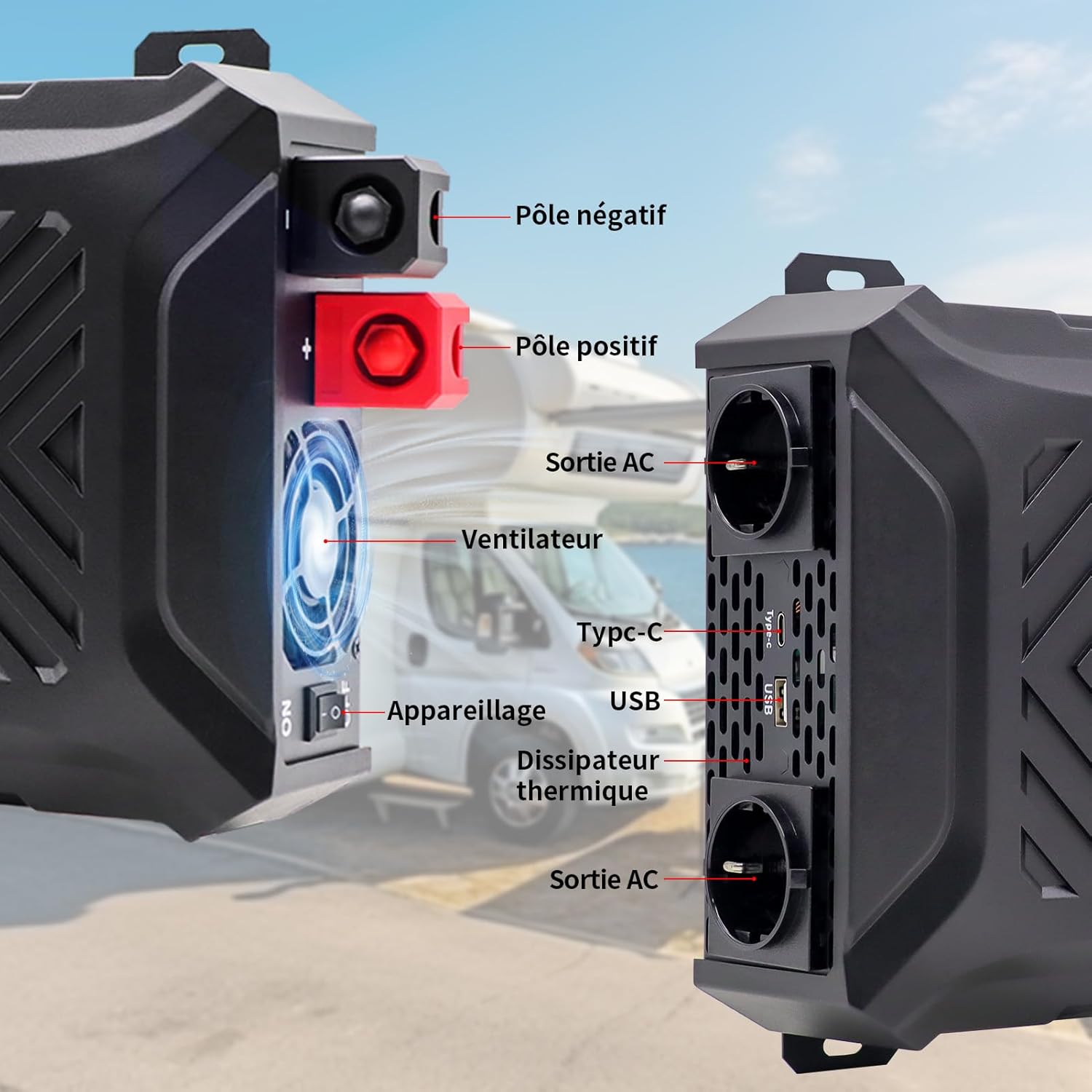
Isithombe: Ngaphambili nangaseceleni view of the inverter with labels for the negative pole, positive pole, AC output sockets, fan, Type-C port, USB port, and heat sink.

Isithombe: Ngemininingwane view of the inverter's LCD screen, AC output sockets, USB port, and Type-C port, with labels for input voltage, okukhiphayo voltage, real-time power, output frequency, and battery level.

Image: The DATOUBOSS inverter connected to various devices, illustrating its multiple output options including two EU AC outlets, a USB port, and a Type-C port, along with its 12V DC input.
4. Sethaphu Imiyalelo
Follow these steps for proper installation and connection of your inverter.
4.1 Ukufaka i-Inverter
- Choose a secure, flat, and well-ventilated location.
- Ensure there is sufficient space around the inverter for airflow, especially around the fan and heat sink.
- Mount the inverter using appropriate screws and brackets (not included unless specified).
4.2 Ukuxhuma Ibhethri
The inverter requires a 12V DC battery system. Ensure the battery type is compatible (GEL, SLA, LI, FLD, AGM, CLA, LifePO4).

Image: Icons representing various compatible battery types including GEL, SLA, LI, FLD, AGM, CLA, and LifePO4, indicating the inverter's versatility.
- Turn off the inverter: Ensure the inverter's power switch is in the 'OFF' position.
- Connect the negative cable: Connect the black battery cable to the negative (-) terminal of the battery and then to the negative (-) terminal of the inverter.
- Connect the positive cable: Connect the red battery cable to the positive (+) terminal of the battery and then to the positive (+) terminal of the inverter.
- Secure connections: Tighten all connections firmly to prevent sparks or overheating.
- Ukubeka phansi: Connect the inverter's grounding terminal to a proper earth ground.
Okubalulekile: Always connect the battery cables in the correct polarity. Reverse polarity can damage the inverter and void the warranty. Use the provided battery cables or cables of appropriate gauge for the power rating.
4.3 Optional Solar Panel Connection
The inverter can be integrated into a solar power system. A solar charge controller is required for this setup.

Image: A diagram illustrating the connection of solar panels to a solar charge controller, which then connects to a battery bank, and finally to the DATOUBOSS inverter to power various household appliances.
5. Iziqondiso Zokusebenza
Once the inverter is properly installed and connected, follow these steps to operate it.
5.1 Ukuvula / Ukuvula
- Ukuvula: After ensuring all connections are secure, switch the inverter's power button to the 'ON' position. The LCD screen will illuminate, displaying current status.
- Ukucisha: Disconnect all AC loads from the inverter, then switch the inverter's power button to the 'OFF' position.
5.2 Ukusebenzisa Isibonisi se-LCD
The LCD screen provides real-time information about the inverter's operation and status.
- Okokufaka Voltage (DC): Ibonisa ivolumu yamanjetage kwibhethri.
- Okukhipha Umqtage (AC): Shows the inverter's AC output voltage.
- Amandla Okukhipha (W): Indicates the real-time power consumption of connected devices.
- Output Frequency (Hz): Ibonisa imvamisa yokuphuma kwe-AC (50Hz).
- Inkomba Yezinga Lebhethri: Shows the approximate charge level of the connected battery.
- Izinkomba Zephutha: Displays error codes or symbols if a protection mechanism is triggered.

Image: The inverter's LCD screen displaying operational data, alongside icons representing various safety protections such as overvoltage, overheating, overload, and undervoltage.
5.3 Ukuxhumanisa Amadivayisi
- Plug your AC appliances into the EU sockets.
- Connect USB-powered devices to the USB 2.1A port.
- Connect Type-C powered devices to the Type-C port.
Qaphela: The total power consumption of all connected devices must not exceed the inverter's rated continuous power (2000W). For inductive loads (e.g., motors, refrigerators), the starting surge power can be significantly higher than the running power. Ensure the inverter's peak power (4000W) can handle these surges.
6. Isondlo
Ukugcinwa njalo kuqinisekisa ukuthi i-inverter yakho ihlala isikhathi eside futhi isebenza kahle.
6.1 Ukuhlanza
- Ensure the inverter is turned off and disconnected from all power sources before cleaning.
- Use a soft, dry cloth to wipe the exterior of the inverter.
- Periodically check and clean the ventilation openings to ensure proper airflow. Do not use liquid cleaners or solvents.
6.2 Isitoreji
- Uma ugcina inverter isikhathi eside, yinqamule ebhethrini bese uyigcina endaweni epholile, neyomile.
- Ensure the battery connected to the inverter is properly maintained according to its manufacturer's instructions, especially if it's a lead-acid battery requiring periodic charging.
7. Ukuxazulula izinkinga
Lesi sigaba sibhekana nezinkinga ezivamile ongase uhlangane nazo nge-inverter yakho.
| Inkinga | Imbangela Engenzeka | Isixazululo |
|---|---|---|
| Akukho okukhishwayo voltage / Inverter not turning on | Ukuxhumeka kwebhethri okuxekethile, ivolumu yebhethri ephansitage, inverter switch off, internal fuse blown. | Check battery connections. Charge or replace battery. Ensure inverter switch is ON. Contact support if fuse is suspected. |
| Inverter shuts down / Overload alarm | Connected load exceeds inverter's rated power. | Reduce the total load by disconnecting some appliances. Check appliance wattage. |
| I-alamu yokushisa ngokweqile | Poor ventilation, excessive ambient temperature, prolonged high load. | Ensure proper ventilation. Move inverter to a cooler location. Reduce load. |
| I-vol ephansitage alarm | Ibhethri voltage iphansi kakhulu. | Charge the battery immediately. Disconnect loads to prevent deep discharge. |
| I-vol ephezulutage alarm | Ibhethri voltage iphezulu kakhulu. | Check battery charging system. Disconnect inverter from battery if voltage remains high. |
| Abnormal noise from inverter | Fan operating, or inductive load causing slight hum. | Normal operation for fan. If noise is excessive or unusual, contact support. |
Uma inkinga iqhubeka ngemva kokuzama lezi zixazululo, sicela uxhumane nokwesekwa kwamakhasimende.
8. Imininingwane
Technical details for the DATOUBOSS PSW-E-12V 2000W Pure Sine Wave Inverter.

Image: The DATOUBOSS inverter with its dimensions labeled: 37 cm (14.57 in) length, 28.5 cm (11.22 in) width, and 18 cm (7.09 in) height, along with the included red and black battery cables.
| Isici | Imininingwane |
|---|---|
| Ibhrendi | I-DATOUBOSS |
| Igama Lemodeli | PSW-E |
| Inombolo Yemodeli | PSW-E-12V 2000W |
| Okokufaka Voltage | 12 Volts DC |
| Okukhipha Umqtage | 220V-230V AC |
| Imvamisa Yokuphuma | 50Hz |
| Amandla Aqhubekayo | 2000 Watts |
| Amandla Aphakeme | 4000 Watts |
| Ukuguqulwa Ngempumelelo | > 92% |
| I-Waveform ephumayo | I-Sine Wave |
| Amachweba okukhiphayo | 2 x EU AC Sockets, 1 x USB 2.1A, 1 x Type-C |
| Umthombo wamandla | Solar and Battery Powered |
| Ubukhulu bomkhiqizo | 37L x 28.5W x 18H amasentimitha |
| Ukusetshenziswa Okunconyiwe | Home and Outdoor Use |
9. Iwaranti kanye Nokusekela
DATOUBOSS provides a comprehensive warranty and customer support for your product.
Ulwazi Lwesiqinisekiso:
- Lo mkhiqizo uza ne-a Iwaranti yomkhiqizi yezinyanga eziyisi-24 kusukela ngedethi yokuthenga.
- Iwaranti ihlanganisa amaphutha ezintweni zokwakha kanye nokusebenza ngaphansi kokusetshenziswa okuvamile.
- Damage caused by improper installation, misuse, unauthorized modifications, or natural disasters is not covered.
Ukwesekwa Kwamakhasimende:
If you have any questions regarding the use, performance, or troubleshooting of your DATOUBOSS inverter, please do not hesitate to contact our customer service team. We offer friendly and patient customer support.
Please refer to the contact information provided with your purchase or visit the official DATOUBOSS webisayithi ukuze uthole imininingwane yosekelo.