
1. Umkhiqizo Uphelileview
The COUGAR FV150 RGB is a mid-tower gaming case designed for high-performance PC builds. It features a dual-chamber design, separating the main components from cables, storage drives, and the power supply unit (PSU) for a clean aesthetic and improved airflow. The case supports various motherboard form factors and offers extensive cooling options, including pre-installed ARGB fans.
Izici Eziyinhloko:
- Dual-Chamber Design: Inikeza okucacile view of your build through glass panels while concealing cables and other components.
- Ukusekela kwe-GPU: Accommodates graphics cards up to 400mm in length, with options for vertical GPU orientation.
- Ukuhambisana kwe-Motherboard: Supports Mini-ITX, Micro-ATX, and ATX motherboards.
- Engineered Bottom Fan Bracket: Simplifies fan installation by allowing attachment prior to setup.
- Extensive Fan & Water Cooling Support: Multiple fan mounting points and radiator support up to 360mm.
- Seamless RGB Synchronization: Integrated universal fan hub for easy ARGB lighting control.
- Modern I/O Panel: Includes 2 x USB Type-A and 1 x USB 3.2 Type-C ports.
- Isitoreji Esivumelana nezimo: Supports combinations of 3.5" HDDs and 2.5" SSDs.
- Izihlungi Zothuli ZikaMagnetic: Located on the top and right side for easy maintenance.

Isithombe 1.1: I-engeli view of the COUGAR FV150 RGB case, highlighting its dual-chamber design and pre-installed ARGB fans.
2. Ukusetha nokufakwa
Follow these steps for proper installation of your PC components into the COUGAR FV150 RGB case.
2.1 Ukuqaqa kanye Nokuhlola Kokuqala
- Susa ngokucophelela ikesi emaphaketheni alo.
- Hlola icala ukuze ubone ukuthi kukhona yini izimpawu zomonakalo ngesikhathi sokuthutha.
- Remove the tempered glass side panel by unscrewing the thumb screws, if present, or by releasing the latch mechanism.
2.2 Ukufakwa Kwebhodi Yomama
- Ensure the correct standoffs are installed for your motherboard form factor (Mini-ITX, Micro-ATX, or ATX).
- Place the I/O shield into the rear opening of the case.
- Carefully align your motherboard with the standoffs and I/O shield, then secure it with screws.
Ukufakwa kwe-Power Supply Unit (PSU)
- The FV150 RGB supports bottom-mount PSUs.
- Slide the PSU into its designated compartment in the secondary chamber from the rear of the case.
- Secure the PSU with screws from the exterior rear of the case.
2.4 Ukufakwa Kwedrayivu Yesitoreji
- Locate the drive bays in the secondary chamber.
- For 3.5" HDDs, slide the drive into the appropriate tray and secure it.
- For 2.5" SSDs, mount them to the designated brackets or trays.
2.5 Ukufakwa Kwekhadi Lezithombe (i-GPU)
- Remove the necessary expansion slot covers at the rear of the case.
- Insert your GPU into the PCIe slot on the motherboard and secure it with screws.
- The case supports GPUs up to 400mm. For vertical GPU mounting, a separate riser cable and bracket (not included) are required.
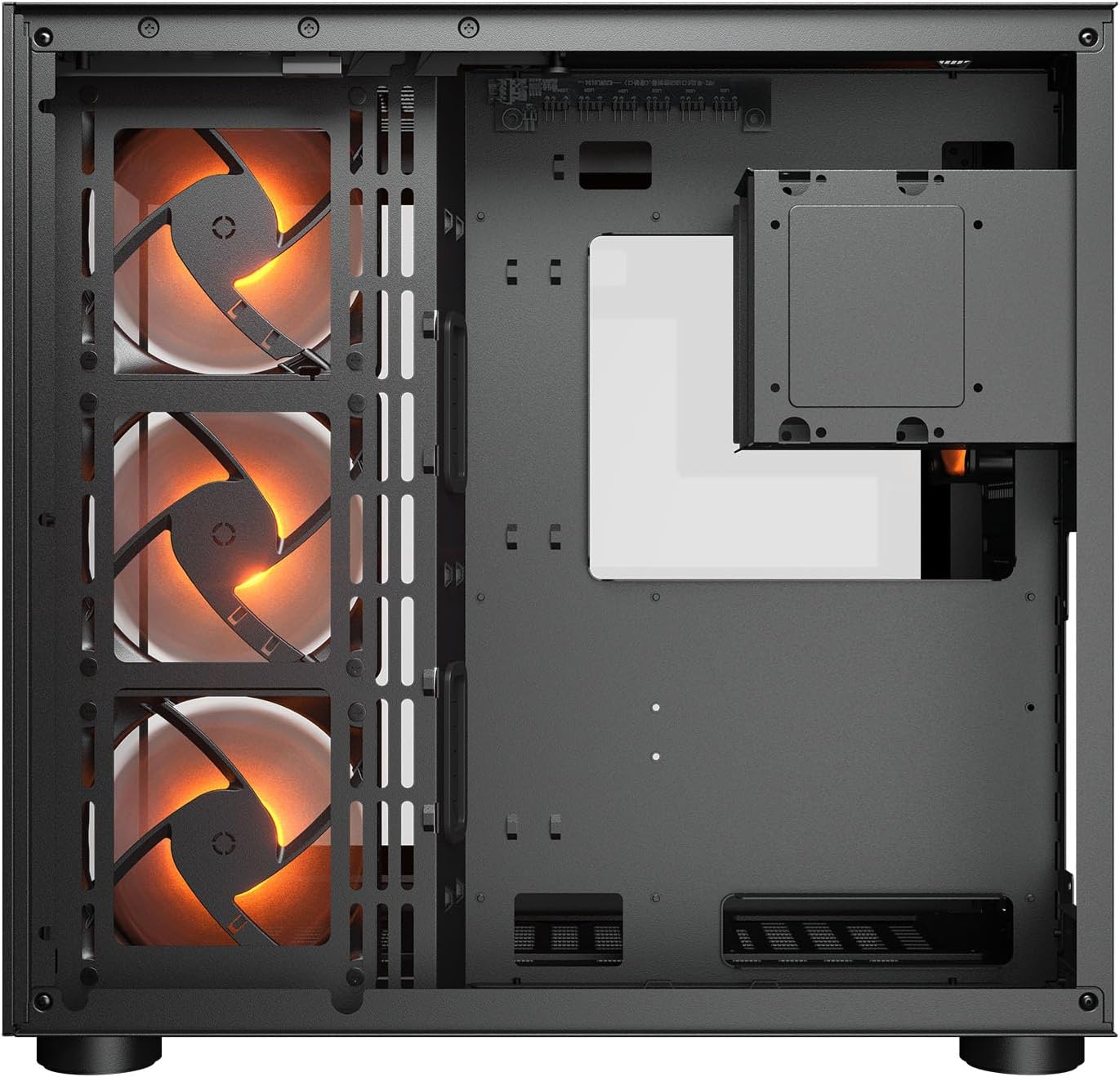
Isithombe 2.1: Ngaphakathi view illustrating the main chamber for motherboard and GPU installation, with pre-installed side fans.
2.6 Ukufakwa kwefeni nerediyetha
- The case comes with 3 x 120mm ARGB side fans and 1 x 120mm ARGB rear fan pre-installed.
- Additional fans can be installed at the top (3 x 120mm or 2 x 140mm) and bottom (3 x 120mm or 2 x 140mm).
- Utilize the engineered bottom fan bracket for easier installation of bottom fans.
- For water cooling, radiators up to 360mm can be mounted on the top and 240mm on the side.

Image 2.2: Top internal view, showing potential mounting locations for additional cooling fans or radiators.
2.7 Ukuphathwa Kwekhebula
- Route all power and data cables through the cutouts to the secondary chamber.
- Sebenzisa i- ample space and tie-down points in the secondary chamber to organize cables for optimal airflow and a clean appearance.
2.8 Connecting Front I/O Panel
- Connect the front panel cables (USB 3.2 Type-C, USB Type-A, audio, power, reset, LED) to the corresponding headers on your motherboard.
3. Iziqondiso Zokusebenza
Uma zonke izingxenye sezifakiwe futhi zixhunyiwe, ungakwazi ukufaka amandla kusistimu yakho.
3.1 Iyavula
- Qinisekisa ukuthi iswishi ye-PSU isesimweni 'SOKUBANISWA'.
- Press the power button on the front I/O panel of the case.
3.2 RGB Lighting Control
- The integrated universal fan hub allows for easy synchronization of ARGB lighting.
- Connect the hub to your motherboard's ARGB header (5V 3-pin) to control lighting effects via motherboard software.
- Alternatively, use the dedicated RGB button on the front I/O panel to cycle through pre-set lighting modes if not connected to a motherboard header.
4. Isondlo
Ukugcinwa njalo kusiza ukuqinisekisa ukusebenza kahle kanye nobude besikhathi sezingxenye ze-PC yakho.
4.1 Ukuhlanza Isihlungi Sothuli
- The COUGAR FV150 RGB features magnetic dust filters on the top and right side, along with a ventilated bottom cover.
- Gently remove the magnetic dust filters.
- Clean them using compressed air or by rinsing with water (ensure they are completely dry before reattaching).
- Periodically clean the ventilated bottom cover.
4.2 Ukuhlanza Okujwayelekile
- Sebenzisa indwangu ethambile neyomile ukuze usule ubuso bangaphandle bekhava.
- For tempered glass panels, use a glass cleaner and a microfiber cloth to avoid streaks.
- Gwema ukusebenzisa amakhemikhali anokhahlo noma izinto ezilumayo ezingalimaza isiphetho.
5. Ukuxazulula izinkinga
Lesi sigaba sihlinzeka ngezixazululo zezinkinga ezivamile ongahlangabezana nazo.
5.1 Uhlelo alusebenzi
- Hlola i-PSU: Ensure the power supply unit is properly connected to the wall outlet and the PSU switch is in the 'ON' position.
- Izixhumanisi zephaneli yangaphambili: Verify that the power button cable from the case is correctly connected to the motherboard's front panel header.
- Amakhebula Kagesi Angaphakathi: Confirm all necessary power cables (24-pin ATX, 8-pin CPU, PCIe for GPU) are securely connected to the motherboard and components.
5.2 Abalandeli Abaphenduki Noma I-RGB Ayisebenzi
- Ukuxhumana Kwabalandeli: Ensure all fan power cables are securely connected to the fan hub or motherboard headers.
- Ukuxhumeka kwe-RGB: Verify the ARGB cables are correctly connected to the fan hub and the hub is connected to a 5V 3-pin ARGB header on the motherboard.
- Software/Button: If connected to the motherboard, check your motherboard's RGB control software. If not, try pressing the RGB button on the case's I/O panel to cycle modes.
5.3 USB Ports Not Functioning
- Ama-Header e-USB angaphakathi: Confirm that the USB 3.0 and USB Type-C cables from the front I/O panel are correctly plugged into the corresponding headers on your motherboard.
- Abashayeli bebhodi lomama: Ensure you have installed the latest chipset and USB drivers for your motherboard.
6. Imininingwane
Detailed technical specifications for the COUGAR FV150 RGB Gaming Case.

Image 6.1: Case dimensions for planning your setup.
| Isici | Ukucaciswa |
|---|---|
| Igama Lomkhiqizo | FV150 RGB |
| I-Case Form Factor | Mid Mid |
| Ukuhambisana kwe-Motherboard | I-Mini-ITX, i-Micro-ATX, i-ATX |
| Ubukhulu (W x H x D) | 300 x 400 x 415 mm (11.8" x 15.7" x 16.3") |
| I/O Iphaneli | USB 3.2 Gen 2 Type-C x 1, USB-A 3.0 x 2, 4 Pole Headset Audio Jack, RGB Button |
| 3.5" Drive Bay | 2 |
| 2.5" Drive Bay | 1+1 (converted from 3.5" drive bays) |
| Ukunwetshwa Slots | 7+3 |
| Ukusekelwa kwe-GPU eqondile | Yebo |
| Cooling Fan Support (Top) | 3 x 120mm noma 2 x 140mm |
| Cooling Fan Support (Bottom) | 3 x 120mm noma 2 x 140mm |
| Cooling Fan Support (Side) | 3 x 120mm |
| Cooling Fan Support (Rear) | 1 x 120mm |
| Pre-installed Fans (Side) | 3 x 120mm ARGB (Reversed) |
| Pre-installed Fans (Rear) | 1 x 120mm ARGB |
| Pre-installed Fan Speed | 1000 (± 10%) RPM |
| Pre-installed Fan Connector | 5V 3 Pin (ARGB) / 3 Pin (Fan) |
| Inombolo enkulu yabalandeli | 10 |
| Water Cooling Support (Top) | I-360mm / 280mm / 240mm |
| Water Cooling Support (Side) | 240mm / 120mm |
| Water Cooling Support (Rear) | 120 mm |
| RGB Hub Sync with M/B | Yebo |
| Ubukhulu. Ubude Bekhadi Lezithombe | 400 mm (15.7 in) |
| Ubukhulu. I-CPU Cooler Height | 180 mm (7.1 in) |
| Ubukhulu. Ubude be-PSU | 210 mm (8.3 in) |
| Okubalulekile | Insimbi |
| Isisindo sento | 6.83 kg |
7. Ulwazi Lwewaranti
COUGAR products are manufactured to the highest quality standards. This product is covered by a manufacturer's warranty against defects in materials and workmanship. The specific duration and terms of the warranty may vary by region and retailer. Please retain your proof of purchase for warranty claims.
For detailed warranty information, please refer to the official COUGAR webisayithi noma thintana nomthengisi wangakini.
8. Ukusekela
If you encounter any issues or have questions regarding your COUGAR FV150 RGB Gaming Case that are not covered in this manual, please contact COUGAR customer support.
- Visit the official COUGAR website for FAQs, driver downloads, and support contact information.
- Contact your retailer for assistance with product returns or exchanges.