
1. Ulwazi Lokuphepha
Please read and understand all safety instructions before using the Alonefire SV119 UV LED Flashlight. Failure to follow these instructions may result in injury or damage to the product.
- UV Radiation Exposure: This flashlight emits powerful 365nm UV light. Avoid direct exposure of UV light to eyes and skin. Prolonged exposure can be harmful.
- Gqoka Izingubo Zamehlo Ezivikelayo: Always wear the provided UV protection glasses when operating the flashlight to shield your eyes from UV radiation.
- Indawo eshisayo: The flashlight head may become hot during extended use. Avoid touching the hot surface directly.
- Ukuphepha Kwebhethri: Use only the specified Lithium-ion battery. Do not attempt to disassemble, puncture, or expose the battery to extreme temperatures or fire.
- Izingane: Gcina ithoshi likude nezingane.
2. Okuqukethwe Kwephakheji
Qinisekisa ukuthi zonke izinto zikhona kuphakheji:
- Alonefire SV119 UV LED Flashlight
- Ikhebuli yokushaja ye-USB-C
- UV Protection Glasses
- Rechargeable Lithium-ion Battery (pre-installed or separate)

Image: Contents of the Alonefire SV119 package, including the flashlight, USB-C cable, and yellow UV protection glasses.
3. Umkhiqizo Uphelileview
The Alonefire SV119 is a powerful 90W UV LED flashlight designed for various detection and curing applications. Its key features include:
- Ikhwalithi ephezulu ye-UV LED: Equipped with 9 pieces of 4-core 365nm UV LEDs, providing up to 90W power consumption and 10000mW light output.
- Black Filter Lens: Features a hardened black optical filter lens to filter out ambient visible light, ensuring a purer and more powerful UV output.
- Ukwakhiwa Okuqinile: Made from high-quality aluminum alloy for enhanced heat dissipation and durability.
- I-USB-C Ishajwa kabusha: Convenient USB-C charging port for easy and versatile recharging.
- Isibonisi se-LCD yedijithali: An innovative LCD screen displays the battery power level numerically.
- Ukushaja okuphindayo: Can function as a power bank to charge other devices via its USB-A output port.

Image: The Alonefire SV119 UV LED flashlight highlighting its 9-core 365nm UV LEDs and various detection and curing applications.

Image: A visual comparison demonstrating the effectiveness of 365nm UV light compared to 395nm UV light for mineral fluorescence.
4. Setha
4.1 Ukufakwa kwebhethri
- Khumula ikepisi lomsila wethoshi.
- If the battery is not pre-installed, insert the provided Lithium-ion battery with the positive (+) terminal facing towards the flashlight head.
- Okubalulekile: If there is a plastic insulating disc on the battery's positive or negative terminal, remove it before installation.
- Khipha ikepisi lomsila emuva ngokuphepha.
4.2 Ukushaja Kwasekuqaleni
Ngaphambi kokusebenzisa okokuqala, shaja ibhethri lethoshi ngokugcwele.
- Locate the USB-C charging port on the flashlight body.
- Connect the provided USB-C cable to the flashlight and plug the other end into a compatible USB power adapter (not included) or a computer USB port.
- The LCD display will show the charging progress. A full charge is indicated by '100%' on the display.
- Isikhathi sokushaja cishe amahora angu-7 ukuze ukhokhiswe ngokugcwele.

Image: The Alonefire SV119 flashlight being charged via its USB-C port, with the LCD screen displaying the battery charge level.
5. Iziqondiso Zokusebenza
5.1 Ukuvula/Ukuvala nokukhetha Imodi
- Vula: Press the power button located on the side of the flashlight.
- Ukukhetha Imodi: The flashlight typically has two brightness modes (strong and medium). Press the power button repeatedly to cycle through these modes.
- Cisha ugesi: Press and hold the power button for a few seconds until the light turns off.
5.2 Ukuqonda isibonisi se-LCD
The integrated LCD display provides real-time information about the battery status.
- When the flashlight is in use, the display shows the remaining battery percentage.
- During charging, it indicates the charging progress.
5.3 Reverse Charging Function
The SV119 can act as a portable power bank to charge other USB-powered devices.
- Locate the USB-A output port on the flashlight.
- Connect your device's charging cable to the USB-A port on the flashlight.
- Ithoshi lizoqala ukushaja idivayisi yakho.
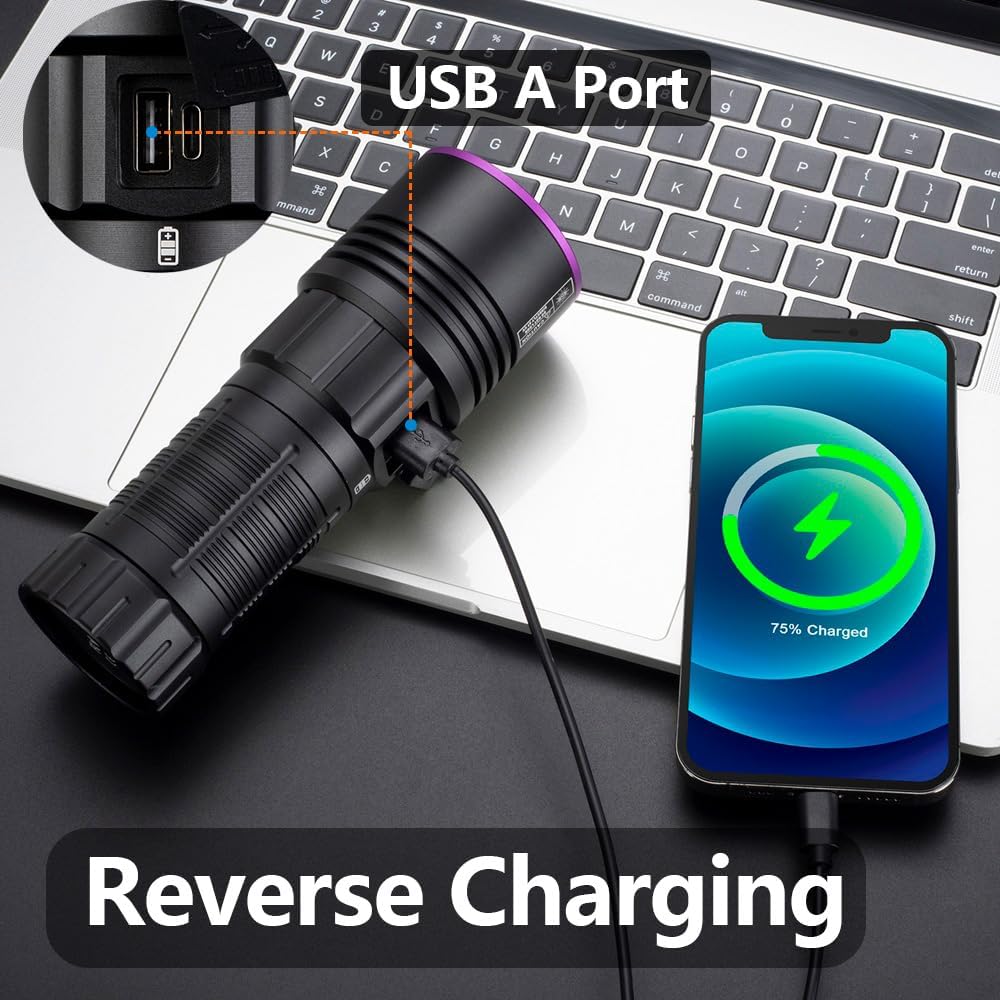
Image: The Alonefire SV119 flashlight demonstrating its reverse charging capability by powering a smartphone.
5.4 Izicelo
The 365nm UV light is suitable for various applications:
- Ukutholwa kwamabala esilwane esifuywayo: Identify hidden pet urine, ringworm, and other biological stains on carpets, furniture, and floors.
- Ukutholwa kweScorpion: Scorpions fluoresce under 365nm UV light, making them easier to spot in dark environments.
- Mineral and Amber Identification: Many minerals and amber exhibit fluorescence under UV light, aiding in identification.
- Currency and Document Authentication: Verify security features on banknotes, passports, and other official documents.
- Ukwelapha i-Resin: Accelerate the curing process of UV-sensitive resins.
- Ukutholwa kokuvuza: Detect leaks in HVAC systems or automotive fluids when used with UV-sensitive dyes.

Image: A demonstration of the UV flashlight's ability to reveal hidden pet urine stains on a carpet, showing a 'before' view under normal light and an 'after' view under UV light.
6. Isondlo
6.1 Ukuhlanza
- Sula umzimba wethoshi ngesithambile, damp indwangu.
- For the lens, use a lens cleaning cloth and solution to avoid scratches.
- Ungasebenzisi izinto zokuhlanza abrasive noma izincibilikisi.
6.2 Ukunakekela Ibhethri Nesitoreji
- Recharge the battery regularly, even if not frequently used, to maintain its lifespan.
- Gcina ithoshi endaweni epholile, eyomile ekude nelanga eliqondile namazinga okushisa aphezulu.
- If storing for an extended period, charge the battery to approximately 50% capacity.
7. Ukuxazulula izinkinga
- I-flashlight ayikhanyi:
- Qinisekisa ukuthi ibhethri ifakwe kahle futhi ishajwe ngokugcwele.
- Check if the plastic insulating disc has been removed from the battery terminals.
- Qinisa isivalo somsila ngokuphepha.
- Ibhethri ayishaji:
- Qinisekisa ukuthi ikhebula le-USB-C lixhunywe kahle kokubili ku-flashlight kanye nomthombo wamandla.
- Zama ikhebuli ye-USB-C ehlukile noma i-adaptha yamandla.
- Qinisekisa ukuthi umthombo wamandla uyasebenza.
- Weak light output:
- Ibhethri lingase libe liphansi; yifake kabusha.
- Ensure the lens is clean and free of obstructions.
- LCD display not working or inaccurate:
- Shaja kabusha ibhethri ngokugcwele.
- Uma inkinga iqhubeka, xhumana nokwesekwa kwamakhasimende.
8. Imininingwane
| Isici | Ukucaciswa |
|---|---|
| Ibhrendi | Umlilo wedwa |
| Inombolo Yemodeli | I-SV119 |
| Umthombo Wokukhanya | 9x 4-core 365nm UV LED |
| Amandla | 90 Watts |
| I-Flux ekhanyayo | 10000 milliwatt |
| Okubalulekile | Ingxube ye-aluminium |
| Uhlobo Lwebhethri | I-Lithium-ion engu-1x (ifakiwe) |
| Imbobo yokushaja | I-USB-C |
| Izici ezikhethekile | Rechargeable, Digital Display, Reverse Charging |
| Isisindo | 580 g |
| Ubukhulu (Iphakheji) | 19.9 x 13.2 x 6.3 cm |
| Izinga Lokumelana Namanzi | Ayingenwa amanzi |
9. Iwaranti kanye Nokusekela
9.1 Ulwazi Lwewaranti
Specific warranty details for the Alonefire SV119 are not provided in this manual. Please refer to the retailer or manufacturer's official webisayithi lenqubomgomo yewaranti yakamuva kakhulu.
9.2 Ukwesekwa Kwamakhasimende
For technical assistance, troubleshooting beyond this manual, or inquiries regarding your product, please contact Alonefire customer support through their official channels or the retailer where the product was purchased.